
elasticsearch学习笔记
·
简介
- ES是一个开原高扩展的分布式全文搜索引擎,它可以近乎实时的存储、检索数据,扩展性好,可以扩展到近百台服务器,处理PB(1PB=1024TB)级别的数据。注意:9300端口为elasticsearch集群间组件通信的端口,9200为浏览器访问restful端口。mysql:擅长事务类型操作,可以保证数据的安全性和一致性。elasticsearch:擅长海量数据的搜索、分析、计算
使用场景
- 系统中的数据随着业务发展,会越来越多,而业务中往往采用模糊查询进行数据搜索,而模糊查询会导致查询引擎放弃索引,导致系统查询时进行全表扫描。而ES做的全文索引,将经常查询的系统功能的某些字段,放入索引库,可以提高索引查询速度。
数据格式
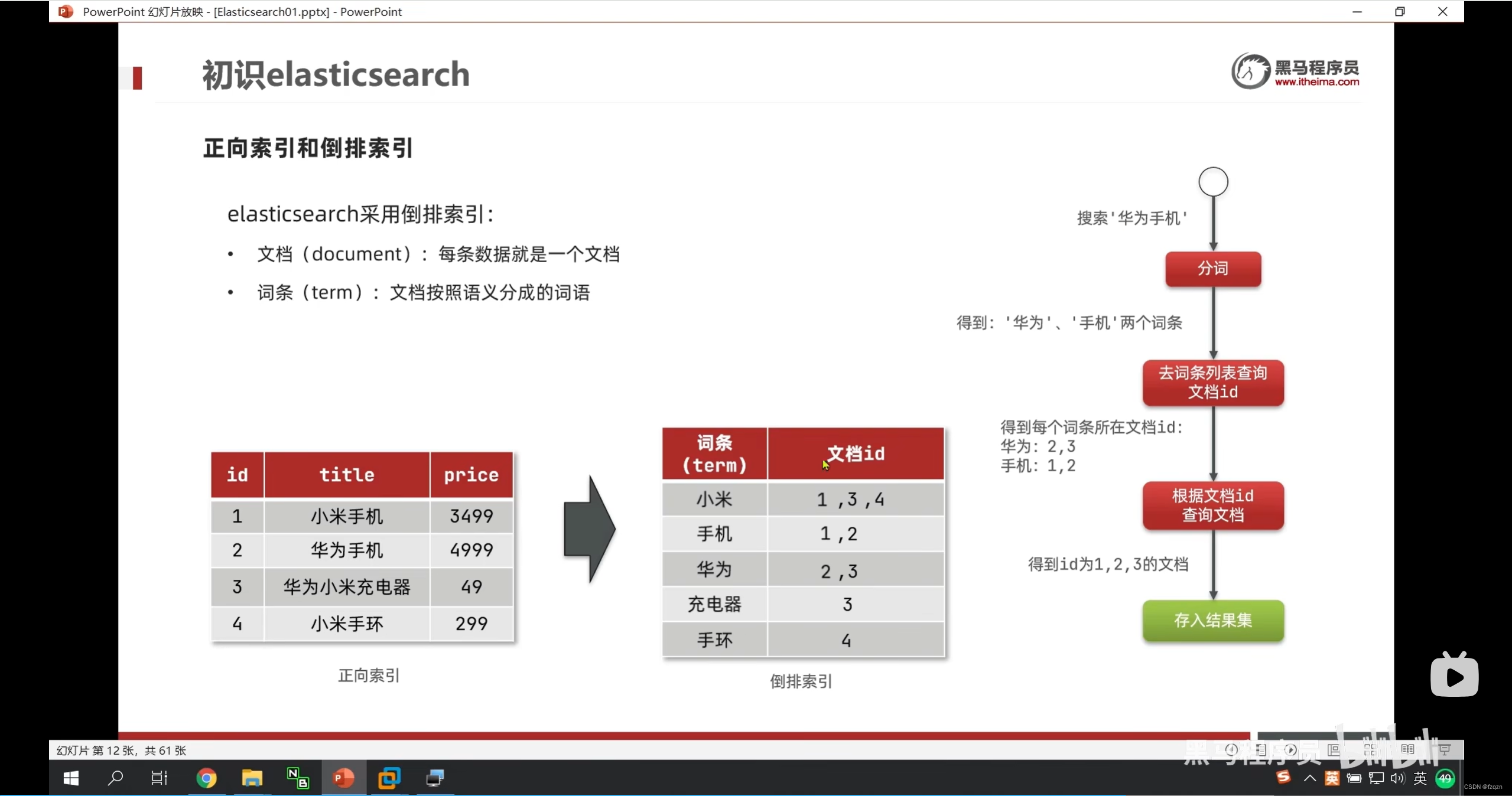
- elasticsearch是面向文档型数据库,一条数据就是一个文档,在版本7中Type概念被删除如下:

索引(index)常用命令
- http://172.30.28.16:9200/shopping(put 创建索引)
- http://172.30.28.16:9200/_cat/indices?v(get 查看索引)
- http://172.30.28.16:9200/shopping(delete 删除索引)
GET _search
{
  "query": {
    "match_all": {}
  }
}

GET /_analyze
{
  "analyzer": "ik_smart",
  "text": "弱智教育"
}


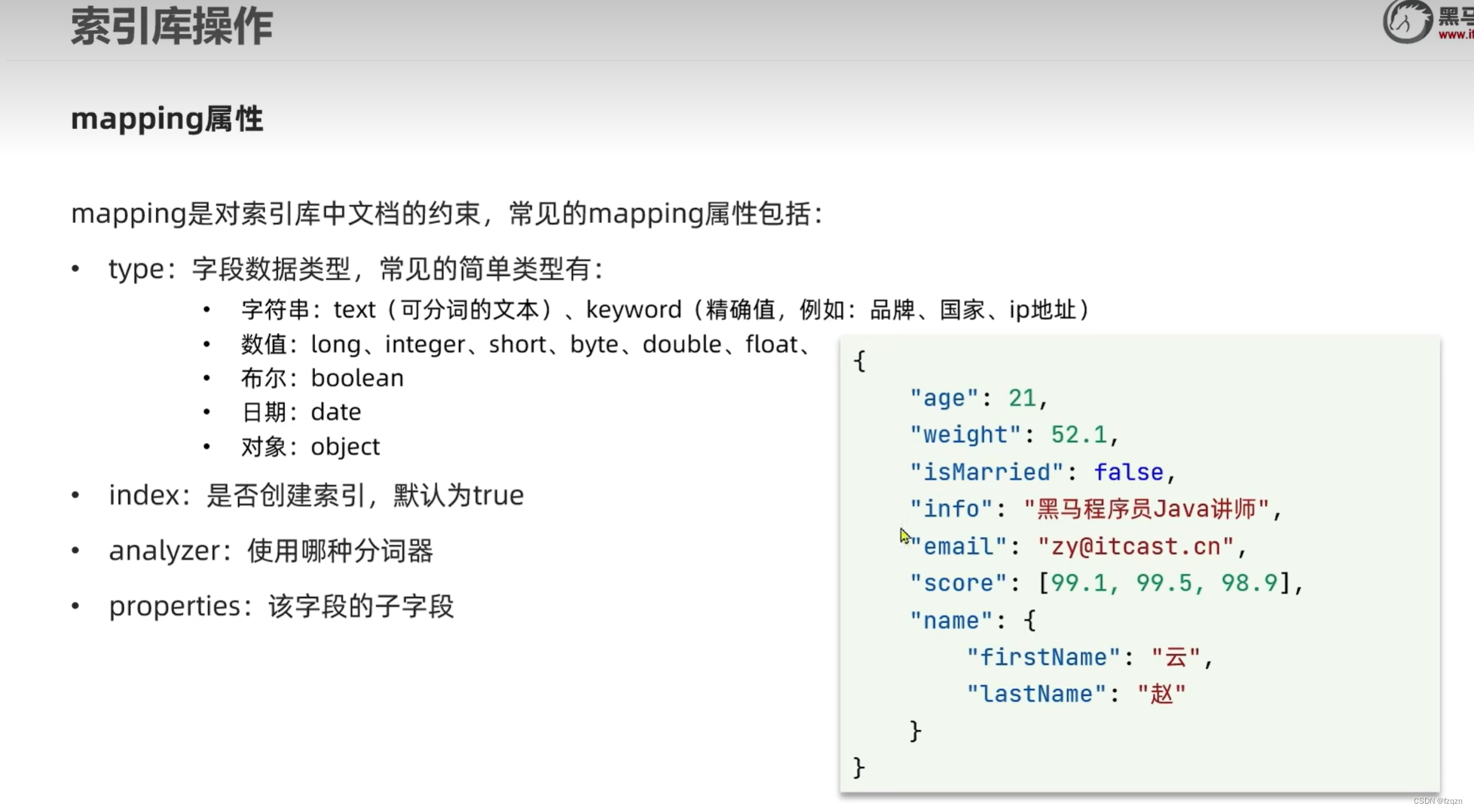
#创建索引库baima
PUT /baima
{
#约束
  "mappings": {
  #子字段
    "properties": {
    #字段
      "info":{
      #类型
        "type": "text",
        #分词器
        "analyzer": "ik_smart"
      },
      "email":{
        "type": "keyword",
        #是否创建倒排索引(true创建、false不创建)
        "index": false
      },
      "name":{
        "type": "object",
        "properties": {
          "firstName":{
            "type": "keyword"
          },
          "LastName":{
            "type": "keyword"
          }
        }
      }
    }
  }
}


查看索引库
GET /索引库名称

删除索引库
DELETE /索引库名称

//不能够修改原有的字段,但是能够新增新的字段
PUT /索引库名称/_mapping
{
	"properties":{
		"新字段名称":{
			"type": "integer"
		}
	}
}
文档(Documents)常用命令
- http://172.30.28.16:9200/索引名字(index)/_doc/自定义id(post 传json格式新建数据,get查询数据,put更新数据)
- http://172.30.28.16:9200/shopping/_search(主键查询)
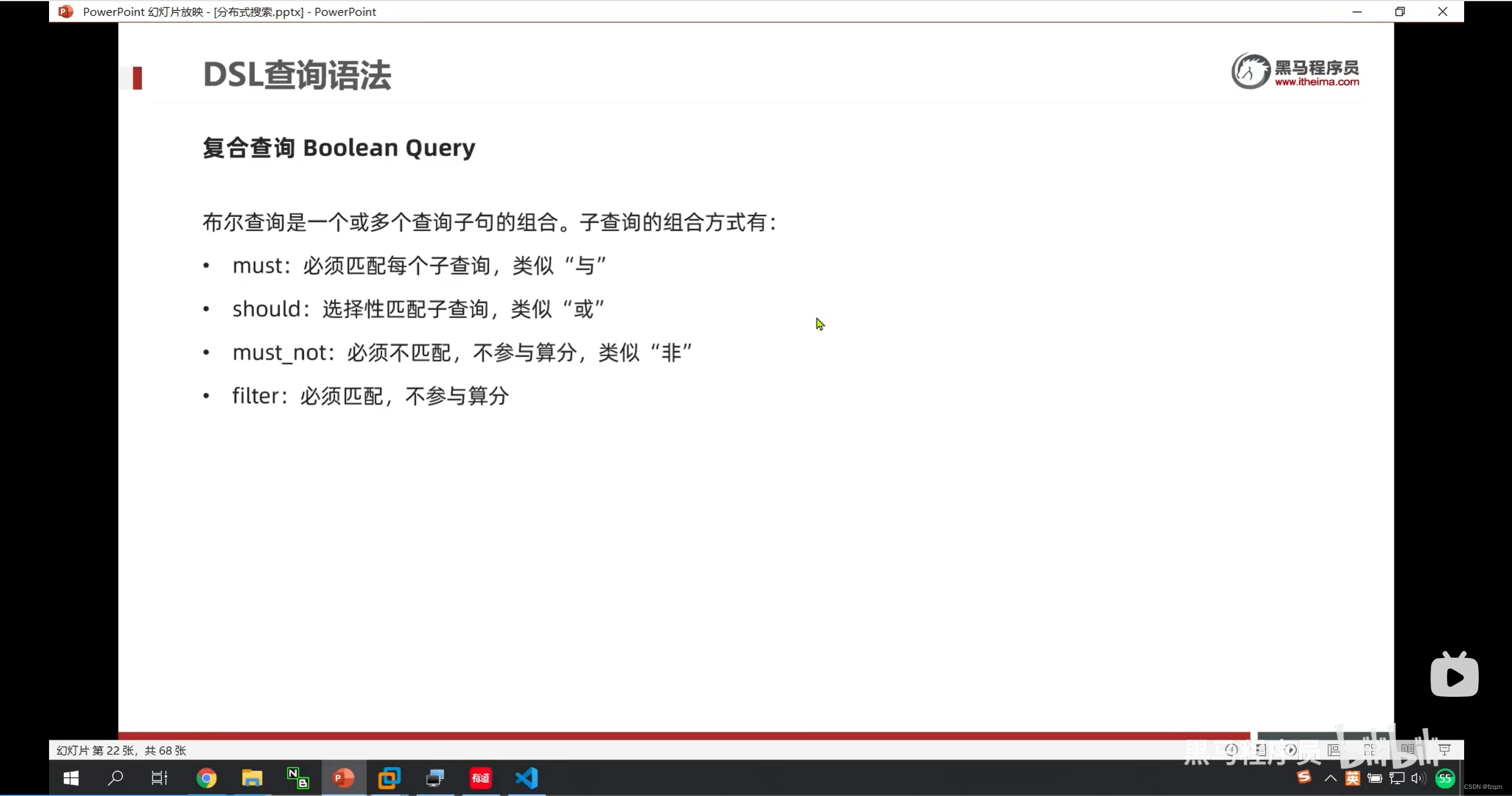
- bool:条件比对;must:多个条件;match:匹配
# 插入文档
POST /baima/_doc/1
{
  "age": 1233,
  "email": "1724193711@qq.com",
  "info": "弱智教育,教的知识",
  "name":{
     "LastName": "自强",
    "firstName": "傅"
  }
}

#查询文档
GET /baima/_doc/1

#删除文档
DELETE /baima/_doc/1

#修改文档,全量修改,会删除久文档,添加新文档
PUT /baima/_doc/1
{
  "age": 1231,
  "email": "1724193711@qq.co11m",
  "info": "弱智教育,教的知识1212",
  "name":{
     "LastName": "自强11",
    "firstName": "傅11"
  }
}

#增量修改,修改指定字段值
POST /baima/_update/1
{
  "doc": {
      "email": "1724193711@qq.co11m222"
  }
}
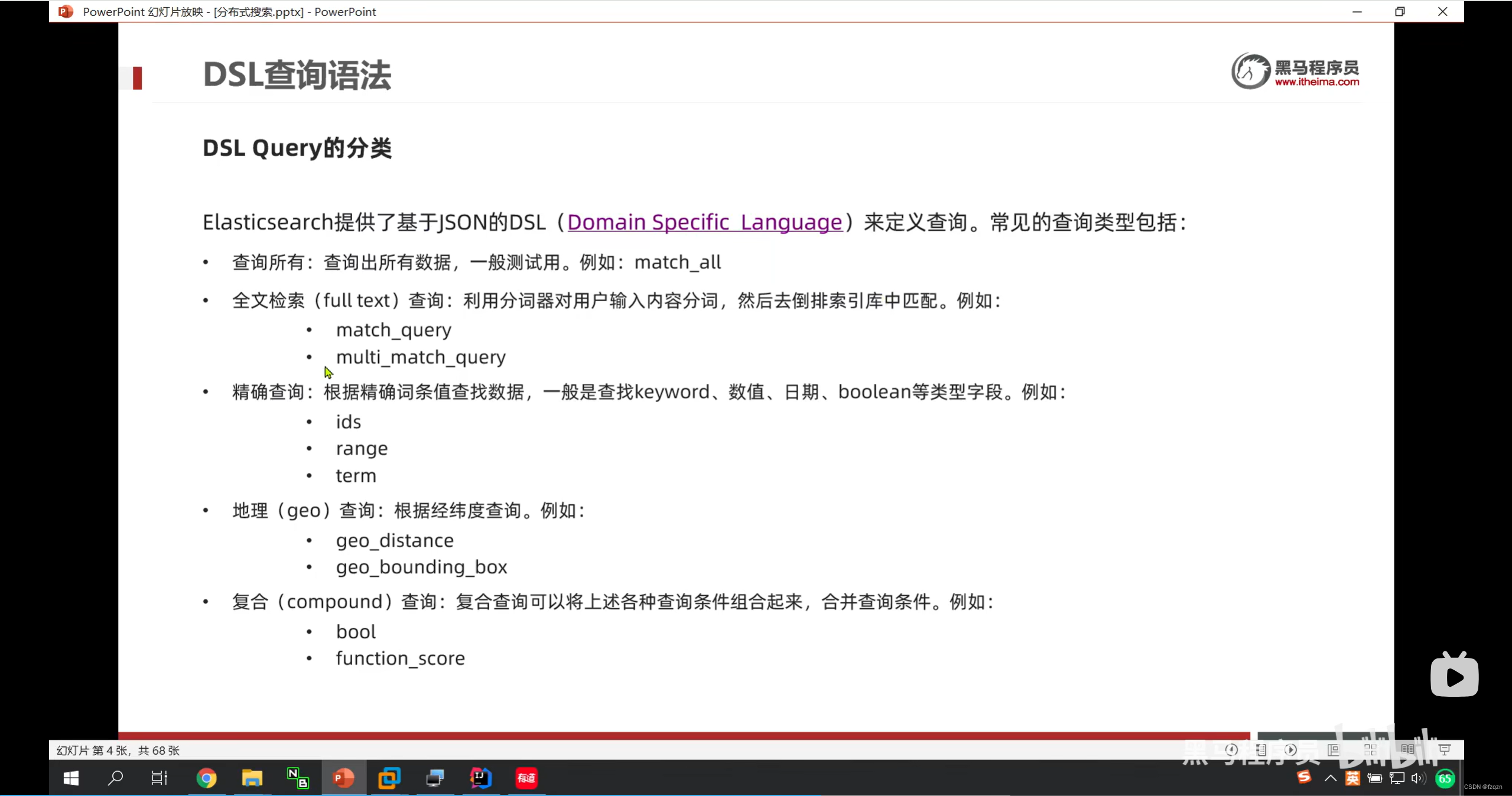
# 查询所有
GET /hotel/_search
{
  "query": {
    "match_all": {}
  }
}

# match查询,全文检索查询,对用户输入内容进行分词,然后倒排索引去查询
GET /hotel/_search
{
  "query": {
    "match": {
      "all": "外滩"
    }
  }
}

# multi_match查询,与match相似,允许同时查询多个字段,参与查询的字段越多速度越慢,推荐多个字段合一
# 起
GET /hotel/_search
{
  "query": {
    "multi_match": {
      "query": "外滩如家",
      "fields": ["brand","name","business"]
    }
  }
}

# term查询(精确匹配,不会做分词)
GET /hotel/_search
{
  "query": {
    "term": {
      "city": {
        "value": "杭州上海"
      }
    }
  }
}


# range查询(范围查询)
GET /hotel/_search
{
  "query": {
    "range": {
      "price": {
        "gte": 100,
        "lte": 200
      }
    }
  }
}

# 经纬度查询(geo_distance)
GET /hotel/_search
{
  "query": {
    "geo_distance":{
      "distance": "2km",
      "location": "31.21, 121.5"
    }
  }
}

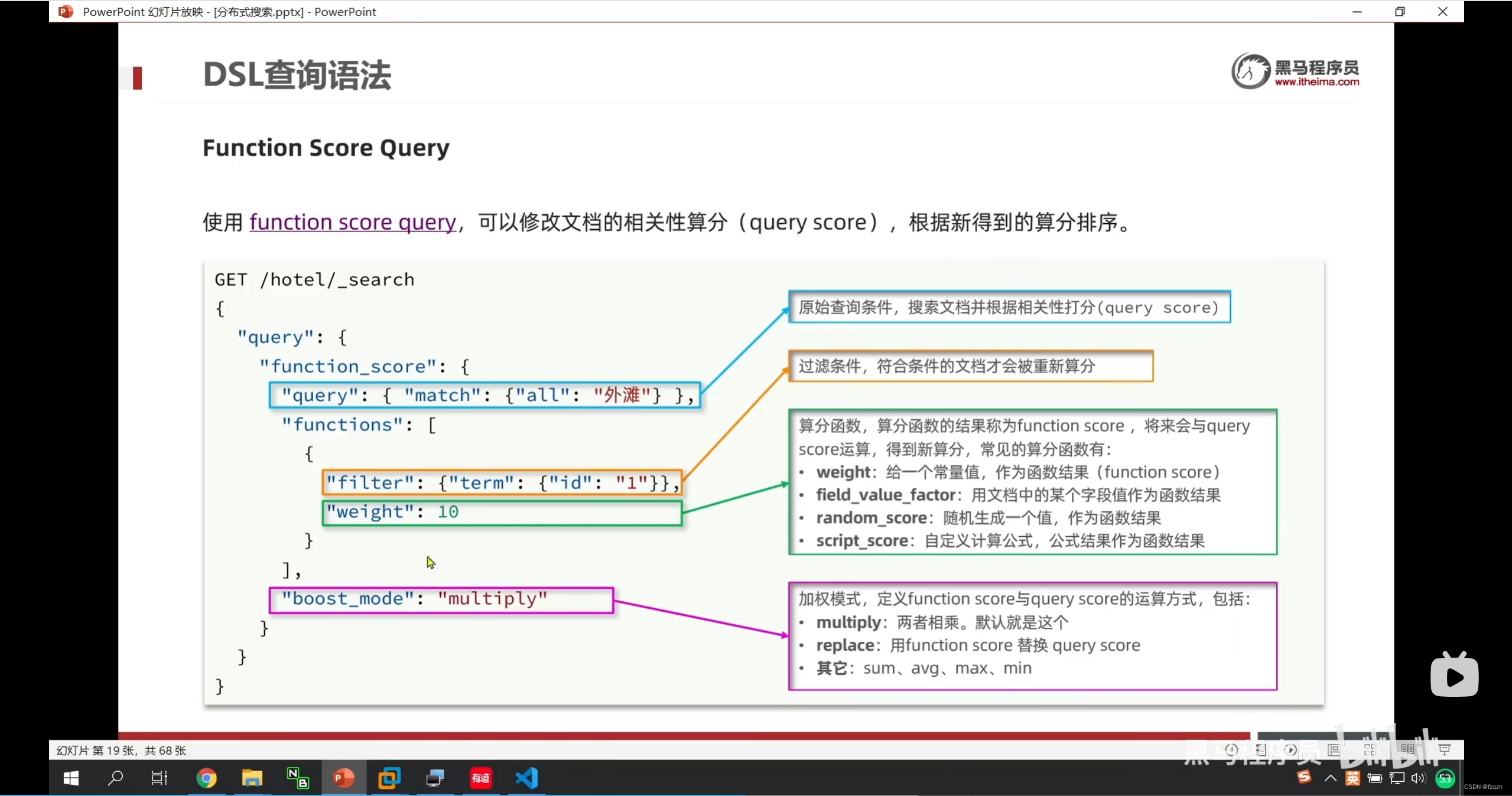
#function score查询
GET /hotel/_search
{
  "query": {
    "function_score": {
      "query": {
        "match": {
          "all": "外滩"
        }
      },
      "functions": [
        {
          "filter": {
            "term": {
              "brand": "如家"
            }
          },
          "weight": 10
        }
      ],
      "boost_mode": "sum"
    }
  }
}

# boolean查询
GET /hotel/_search
{
  "query": {
    "bool": {
      "must": [
        {
          "match": {
            "name": "如家"
          }
        }
      ],
      "must_not": [
        {
          "range": {
            "price": {
              "gte": 400
            }
          }
        }
      ],
      "filter": [
        {
          "geo_distance": {
            "distance": "10km",
            "location": {
              "lat": 31.12,
              "lon": 121.5
            }
          }
        }
      ]
    }
  }
}

# sort排序
GET /hotel/_search
{
  "query": {
    "match_all": {}
  },
  "sort": [
    {
      "score": {
        "order": "desc"
      },
      "price": {
        "order": "asc"
      }
    }
  ]
}

GET /hotel/_search
{
  "query": {
    "match_all": {}
  },
  "sort": [
    {
      "_geo_distance": {
        "location": {
          "lat": 31.034661,
          "lon": 121.612282
        },
        "order": "asc",
        "unit": "km"
      }
    }
  ]
}

#分页查询
GET /hotel/_search
{
  "query": {
    "match_all": {}
  },
  "sort": [
    {
      "price": {
        "order": "asc"
      }
    }
  ],
  "from": 40,
  "size": 20
}

# 高亮查询,默认情况搜索字段必须与高亮字段一致
GET /hotel/_search
{
  "query": {
    "match": {
      "all": "如家"
    }
  },
  "highlight": {
    "fields": {
      "name": {
        "require_field_match": "false"
      }
    }
  }
}
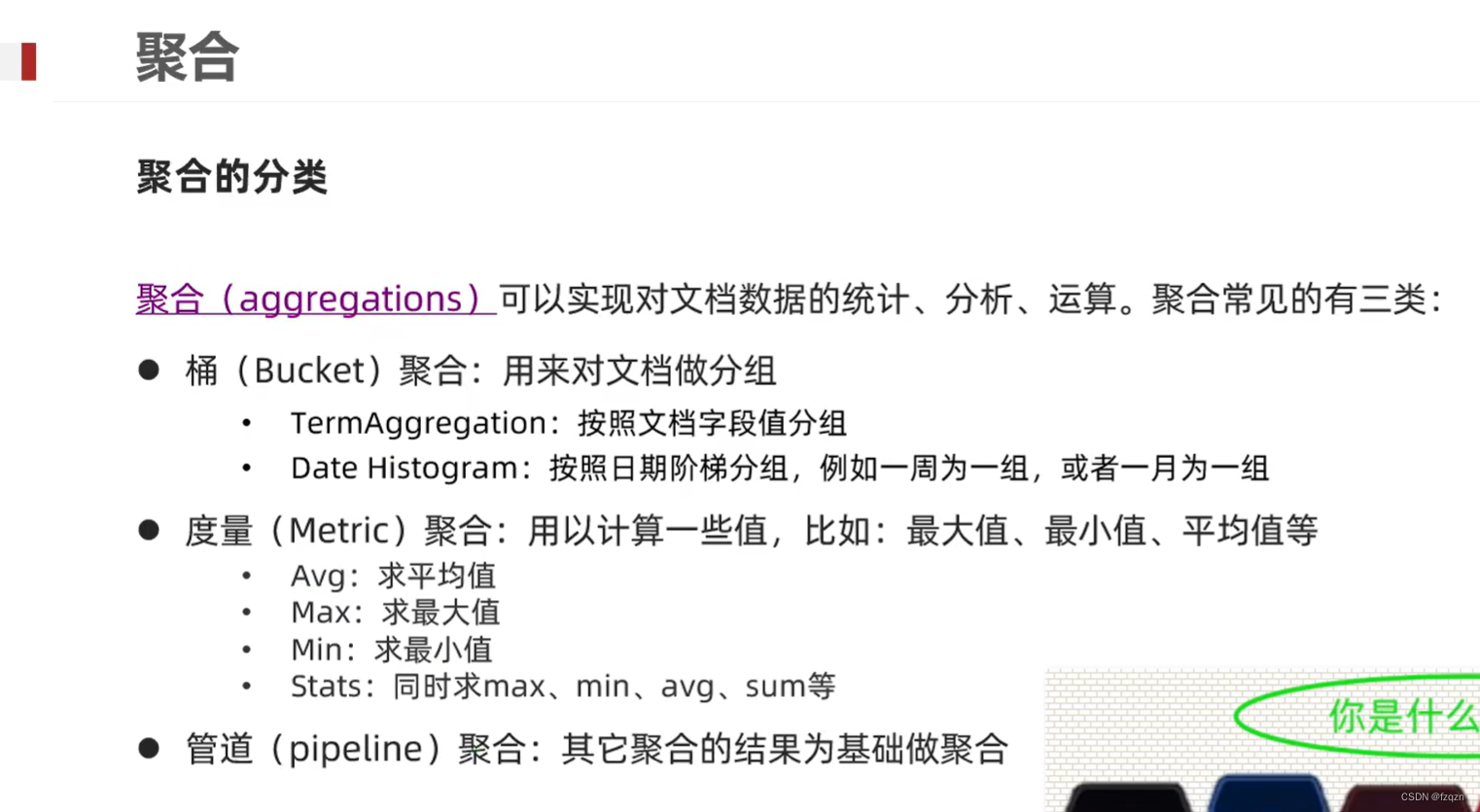
聚合分类
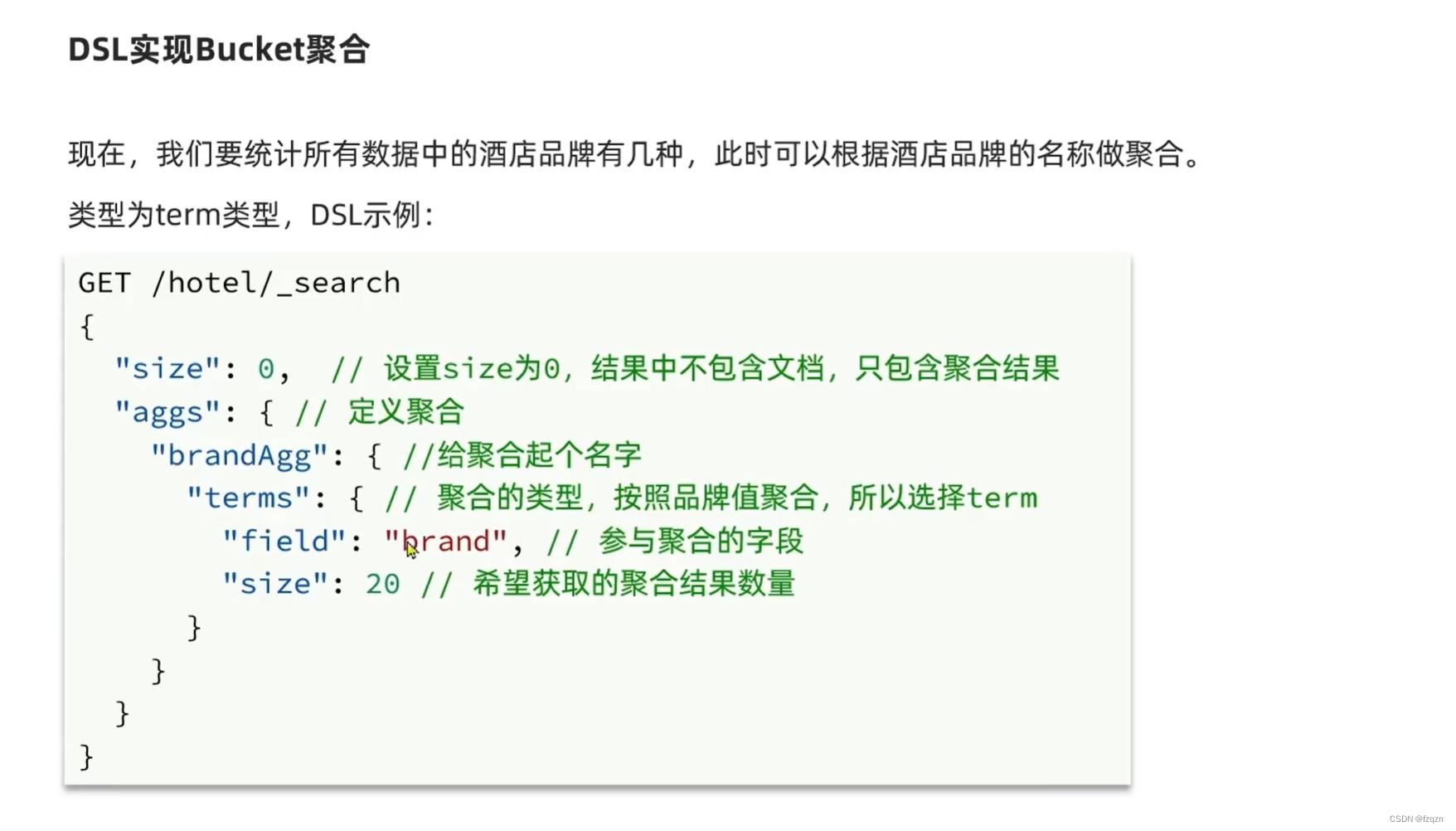
# Bucket聚合
GET /hotel/_search
{
  "size": 0,
  "aggs": {
    "brandAgg": {
      "terms": {
        "field": "brand",
        "size": 10
      }
    }
  }
}

# Bucket聚合,自定义排序规则
GET /hotel/_search
{
  "size": 0,
  "aggs": {
    "brandAgg": {
      "terms": {
        "field": "brand",
        "size": 10,
        "order": {
          "_count": "asc"
        }
      }
    }
  }
}

# Bucket聚合,限定聚合范围
GET /hotel/_search
{
  "query": {
    "range": {
      "price": {
        "lte": 200
      }
    }
  },
  "size": 0,
  "aggs": {
    "brandAgg": {
      "terms": {
        "field": "brand",
        "size": 10,
        "order": {
          "_count": "asc"
        }
      }
    }
  }
}

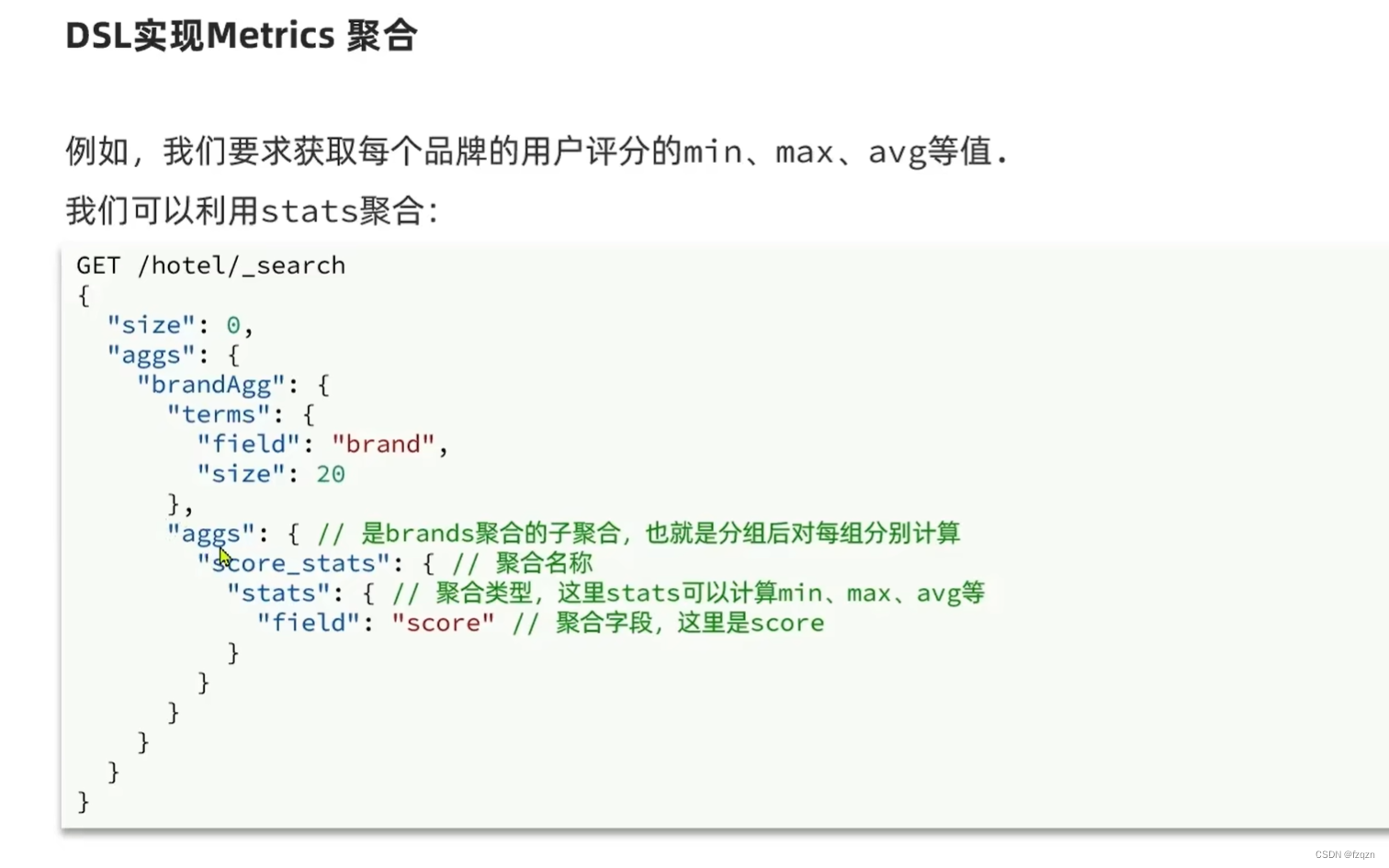
#嵌套聚合 metric
GET /hotel/_search
{
  "size": 0,
  "aggs": {
    "brandAgg": {
      "terms": {
        "field": "brand",
        "size": 100
      },
      "aggs": {
        "scoreAgg": {
          "stats": {
            "field": "score"
          }
        }
      }
    },
    "cityAgg": {
      "terms": {
        "field": "city",
        "size": 100
      },
      "aggs": {
        "scoreAgg": {
          "stats": {
            "field": "score"
          }
        }
      }
    }
  }
}
linux单节点部署
- useradd es(创建用户)
- passwd es(设定密码)
- userdel -r es(删除用户)
- chown -R es:es /opt/moudel/es(文件夹所有者)
集群现在是拥有一个索引的单节点集群。所有3个主分片都被分配在node-1
{
    "settings": {
        "number_of_shards": 3,  //主分片3
        "number_of_replicas": 1 //副本1
    }
}
故障转移
- 简介:当集群中只有一个节点运行时,意味着会有单节点故障。启动多一个节点防止数据的丢失,只需要和第一个节点配置一样的cluster.name配置,它会自动发现集群并加入其中。但是在不同机器上启动节点,为了加入到同一个集群,需要配置一个可连接到的单播主机列表。之所以配置为使用单播发现,以防止节点无疑加入集群。只有在同一台机器上运行的节点才会自动组成集群。
水平扩容
- 当启动第三个节点,我们集群将会拥有三个节点集群:为了分散负载而对分片进行重新分配
- 扩容超过6个节点:主分片的数目在索引创建时已经确定下来,实际上这个数目定义了索引能够存储的最大数据量(实际大小取决于你的数据、硬件和使用场景)。读操作–搜索和返回数据–可以同时被主分片或副分片所处理。所以当你拥有越多的副分片时,也将拥有越高的吞吐量。
http://172.30.28.16:9200/users/_settings(put方法)
{
    "number_of_replicas": 2 //副本1
}
路由计算&分片控制
- 路由计算:hash(id)%主分片数量=[0,1,2]
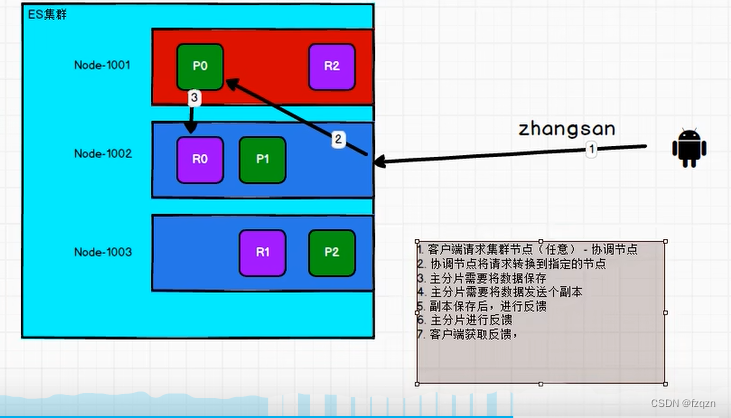
- 分片控制:用户可以访问任何一个节点获取数据,这个节点称之为协调节点
数据写流程
- 客户端请求集群节点(任意)- 协调节点
- 协调节点将请求转换到指定的节点
- 主分片需要将数据保存
- 主分片需要将数据发送到副本
- 副本保存后进行反馈
- 主分片进行反馈
- 客户端获取反馈
数据读流程
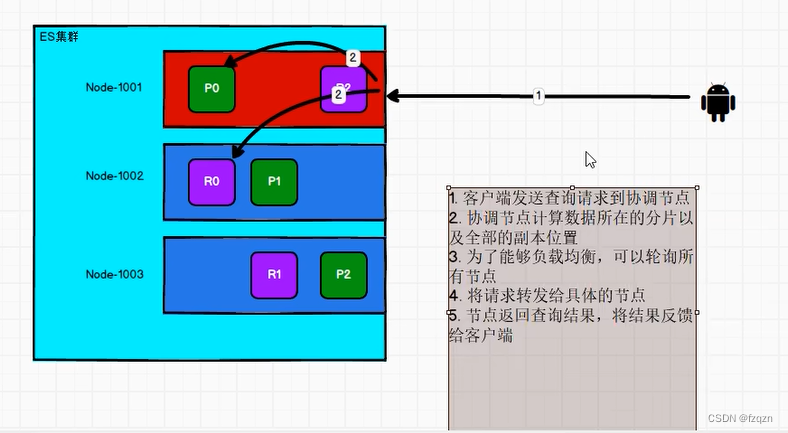
- 客户端发送查询请求到协调节点
- 协调节点计算数据所在的分片以及全部副本位置
- 为了能够负载均衡,可以轮询所有节点
- 将请求转发给具体的节点
- 节点返回查询结果,将结果反馈给客户端
更新流程&批量操作流程
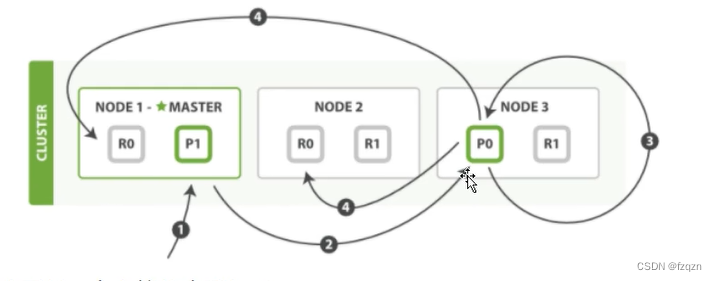
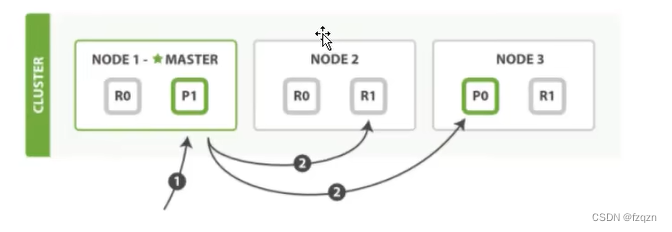
分片原理
- 分片是elasticsearch最小的工作单元。传统数据库每个字段存储单个值,但这对全文检索并不够。文本字段中的每个单词需要被搜索,对于数据库意味着需要单个字段有索引多值的能力。最好支持是一个字段多个值需求的数据结构是倒排索引。
文档搜索
- 早期全文检索会为整个文档集合建立一个很大的倒排索引并将其写入磁盘中。一旦新的索引就绪,旧的就会被其替换,这样最近的变化便可以被检索到。倒排索引被写入磁盘后是不可以改变的。
- 特点:不需要锁。如果从来不更新索引,你就不需要担心多进程同时修改数据问题;一旦索引被读入内核文件系统缓存,便会留在哪里,由于其不变性。只要文件系统缓存中还有足够的空间,那么大部分请求会直接请求内存,而不会命中磁盘,这提供了很大的性能提升。
- 动态更新索引:如何在保留不变性前提下实现倒排索引的更新?对于新来的修改可以通过新增索引,而不是重写整个倒排索引。
文档分析
- 将一个文本分成适合倒排索引的独立词条;将这些词条统一化为标准格式以提高他们的可搜索性,或者在recall分析器执行上面的工作。分析器实际上是将三个功能封装到一个包里。
//普通分词器
http://172.30.28.16:9200/_analyze(get请求)
{
    "analyzer": "standard",
    "text": "Text to analyzer"
}
结果
{
    "tokens": [
        {
            "token": "text",	//分析后的词条
            "start_offset": 0,	//开始偏移量
            "end_offset": 4,	//结束偏移量
            "type": "<ALPHANUM>",	//
            "position": 0	//位置
        },
        {
            "token": "to",
            "start_offset": 5,
            "end_offset": 7,
            "type": "<ALPHANUM>",
            "position": 1
        },
        {
            "token": "analyzer",
            "start_offset": 8,
            "end_offset": 16,
            "type": "<ALPHANUM>",
            "position": 2
        }
    ]
}
文档冲突
- 当我们使用idnexApi更新文档,可以一次性读取原始文档,做我们的修改,然后重新索引整个文档。最近的索引请求将获胜。无论最后哪一个文档被索引,都将被唯一存储elasticsearch中。如果其他人更新文档,他们的更改将丢失
索引操作
#创建索引
#PUT 索引名称(小写)
PUT test_index

# PUT 索引
# 增加配置,JSON格式的主体内容,ES不允许修改索引信息
PUT test_index_1
{
  "aliases": {
    "test1": {}
  }
}

#delete 删除索引
DELETE test_index_1

#HEAD索引 HTTP状态码
HEAD test_index1

#查询索引
#GET 索引名称
GET test_index_1

#查询所有的索引
GET _cat/indices
文档操作
# 创建文档(索引数据)- 增加唯一性标识
PUT test_doc

PUT test_doc/_doc/1001
{
  "id" : 1001,
  "name" : "zhangsan",
  "age" : 30
}

POST test_doc/_doc
{
  "id" : 1002,
  "name" : "lisi",
  "age" : 40
}

#查询文档
GET test_doc/_doc/1001

#查询索引中所有的文档数据
GET test_doc/_search

#修改文档数据
PUT test_doc/_doc/1001
{
  "id" : 10011,
  "name" : "zhangsan",
  "age" : 303
}

POST test_doc/_doc/1002
{
  "id" : 10012,
  "name" : "lisi3",
  "age" : 400,
  "tel" : 15362952173
}

#删除数据
DELETE test_doc/_doc
文档搜索
#批量新增数据
PUT test_query
PUT test_query/_bulk
{"index":{"_index":"test_query","_id":"1001"}}
{"id":"1001","name":"zhang san","age":30}
{"index":{"_index":"test_query","_id":"1002"}}
{"id":"1002","name":"li si","age":40}
{"index":{"_index":"test_query","_id":"1003"}}
{"id":"1003","name":"wang wu","age":50}
{"index":{"_index":"test_query","_id":"1004"}}
{"id":"1004","name":"zhangsan","age":30}
{"index":{"_index":"test_query","_id":"1005"}}
{"id":"1005","name":"lisi","age":40}
{"index":{"_index":"test_query","_id":"1006"}}
{"id":"1006","name":"wangwu","age":50}


#查询所有的数据
GET test_query/_search
{
  "query":{
    "match_all": {

    }
  }
}


#有条件查询,会查询出包含zhang或者li的数据
#match是分词查询,ES会将数据分词(关键词)保存
GET test_query/_search
{
  "query":{
    "match": {
      "name": "zhang li"
    }
  }
}

#有条件查询,将zhang san当作一个整体去查询
#match是分词查询,ES会将数据分词(关键词)保存
GET test_query/_search
{
  "query":{
    "term": {
      "name":{
        "value": "zhang san"
      }
    }
  }
}

#对查询结果的字段作限制
GET test_query/_search
{
  "_source":["name"],
  "query":{
    "match": {
      "name": "zhang li"
    }
  }
}

#组合多个条件 or
GET test_query/_search
{
  "query": {
    "bool": {
      "should": [
        {
          "match": {
            "name": "li"
          }
        },
        {
          "match": {
            "age": 30
          }
        }
      ]
    }
  }
}

#排序后查询
GET test_query/_search
{
  "query":{
    "match": {
      "name": "zhang li"
    }
  },
  "sort": [
    {
      "age": {
        "order": "desc"
      }
    }
  ]
}

#分页查询
#from等于(当前页数-1)*size
GET test_query/_search
{
  "query":{
    "match": {
      "name": "zhang li"
    }
  },
  "from": 1,
  "size": 2
}
聚合搜索
# 分组查询
GET test_query/_search
{
  "aggs": {
    "aggGroup": {
      "terms": {
        "field": "age"
      }
    }
  },
  "size": 0
}

#分组之后再聚合(求和)
GET test_query/_search
{
  "aggs": {
    "aggGroup": {
      "terms": {
        "field": "age"
      },
    "aggs": {
      "aggSum": {
      "sum": {
        "field": "age"
        }
      }
    }
    }
  },
  "size": 0
}

#求年龄平均值
GET test_query/_search
{
  "aggs": {
    "avgAge": {
      "avg": {
        "field": "age"
      }
    }
  },
  "size": 0
}

#获取前几名
GET test_query/_search
{
  "aggs": {
    "top3": {
      "top_hits": {
        "sort": [
          {
            "age": {
              "order": "desc"
            }
          }
          ],
        "size": 3
      }
    }
  },
  "size": 0
}
索引模板
#新建模板
PUT _template/mytemplate
{
  "index_patterns":[
    "my*"
  ],
  "settings":{
    "index":{
      "number_of_shards":"1"
    }
  },
  "mappings":{
    "properties":{
      "now":{
        "type":"date",
        "format":"yyyy/MM/dd"
      }
    }
  }
}

#查看模板
GET _template/mytemplate

#使用模板
PUT my_test_temp
GET my_test_temp

#删除模板
DELETE _template/mytemplate
中文分词
#分词
GET _analyze
{
  "analyzer": "standard",
  "text": ["I am a good boy"]
}
数据同步
方案一: 数据同步调用(在进行MySQL的增删改后同步进行elasticsearch的增删改)
方案二:异步调用:低耦合,通过mq来实现
方案三:通过canal来监听binlog,缺点增加数据库负担
更多推荐



 52
52 0
0- 0


 已为社区贡献1条内容

所有评论(0)