
使用elesticsearch-7.10.0版本连接elasticsearch-head
背景:
由于esasticsearch-5.5.1中没有登录,登出的安全校验,在安全测评时,经常被检查到高危漏洞,因此项目经常要升级到es7版本。
问题一:jdk版本不满足要求,提示如下
future versions of Elasticsearch will require Java 11; your Java version from [C:\Program Files\Java\jdk1.8.0_151\jre] does not meet this requirement
原因是使用了系统环境变量中的jdk(1.8),而es7要求的jdk版本为11
解决方法:
rem #####屏蔽之前默认读取系统变量的jdk
rem compariing to empty string makes this equivalent to bash -v check on env var
rem and allows to effectively force use of the bundled jdk when launching ES
rem by setting JAVA_HOME=
rem if "%JAVA_HOME%" == "" (
rem set JAVA="%ES_HOME%\jdk\bin\java.exe"
rem set JAVA_HOME="%ES_HOME%\jdk"
rem set JAVA_TYPE=bundled jdk
rem ) else (
rem set JAVA="%JAVA_HOME%\bin\java.exe"
rem set JAVA_TYPE=JAVA_HOME
rem )
rem #####屏蔽之前默认读取系统变量的jdk
set JAVA="%ES_HOME%\jdk\bin\java.exe"
set JAVA_HOME="%ES_HOME%\jdk"
set JAVA_TYPE=bundled jdk
问题二:es7设置用户名和密码
修改elasticsearch.yml配置
在elasticsearch.yml中添加
xpack.security.enabled: true
xpack.security.transport.ssl.enabled: true
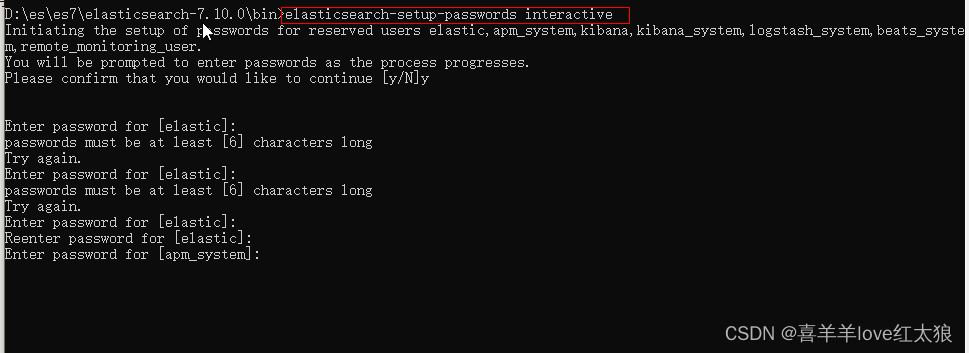
设置密码:
在es的bin目录下命令行执行:elasticsearch-setup-passwords interactive
修改密码:
curl -H "Content-Type:application/json" -XPOST -u elastic 'http://127.0.0.1:9200/_xpack/security/user/elastic/_password' -d '{ "password" : "123456" }'
重置密码:
修改
elasticsearch.yml文件,重启ES#是否启用es的安全设置,启用安全设置后es各节点、客户端的传输都会加密,并需要账号密码
xpack.security.enabled: false
问题三:使用elasticsearch-head-master插件连不上elasticsearch服务
描述:elasticsearch服务正常启动,但是elasticsearch-head-master连接不上
原因:elasticsearch.yml中没有跨域配置。
解决方案:在elasticsearch.yml中添加跨域配置
http.cors.enabled: true
http.cors.allow-origin: "*"
问题五:elasticsearch开启认证后使用elasticsearch-head-master插件认证访问elasticsearch
http://192.168.xxx。xxx:9100/?auth_user=elastic&auth_password=admin@1234
问题六:使用elasticsearch-head-master插件认证访问elasticsearch不能可视化显示
http.cors.enabled: true
http.cors.allow-origin: "*"
http.cors.allow-headers: "Authorization,X-Requested-With, Content-Type, Content-Length, X-User"
更多推荐



 0
0 0
0- 0


 已为社区贡献2条内容

所有评论(0)