
C#控制台打印二叉树
·
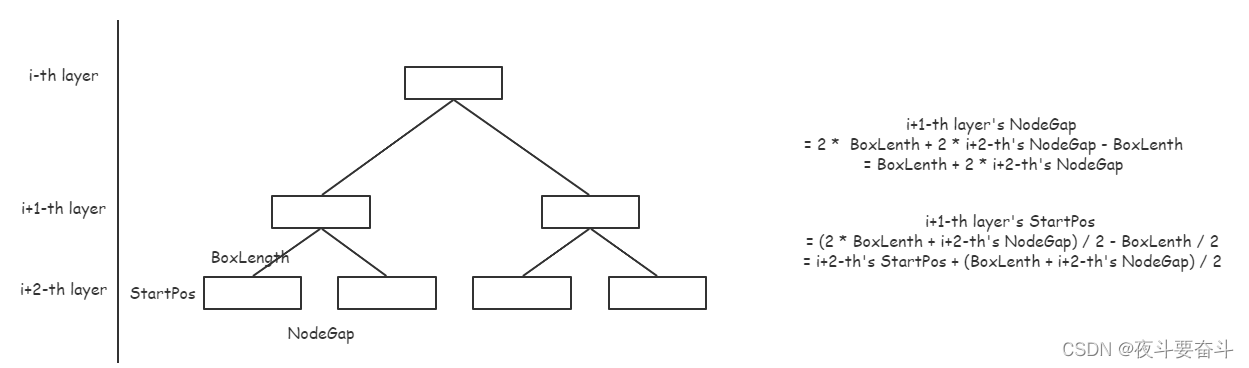
1. 先序遍历树节点,分层存储
1)计算获取NULL节点的占位符长度和所有节点字符串中的最长长度maxLength,作为box的长度
2. 从叶子节点层向上迭代计算每一层的起始点位置StartPos和节点间宽度NodeGap
1)当前层StartPos = 上一层StartPos + ( 2 * maxLenth + 上一层NodeGap ) / 2 - maxLength / 2
= 上一层StartPos + (maxLength + NodeGap) / 2
2)当前层NodeGap = ( 2 * maxLength + 2 * 上一层NodeGap) - maxLength
= 2 * NodeGap + maxLength
3. 打印字符串输出控制台:起始空格 box gap box gap .....
1)绘制节点时,需要把字符串绘制在box的中间
2)基于颜色变色处理
3)最后一位不绘制
4)绘制一层节点,就绘制连接线,这里以斜杠和反斜杠作为示例,为了保证左右孩子间距的一半等于父节点到子节点的垂线距离(如下图a和b所示,a=b),分别计算得到连接线的层数和每一层连接线的节点数
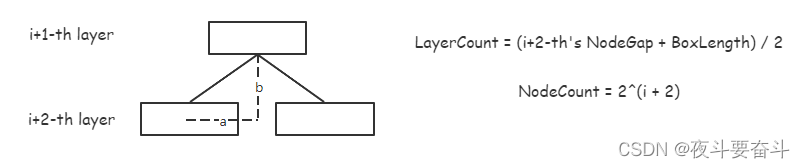
5)绘制连接线时,需要不断更新当前层的起始坐标StartPos,斜杠后的空格和反斜杠后的空格数量不同,而且连接线中的每一层斜杠间的间距不同

完整代码如下:
  public void PrintTree(int startPos = 10, int nodeGap = 3, int boxLenth = -1, string placeholder = "n")
        {
            // 先序遍历获取所有树节点  并分层存储
            var queue = new Queue<Tuple<RBNode<K, V>, int>>();
            queue.Enqueue(new Tuple<RBNode<K, V>, int>(this.root, 1));
            var dic = new Dictionary<int, List<RBNode<K,V>>>();    // 存储层号和对应节点
            int maxLength = Math.Max(placeholder.Length, boxLenth);

            while (queue.Count > 0)
            {
                var item = queue.Dequeue();
                var t = item.Item1;
                var l = item.Item2;

                if (dic.ContainsKey(l) == false)
                {
                    // 上一层全部为空
                    if (dic.ContainsKey(l - 1) && dic[l - 1].Any(p => p != null) == false) break;
                    dic[l] = new List<RBNode<K, V>>();
                }

                dic[l].Add(t);

                if (t != null)
                {
                    maxLength = Math.Max(t.key.ToString().Length, maxLength);
                }
                queue.Enqueue(new Tuple<RBNode<K, V>, int>(t?.left, l + 1));
                queue.Enqueue(new Tuple<RBNode<K, V>, int>(t?.right, l + 1));
            }

            // 计算每一层节点起始字符宽度和节点间的宽度
            int height = dic.Last().Key;
            Tuple<int, int>[] locs = new Tuple<int, int>[height];   // 存储起始坐标和节点间距
            locs[locs.Length - 1] = new Tuple<int, int>(startPos, nodeGap);
            for (int i = locs.Length - 2; i >= 0; i--)
            {
                var cur = locs[i + 1];
                int nextStartPos = cur.Item1 + (maxLength + cur.Item2) / 2;
                int nextNodeGap = 2 *  cur.Item2 + maxLength;
                locs[i] = new Tuple<int, int>(nextStartPos, nextNodeGap);
            }


            // PadLeft 填充字符串  绘制二叉树
            int ind = 1;
            foreach (var item in dic.Zip(locs))
            {
                int layer = item.First.Key;
                var nodes = item.First.Value;
                int sp = item.Second.Item1;
                int ng = item.Second.Item2;
                Console.WriteLine();
                Console.Write("".PadLeft(sp, ' '));

                // 绘制节点
                int nc = 1;
                foreach (var n in nodes)
                {
                    string str = string.Empty;
                    bool isLeaf = false;
                    if (n == null)
                    {
                        var pa = dic[ind - 1][(nc - 1) / 2];
                        int a = 0;
                        if (pa?.key.ToString() == "35")
                            a = 11;
                        isLeaf = pa != null && (pa.left == n || pa.right == n);
                        if (isLeaf) str = placeholder;
                        else str = "";
                    }
                    else
                    {
                        isLeaf = true;
                        str = n.key.ToString();
                    }

                    var l = str.Length;
                    var pos = (maxLength - l) / 2;
                    string merge = "".PadLeft(pos, ' ') + str + "".PadRight(maxLength - pos - str.Length, ' ');


                    ChangeColor(n);
                    if (isLeaf == false) ClearColor();
                    Console.Write(merge);
                    ClearColor();

                    if (nc < nodes.Count)   // 不是最后一位
                        Console.Write("".PadLeft(ng, ' '));


                    nc++;
                }

                if (ind == height) break;

                // 绘制连接线
                sp = sp + maxLength / 2;
                int layerCount = (locs[ind].Item2 + maxLength) / 2;  // 保证左右孩子间距的一半等于父节点到子节点的垂线距离
                int charLenth = 1;
                for (int i = 0; i < layerCount; i++)
                {
                    sp--;
                    Console.WriteLine();
                    Console.Write("".PadLeft(sp, ' '));
                    int nodeCount = (int)Math.Pow(2, ind);
                    int charGap = i * 2;
                    for (int j = 0; j < nodeCount; j++)
                    {
                        // 空节点不画下方的连接线
                        bool isEmptyNode = nodes[j / 2] == null;

                        if (j % 2 == 0)
                        {
                            string c = isEmptyNode ? " " : "/";
                            Console.Write(c.PadRight(charGap + 1, ' '));
                        }
                        else
                        {
                            string c = isEmptyNode ? " " : "\\";
                            Console.Write(c);
                            // 不是最后一位
                            if (j < nodeCount - 1)
                                Console.Write("".PadLeft(ng + maxLength - charGap - 2 * charLenth, ' '));
                        }

                    }
                }

                ind++;

            }

        }
        private void ChangeColor(RBNode<K, V> n)
        {
            if (n == null || n.color == BLACK)
            {
                Console.BackgroundColor = ConsoleColor.DarkGray;
                Console.ForegroundColor = ConsoleColor.White;
            }
            else
            {
                Console.BackgroundColor = ConsoleColor.Red;
                Console.ForegroundColor = ConsoleColor.White;
            }
        }
        private void ClearColor()
        {
            Console.BackgroundColor = ConsoleColor.Black;
            Console.ForegroundColor = ConsoleColor.White;
        }
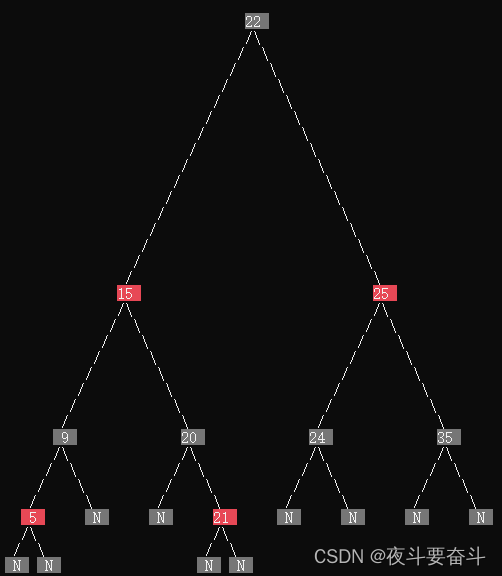
调用效果如下:
更多推荐


 0
0 0
0- 0


 已为社区贡献1条内容

所有评论(0)