
树莓派 Pico ADC温度测量
1 工作原理
1.1 ADC基础原理介绍
树莓派Pico内置5个ADC引脚,其中4引脚接入了内置的温度传感器。
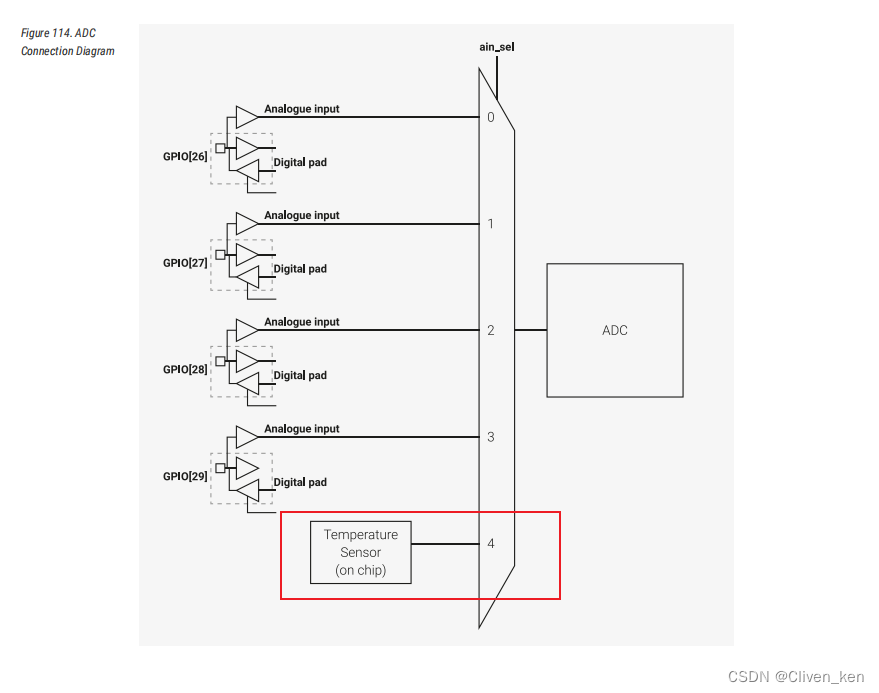
ADC(analogue-digital converter) 也即模拟数字转换器,也就是把模拟信号转换为数字信号。
- RP2040芯片上搭载的ADC能够支持12比特的数模转换: 0 0 0~ 2 12 2^{12} 212
- RP2040工作电压范围为: 0~3.3V。
可以得到电压与ADC采集参数的换算关系如下:
f a c t o r = 3.3 2 12 factor = \frac {3.3}{ 2^{12}} \qquad factor=2123.3
设ADC读数为 n n n ,那么电压 v v v为:
v = n ∗ 3.3 2 12 v = n * \frac {3.3}{ 2^{12}} \qquad v=n∗2123.3
详见 [1] 4.9. ADC and Temperature Sensor
1.2 温度传感器
由于ADC直连温度传感器,温度传感器将会把温度以电压的形式反馈输出到ADC中,由ADC转换为数值。
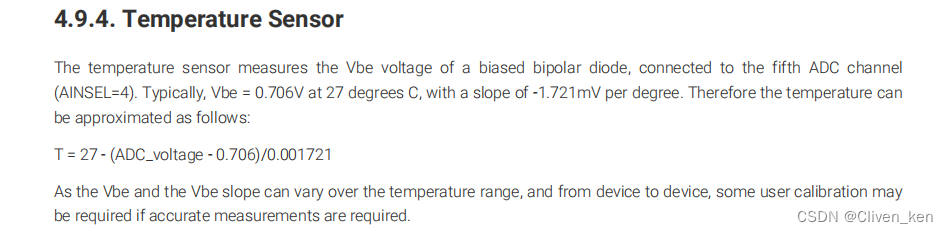
根据官方给出的物理参数可知:
- ADC
4通道接入温度传感器,见ADC图电路图。 - 温度
27°C时,电压为0.706V。 - 温度与电压变换的函数的斜率为
-1.721mV/°C,翻译一下就是每增加1°C那么电压下降0.001721V。
设温度为 T T T,当前温度传感器的电压为 v v v,可得到如下关系:
T = 27 − ( v − 0.706 ) 0.001721 T = 27 - \frac {(v - 0.706)}{0.001721} \qquad T=27−0.001721(v−0.706)
电压 v v v可以通过ADC的读数 n n n通过转换公式得到,这样我们就可以通过ADC读数计算出当前温度:
T = 27 − ( n ∗ 3.3 2 12 − 0.706 ) 0.001721 T = 27 - \frac {(n * \frac {3.3}{ 2^{12}} \qquad - 0.706)}{0.001721} \qquad T=27−0.001721(n∗2123.3−0.706)
详见 [1] 4.9.4
2. 开发
- 为了能够直观看到温度,我们需要通过串口将温度打印出来需要启用USB UART。
- 由于这次还需要使用ADC硬件外设,因此还需需要链接
hardware_adc库。
Makefile.txt关键内容如下:
add_executable(adc_temp main.c)
target_link_libraries(adc_temp pico_stdlib hardware_adc)

pico_enable_stdio_usb(adc_temp 1)
pico_enable_stdio_uart(adc_temp 0)

pico_add_extra_outputs(adc_temp)
程序方面:
- 初始化IO。
- 初始化ADC
- 启用温度传感器。
- ADC选择4号引脚读取。
- 循环读取计算温度。
#include "pico/stdio.h"
#include "hardware/adc.h"
#include "pico/stdlib.h"
#include <stdio.h>

// 数模转换器为 0~3.3v 最大值为 12bit
const float conversion_factor = 3.3f / (1 << 12);

int main() {
    float v;
    float t;
    stdio_init_all();
    printf("Use adc channel 4, measuring temptutre\n");
    // ADC初始化
    adc_init();
    adc_set_temp_sensor_enabled(true);
    adc_select_input(4);

    while (true) {
        // 数字转换为电压
        v = adc_read() * conversion_factor;
        t = 27 - (v - 0.706) / 0.001721;
        printf("%.2f\n", t);
        sleep_ms(1000);
    }
    return 0;
}
程序烧录后读数如下:
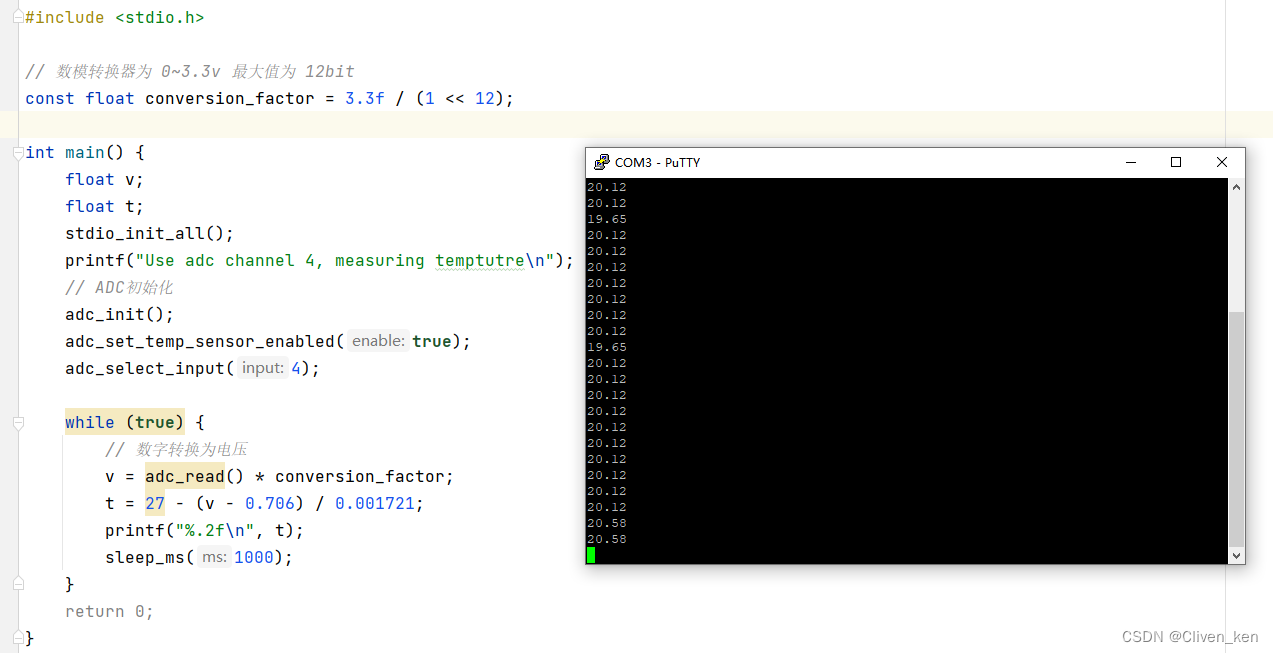
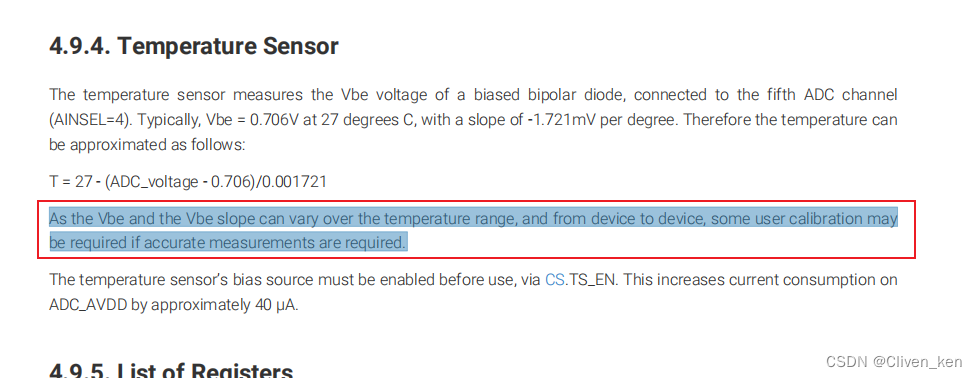
可以发现读数并不准确,根据官方说法根据设备情况的不同,温度随电压的斜率可能会不一致,需要用户校准,才可以获得较为准确的读数。
参考文献
[1]. raspberrypi . rp2040 datasheet . 2021.11. https://datasheets.raspberrypi.com/rp2040/rp2040-datasheet.pdf
[2]. raspberrypi . pico-examples . hello_adc . https://github.com/raspberrypi/pico-examples/blob/master/adc/hello_adc/hello_adc.c
更多推荐



 1
1 0
0- 0


 已为社区贡献2条内容

所有评论(0)