
uniapp app端调起google地图app,传参导航到对应位置
·
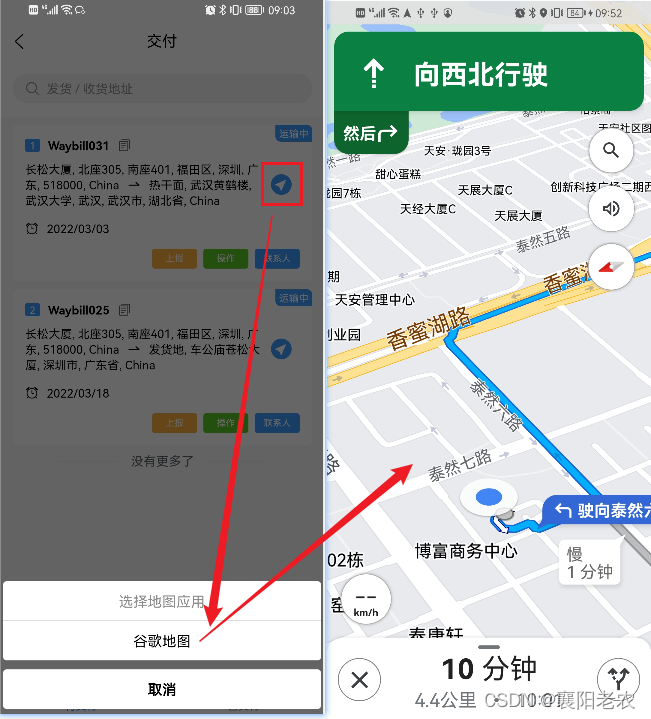
主要功能:app内调起google地图app,传递终点经纬度,并导航到终点
效果图
1.代码
/**
    latLng   String   例如:'31.1443439,121.808273'
 */
navGoogleMap(latLng) {
	let that = this
	// 应用地址
	let url = ''
	// android 包名
	let pname = ''
	// ios id
	let appid
	if (plus.os.name == 'Android') {
		plus.nativeUI.actionSheet({
			title: '选择地图应用',
			cancel: '取消',
			buttons: [{
				title: '谷歌地图'
			}]
		}, function(e) {
			switch (e.index) {
				case 1:
					url = 'google.navigation:q=' + latLng
					pname = 'com.android.vending'
					break;
			}
			if (url) {
				plus.runtime.openURL(url, function() {
					plus.nativeUI.actionSheet({
						title: '应用市场',
						cancel: '取消',
						buttons: [{
							title: '应用市场'
						}]
					}, function({
						index
					}) {
						switch (index) {
							case 1:
								plus.runtime.openURL('market://details?id=' + pname,
									function() {
										plus.nativeUI.alert('本机未安装指定的应用');
									})
						}
					})
				});
			}
		});
	} else {
		plus.nativeUI.actionSheet({
			title: '选择地图应用',
			cancel: '取消',
			buttons: [{
				title: '谷歌地图'
			}]
		}, function(e) {
			switch (e.index) {
				case 1:
					url = 'comgooglemaps://?saddr=&daddr=' + latLng
					appid = 585027354
					break;
				default:
					break;
			}
			if (url != '') {
				plus.runtime.launchApplication({ action: url }, function(err) {
					plus.nativeUI.actionSheet({
						title: '应用市场',
						cancel: '取消',
						buttons: [{
							title: '应用市场'
						}]
					}, function({
						index
					}) {
						switch (index) {
							case 1:
								plus.runtime.openURL(
									`itms-apps://itunes.apple.com/cn/app/id${appid}?mt=8')`,
									function() {
										plus.nativeUI.alert('本机未安装指定的应用');
									})
						}
					})
				});
			}
		});
	}
}
开发流程:
1.首先判断手机版本 android、ios
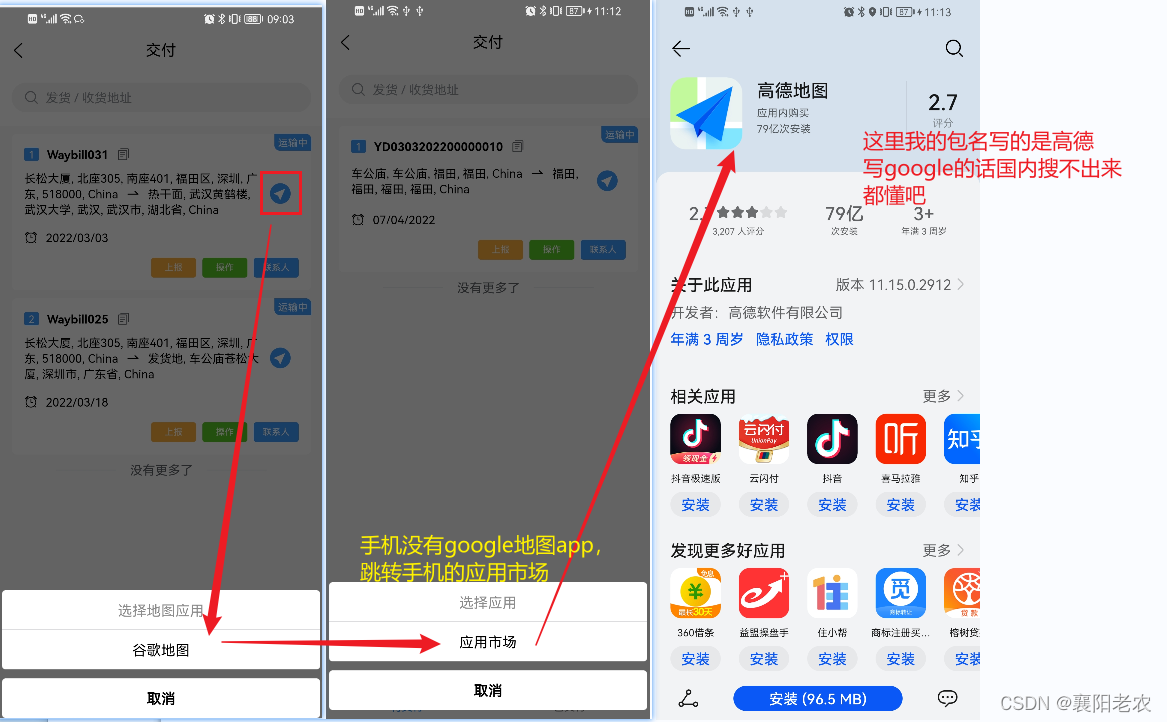
2.点击跳转google地图app时,如果手机有google地图app,会直接跳转,如果没有这个app,会进入回调函数,在这里面提示让客户去应用市场下载google地图app,如图
3.先写到这里。。。
更多推荐



 5
5 0
0- 0


 已为社区贡献1条内容

所有评论(0)