
对象数组、集合、数据结构
目录
List ArrayList Vector LinkedList的特点
对象数组
概述
对象数组的每一个元素都是一个对象。例如创建一个Student类如下:
public class Student {
String name;
int age;
public Student(String name, int age) {
this.name = name;
this.age = age;
}
}创建方法
在测试类Test中创建三个Student对象并放入对象数组中,具体的定义对象数组的方法为:
public class Test {
    public static void main(String[] args) {
        //定义一个Student对象数组,并且初始化数组长度为3
        Student[] students = new Student[3];
        //创建三个Student对象,并存放入students数组中
        students[0] = new Student("Alice", 18);
        students[1] = new Student("Helen", 19);
        students[2] = new Student("Jack", 20);
    }
}
对象数组的遍历
因为对象数组也是一个数组,里面存放的每个元素都是相同数据类型的,所以我们可以直接循环遍历对象数组。
我们在遍历对象数组时,可以使用get()和set()方法来获取每个数组元素中的成员变量的值,也可以使用toString()方法来直接打印对象数组,前提是必须在Student类中重写toString()方法,否则打印的是每个对象的地址值。
重写toString()方法后的Student类:
public class Student {
String name;
int age;
public Student(String name, int age) {
this.name = name;
this.age = age;
}
@Override
public String toString() {
return "Student{" +
"name='" + name + '\'' +
", age=" + age +
'}';
}
}使用重写后的toString()方法打印数组的每个元素:
public class Test {
    public static void main(String[] args) {
        Student[] students = new Student[3];
        students[0] = new Student("Alice", 18);
        students[1] = new Student("Helen", 19);
        students[2] = new Student("Jack", 20);
        for (Student student : students) {
            System.out.println(student.toString());
        }
    }
}
集合
集合的由来
面向对象语言对事物的体现都是以对象的形式,所以为了方便对多个对象操作,Java就提供了集合类。
集合是一个体系,有很多集合的接口和类组成,不同的集合有各自的特点。
Collection集合继承体系
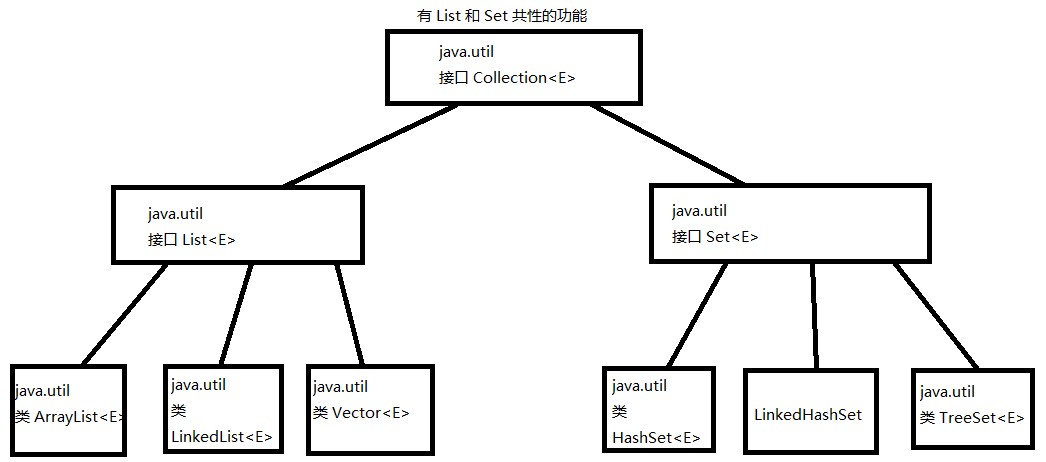
数组和集合的区别
1)长度区别:
数组的长度是固定的,而集合的长度是可变的。
2)存储数据类型的区别:
数组可以存储基本数据类型,也可以存储引用数据类型;
集合只能存储引用数据类型。
3)内容的区别
数组只能存储相同数据类型的元素;
集合可以存储不同数据类型的元素。
Collection集合的功能
创建Collection集合,下面都使用子类ArrayList演示
import java.util.ArrayList;
import java.util.Collection;
public class Test2 {
public static void main(String[] args) {
Collection collection = new ArrayList();
}
}添加功能
//添加单个元素
boolean add(Object obj)
该方法的返回值是boolean类型,true为添加成功,false为添加失败。
代码示例
import java.util.ArrayList;
import java.util.Collection;
public class Test2 {
public static void main(String[] args) {
Collection collection = new ArrayList();
boolean b = collection.add(100);
System.out.println(b);
}
}
//添加一个集合的元素(即给一个集合添加进另一个集合的所有元素)
boolean addAll(Collection c)
同上,该方法的返回值与add()方法的返回值类似,
代码示例
import java.util.ArrayList;
import java.util.Collection;
public class Test3 {
public static void main(String[] args) {
Collection collection = new ArrayList();
collection.add(1);
Collection collection2 = new ArrayList();
collection2.add(2);
collection2.add(3);
collection2.add(4);
collection2.add(5);
boolean b = collection.addAll(collection2);
System.out.println(b); //打印返回值
System.out.println(collection);//打印collection的元素
System.out.println(collection2);//打印collection2的元素
}
}
删除功能
//移除所有元素
void clear()
//移除一个元素
boolean remove(Object o)
//移除一个集合的元素(移除一个以上返回的就是true) 删除的元素是两个集合的交集元素,如果没有交集元素 则删除失败 返回false
boolean removeAll(Collection c)
删除功能代码实现如下
import java.util.ArrayList;
import java.util.Collection;
public class Test3 {
public static void main(String[] args) {
Collection collection = new ArrayList();
collection.add(1);
collection.add(2);
collection.add(3);
collection.add(4);
collection.add(5);
System.out.println("原本的元素:"+collection);
collection.remove(0);
System.out.println("删除0号索引后的剩余元素:" + collection);
collection.clear();
System.out.println("移除所有元素后:" + collection);
}
}
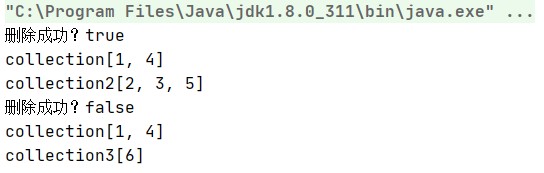
第三种情况,也就是移除两个集合交集元素的方法removeAll()代码实现
import java.util.ArrayList;
import java.util.Collection;
public class Test4 {
public static void main(String[] args) {
Collection collection = new ArrayList();
collection.add(1);
collection.add(2);
collection.add(3);
collection.add(4);
collection.add(5);
Collection collection2 = new ArrayList();
collection2.add(2);
collection2.add(3);
collection2.add(5);
Collection collection3 = new ArrayList();
collection3.add(6);
//删除collection 和 collection2的交集元素
boolean b = collection.removeAll(collection2);
System.out.println("删除成功?"+b);
//打印collection 和collection2
System.out.println("collection"+collection);
System.out.println("collection2"+collection2);
//删除collection 和 collection2的交集元素
boolean b1 = collection.removeAll(collection3);
System.out.println("删除成功?"+b1);
//打印collection 和collection3
System.out.println("collection" + collection);
System.out.println("collection3" + collection3);
}
}
判断功能
//判断集合中是否包含指定的元素
boolean contains(Object o)
//判断集合中是否包含指定的集合元素(这个集合包含另一个集合中所有的元素才算包含 才返回true)
boolean containsAll(Collection c)
//判断集合是否为空
boolean isEmpty()
containsAll()方法代码示例
因为collection包含了collection2所有的元素,所以返回值为true,而collection2没有包含collection所有的元素,所以返回值为false。
import java.util.ArrayList;
import java.util.Collection;
public class Test5 {
public static void main(String[] args) {
Collection collection = new ArrayList();
collection.add(1);
collection.add(2);
collection.add(3);
collection.add(4);
collection.add(5);
Collection collection2 = new ArrayList();
collection2.add(2);
collection2.add(3);
collection2.add(5);
boolean b = collection.containsAll(collection2);
System.out.println("collenction包含collection2?"+b);
boolean b1 = collection2.containsAll(collection);
System.out.println("collenction2包含collection?"+b1);
}
}
获取功能
Iterator<E> iterator()
private class Itr implements Iterator<E> {}
Itr这个迭代器,是ArrayList的内部类,内部类可以访问外部类的所有成员,包括私有成员。
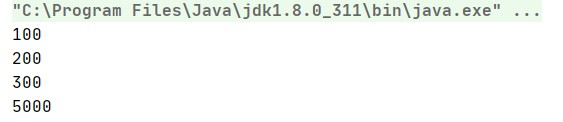
使用Iterator迭代器获取集合中的元素代码实现
import java.util.ArrayList;
import java.util.Collection;
import java.util.Iterator;
public class Test6 {
public static void main(String[] args) {
Collection collection = new ArrayList();
collection.add(100);
collection.add(200);
collection.add(300);
collection.add(5000);
Iterator iterator = collection.iterator();
while (iterator.hasNext()) {
Object o = iterator.next();
System.out.println(o);
}
}
}
长度功能
//获取集合中元素的个数:
int size()
代码实现
import java.util.ArrayList;
import java.util.Collection;
public class Test6 {
public static void main(String[] args) {
Collection collection = new ArrayList();
collection.add(100);
collection.add(200);
collection.add(300);
collection.add(5000);
int size = collection.size();
System.out.println(size);
}
}
注意:
数组中的length,它是数组的属性,作用是获取数组的元素个数,字符串中的length()方法的作用是获取字符串的长度,而集合中是没有length()方法的,集合中可以使用size()方法来获取集合中元素的个数。
交集功能
boolean retainAll(Collection c)
/*
1. A集合对B集合取交集元素,获取到的交集元素在A集合中。返回的布尔值表示的是A集合是否发生变化
2. A集合对B集合取交集元素,如果没有取到交集元素A集合会被清空
*/
代码实现,这里只演示取到了交集元素的情况
import java.util.ArrayList;
import java.util.Collection;
public class Test6 {
public static void main(String[] args) {
Collection collection = new ArrayList();
collection.add(100);
collection.add(200);
collection.add(300);
collection.add(5000);
Collection collection1 = new ArrayList();
collection1.add(100);
collection1.add(200);
boolean b = collection.retainAll(collection1);
System.out.println(b);
System.out.println(collection);
}
}
把集合转换为数组的功能
import java.util.ArrayList;
import java.util.Collection;
public class Test7 {
public static void main(String[] args) {
Collection collection = new ArrayList();
collection.add(100);
collection.add(200);
collection.add(300);
Object[] objects = collection.toArray();
for (Object object : objects) {
System.out.println(object);
}
}
}
集合的遍历
集合转数组遍历
import java.util.ArrayList;
import java.util.Collection;
public class Test {
public static void main(String[] args) {
Collection collection = new ArrayList();
collection.add(11);
collection.add(12);
collection.add(13);
//将集合转换为数组
Object[] objects = collection.toArray();
//对数组进行遍历
System.out.println(Arrays.toString(objects));
}
}集合存储自定义对象并遍历
import org.westos.demo5.Student;
import java.util.ArrayList;
import java.util.Arrays;
import java.util.Collection;
public class Test2 {
public static void main(String[] args) {
Collection collection = new ArrayList();
collection.add(new Student("Alice", 18));
collection.add(new Student("Jack", 19));
collection.add(new Student("Maik", 20));
Object[] objects = collection.toArray();
System.out.println(Arrays.toString(objects));
}
}
迭代器遍历
import java.util.ArrayList;
import java.util.Collection;
import java.util.Iterator;
public class Test3 {
public static void main(String[] args) {
Collection collection = new ArrayList();
collection.add(11);
collection.add(12);
collection.add(13);
Iterator iterator = collection.iterator();
while (iterator.hasNext()) {
System.out.println(iterator.next());
}
}
}
集合存储字符串并遍历
import java.util.ArrayList;
import java.util.Arrays;
import java.util.Collection;
public class Test3 {
public static void main(String[] args) {
Collection collection = new ArrayList();
collection.add("abc");
collection.add("abc2");
collection.add("abc3");
Object[] objects = collection.toArray();
System.out.println(Arrays.toString(objects));
}
}
List集合
List集合的特点
元素有序,并且每一个元素都存在一个索引,元素可以重复。
List集合的特有功能
在指定索引处添加元素
void add(int index,E element)
移除指定索引处的元素,返回移除的元素
E remove(int index)
获取指定索引处的元素
E get(int index)
更改指定索引处的元素 返回的而是被替换的元素
E set(int index,E element)
返回此列表中第一次出现的指定元素的索引;如果此列表不包含该元素,则返回 -1。
int indexOf(Object o)
返回此列表中最后出现的指定元素的索引;如果列表不包含此元素,则返回 -1。
int lastIndexOf(Object o)
List集合特有的遍历功能
使用for循环,结合size()和get()方法来遍历集合。
import java.util.ArrayList;
import java.util.List;
public class Test3 {
public static void main(String[] args) {
List list = new ArrayList();
list.add("aaa");
list.add("bbb");
list.add("ccc");
for (int i = 0; i < list.size(); i++) {
Object o = list.get(i);
System.out.println(o);
}
}
}
List ArrayList Vector LinkedList的特点
List: 集合,元素有序且可以重复
Vector : 底层数据结构是数组,增删慢,查询块 线程安全的,效率低。
ArrayList: 底层数据结构是数组,增删慢,查询快,线程不安全效率高。
LinkedList:底层数据结构是链表,查询慢,增删快 ,线程不安全,效率高。
数据结构
数据结构其实就是存储数据的格式
栈
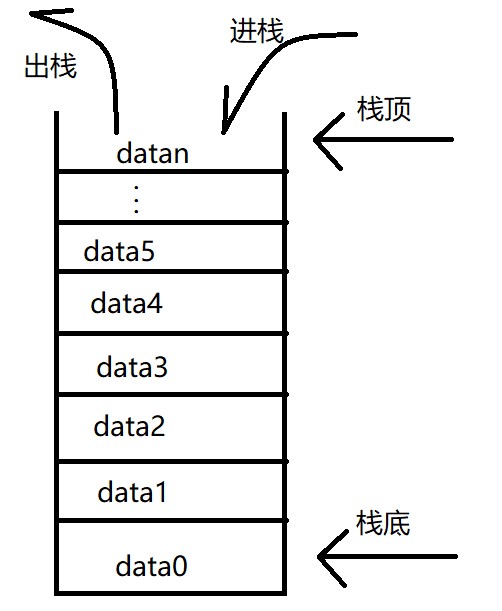
栈的特点:先进后出,后进先出。
队列
队列的特点:先进先出,后进后出。

数组
数组的特点:查询快,增删慢。
链表
链表的特点:查询慢,增删快
更多推荐


 1
1 0
0- 0


 已为社区贡献1条内容

所有评论(0)