
flink基本原理与kafka数据处理实践
基本原理
简介
-
flink支持大规模计算能力,能够在多个节点上并发运行,具有高吞吐以及低延迟的特点
-
flink是有状态的和容错的,保证了其Exactly-Once语义,可以无缝的从故障中恢复
-
flink提供了多种算子,数据处理灵活多样
工作原理

-
JobClient 负责接收用户程序,解析和优化程序的执行计划,然后提交到JobManager,
-
JobManager负责协调资源及控制Job的任务执行并进行对应的状态保证和容错
-
TaskManager是运行在不同节点上的JVM进程,负责接收JobManager发送过来的task的任务
-
Task运行在TaskManager的Slot上
-
Slot是TaskManager资源粒度的划分,每个Slot都有自己独立的内存,但是共享了TaskManager的CPU,Slot的个数就代表了一个程序的最高并行度
-
flink算子说明与代码解析
Map
输入与输出一比一对应的算子,例如传入的是一个整型的集合,输出的是进行map算法计算后的整型的集合
接口声明:
public interface MapFunction<T, O> extends Function, Serializable {

    O map(T var1) throws Exception;

}
由代码定义可以看出,接收的是一个T,对应输出了一个O
实现举例(将源数据中的Integer值扩大10倍)
SingleOutputStreamOperator<Integer> result = streamSource.map(new MapFunction<Integer, Integer>()

{

    @Override

    public Integer map(Integer item) throws Exception

    {

        return item \* 10;

    }

});
Flite
定义判断条件,符合条件的进行过滤,这里与map不同的是,如果有被过滤掉的值,那么输出可能会比原先的值少
接口声明:
public interface FilterFunction<T> extends Function, Serializable {

     boolean filter(T var1) throws Exception;

}
实现举例(去掉string为"test"的字符串)
DataStream<String> FilterRes1 = source.filter(new FilterFunction<String>() {

@Override

public boolean filter(String s) throws Exception {

    if (s.equals("test")) {

        return true;

    }

    return false;

}

});
FlatMap
输入与输出为一对多的形式(可以做到替代map和filter的操作,但是map与filter可以让代码更为清晰简洁)
代码interface
public interface FlatMapFunction<T, O> extends Function, Serializable {

    void flatMap(T var1, Collector<O> var2) throws Exception;

}
由代码interface可以看出,输入的是T,计算后,输出O的一个Collecto
代码实现示例(收集大于等于0的数据)
streamSource.flatMap(new FlatMapFunction<Integer, Integer>() {

    @Override

    public void flatMap(Integer item, Collector<Integer> out) throws Exception {

        if (item < 0) {

            item = -item;

        }

        out.collect(item);

    }

})
注:以上的3种算子均支持lambda表达式,这里不再具体举例说明,但是在使用lambda表达式时需要注意,如果Collector的返回值不是基本类型,生成jar包时没问题,但是在flink上运行时会报如下错误:
The generic type parameters of ‘Collector’ are missing. In many cases lambda methods don’t provide enough information for automatic type extraction when Java generics are involved. An easy workaround is to use an (anonymous) class instead that implements the 'org.apache.flink.api.common.functions.FlatMapFunction interface. Otherwise the type has to be specified explicitly using type information.
The return type of function ‘main(StreamingJob.java:115)’ could not be determined automatically, due to type erasure. You can give type information hints by using the returns(…) method on the result of the transformation call, or by letting your function implement the ‘ResultTypeQueryable’ interface.
这个错误表示的是lambda表达式不确定Collector的返回类型,需要用returns(Types.class)声明
Keyby
以某个key对DataStream进行聚合操作,将结果转换为Tuple<T,T,T…>的形式,可以使用KeyBy(0/1/2)进行聚合,flink提供了Tuple0,Tuple1,Tuple2…Tuple25的操作,用户也可以自行定义class,并且按照类的成员变量进行KeyBy的操作
分组后的聚合或数值运算
.KeyBy(0)
.function()
Reduce
public interface ReduceFunction extends Function, Serializable {
T reduce(T var1, T var2) throws Exception;
}
传入两个值后,根据reduce功能,返回一个值
flink的窗口
窗口使用的前缀说明
mapped : 表示数据经过map或者flatMap处理的
keyed: 表示数据经过keyBy分组的
计数窗口countWindow
mapped.countWindowAll(5)
窗口大小是5个数据
keyed.countWindow(5)
表示分组后,每个组的数据达到一定数据后才会触发
滚动窗口
mapped.timeWindow.All(Time.second(5))
窗口大小是5秒,时间间隔是5秒,表示每隔5s,统计5秒内的数据结果
keye.timeWindow(Time.second(5))
分组后,每隔5s,统计一次各个分组的情况
滑动窗口slidingWindow
mapped.timeWindowAll(Time.seconds(5), Time.seconds(1))
每隔1s,计算5秒内的数据
keyed.timeWindow(Time.second(5), time.seconds(1))
分组后,每隔1秒,统计5秒各个分组的情况
Session窗口
mapped.windowAll(ProcessingTimeSessionWindows.withGap(Time.seconds(5)));
5秒切分一个session
EventTime窗口
根据数据所携带的时间来划分窗口
可以从数据源中提取时间字段作为EventTime,不会改变原有数据的样子
env.setStreamTimeCharacteristic(TimeCharacteristic.EventTime);

DataStream<SingleMessage> timeRes = source.assignTimestampsAndWatermarks(new BoundedOutOfOrdernessTimestampExtractor<String>(Time.seconds(0)) {

   @Override

   public long extractTimestamp(String s) {

      return 0;

   }

}).flatMap((FlatMapFunction<String, String>) (s, out) ->  {

   out.collect(String)

});

mapped.windowAll(EventTimeSessionWindows.withGap(Time.seconds(5)));
kafka数据处理实践
flink数据处理流程
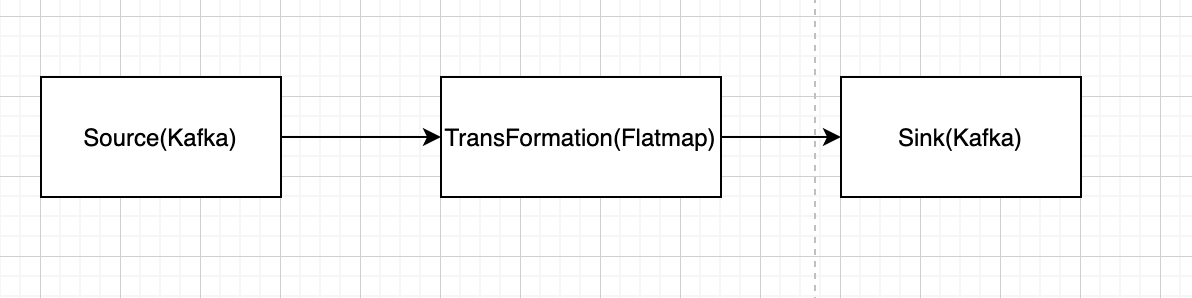
flink处理数据,分为以上3个步骤
-
初始化env,定义kafka source consumer,从kafka消费数据
-
定义flatmap,从对消费到的数据进行加工处理
-
定义kafka sink producer,将处理后的数据写到kafka另外的一个topic
flink处理kafka数据
功能及环境说明
功能说明
对kafka的某个topic的数据进行读取,在对行进行处理后写入kafka的另外一个topic
kafka环境
- docker搭建,搭建命令如下(需要替换$ip字段)
docker pull wurstmeister/zookeepe

docker pull wurstmeister/kafka

docker run -d --name zookeeper -p 2181:2181 -t wurstmeister/zookeepe

docker run  -d --name kafka -p 9092:9092 -e KAFKA\_BROKER\_ID=0 -e KAFKA\_ZOOKEEPER\_CONNECT=$ip:2181/kafka -e KAFKA\_ADVERTISED\_LISTENERS=[PLAINTEXT://$ip:9092](plaintext://$ip:9092) -e KAFKA\_LISTENERS=[PLAINTEXT://0.0.0.0:9092](plaintext://0.0.0.0:9092) -t wurstmeister/kafka
-
腾讯云购买ckafka实例
-
本次测试使用第2种方式,在腾讯云上购买ckafka实例,可以在控制台查看消息,以及可以查看对应生产和消费的监控
生产消息(Source)
消息格式
json:

{

    "name": $name;  // test or username-$id

    "message": $message;

    "time": $time,

    "uuid": $uuid

}
topic name
topic-flink-consume
数据处理(transformation)
-
过滤掉name为test的消息
-
将username-$id后面的id去掉
消息重写(sink)
topic name
topic-flink-produce
代码构建
java环境配置
本次构建采用1.7.0版本
- maven构建java的flink项目
mvn archetype:generate -DarchetypeGroupId=org.apache.flink -DarchetypeArtifactId=flink-quickstart-java -DarchetypeVersion=1.7.0
- IntelliJ IDEA构建
pkg依赖
import org.apache.flink.api.common.functions.FlatMapFunction; //数据处理使用函数

import org.apache.flink.api.common.serialization.SimpleStringSchema; //kafka数据消费

import org.apache.flink.streaming.api.datastream.DataStream; //flink数据stream

import org.apache.flink.streaming.api.environment.StreamExecutionEnvironment; //flink执行环境

import org.apache.flink.streaming.connectors.kafka.FlinkKafkaConsumer011; //flink kafka数据消费

import org.apache.flink.streaming.connectors.kafka.FlinkKafkaProducer011; //flink kafka数据写入

import java.util.Properties; //用作kafka配置使用

import org.apache.flink.api.common.serialization.SerializationSchema; //序列化写入kafka使用

import com.alibaba.fastjson.JSONObject; //json数据解析与生成使用
flink source生成(从kafka消费源数据)
final StreamExecutionEnvironment env = StreamExecutionEnvironment.getExecutionEnvironment();
env.enableCheckpointing(5000); // 启动检查点
Properties props = new Properties();
props.setProperty("bootstrap.servers", "9.112.213.121:6121");
props.setProperty("[group.id](http://group.id)", "flink-group");
FlinkKafkaConsumer011<String> consumer =
new FlinkKafkaConsumer011<>("topic-flink-consumer", new SimpleStringSchema(), props);
DataStream<String> source = env.addSource(consumer);
transformation(数据处理)
DataStream<SingleMessage> res = source.flatMap((FlatMapFunction<String, SingleMessage>) (s, out) ->  {

   SingleMessage singleMessage = JSONHelper.parse(s);

   if (null != singleMessage) {

      if (!singleMessage.getName().equals("test") && singleMessage.getName().split("-").length == 2) {

         singleMessage.setName(singleMessage.getName().split("-")[0]);

         out.collect(singleMessage);

      }

   }

}).returns(SingleMessage.class);
-
这里使用了lambda表达式对数据进行处理,结合前文收到的类型识别,需要加上returns字段
-
对kafka数据消费后,需要进行json的反序列化,需要分别定义singleMessage和JSONHelpe
- singleMessage
public class SingleMessage {

    private String name;

    private String uuid;

    private String time;

    private String message;

    public String getName() { return name; }

    public void setName(String name) { this.name = name; }

    public String getUuid() {  return uuid; }

    public void setUuid(String uuid) {  this.uuid = uuid;  }

    public String getTime() { return time; }

    public void setTime(String time) {  this.time = time; }

    public String getMessage() { return message; }

    public void setMessage(String message) { this.message = message; }

}
- JSONHelpe
public class JSONHelper {

    public static SingleMessage parse(String raw){

        SingleMessage singleMessage = null;

        if (raw != null) {

            singleMessage = JSONObject.parseObject(raw, SingleMessage.class);

        }

        return singleMessage;

    }

}
sink(数据处理后写入kafka)
FlinkKafkaProducer011<SingleMessage> producer = new FlinkKafkaProducer011<>("topic-flink-producer", new SingleMessageSerializationSchema(), props);

res.addSink(producer);
- 注意这里需要将kafka的数据序列化后,才能调用producer的写入功能,定义如下序列化函数
public class SingleMessageSerializationSchema implements SerializationSchema<SingleMessage> {

    @Override

    public byte[] serialize(SingleMessage singleMessage) {

        JSONObject jsonObject = new JSONObject();

        jsonObject.put("name", singleMessage.getName());

        jsonObject.put("time", singleMessage.getTime());

        jsonObject.put("message", singleMessage.getMessage());

        jsonObject.put("uuid", singleMessage.getUuid());

        return jsonObject.toJSONString().getBytes();

    }

}
结果分析
- 从腾讯云控制台查询消息,可以看到源日志的name为test或name-$id


-
数据处理后,name为test的字段被过滤掉,name-$id的后缀id也被去除

-
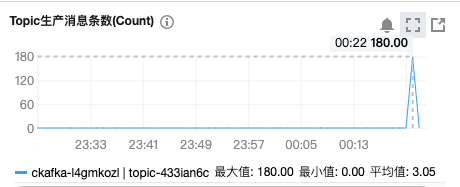
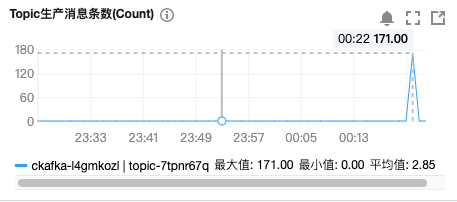
在腾讯云查看topic监控,源日志生产了180条日志,经过flink处理后,因为过滤了name为test的9条数据,写入到sink端的消息数量为171条
- 访问ip:8081(ip为对应flink搭建的节点),可以查看flink集群的状态以及提交的任务运行情况
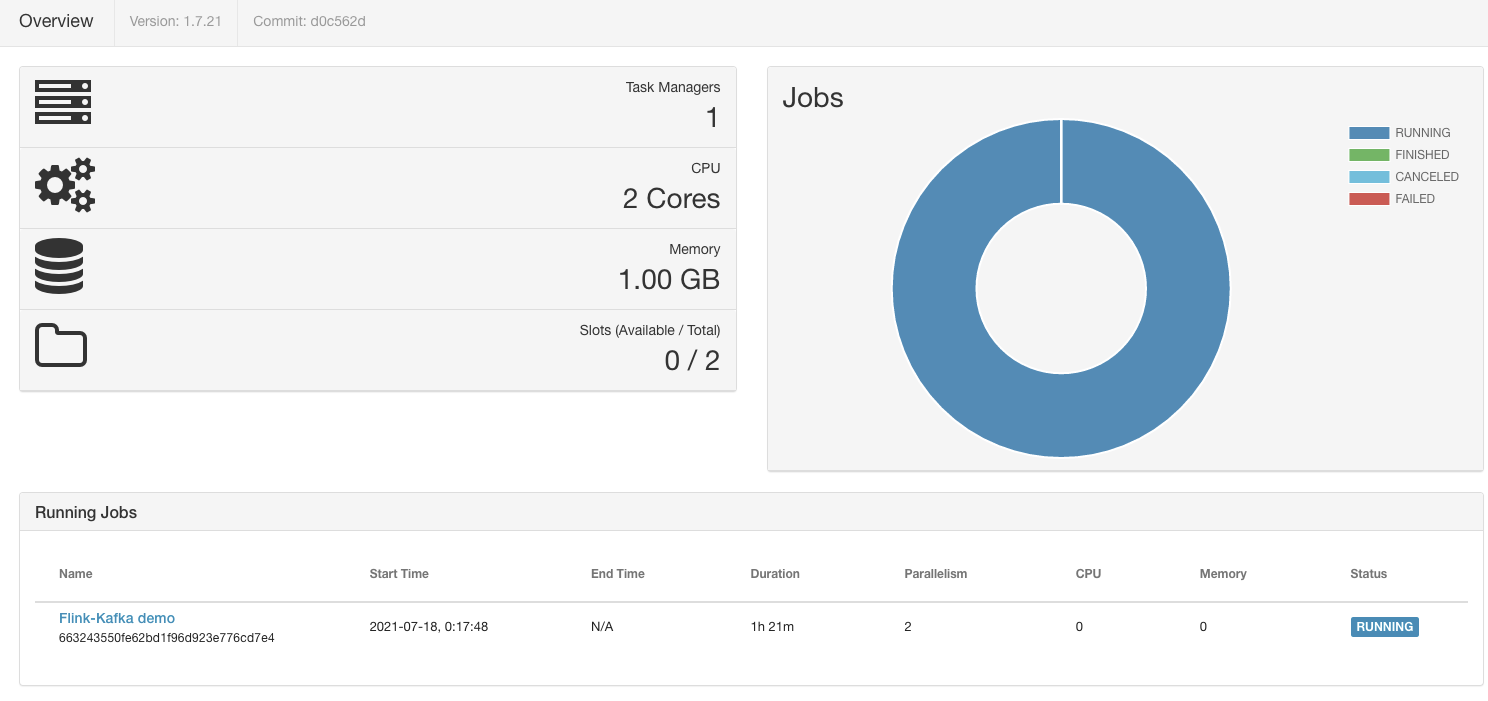
- 如上图所示,搭建了一个小型的flink供测试使用,提交jar包任务配置了Parallelism为2,用掉了TaskManager的2个Slots
总结
-
flink的使用,在梳理流程后,代码构建还是较为清晰的,提供的各种算子以及函数功能强大,为数据处理带来了高效和便捷
-
本篇针对flink的基本原理做了说明,但是flink的功能细节远不止此,对flink的技术细节还有很多值得深入研究的地方
-
本篇使用kafka作为source和sink对flink进行了数据处理,flink还支持其他的各种stream,比如fileSystem,Clickhouse,Redis等等。
-
本篇是基于DataStream来进行数据处理的,flink还支持DataSet以及TableAPI & SQL
更多推荐


 0
0 0
0- 0


 已为社区贡献1条内容

所有评论(0)