
Android kotlin 实现仿微信朋友圈全文与收起功能(RecyclerView+BRVAH3.0.6+androidx)
·
一、实现效果
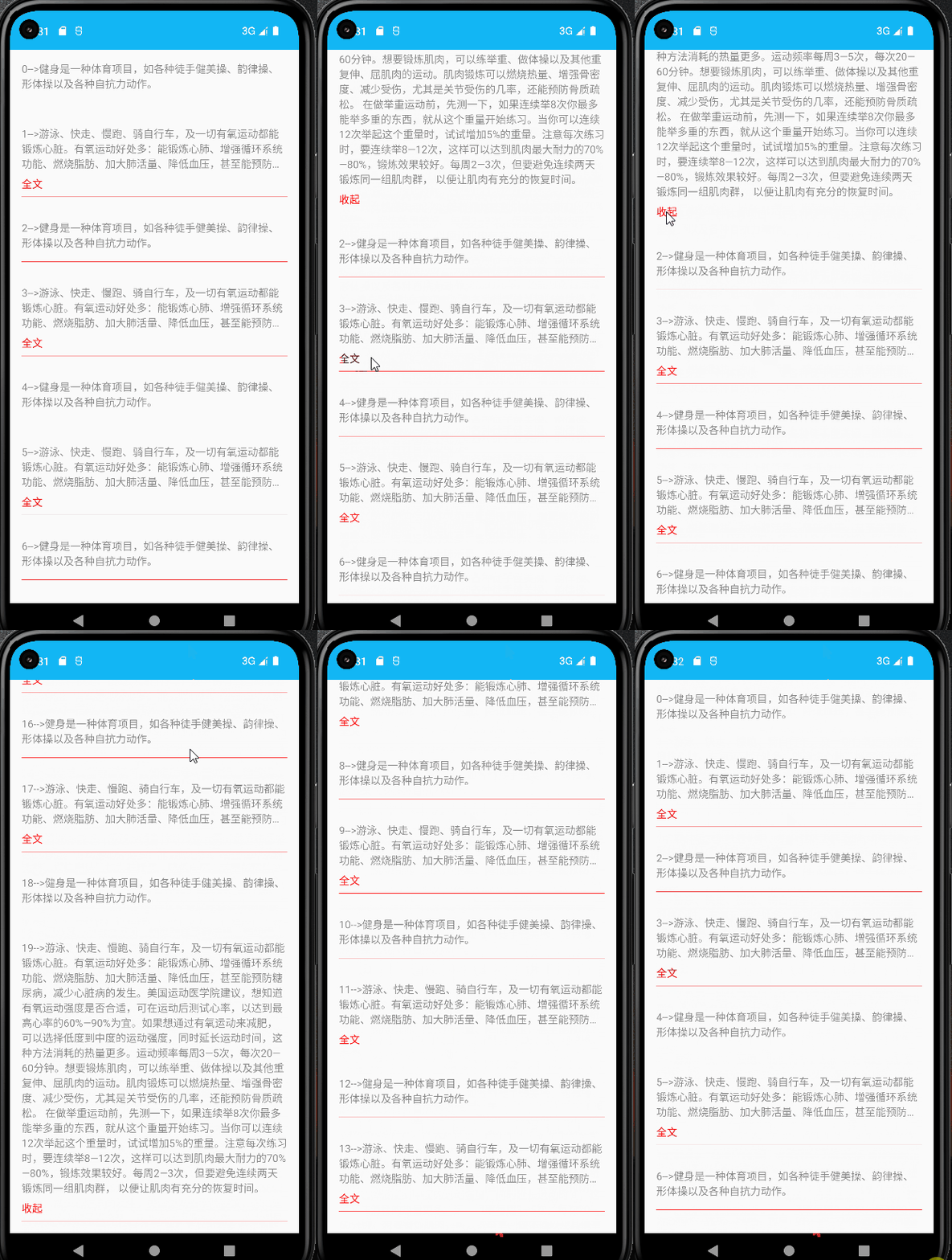
二、引入依赖
在app的build.gradle在添加以下代码
1、implementation 'com.github.CymChad:BaseRecyclerViewAdapterHelper:3.0.6',这个里面带的适配器,直接调用就即可
BaseRecyclerViewAdapterHelper简称BRVAH
Android SDK | 是否支持BaseRecyclerViewAdapterHelper:3.0.6 |
|---|---|
android compileSdkVersion 29 | 是 |
android compileSdkVersion 30 | 是 |
android compileSdkVersion 31 | 是 |
android compileSdkVersion 32 | 是 |
android compileSdkVersion 33 | 是 |
这依赖包还需要得到要添加,在Project的build.gradle在添加以下代码,不添加就不行
allprojects {
    repositories {
        ...
        maven { url "https://jitpack.io" }//加上
    }
}
三、实现源码
1、实体类
全文与收起ExpandFoldTextBean.java
package com.example.myapplication3.Bean;

public class ExpandFoldTextBean {

    private String content;//内容

    private int id;//该条数据的id

    public String getContent() {
        return content;
    }

    public void setContent(String content) {
        this.content = content;
    }

    public int getId() {
        return id;
    }

    public void setId(int id) {
        this.id = id;
    }
}
2、适配器
ExpandFoldTextAdapter.kt
package com.example.myapplication3.adapter

import android.util.SparseArray
import android.view.View
import android.view.ViewTreeObserver
import com.chad.library.adapter.base.BaseQuickAdapter
import com.chad.library.adapter.base.viewholder.BaseViewHolder
import com.example.myapplication3.Bean.ExpandFoldTextBean
import com.example.myapplication3.R
import kotlinx.android.synthetic.main.item_expand_fold_text.view.*

class ExpandFoldTextAdapter(layoutResId: Int = R.layout.item_expand_fold_text) :
    BaseQuickAdapter<ExpandFoldTextBean, BaseViewHolder>(layoutResId) {

    private val MAX_LINE_COUNT = 3 //最大显示行数
    private val STATE_UNKNOW = -1 //未知状态
    private val STATE_NOT_OVERFLOW = 1 //文本行数小于最大可显示行数
    private val STATE_COLLAPSED = 2 //折叠状态
    private val STATE_EXPANDED = 3 //展开状态

    /**
     * 注意:保存文本状态集合的key一定要是唯一的,如果用position。
     * 如果使用position作为key,则删除、增加条目的时候会出现显示错乱
     */
    private val mTextStateList = SparseArray<Int>() //保存文本状态集合

    override fun convert(holder: BaseViewHolder, item: ExpandFoldTextBean) {

        val state: Int = mTextStateList!!.get(item.id, STATE_UNKNOW)

        //第一次初始化,未知状态
        if (state == STATE_UNKNOW) {
            holder.itemView.run {
                tv_content.viewTreeObserver.addOnPreDrawListener(object:ViewTreeObserver.OnPreDrawListener{
                    override fun onPreDraw(): Boolean {

                        //这个回掉会调用多次,获取完行数后记得注销监听
                        tv_content.viewTreeObserver.removeOnPreDrawListener(this);

                        //如果内容显示的行数大于最大显示行数
                        if (tv_content.lineCount > MAX_LINE_COUNT) {
                            tv_content.maxLines = MAX_LINE_COUNT//设置最大显示行数
                            tv_expand_or_fold.visibility = View.VISIBLE //显示“全文”
                            tv_expand_or_fold.text = "全文"
                            mTextStateList.put(item.id, STATE_COLLAPSED) //保存状态
                        } else {
                            tv_expand_or_fold.visibility = View.GONE
                            mTextStateList.put(item.id, STATE_NOT_OVERFLOW)
                        }
                        return true
                    }
                })
                tv_content.maxLines = Integer.MAX_VALUE //设置文本的最大行数,为整数的最大数值
                tv_content.text = item.content
            }
        } else {

            //如果之前已经初始化过了,则使用保存的状态。
            holder.itemView.run {
                when (state) {
                    STATE_NOT_OVERFLOW -> tv_expand_or_fold.visibility = View.GONE
                    STATE_COLLAPSED -> {
                        tv_content.maxLines = MAX_LINE_COUNT
                        tv_expand_or_fold.visibility = View.VISIBLE
                        tv_expand_or_fold.text = "全文"
                    }
                    STATE_EXPANDED -> {
                        tv_content.maxLines = Integer.MAX_VALUE
                        tv_expand_or_fold.visibility = View.VISIBLE
                        tv_expand_or_fold.text = "收起"
                    }
                }
                tv_content.text = item.content
            }
        }

        //全文和收起的点击事件
        holder.itemView.run {
            tv_expand_or_fold.setOnClickListener {
                val state: Int = mTextStateList!!.get(item.id, STATE_UNKNOW)
                if (state == STATE_COLLAPSED) {
                    tv_content.maxLines = Integer.MAX_VALUE
                    tv_expand_or_fold.text = "收起"
                    mTextStateList.put(item.id, STATE_EXPANDED)
                } else if (state == STATE_EXPANDED) {
                    tv_content.maxLines = MAX_LINE_COUNT
                    tv_expand_or_fold.text = "全文"
                    mTextStateList.put(item.id, STATE_COLLAPSED)
                }
            }
        }
    }
}
item布局item_expand_fold_text.xml
<?xml version="1.0" encoding="utf-8"?>
<LinearLayout xmlns:android="http://schemas.android.com/apk/res/android"
    android:layout_width="match_parent"
    android:layout_height="wrap_content"
    android:orientation="vertical"
    android:paddingLeft="16dp"
    android:paddingTop="16dp"
    android:paddingRight="16dp"
    android:paddingBottom="16dp">

    <LinearLayout
        android:layout_width="match_parent"
        android:layout_height="wrap_content"
        android:orientation="vertical"
        android:paddingBottom="8dp">

        <TextView
            android:id="@+id/tv_content"
            android:layout_width="wrap_content"
            android:layout_height="wrap_content"
            android:layout_marginBottom="8dp"
            android:alpha="0.85"
            android:ellipsize="end"
            android:text="内容"
            android:textSize="14sp" />

        <TextView
            android:id="@+id/tv_expand_or_fold"
            android:layout_width="wrap_content"
            android:layout_height="wrap_content"
            android:text="全文"
            android:textColor="@color/red"
            android:textSize="14sp" />
    </LinearLayout>

    <View
        android:layout_width="match_parent"
        android:layout_height="0.5dp"
        android:background="@color/red" />
</LinearLayout>
3、实现视图
MainActivity.kt
package com.example.myapplication3

import android.os.Bundle
import androidx.appcompat.app.AppCompatActivity
import androidx.recyclerview.widget.LinearLayoutManager
import com.example.myapplication3.Bean.ExpandFoldTextBean
import com.example.myapplication3.adapter.ExpandFoldTextAdapter
import kotlinx.android.synthetic.main.activity_main.*


class MainActivity : AppCompatActivity() {

    private val mAdapter by lazy {
        ExpandFoldTextAdapter()
    }

    private val mList: MutableList<ExpandFoldTextBean> = ArrayList()

    override fun onCreate(savedInstanceState: Bundle?) {
        super.onCreate(savedInstanceState)
        setContentView(R.layout.activity_main)
        init()
    }

    private fun init() {

        val longContent = "-->游泳、快走、慢跑、骑自行车,及一切有氧运动都能锻炼心脏。有氧运动好处多:" +
        "能锻炼心肺、增强循环系统功能、燃烧脂肪、加大肺活量、降低血压,甚至能预防糖尿病," +
                "减少心脏病的发生。美国运动医学院建议,想知道有氧运动强度是否合适,可在运动后测试心率," +
                "以达到最高心率的60%—90%为宜。如果想通过有氧运动来减肥,可以选择低度到中度的运动强度," +
                "同时延长运动时间,这种方法消耗的热量更多。运动频率每周3—5次,每次20—60分钟。" +
                "想要锻炼肌肉,可以练举重、做体操以及其他重复伸、屈肌肉的运动。肌肉锻炼可以燃烧热量、" +
                "增强骨密度、减少受伤,尤其是关节受伤的几率,还能预防骨质疏松。 在做举重运动前,先测一下," +
                "如果连续举8次你最多能举多重的东西,就从这个重量开始练习。当你可以连续12次举起这个重量时," +
                "试试增加5%的重量。注意每次练习时,要连续举8—12次,这样可以达到肌肉最大耐力的70%—80%," +
                "锻炼效果较好。每周2—3次,但要避免连续两天锻炼同一组肌肉群, 以便让肌肉有充分的恢复时间。";

        val shortContent = "-->健身是一种体育项目,如各种徒手健美操、韵律操、形体操以及各种自抗力动作。";

        for (i in 0..19) {
            val bean = ExpandFoldTextBean()
            if (i % 2 == 0) {
                bean.content = "$i" + shortContent
                bean.id = i;
            } else {
                bean.content = "$i" + longContent
                bean.id = i;
            }
            mList.add(bean);

        }
        val layoutManager = LinearLayoutManager(this@MainActivity)
        layoutManager.orientation = LinearLayoutManager.VERTICAL
        recyclerview.layoutManager = layoutManager
        recyclerview.adapter = mAdapter
        recyclerview.isNestedScrollingEnabled = true
        mAdapter.setList(mList)
    }
}
activity_main.xml
<?xml version="1.0" encoding="utf-8"?>
<RelativeLayout xmlns:android="http://schemas.android.com/apk/res/android"
    android:id="@+id/activity_main"
    android:layout_width="match_parent"
    android:layout_height="match_parent">

    <androidx.recyclerview.widget.RecyclerView
        android:id="@+id/recyclerview"
        android:layout_width="match_parent"
        android:layout_height="match_parent"/>
</RelativeLayout>
更多推荐



 5
5 0
0- 0


 已为社区贡献11条内容

所有评论(0)