
unity3d添加碰撞效果_Unity 3D:在游戏中添加声音效果
unity3d添加碰撞效果
Audio is quite an interesting concept to cover, not only in game design but when studying its nature in general. The way it's perceived depends on a lot of factors, which have to be taken into account when you're trying to control or use it.
音频不仅在游戏设计中,而且在研究其本质时,都是一个非常有趣的概念。 感知方式取决于许多因素,在您尝试控制或使用它时必须考虑这些因素。
Perception of audio generally involves the position of the source and how fast it's moving if it's moving at all (If you've studied Physics, you may be familiar with the Doppler Effect).
音频的感知通常涉及源的位置以及源的移动速度(如果已经移动的话)(如果您已经学习过物理,则可能对多普勒效应很熟悉)。
In Unity, the positioning of a source of audio is important to characterize its source. For example, we need to make sure that a gameObject playing the sound of a waterfall matches with an actual waterfall gameObject, and that the player's perception of that sound feels real. Getting louder as the player gets closer, making sure the audio panning varies as the relative position of the waterfall changes with respect to the player, and so on.
在Unity中, 音频源的定位对于表征其源很重要。 例如,我们需要确保播放瀑布声的gameObject与实际的瀑布gameObject匹配,并且玩家对声音的感觉是真实的。 随着播放器靠近,声音会变大,请确保音频平移随瀑布相对于播放器的相对位置的变化而变化,依此类推。
We deal with 2 main components related to Audio in Unity, they are:
我们处理与Unity中的音频相关的2个主要组件,它们是:
Audio Listener
音频听众
Audio Source
音源
Let's have a look at these components.
让我们看一下这些组件。
音频听众 (Audio Listener)
This is a component that's automatically attached to the main camera every time you create a scene. It doesn't have any properties, since its only job is to act as the point of perception. Leaving the Audio Listener as it is, is recommended.
每次创建场景时,此组件都会自动附加到主摄像机。 它没有任何属性,因为它的唯一工作就是充当感知点 。 建议保留音频侦听器原样。
音源 (Audio Source)
This is the component that's actually responsible for playing the sound. In common development practice, it's generally a good idea to make an empty gameObject to act as the Audio Source and make it a child when you're dealing with large, complex structures, so you have a clear idea of where the Audio Source is.
这是实际上负责播放声音的组件。 在常见的开发实践中,通常最好将一个空的gameObject用作音频源,并在处理大型复杂结构时将其作为孩子 ,因此您对音频源的位置有清楚的了解。
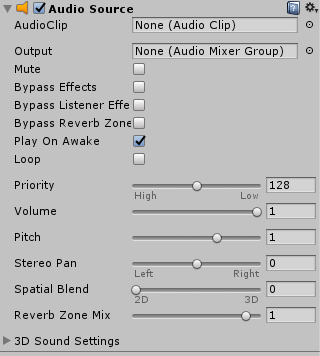
The Audio Source component has quite a few properties which we can tinker around with. This includes its pitch, panning, spatial blending (We'll get to that later), and if you open the 3D Sound Settings, you will find options for adding Doppler Effects and volume rolloffs.
音频源组件具有许多我们可以修改的属性。 这包括其音调 , 平移 , 空间混合 (我们将在后面介绍),如果您打开3D声音设置 ,则会找到用于添加多普勒效果和音量衰减的选项 。
What interests us the most here is the AudioClip slot, however. That's where the sound effect to be played goes. Unity supports quite a few common sound formats, including .mp3 and .ogg etc.
但是,最让我们感兴趣的是AudioClip插槽。 那就是要播放声音效果的地方。 Unity支持许多常见的声音格式,包括.mp3和.ogg等。
添加自己的声音效果 (Adding your Own Sound Effects)
Until sound-supportive documents are supported, we'll have to create our own sound effects. We have made a package of a pair of small sound effects, which you can download from here.
在支持声音的文档之前,我们必须创建自己的声音效果。 我们制作了一对小声音效果的程序包,您可以从此处下载。
Let's import these sound effects into our project by creating a new folder for sound effects and adding the sounds to it.
通过创建一个新的声音效果文件夹并将声音添加到其中,让我们将这些声音效果导入到我们的项目中。
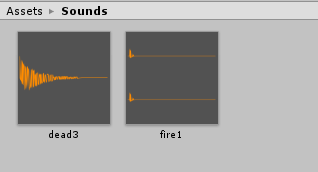
Now, since the main camera already has an Audio Listener, all we have to do is add Audio Sources to our relevant gameObjects.
现在,由于主摄像机已经具有音频侦听器 ,所以我们要做的就是将音频源添加到相关的gameObjects中。
Unity 3D:添加音频源 (Unity 3D: Adding an Audio Source)
First off, we'll have a sound effect that plays when our character fires a fireball. For that, we'll simply attach an Audio Source to our character's shooter gameObject. Go to Add Component → Audio → Audio Source.
首先,当角色发射火球时,我们将播放声音效果。 为此,我们只需将音频源附加到角色的射击游戏gameObject。 转到添加组件→音频→音频源 。
In the AudioClip slot, drag in the sound effect you want to use. If you downloaded the soundpack, drag in fire1.mp3. Now, untick the Play on Awake checkbox. This makes sure that this sound doesn't play as soon as the gameObject awakes, which in our case is as soon as the game starts.
在AudioClip插槽中,拖入要使用的声音效果。 如果您下载了声音包,请拖入fire1.mp3 。 现在,取消选中“唤醒时播放”复选框。 这样可以确保在gameObject唤醒后就不会播放声音,在我们的情况下,这是在游戏开始时立即播放。
In the tutorial Prefab Instantiation and making them move, we created a class Shooter which was instantiating a new fireball every time Spacebar was hit, let's add sound when a new fireball is fired.
在“ 预制实例化并使它们移动 ”教程中,我们创建了一个Shooter类,每次按下空格键时都会实例化一个新的火球 ,让我们在发射一个新的火球时添加声音。
using System.Collections;
using System.Collections.Generic;
using UnityEngine;

public class Shooter : MonoBehaviour
{
    public GameObject fireball;
    private AudioSource source;

    void Start()
    {
        source = GetComponent<AudioSource>();
    }

    void Update()
    {
        // When spacebar is hit
        if(Input.GetKeyDown(KeyCode.Space))
        {
            // instantiate the fireball object
            Instantiate(fireball,
                new Vector3(gameObject.transform.position.x, gameObject.transform.position.y, 0),
                new Quaternion(0, 0, 0, 0));

            // play the sound
            source.Play();
        }
    }

}
Besides the declaration of the AudioSource variable initially, the magic happens when we call, source.Play(). This line of code makes the referenced AudioSource play the AudioClip that's loaded into its slot. It has an overloaded(variant) method as well for playing the sound effect after a certain specified delay.
除了最初声明AudioSource变量外,魔术还发生在我们调用source.Play() 。 这行代码使引用的AudioSource播放加载到其插槽中的AudioClip。 它还具有重载(变体)方法,可以在特定的指定延迟后播放声音效果。
Now, save this script, and simply fill in the slot in the Player's AudioSource's AudioClip slot with your sound effect. (Use fire1.mp3 if you're using our soundpack, that you just downloaded.)
现在,保存此脚本,并只需用您的声音效果填充播放器AudioSource的AudioClip插槽中的插槽即可。 (如果您使用的是刚刚下载的声音包,请使用fire1.mp3 。)
Similarly, for the target, we will update the script for class TargetBehaviour used in the tutorial Detecting Collisions and attach an Audio Source to it, then use the script:
同样,对于目标,我们将更新“ 检测碰撞 ”教程中使用的TargetBehaviour类的脚本,并将音频源附加到该脚本,然后使用该脚本:
public class TargetBehaviour : MonoBehaviour
{
    private AudioSource source;

    void Start()
    {
        source = GetComponent<AudioSource>();
    }

    void onCollisionEnter2D(Collision2D col)
    {
        // When target is hit
        if(col.gameObject.tag == "Bullet")
        {
            Debug.Log("Target was Hit!");

            // calling AddScore method
            ScoreBehaviour.AddScore();

            // play sound
            source.Play();

            Destroy(col.gameObject);
            Destroy(gameObject);
        }
    }

}
And fill in the AudioClip slot with your sound effect when the target gets destroyed (dead3.mp3 if you are using our soundpack). Play the game, and you can hear the sound effects when the player shoots a fireball and when it hits a target!
而在音频剪辑插槽填写您的声音效果,当目标被摧毁(dead3.mp3如果您正在使用我们的soundpack)。 玩游戏,当玩家射击火球并击中目标时,您会听到声音效果!
Unity 3D:添加声音效果摘要 (Unity 3D: Adding Sound Effects Summary)
All in all, you have to do the following things to add an audio clip to your game:
总而言之,您必须执行以下操作才能将音频剪辑添加到游戏中:
Add an AudioSource component to your gameObject, like you add a RigidBody or BoxCollider component.
将AudioSource组件添加到游戏对象,就像添加RigidBody或BoxCollider组件一样。
In the script attached to the gameObject, initialise a variable of type
AudioSource在游戏对象附带的脚本中,初始化
AudioSource类型的变量In the
Start()method, useGetComponentto set theAudioSourcecomponent to theAudioSourcevariable.在
Start()方法中,使用GetComponent将AudioSource组件设置为AudioSource变量。When you want the sound to play, call the
Play()method.当您想要播放声音时,请调用
Play()方法。
翻译自: https://www.studytonight.com/game-development-in-2D/audio-in-unity
unity3d添加碰撞效果
更多推荐



 3
3 0
0- 0


 已为社区贡献3条内容

所有评论(0)