
Flutter 框架跨平台鸿蒙开发 - 食谱翻译机
·
食谱翻译机应用
欢迎加入开源鸿蒙跨平台社区:
https://openharmonycrossplatform.csdn.net
一、项目概述
运行效果图
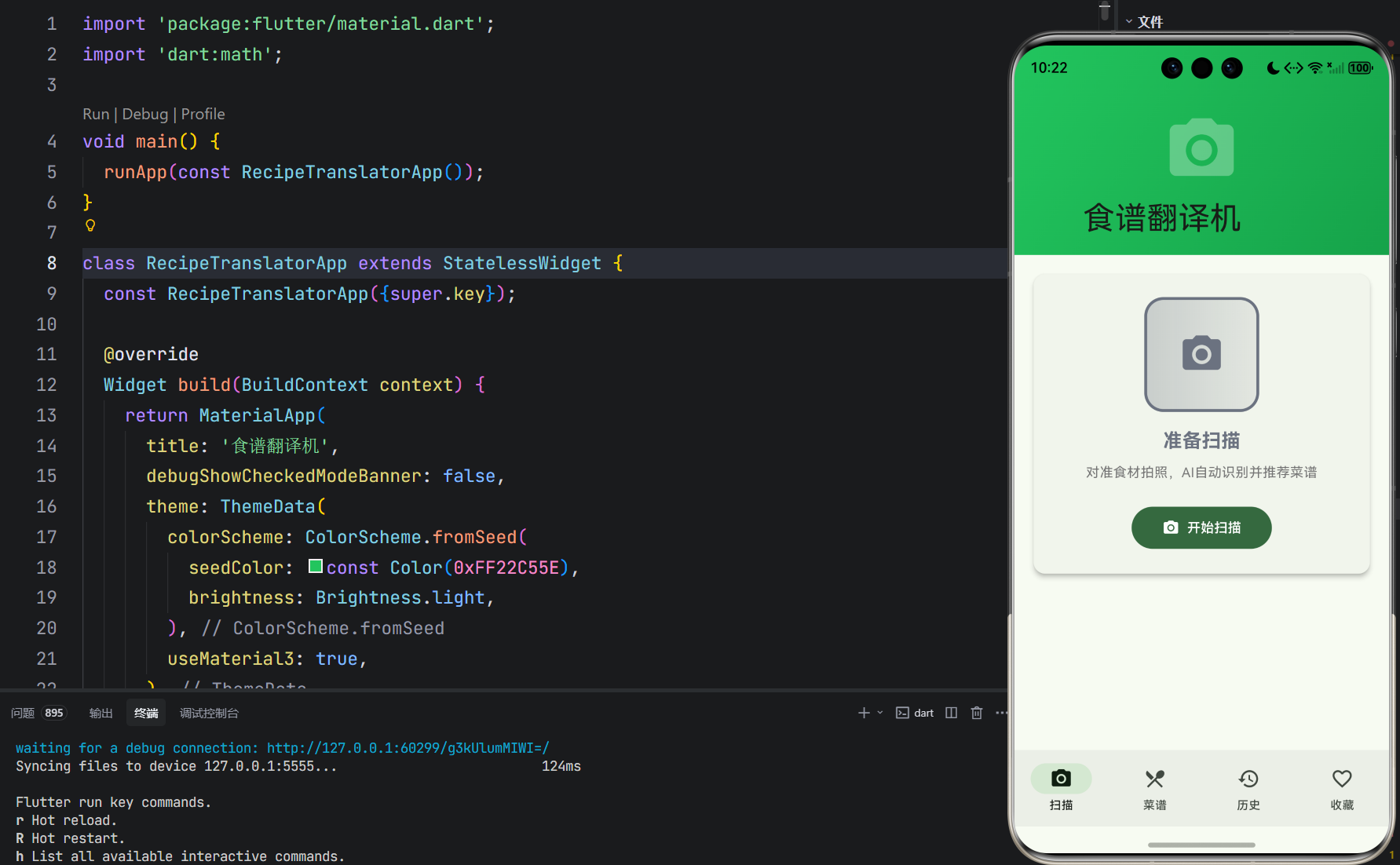
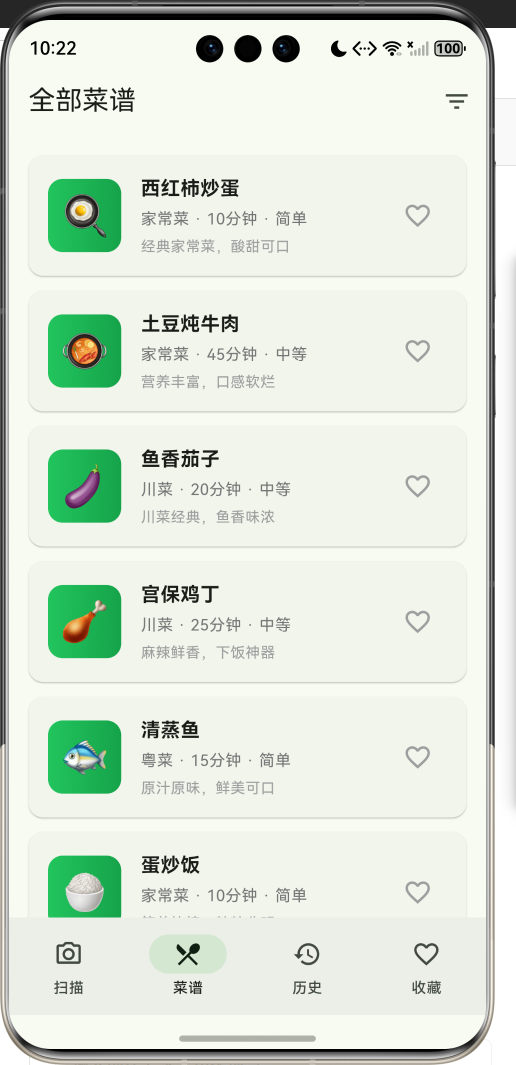
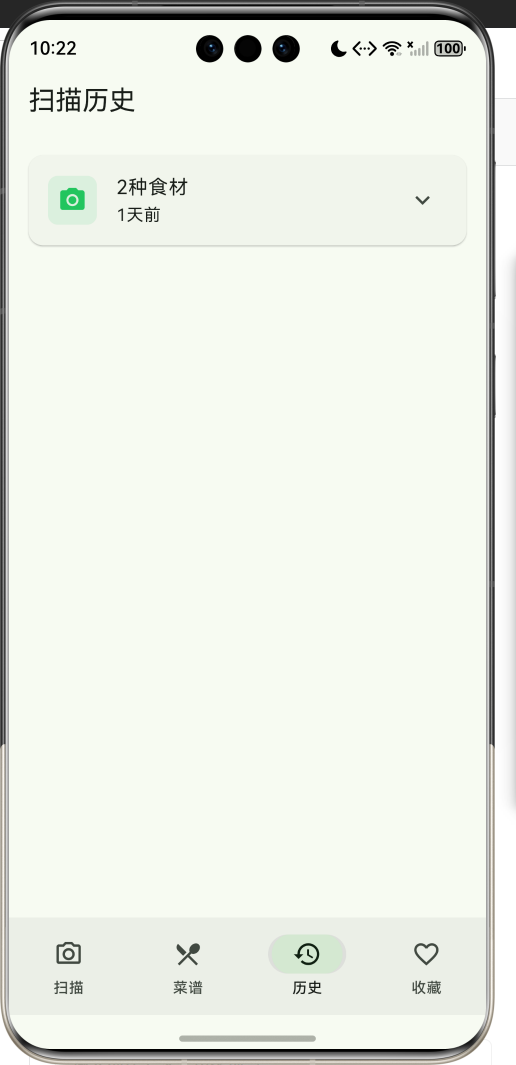
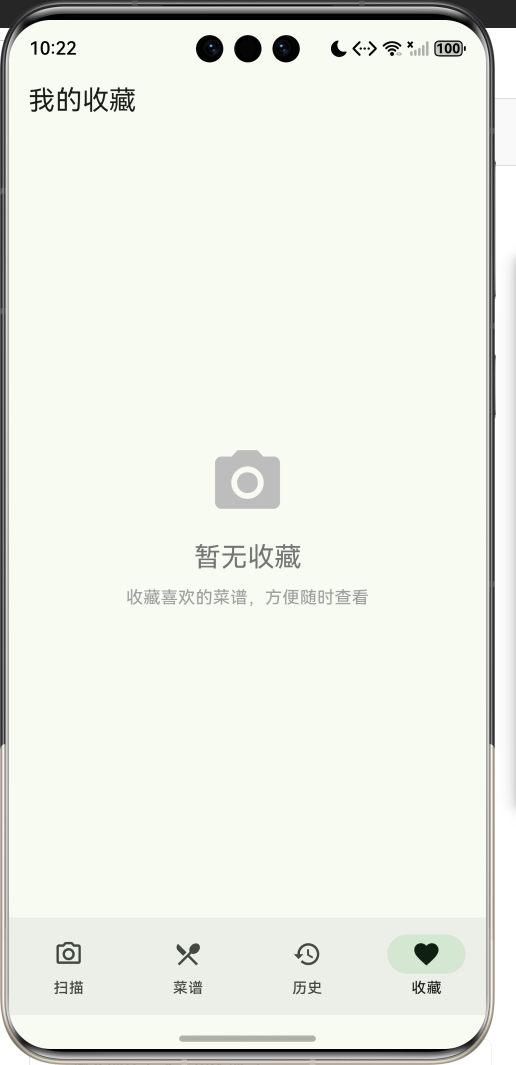
1.1 应用简介
"食谱翻译机"是一款智能烹饪助手应用,核心理念是拍照识别食材,自动推荐能做的菜谱。用户只需对准冰箱里的食材拍照,应用就能自动识别食材种类,并根据现有食材智能推荐可以制作的菜谱,解决"今天吃什么"的难题。
应用以绿色为主色调,传递新鲜、健康、自然的饮食理念。通过AI图像识别技术(模拟),快速识别食材,智能匹配菜谱,让烹饪变得简单有趣。
1.2 核心功能
| 功能模块 | 功能描述 | 实现方式 |
|---|---|---|
| 食材扫描 | 拍照识别食材种类 | 模拟AI识别 + Random数据 |
| 智能推荐 | 根据食材推荐菜谱 | 匹配算法计算匹配度 |
| 菜谱详情 | 查看菜谱详细信息和步骤 | 底部弹窗展示 |
| 收藏功能 | 收藏喜欢的菜谱 | 心形按钮 + 列表管理 |
| 扫描历史 | 查看过往扫描记录 | ExpansionTile展开 |
| 全部菜谱 | 浏览所有可用菜谱 | ListView列表 |
1.3 扫描状态
| 序号 | 状态名称 | 图标 | 颜色 | 说明 |
|---|---|---|---|---|
| 1 | 准备扫描 | camera_alt | 灰色 #6B7280 | 等待用户开始扫描 |
| 2 | 正在识别 | camera | 橙色 #F59E0B | AI正在分析图像 |
| 3 | 识别完成 | check_circle | 绿色 #22C55E | 成功识别食材 |
| 4 | 未识别到 | error_outline | 红色 #EF4444 | 未识别到食材 |
1.4 食材分类
| 序号 | 分类名称 | 图标 | 颜色 | 示例食材 |
|---|---|---|---|---|
| 1 | 蔬菜 | eco | 绿色 #22C55E | 西红柿、土豆、黄瓜 |
| 2 | 肉类 | restaurant | 红色 #EF4444 | 猪肉、牛肉、鸡肉 |
| 3 | 海鲜 | water | 蓝色 #3B82F6 | 鱼、虾、蟹 |
| 4 | 主食 | grain | 黄色 #F59E0B | 米饭、面条、面包 |
| 5 | 调料 | local_fire_department | 紫色 #8B5CF6 | 盐、糖、酱油 |
| 6 | 水果 | apple | 粉色 #EC4899 | 苹果、香蕉、橙子 |
| 7 | 乳制品 | egg | 黄色 #FCD34D | 鸡蛋、牛奶、奶酪 |
| 8 | 其他 | help_outline | 灰色 #6B7280 | 其他食材 |
1.5 技术栈
| 技术领域 | 技术选型 | 版本要求 |
|---|---|---|
| 开发框架 | Flutter | >= 3.0.0 |
| 编程语言 | Dart | >= 2.17.0 |
| 设计规范 | Material Design 3 | - |
| 状态管理 | setState | - |
| 随机数据 | dart:math | - |
| 目标平台 | 鸿蒙OS / Android / iOS | API 21+ |
二、系统架构
2.1 整体架构图
2.2 类图设计
2.3 页面导航流程
2.4 扫描流程图
三、核心模块设计
3.1 数据模型设计
3.1.1 扫描状态枚举 (ScanStatus)
enum ScanStatus {
  idle('准备扫描', Icons.camera_alt, Color(0xFF6B7280)),
  scanning('正在识别', Icons.camera, Color(0xFFF59E0B)),
  recognized('识别完成', Icons.check_circle, Color(0xFF22C55E)),
  noMatch('未识别到食材', Icons.error_outline, Color(0xFFEF4444));

  final String label;
  final IconData icon;
  final Color color;
  const ScanStatus(this.label, this.icon, this.color);
}
3.1.2 食材分类枚举 (IngredientCategory)
enum IngredientCategory {
  vegetable('蔬菜', Icons.eco, Color(0xFF22C55E)),
  meat('肉类', Icons.restaurant, Color(0xFFEF4444)),
  seafood('海鲜', Icons.water, Color(0xFF3B82F6)),
  grain('主食', Icons.grain, Color(0xFFF59E0B)),
  seasoning('调料', Icons.local_fire_department, Color(0xFF8B5CF6)),
  fruit('水果', Icons.apple, Color(0xFFEC4899)),
  dairy('乳制品', Icons.egg, Color(0xFFFCD34D)),
  other('其他', Icons.help_outline, Color(0xFF6B7280));

  final String label;
  final IconData icon;
  final Color color;
  const IngredientCategory(this.label, this.icon, this.color);
}
3.1.3 食材模型 (Ingredient)
class Ingredient {
  final String id;
  final String name;
  final String emoji;
  final IngredientCategory category;
  final double confidence;

  Ingredient({
    required this.id,
    required this.name,
    required this.emoji,
    required this.category,
    this.confidence = 0.95,
  });
}
3.1.4 菜谱模型 (Recipe)
class Recipe {
  final String id;
  final String name;
  final String emoji;
  final String cuisine;
  final int cookTime;
  final String difficulty;
  final List<String> requiredIngredients;
  final List<String> optionalIngredients;
  final int matchCount;
  final double matchRate;
  final String description;
  final bool isFavorite;

  Recipe({
    required this.id,
    required this.name,
    required this.emoji,
    required this.cuisine,
    required this.cookTime,
    required this.difficulty,
    required this.requiredIngredients,
    this.optionalIngredients = const [],
    this.matchCount = 0,
    this.matchRate = 0.0,
    required this.description,
    this.isFavorite = false,
  });

  Recipe copyWith({bool? isFavorite}) {
    return Recipe(
      id: id,
      name: name,
      emoji: emoji,
      cuisine: cuisine,
      cookTime: cookTime,
      difficulty: difficulty,
      requiredIngredients: requiredIngredients,
      optionalIngredients: optionalIngredients,
      matchCount: matchCount,
      matchRate: matchRate,
      description: description,
      isFavorite: isFavorite ?? this.isFavorite,
    );
  }
}
3.2 页面结构设计
3.2.1 扫描页面布局
3.2.2 菜谱详情弹窗
3.3 匹配算法设计
四、UI设计规范
4.1 配色方案
应用采用绿色为主色调,传递新鲜、健康、自然的饮食理念:
| 颜色类型 | 色值 | 用途 |
|---|---|---|
| 主色 | #22C55E (Green) | 导航、强调元素 |
| 辅色 | #16A34A (Dark Green) | 渐变背景 |
| 准备扫描 | #6B7280 (Gray) | 初始状态 |
| 正在识别 | #F59E0B (Amber) | 加载状态 |
| 识别完成 | #22C55E (Green) | 成功状态 |
| 未识别到 | #EF4444 (Red) | 错误状态 |
4.2 字体规范
| 元素 | 字号 | 字重 | 颜色 |
|---|---|---|---|
| 应用标题 | 20px | Bold | #FFFFFF |
| 状态文字 | 20px | Bold | 状态色 |
| 食材标签 | 14px | Regular | #000000 |
| 菜谱名称 | 16px | Bold | #000000 |
| 菜谱信息 | 13px | Regular | #666666 |
| 匹配度标签 | 12px | Medium | #22C55E |
4.3 组件规范
4.3.1 扫描区域
┌─────────────────────────────────────────┐
│                                         │
│         ┌─────────────┐                │
│         │   📷        │  状态边框      │
│         │  (图标)     │                │
│         └─────────────┘                │
│                                         │
│         准备扫描 / 正在识别             │
│    对准食材拍照,AI自动识别并推荐菜谱   │
│                                         │
│         [    开始扫描    ]              │
│                                         │
└─────────────────────────────────────────┘
4.3.2 食材标签
┌─────────────────────────────────────────┐
│  识别到的食材                           │
│                                         │
│  🍅 西红柿  🥔 土豆  🥩 猪肉            │
│                                         │
└─────────────────────────────────────────┘
4.3.3 推荐菜谱项
┌─────────────────────────────────────────┐
│  ┌────┐                                 │
│  │ 🍳 │  西红柿炒蛋                     │
│  └────┘  家常菜 · 10分钟 · 简单         │
│          ┌────────┐    [♡]             │
│          │ 100%匹配 │                   │
│          └────────┘                     │
└─────────────────────────────────────────┘
五、核心功能实现
5.1 扫描功能
void _startScan() {
  setState(() => _scanStatus = ScanStatus.scanning);

  // 模拟扫描过程
  Future.delayed(const Duration(seconds: 2), () {
    final random = Random();
    final categories = _ingredientDatabase.keys.toList();
    final selectedCategories = categories.sublist(0, random.nextInt(3) + 2);

    final recognizedIngredients = <Ingredient>[];
    for (var category in selectedCategories) {
      final ingredients = _ingredientDatabase[category]!;
      recognizedIngredients.add(ingredients[random.nextInt(ingredients.length)]);
    }

    final recommendedRecipes = _getMatchingRecipes(recognizedIngredients);

    setState(() {
      _recognizedIngredients = recognizedIngredients;
      _recommendedRecipes = recommendedRecipes;
      _scanStatus = recognizedIngredients.isEmpty
          ? ScanStatus.noMatch
          : ScanStatus.recognized;
    });

    if (recognizedIngredients.isNotEmpty) {
      _scanHistory.insert(0, ScanHistory(
        id: 'scan_${DateTime.now().millisecondsSinceEpoch}',
        scanTime: DateTime.now(),
        ingredients: recognizedIngredients,
        recommendedRecipes: recommendedRecipes,
      ));
    }
  });
}
5.2 匹配算法
List<Recipe> _getMatchingRecipes(List<Ingredient> ingredients) {
  final ingredientNames = ingredients.map((i) => i.name).toSet();

  return _recipeDatabase.map((recipe) {
    final matchedIngredients = recipe.requiredIngredients
        .where((ing) => ingredientNames.contains(ing))
        .toList();

    final matchCount = matchedIngredients.length;
    final matchRate = recipe.requiredIngredients.isEmpty
        ? 0.0
        : matchCount / recipe.requiredIngredients.length;

    return Recipe(
      id: recipe.id,
      name: recipe.name,
      emoji: recipe.emoji,
      cuisine: recipe.cuisine,
      cookTime: recipe.cookTime,
      difficulty: recipe.difficulty,
      requiredIngredients: recipe.requiredIngredients,
      optionalIngredients: recipe.optionalIngredients,
      matchCount: matchCount,
      matchRate: matchRate,
      description: recipe.description,
      isFavorite: recipe.isFavorite,
    );
  }).where((recipe) => recipe.matchCount > 0)
    .toList()
    ..sort((a, b) => b.matchRate.compareTo(a.matchRate));
}
5.3 收藏功能
void _toggleRecipeFavorite(Recipe recipe) {
  setState(() {
    final index = _recommendedRecipes.indexWhere((r) => r.id == recipe.id);
    if (index != -1) {
      _recommendedRecipes[index] = _recommendedRecipes[index].copyWith(
        isFavorite: !_recommendedRecipes[index].isFavorite,
      );

      if (_recommendedRecipes[index].isFavorite) {
        _favoriteRecipes.add(_recommendedRecipes[index]);
      } else {
        _favoriteRecipes.removeWhere((r) => r.id == recipe.id);
      }
    }
  });
}
5.4 菜谱详情弹窗
void _showRecipeDetail(Recipe recipe) {
  showModalBottomSheet(
    context: context,
    isScrollControlled: true,
    builder: (context) => DraggableScrollableSheet(
      initialChildSize: 0.8,
      maxChildSize: 0.95,
      minChildSize: 0.5,
      expand: false,
      builder: (context, scrollController) => Container(
        padding: const EdgeInsets.all(24),
        child: ListView(
          controller: scrollController,
          children: [
            Center(child: Text(recipe.emoji, style: const TextStyle(fontSize: 80))),
            const SizedBox(height: 16),
            Text(recipe.name,
                 style: const TextStyle(fontSize: 28, fontWeight: FontWeight.bold),
                 textAlign: TextAlign.center),
            const SizedBox(height: 24),
            Row(
              mainAxisAlignment: MainAxisAlignment.spaceEvenly,
              children: [
                _buildInfoItem(Icons.timer, '${recipe.cookTime}分钟'),
                _buildInfoItem(Icons.restaurant, recipe.cuisine),
                _buildInfoItem(Icons.trending_up, recipe.difficulty),
              ],
            ),
            const SizedBox(height: 24),
            const Text('所需食材', style: TextStyle(fontSize: 18, fontWeight: FontWeight.bold)),
            ...recipe.requiredIngredients.map((ing) => ListTile(
              leading: const Icon(Icons.check_circle, color: Color(0xFF22C55E)),
              title: Text(ing),
            )),
            FilledButton.icon(
              onPressed: () {},
              icon: const Icon(Icons.play_circle),
              label: const Text('开始烹饪'),
            ),
          ],
        ),
      ),
    ),
  );
}
六、状态管理流程
6.1 扫描状态流转
七、扩展功能规划
7.1 后续版本规划
7.2 功能扩展建议
7.2.1 真实AI识别
- 集成TensorFlow Lite模型
- 支持离线识别
- 提高识别准确率
7.2.2 烹饪步骤
- 详细的烹饪步骤
- 图文/视频教程
- 计时器功能
7.2.3 营养分析
- 卡路里计算
- 营养成分分析
- 健康饮食建议
八、注意事项
8.1 开发注意事项
- 模拟数据:当前使用Random模拟识别结果,实际应用需接入AI模型
- 状态管理:扫描状态变化需及时更新UI
- 匹配算法:根据实际需求调整匹配度计算方式
- 性能优化:菜谱数据量大时需考虑分页加载
8.2 常见问题
| 问题 | 原因 | 解决方案 |
|---|---|---|
| 识别结果不准确 | 模拟随机数据 | 接入真实AI模型 |
| 推荐菜谱太少 | 食材匹配度低 | 降低匹配阈值 |
| 收藏状态不同步 | 状态未更新 | 检查setState调用 |
九、运行说明
9.1 环境要求
| 环境 | 版本要求 |
|---|---|
| Flutter SDK | >= 3.0.0 |
| Dart SDK | >= 2.17.0 |
| 鸿蒙OS | API 21+ |
9.2 运行命令
# 查看可用设备
flutter devices

# 运行到Web服务器
flutter run -d web-server -t lib/main_recipe_translator.dart --web-port 8098

# 运行到鸿蒙设备
flutter run -d 127.0.0.1:5555 lib/main_recipe_translator.dart

# 运行到Windows
flutter run -d windows -t lib/main_recipe_translator.dart

# 代码分析
flutter analyze lib/main_recipe_translator.dart
十、总结
"食谱翻译机"应用通过智能食材识别和菜谱推荐,解决用户"今天吃什么"的难题。应用采用 Flutter + Material Design 3 技术栈,具有简洁美观的界面和流畅的交互体验。核心功能包括食材扫描、智能推荐、菜谱详情和收藏功能,让烹饪变得简单有趣。
技术亮点
- 智能匹配算法:根据食材自动计算匹配度
- 状态驱动UI:四种扫描状态清晰展示
- 丰富的食材库:8大分类,22种常见食材
- 完整的菜谱数据:8道经典菜谱,详细信息
- 流畅的用户体验:扫描动画、推荐列表、详情弹窗
核心代码文件
- [main_recipe_translator.dart](file:///f:/Flutter/flutter_harmonyos/lib/main_recipe_translator.dart) - 完整应用代码
拍照识食材,智能推荐菜谱
更多推荐



 8
8 0
0- 0


 已为社区贡献2条内容

所有评论(0)