
zabbix监控实践:基于Redfish监控HP服务器
·
在线答疑:乐维社区https://forum.lwops.cn
背景:
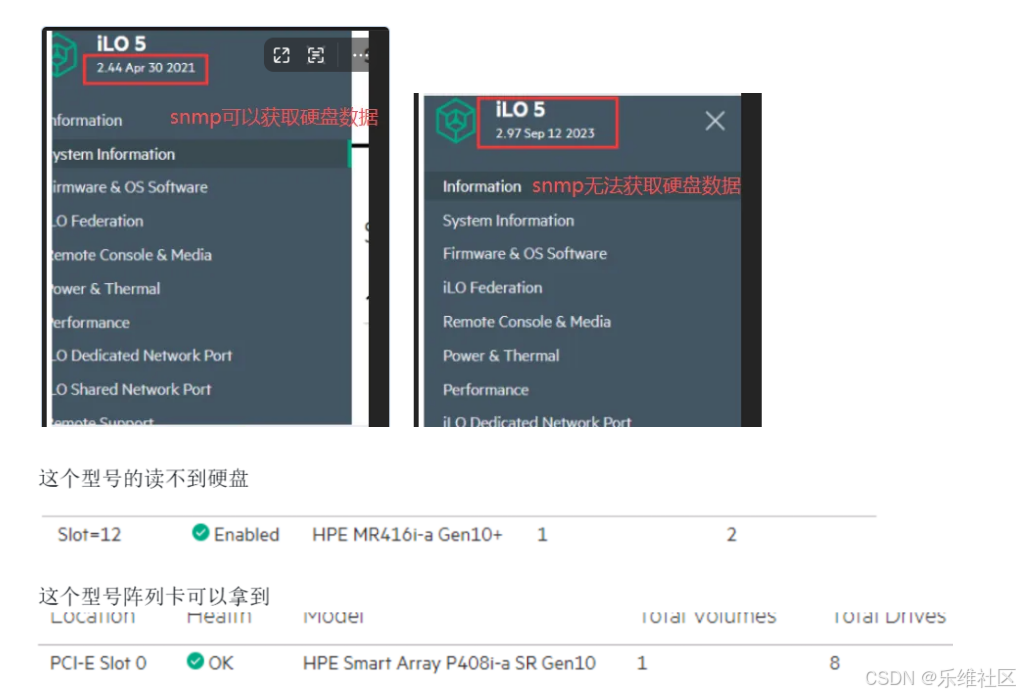
服务器硬盘故障率比较高,希望通过zabbix监控服务器硬盘状态,公司有不同ILO版本HP服务器。ILO低版本的服务器可以通过snmp获取到硬盘状态信息而ILO高版本服务器因为是高版本阵列卡,不支持snmp读取硬盘数据。
服务器型号:
HP ProLiant DL380 Gen Plus
解决:
snmp+redfish方式对服务器进行监控,redfish获取硬盘信息
Redfish
Redfish 是 DMTF 制定的现代服务器硬件管理标准,基于 RESTful API + JSON + HTTPS,核心是安全、易读、可扩展、跨厂商统一,用于替代传统 IPMI。
- 核心资源类型(常用路径)
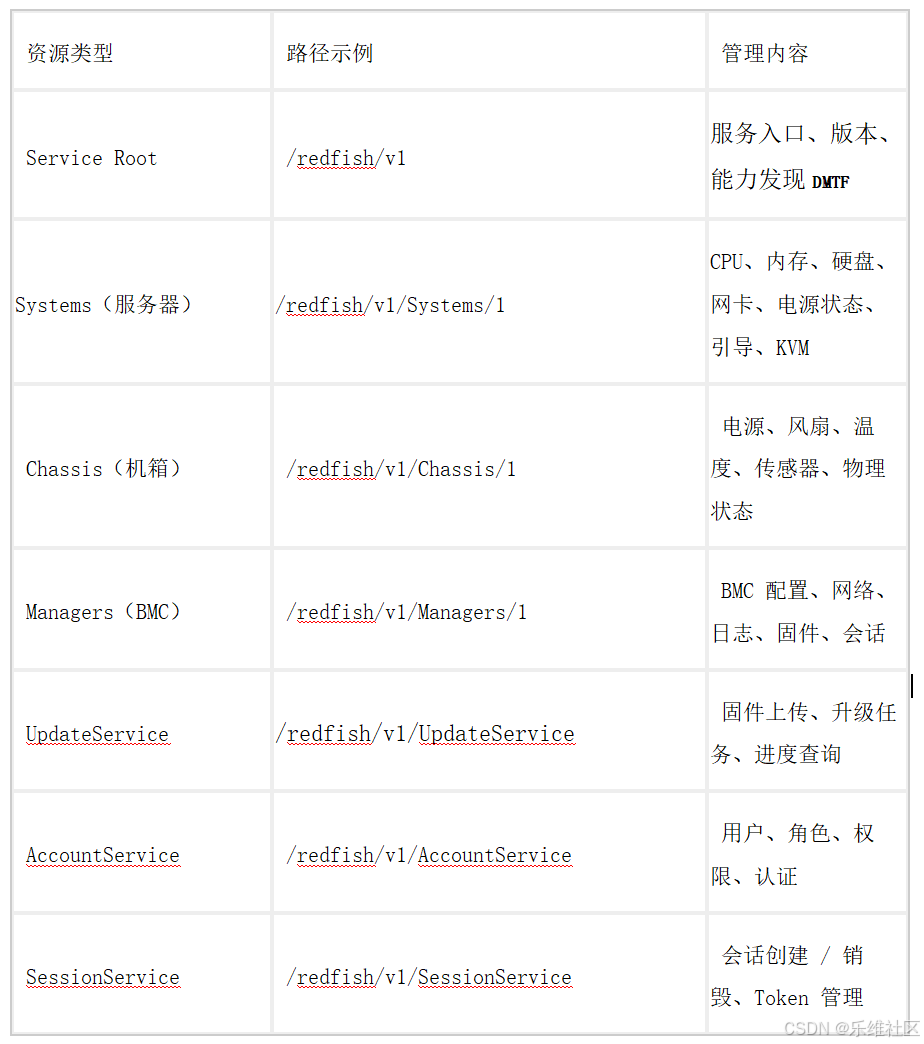

由于产生官方Ipmi和redfish没有详细文档,我们在服务器web管理界面使用F12查看接口请求信息。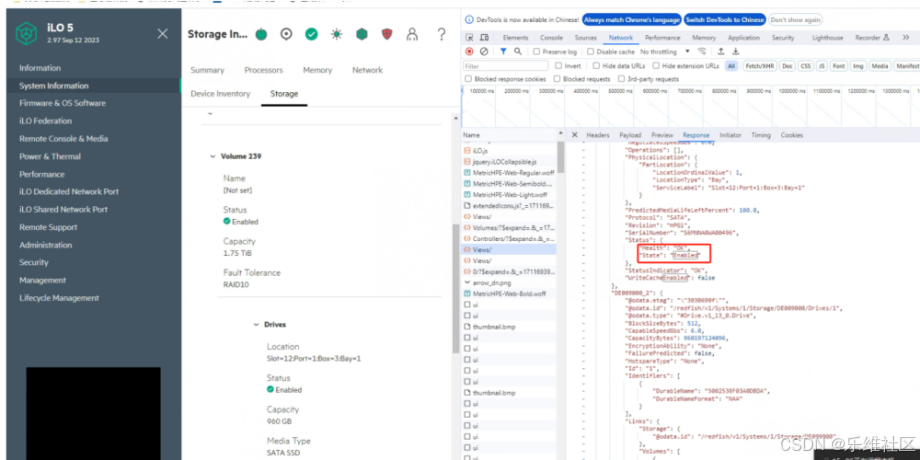
以下是具体获取数据脚本
#!/itops/python3/bin/python3
# -*- coding: UTF-8 -*-


###########################
#make: kk
###########################

import requests
import json
import inspect
import urllib3
import argparse
from os import popen
from requests.auth import HTTPBasicAuth

#忽略证书验证警告
urllib3.disable_warnings(urllib3.exceptions.InsecureRequestWarning)
# Redfish API endpoint URL

class HPE(object):
    def volumeName(self):
        token= self.getToken()
        headers= {
            'Content-Type': 'application/json',
            'X-Auth-Token': '{0}'.format(token)
        }
        url='https://{hostIp}/redfish/v1/Systems/1/Storage/DE009000'.format(hostIp=self.hostIp)
        response = requests.get(url, headers=headers,verify=False)
        driversName=response.json()['Drives']
        diskName=[]
        for i in driversName:
            urlDriver='https://{hostIp}{url}'.format(hostIp=self.hostIp,url=i['@odata.id'])
            response = requests.get(urlDriver, headers=headers,verify=False)
            #print(response.json()['Status']['State'])
            #print(response.json()['PhysicalLocation']['PartLocation']['ServiceLabel'])
            diskName.append({"{#NAME}": response.json()['PhysicalLocation']['PartLocation']['ServiceLabel']})
        print(json.dumps({'data': diskName}))

    def volumeStatus(self):
        token= self.getToken()
        headers= {
            'Content-Type': 'application/json',
            'X-Auth-Token': '{0}'.format(token)
        }
        url='https://{hostIp}/redfish/v1/Systems/1/Storage/DE009000'.format(hostIp=self.hostIp)
        response = requests.get(url, headers=headers,verify=False)
        driversName=response.json()['Drives']
        diskStatus={}
        for i in driversName:
            urlDriver='https://{hostIp}{url}'.format(hostIp=self.hostIp,url=i['@odata.id'])
            response = requests.get(urlDriver, headers=headers,verify=False)
            volumeName = "volumeStatus[{0}]".format(response.json()['PhysicalLocation']['PartLocation']['ServiceLabel'])
            volumeStatus = response.json()['Status']['State']
            serialKey = "serialNumber[{0}]".format(response.json()['PhysicalLocation']['PartLocation']['ServiceLabel'])
            serialNumber = response.json()['SerialNumber']
            mediaKey =  "mediaType[{0}]".format(response.json()['PhysicalLocation']['PartLocation']['ServiceLabel'])
            mediaType = response.json()['MediaType']
            capacityKey = "capacityBytes[{0}]".format(response.json()['PhysicalLocation']['PartLocation']['ServiceLabel'])
            capacityBytes = response.json()['CapacityBytes']
            modelKey = "model[{0}]".format(response.json()['PhysicalLocation']['PartLocation']['ServiceLabel'])
            model = response.json()['Model']
            revisionKey = "revision[{0}]".format(response.json()['PhysicalLocation']['PartLocation']['ServiceLabel'])
            revision = response.json()['Revision']
            nameKey = "name[{0}]".format(response.json()['PhysicalLocation']['PartLocation']['ServiceLabel'])
            name = response.json()['Name']
            self.Sender(volumeName,volumeStatus)
            self.Sender(serialKey,serialNumber)
            self.Sender(mediaKey,mediaType)
            self.Sender(capacityKey,capacityBytes)
            self.Sender(modelKey,model)
            self.Sender(revisionKey,revision)
            self.Sender(nameKey,name)
            #['SerialNumber']
            #['MediaType']
            #['CapacityBytes']
            #['Model']
            #['Revision']
            #['Name']
            #print(response.json()['Status']['State'])
            #print(response.json()['PhysicalLocation']['PartLocation']['ServiceLabel'])
        print('ok')

class Main(HPE):
    def __init__(self):
        parser = argparse.ArgumentParser()
        parser.add_argument('--host')
        parser.add_argument('--user')
        parser.add_argument('--password')
        parser.add_argument('--hostname',required=False)

        subparsers = parser.add_subparsers()
        #self.sender = "/itops/zabbix/bin/zabbix_sender"
        #self.server = '127.0.0.1'
        for name in dir(self):
            if not name.startswith("_"):
                p = subparsers.add_parser(name)
                method = getattr(self, name)
                argnames = inspect.getargspec(method).args[1:]
                for argname in argnames:
                    p.add_argument(argname)
                p.set_defaults(func=method, argnames=argnames)
        self.args = parser.parse_args()
        self.hostIp = self.args.host   #服务器web管理界面IP地址
        self.username = self.args.user  #服务器web管理界面账号
        self.password = self.args.password #服务器web管理界面密码
        self.hostname = self.args.hostname  #zabbix上面服务器主机名称
        self.sender = "/itops/zabbix/bin/zabbix_sender"
        self.server = '127.0.0.1'

    def __call__(self):
        try:
           a = self.args
           callargs = [getattr(a, name) for name in a.argnames]
           return self.args.func(*callargs)
        except Exception as err:
           print('0')
           print(str(err))

    # Redfish API credentials
    def Sender(self,key,value):
        popen('%s -z %s -s %s -k %s -o %s > /dev/null ' % (self.sender,self.server,self.hostname,key,value))
        #print('%s -z %s -s %s -k volumeStatus[%s] -o %s > /dev/null ' % (self.sender,self.server,self.hostname,key,value))


    def getToken(self):
        # 请求头部信息
        url = 'https://{hostIp}/redfish/v1/Sessions/'.format(hostIp=self.hostIp)
        headers = {
            'Content-Type': 'application/json'
        }
        data = {"Password":self.password,"UserName":self.username}

        # 发送GET请求获取Redfish API信息
        response = requests.post(url, headers=headers, data=json.dumps(data), verify=False) # 如果不是自签名证书,可以去掉verify参数
        if response.status_code == 201:
            token=response.headers['X-Auth-Token']
            #print(token)
            return token
        else:
            print('Failed to retrieve data from Redfish API. Status code:', response.status_code)

if __name__ == "__main__":
    main = Main()
    main()

python3 /itops/zabbix/scripts/hpe.py --host {#服务器IP地址} --user {#账号} --password {#密码}
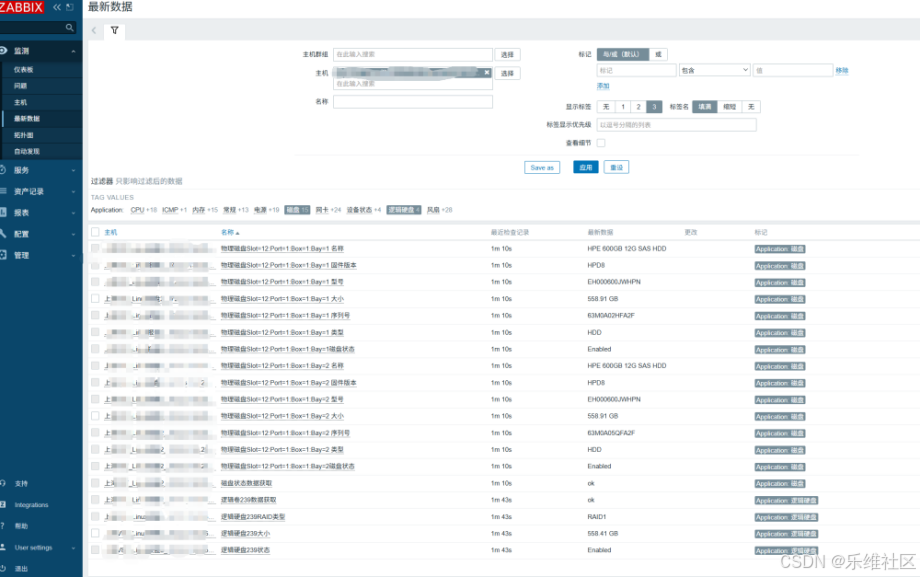
zabbix取值结果:
更多推荐



 2
2 0
0- 0


 已为社区贡献11条内容

所有评论(0)