
GUI自动化测试[1]——pywinauto
目录
只有认知的突破💫才能带来真正的成长💫编程技术的学习💫没有捷径💫一起加油💫

🍁感谢各位的观看🍁欢迎大家留言🍁咱们一起加油🍁努力成为更好的自己🍁
GUI自动化测试
简述
pywinauto库专门用于windows系统的库,它为了适用于不同的window系统,底层技术有两种,分别是:win32和uia。因为现在都是win11OS,所以,uia技术常用。
pywinauto下载
指令:pip install pywinauto==0.6.9
pywinauto必要操作
启动程序
函数:start(path)。path是应用的可执行路径。
如下所示的代码。
from pywinauto import Application

Application(backend='uia').start("notepad.exe")
-
Application(backend='uia'):通过uia,构建一个windows系统服务,用于启动程序。
链接程序
函数:connect(**kwg)。如下所示的connet的参数。
-
precess:目标程序的ID。Application(backend='uia').connect(process=31528) -
handle:目标窗口的句柄。Application(backend='uia').connect(handle=65552) -
title:窗口的标题。Application(backend='uia').connect(title_re="无标题-Notepad") -
title_re:采用正则表达式。Application(backend='uia').connect(title_re=".*Notepad.*") -
class_name:窗口的类名。Application(backend='uia').connect(class_name="PX_WINDOW") -
class_name_re:窗口的类名正则表达式。Application(backend='uia').connect(class_name_re=".*WINDOW.*")
如果应用未自己打开,而是通过start启动程序,需要使用title,title_re,class_name,class_name_re的方式链接窗口。如果自己手动启动了程序,这些方式都OK。
定位窗口
函数:window(**kwg)。它的参数和connect的相似。
-
precess:目标程序的ID。window(process=31528) -
handle:目标窗口的句柄。window(handle=65552) -
title:窗口的标题。window(title_re="无标题-Notepad") -
title_re:采用正则表达式。window(title_re=".*Notepad.*") -
class_name:窗口的类名。window(class_name="PX_WINDOW") -
class_name_re:窗口的类名正则表达式。window(class_name_re=".*WINDOW.*")
总结
GUI的基础必备操作:启动程序-->链接程序-->定位窗口.
import time
from pywinauto import Application


Application(backend='uia').start("notepad.exe")
time.sleep(2)
app=Application(backend='uia').connect(title_re=".*Notepad.*")
win=app.window(title_re=".*Notepad.*")

win.Document.type_keys("hello world")
win.type_keys("hello world")
time.sleep(2)
win.close()print_control_identifiers():用来打印窗口及其子控件的标识符信息的。帮助用户更加清楚窗口及其子控件的结构和信息。注意:不能使用pytest框架启动代码,否则就打印不出来。如下所示的信息。
Dialog - '无标题 - Notepad'    (L22, T500, R1382, B1278)
['无标题 - NotepadDialog', 'Dialog', '无标题 - Notepad', 'Dialog0', 'Dialog1']
child_window(title="无标题 - Notepad", control_type="Window")
   |
   | Pane - ''    (L34, T652, R1370, B1202)
   | ['Pane', '无标题Pane', 'Pane0', 'Pane1', '无标题Pane0', '无标题Pane1']
   |    |
   |    | Document - ''    (L34, T652, R1370, B1202)
   |    | ['无标题Document', 'Document']
   |
   | Pane - ''    (L114, T518, R688, B582)
   | ['Pane2', '无标题Pane2']
   |    |
   |    | Pane - ''    (L114, T518, R688, B582)
   |    | ['Pane3', '无标题Pane3']
   |    |    |
   |    |    | TabControl - ''    (L114, T518, R688, B582)
   |    |    | ['TabControl添加新标签页', '无标题TabControl', 'TabControl']
   |    |    | child_window(auto_id="Tabs", control_type="Tab")
   |    |    |    |
   |    |    |    | ListBox - ''    (L118, T518, R614, B582)
   |    |    |    | ['ListBox', '无标题ListBox']
   |    |    |    | child_window(auto_id="TabListView", control_type="List")
   |    |    |    |    |
   |    |    |    |    | TabItem - '无标题. 未修改。'    (L122, T518, R614, B582)
   |    |    |    |    | ['无标题. 未修改。TabItem', '无标题. 未修改。', 'TabItem']
   |    |    |    |    | child_window(title="无标题. 未修改。", control_type="TabItem")
   |    |    |    |    |    |
   |    |    |    |    |    | Static - '无标题'    (L148, T532, R229, B567)
   |    |    |    |    |    | ['Static', '无标题', '无标题Static', 'Static0', 'Static1']
   |    |    |    |    |    | child_window(title="无标题", control_type="Text")
   |    |    |    |    |    |
   |    |    |    |    |    | Button - '关闭标签页'    (L532, T526, R596, B574)
   |    |    |    |    |    | ['关闭标签页Button', 'Button', '关闭标签页', 'Button0', 'Button1']
   |    |    |    |    |    | child_window(title="关闭标签页", auto_id="CloseButton", control_type="Button")
   |    |    |    |
   |    |    |    | Button - '添加新标签页'    (L620, T528, R684, B576)
   |    |    |    | ['添加新标签页', '添加新标签页Button', 'Button2']
   |    |    |    | child_window(title="添加新标签页", auto_id="AddButton", control_type="Button")
   |
   | Pane - ''    (L34, T582, R1370, B652)
   | ['Pane4', '无标题Pane4']
   |    |
   |    | Pane - ''    (L34, T582, R1370, B652)
   |    | ['Pane5', '无标题Pane5']
   |    |    |
   |    |    | Menu - ''    (L34, T582, R385, B650)
   |    |    | ['无标题Menu', 'Menu', 'Menu0', 'Menu1']
   |    |    | child_window(auto_id="MenuBar", control_type="MenuBar")
   |    |    |    |
   |    |    |    | MenuItem - '文件'    (L42, T582, R143, B650)
   |    |    |    | ['文件', '文件MenuItem', 'MenuItem', 'MenuItem0', 'MenuItem1']
   |    |    |    | child_window(title="文件", auto_id="File", control_type="MenuItem")
   |    |    |    |
   |    |    |    | MenuItem - '编辑'    (L159, T582, R260, B650)
   |    |    |    | ['编辑', '编辑MenuItem', 'MenuItem2']
   |    |    |    | child_window(title="编辑", auto_id="Edit", control_type="MenuItem")
   |    |    |    |
   |    |    |    | MenuItem - '查看'    (L276, T582, R377, B650)
   |    |    |    | ['查看', '查看MenuItem', 'MenuItem3']
   |    |    |    | child_window(title="查看", auto_id="View", control_type="MenuItem")
   |    |    |
   |    |    | Button - '标题'    (L406, T584, R518, B648)
   |    |    | ['标题', 'Button3', '标题Button']
   |    |    | child_window(title="标题", control_type="Button")
   |    |    |
   |    |    | Button - '列表'    (L518, T584, R630, B648)
   |    |    | ['列表', '列表Button', 'Button4']
   |    |    | child_window(title="列表", control_type="Button")
   |    |    |
   |    |    | Button - '加粗(Ctrl+B)'    (L630, T584, R694, B648)
   |    |    | ['加粗(Ctrl+B)', 'Button5', '加粗(Ctrl+B)Button']
   |    |    | child_window(title="加粗(Ctrl+B)", control_type="Button")
   |    |    |
   |    |    | Button - '斜体(Ctrl+I)'    (L694, T584, R758, B648)
   |    |    | ['Button6', '斜体(Ctrl+I)Button', '斜体(Ctrl+I)']
   |    |    | child_window(title="斜体(Ctrl+I)", control_type="Button")
   |    |    |
   |    |    | Button - '链接(Ctrl+K)'    (L758, T584, R822, B648)
   |    |    | ['链接(Ctrl+K)', '链接(Ctrl+K)Button', 'Button7']
   |    |    | child_window(title="链接(Ctrl+K)", control_type="Button")
   |    |    |
   |    |    | Button - '表'    (L822, T584, R934, B648)
   |    |    | ['表Button', 'Button8', '表']
   |    |    | child_window(title="表", control_type="Button")
   |    |    |
   |    |    | Button - '清除格式设置(Ctrl+空格)'    (L934, T584, R998, B648)
   |    |    | ['Button9', '清除格式设置(Ctrl+空格)Button', '清除格式设置(Ctrl+空格)']
   |    |    | child_window(title="清除格式设置(Ctrl+空格)", control_type="Button")
   |    |    |
   |    |    | Button - '设置'    (L1294, T582, R1354, B650)
   |    |    | ['设置', '设置Button', 'Button10']
   |    |    | child_window(title="设置", auto_id="SettingsButton", control_type="Button")
   |    |    |
   |    |    | Dialog - ''    (L0, T0, R0, B0)
   |    |    | ['Dialog2']
   |    |    | child_window(auto_id="PrivacyTeachingTip", control_type="Window")
   |    |    |
   |    |    | Dialog - ''    (L0, T0, R0, B0)
   |    |    | ['Dialog3']
   |    |    | child_window(auto_id="CowriterTeachingTip", control_type="Window")
   |    |    |
   |    |    | Pane - ''    (L0, T0, R0, B0)
   |    |    | ['Pane6']
   |    |    | child_window(auto_id="PsDownloadDetailTeachingTip", control_type="Pane")
   |    |    |
   |    |    | Pane - '本地模型必须完成下载才可在注销后使用 AI 功能。'    (L0, T0, R0, B0)
   |    |    | ['Pane7', '本地模型必须完成下载才可在注销后使用 AI 功能。', '本地模型必须完成下载才可在注销后使用 AI 功能。Pane']
   |    |    | child_window(title="本地模型必须完成下载才可在注销后使用 AI 功能。", auto_id="PsDownloadLightTeachingTip", control_type="Pane")
   |
   | Pane - ''    (L34, T1202, R1370, B1266)
   | ['Pane8', '  行 1,列 1Pane', '  行 1,列 1Pane0', '  行 1,列 1Pane1']
   |    |
   |    | Pane - ''    (L34, T1202, R1370, B1266)
   |    | ['Pane9', '  行 1,列 1Pane2']
   |    |    |
   |    |    | Static - '  行 1,列 1'    (L66, T1216, R206, B1252)
   |    |    | ['  行 1,列 1', 'Static2', '  行 1,列 1Static']
   |    |    | child_window(title="  行 1,列 1", auto_id="ContentTextBlock", control_type="Text")
   |    |    |
   |    |    | Static - '0 个字符'    (L244, T1216, R345, B1252)
   |    |    | ['0 个字符Static', '0 个字符', 'Static3']
   |    |    | child_window(title="0 个字符", auto_id="ContentTextBlock", control_type="Text")
   |    |    |
   |    |    | Static - '纯文本'    (L479, T1202, R583, B1266)
   |    |    | ['纯文本', 'Static4', '纯文本Static']
   |    |    | child_window(title="纯文本", auto_id="ContentTextBlock", control_type="Text")
   |    |    |
   |    |    | Static - ' 100%'    (L741, T1216, R813, B1252)
   |    |    | [' 100%Static', ' 100%', 'Static5']
   |    |    | child_window(title=" 100%", auto_id="ContentTextBlock", control_type="Text")
   |    |    |
   |    |    | Static - ' Windows (CRLF)'    (L877, T1216, R1073, B1252)
   |    |    | ['Static6', ' Windows (CRLF)', ' Windows (CRLF)Static']
   |    |    | child_window(title=" Windows (CRLF)", auto_id="ContentTextBlock", control_type="Text")
   |    |    |
   |    |    | Static - ' UTF-8'    (L1125, T1216, R1203, B1252)
   |    |    | ['Static7', ' UTF-8Static', ' UTF-8']
   |    |    | child_window(title=" UTF-8", auto_id="ContentTextBlock", control_type="Text")
   |
   | TitleBar - ''    (L0, T0, R0, B0)
   | ['TitleBar']
   |    |
   |    | Menu - '系统'    (L35, T513, R79, B557)
   |    | ['系统Menu', '系统', 'Menu2', '系统0', '系统1']
   |    | child_window(title="系统", auto_id="MenuBar", control_type="MenuBar")
   |    |    |
   |    |    | MenuItem - '系统'    (L35, T513, R79, B557)
   |    |    | ['系统MenuItem', '系统2', 'MenuItem4']
   |    |    | child_window(title="系统", control_type="MenuItem")
   |    |
   |    | Button - '最小化'    (L1091, T501, R1185, B558)
   |    | ['最小化Button', '最小化', 'Button11']
   |    | child_window(title="最小化", control_type="Button")
   |    |
   |    | Button - '最大化'    (L1185, T501, R1277, B558)
   |    | ['最大化', '最大化Button', 'Button12']
   |    | child_window(title="最大化", control_type="Button")
   |    |
   |    | Button - '关闭'    (L1277, T501, R1371, B558)
   |    | ['关闭', 'Button13', '关闭Button']
   |    | child_window(title="关闭", control_type="Button")
窗口的操作
常用的操作如下所示。
| 方法 | 功能描述 | 返回值 |
|
| 关闭窗口 | 无 |
|
| 窗口最大化 | 无 |
|
| 窗口最小化 | 无 |
|
| 恢复窗口大小 | 无 |
如下所示的代码。
import time
from pywinauto import Application


Application(backend='uia').start("notepad.exe")
time.sleep(2)
app=Application(backend='uia').connect(title_re=".*Notepad.*")
win=app.window(title_re=".*Notepad.*")


time.sleep(2)
win.maximize()
print("maximized")
time.sleep(2)
win.minimize()
print("minimized")
time.sleep(2)
win.restore()
print("restore")
win.close()
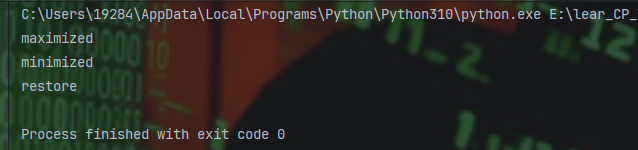
如下图所示的执行结果。
更多推荐


 14
14 0
0- 0



 已为社区贡献1条内容

所有评论(0)