
使用logstash和elasticsearch实现日志链路(二)
1.开发第二个接口
1.1.接口定义
127.0.0.1:5501/api/traces/{tradeId}
127.0.0.1:5501/api/traces/695ca6b528140ca7802052bea3187457
1.2.手搓日志数据
servera.log新增:
[linkservera] [695ca6b528140ca7802052bea3187457,802052bea3187457] [com.gg.core.aspect.MethodAspect] [2026-01-29 14:07:50.491] > [INFO] [http-nio-13000-exec-3] - 请求参数: {“tradeTime”:“2026-01-29 14:07:50”,“name”:“小王”,“patientId”:“123456”}
[linkservera] [695ca6b528140ca7802052bea3187457,802052bea3187457] [com.gg.core.aspect.MethodAspect] [2026-01-29 14:07:51.562] > [INFO] [http-nio-13000-exec-3] - 返回结果: {“tradeTime”:“2026-01-29 14:07:50”,“name”:“小王”,“patientId”:“123456”}
serverb.log新增:
[linkserverb] [695ca6b528140ca7802052bea3187457,802052bea3187457] [com.gg.core.aspect.MethodAspect] [2026-01-29 14:07:51.491] > [INFO] [http-nio-14000-exec-3] - 请求参数: {“tradeTime”:“2026-01-29 14:07:50”,“name”:“小王”,“patientId”:“123456”}
[linkserverb] [695ca6b528140ca7802052bea3187457,802052bea3187457] [com.gg.core.aspect.MethodAspect] [2026-01-29 14:07:51.541] > [INFO] [http-nio-14000-exec-3] - 返回结果: {“tradeTime”:“2026-01-29 14:07:50”,“name”:“小王”,“patientId”:“123456”}
1.3.代码
此时的代码类:
package com.gg.midend.service.impl;

import co.elastic.clients.elasticsearch.ElasticsearchClient;
import co.elastic.clients.elasticsearch._types.SortOrder;
import co.elastic.clients.elasticsearch._types.query_dsl.Query;
import co.elastic.clients.elasticsearch.core.SearchRequest;
import co.elastic.clients.elasticsearch.core.SearchResponse;
import co.elastic.clients.elasticsearch.core.search.Hit;

import com.gg.midend.config.GlobalConfig;
import org.springframework.stereotype.Service;

import java.io.IOException;
import java.util.*;
import java.util.regex.Matcher;
import java.util.regex.Pattern;

@Service
public class TraceQueryService {

    private final ElasticsearchClient esClient;

    // 正则表达式:提取serviceName和traceId
    private static final Pattern LOG_PATTERN = Pattern.compile(
            "(?:\\[)?([^\\[\\]]+)(?:\\])?\\s+\\[([a-fA-F0-9]+),[a-fA-F0-9]+\\]"
    );

    // 需要保留的关键词
    private static final List<String> KEEP_KEYWORDS = Arrays.asList(
            "请求参数:", "返回结果:"
    );

    // 正则表达式:提取日志时间戳 [2026-01-28 14:07:54.541]
    private static final Pattern TIMESTAMP_PATTERN = Pattern.compile(
            "\\[(\\d{4}-\\d{2}-\\d{2} \\d{2}:\\d{2}:\\d{2}\\.\\d{3})\\]"
    );

    // 正则表达式:提取"请求参数:"或"返回结果:"后面的内容
    private static final Pattern CONTENT_PATTERN = Pattern.compile(
            "(?:请求参数:|返回结果:)\\s*(\\{.*\\})"
    );

    public TraceQueryService(ElasticsearchClient esClient) {
        this.esClient = esClient;
    }

    public List<Map<String, Object>> listLogsByTraceId(String traceId) throws IOException {
        if (traceId == null || traceId.trim().isEmpty()) {
            return new ArrayList<>();
        }

        GlobalConfig.log_api.info(">>> [Trace Detail] 开始查询traceId: " + traceId);

        // 优化查询条件:使用更宽松的查询条件
        SearchRequest request = SearchRequest.of(s -> s
                .index("microservice-logs-*")
                .query(Query.of(q -> q
                        .bool(b -> b
                                .should(sh -> sh.wildcard(w -> w
                                        .field("content.keyword")
                                        .value("*[" + traceId + ",*]*")
                                ))
                                .should(sh -> sh.wildcard(w -> w
                                        .field("content.keyword")
                                        .value("*" + traceId + "*")
                                ))
                        )
                ))
                .sort(sort -> sort.field(f -> f.field("@timestamp").order(SortOrder.Asc)))
                // 只查询需要的字段:@timestamp 和 content
                .source(src -> src.filter(f -> f.includes(
                        "@timestamp", "content"
                )))
                .size(1000)  // 增加返回数量
        );

        SearchResponse<Map> response = esClient.search(request, Map.class);
        List<Map<String, Object>> results = new ArrayList<>();

        GlobalConfig.log_api.info(">>> [Trace Detail] ES查询完成,命中条数: " + response.hits().hits().size());

        for (Hit<Map> hit : response.hits().hits()) {
            Map<String, Object> source = hit.source();
            if (source != null) {
                String content = (String) source.get("content");
                if (content == null) {
                    continue;
                }

                // 过滤逻辑:只保留包含"请求参数:"或"返回结果:"的日志
                boolean shouldKeep = false;
                for (String keyword : KEEP_KEYWORDS) {
                    if (content.contains(keyword)) {
                        shouldKeep = true;
                        break;
                    }
                }

                // 如果不包含关键词,跳过此条记录
                if (!shouldKeep) {
                    continue;
                }

                // 提取serviceName和traceId
                String serviceName = "";
                String extractedTraceId = "";

                Matcher matcher = LOG_PATTERN.matcher(content);
                if (matcher.find()) {
                    serviceName = matcher.group(1);
                    extractedTraceId = matcher.group(2);
                }

                // 如果从content中提取的traceId为空,使用传入的traceId
                if (extractedTraceId.isEmpty()) {
                    extractedTraceId = traceId;
                }

                // 处理content字段,只保留"请求参数:"或"返回结果:"后面的内容
                String processedContent = extractContentAfterKeywords(content);
                if (processedContent != null && !processedContent.isEmpty()) {
                    source.put("content", processedContent);
                } else {
                    // 如果提取失败,跳过此条记录
                    GlobalConfig.log_api.warn(">>> [Trace Detail] 提取content失败,跳过记录,原始content: " + content);
                    continue;
                }

                // 提取日志时间戳 [2026-01-28 14:07:54.541]
                String logTimestamp = extractLogTimestamp(content);
                if (logTimestamp != null && !logTimestamp.isEmpty()) {
                    source.put("logTime", logTimestamp);
                } else {
                    // 如果没有提取到时间戳,跳过此条记录
                    GlobalConfig.log_api.warn(">>> [Trace Detail] 提取logTime失败,跳过记录,原始content: " + content);
                    continue;
                }

                // 提取日志类型(请求参数或返回结果)
                String logType = extractLogType(content);
                if (!logType.isEmpty()) {
                    source.put("logType", logType);
                } else {
                    // 如果没有提取到日志类型,跳过此条记录
                    GlobalConfig.log_api.warn(">>> [Trace Detail] 提取logType失败,跳过记录,原始content: " + content);
                    continue;
                }

                // 添加 serviceName 和 traceId
                source.put("serviceName", serviceName);
                source.put("traceId", extractedTraceId);

                // 移除不需要的字段
                source.remove("tradeTime");
                source.remove("patientId");
                source.remove("name");

                results.add(source);
            }
        }

        // 新增:按照logTime字段进行升序排序
        sortResultsByLogTime(results);

        GlobalConfig.log_api.info("<<< [Trace Detail] 查询完成,返回结果条数: " + results.size());

        return results;
    }

    /**
     * 按照logTime字段进行升序排序
     * @param results 待排序的结果列表
     */
    private void sortResultsByLogTime(List<Map<String, Object>> results) {
        if (results == null || results.size() <= 1) {
            return;
        }

        results.sort((map1, map2) -> {
            String time1 = (String) map1.get("logTime");
            String time2 = (String) map2.get("logTime");

            // 处理空值情况
            if (time1 == null && time2 == null) {
                return 0;
            } else if (time1 == null) {
                return 1; // time1为空放到后面
            } else if (time2 == null) {
                return -1; // time2为空放到后面
            }

            // 直接比较字符串,因为时间格式是固定的:yyyy-MM-dd HH:mm:ss.SSS
            return time1.compareTo(time2);
        });

        // 打印排序后的时间顺序用于调试
        if (GlobalConfig.log_api.isDebugEnabled()) {
            for (int i = 0; i < Math.min(results.size(), 5); i++) {
                GlobalConfig.log_api.debug("排序后第" + (i+1) + "条记录的logTime: " + results.get(i).get("logTime"));
            }
        }
    }

    /**
     * 提取"请求参数:"或"返回结果:"后面的内容,并处理中文引号
     * @param originalContent 原始日志内容
     * @return 处理后的内容
     */
    private String extractContentAfterKeywords(String originalContent) {
        if (originalContent == null || originalContent.isEmpty()) {
            return originalContent;
        }

        // 使用正则表达式提取
        Matcher matcher = CONTENT_PATTERN.matcher(originalContent);
        if (matcher.find()) {
            String extracted = matcher.group(1);
            // 处理中文引号
            extracted = replaceChineseQuotes(extracted);
            return extracted;
        }

        // 如果正则失败,使用字符串查找
        for (String keyword : KEEP_KEYWORDS) {
            int index = originalContent.indexOf(keyword);
            if (index != -1) {
                String extracted = originalContent.substring(index + keyword.length()).trim();
                // 清理可能的空格和换行符
                extracted = extracted.replaceAll("[\\r\\n\\t]", "");
                // 处理中文引号
                extracted = replaceChineseQuotes(extracted);
                return extracted;
            }
        }

        // 如果没有找到关键词,返回null
        return null;
    }

    /**
     * 替换中文引号为英文引号
     * @param content 原始内容
     * @return 替换后的内容
     */
    private String replaceChineseQuotes(String content) {
        if (content == null || content.isEmpty()) {
            return content;
        }

        // 使用Unicode编码
        return content
                .replace("\u201c", "\"")  // 左中文引号的Unicode
                .replace("\u201d", "\""); // 右中文引号的Unicode
    }

    /**
     * 提取日志时间戳 [2026-01-28 14:07:54.541]
     * @param originalContent 原始日志内容
     * @return 日志时间戳
     */
    private String extractLogTimestamp(String originalContent) {
        if (originalContent == null || originalContent.isEmpty()) {
            return "";
        }

        // 使用正则表达式提取时间戳
        Matcher matcher = TIMESTAMP_PATTERN.matcher(originalContent);
        if (matcher.find()) {
            return matcher.group(1);
        }

        return "";
    }

    /**
     * 提取日志类型(请求参数或返回结果)
     * @param originalContent 原始日志内容
     * @return 日志类型
     */
    private String extractLogType(String originalContent) {
        if (originalContent == null || originalContent.isEmpty()) {
            return "";
        }

        if (originalContent.contains("请求参数:")) {
            return "REQUEST";
        } else if (originalContent.contains("返回结果:")) {
            return "RESPONSE";
        }

        return "";
    }
}
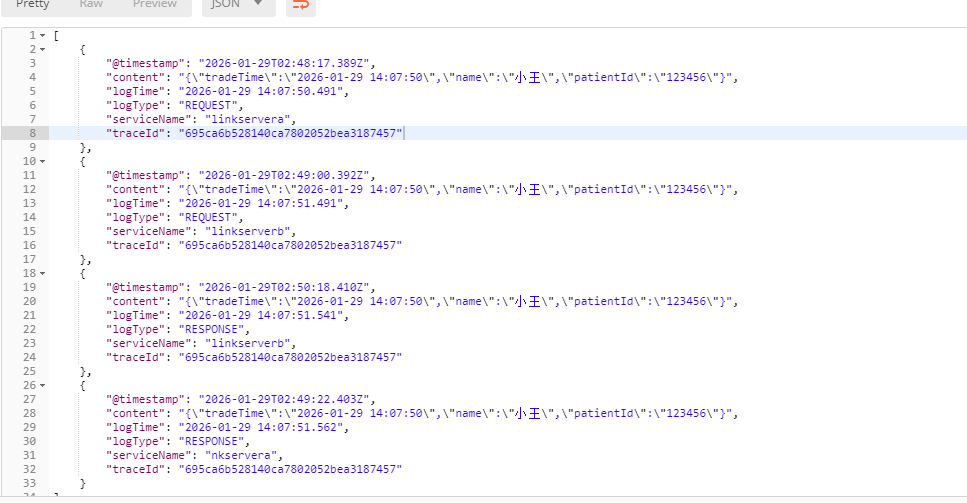
1.4.测试
返回结果:
2.发现问题解决问题
添加日志丢失,导致logstash启动异常,不可见字符,全角半角
2.1.注意点1
日志通过命令传入servera.log和serverb.log,防止异常
echo '[linkservera] [695ca6b528140ca7802052bea3187466,802052bea3187466] [com.gg.core.aspect.MethodAspect] [2026-02-02 14:12:50.491] > [INFO] [http-nio-13000-exec-3] - 收到请求: {"tradeTime":"2026-02-02 14:07:50","name":"小龙","patientId":"123456"}' >> /home/geit/midend-center/service3/linkservera/logs/servera.log
2.2.注意点2
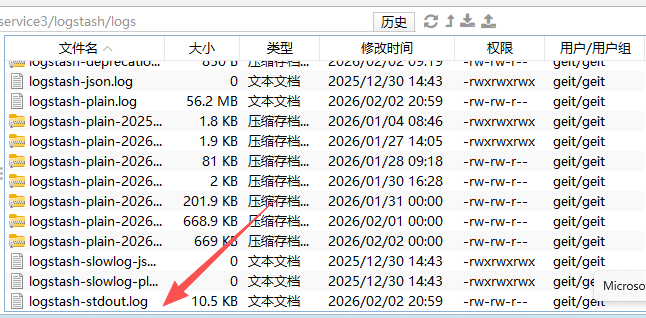
logstash的pipeline.conf做了修改后,要特别注意启动是否报错。
2.3.注意点3
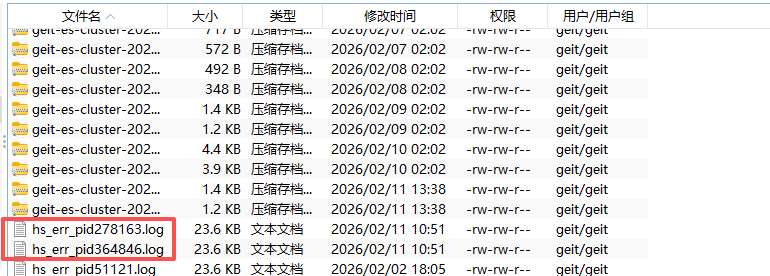
es启动是否成功关注:碰到应用ES连接异常,9200端口检测不通
关注日志如:

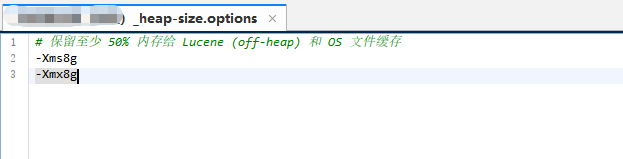
常见问题:
系统启动内存不足。应对方法,添加

3.测试方法
3.1.清理ES数据(测试用,生产不行)
curl -X GET "http://localhost:9200/_cat/indices?v"
curl -X DELETE "http://localhost:9200/microservice-logs-linkservera-*"
3.2.如何添加日志测试
为防止不可见字符异常,现在VSCODE编辑
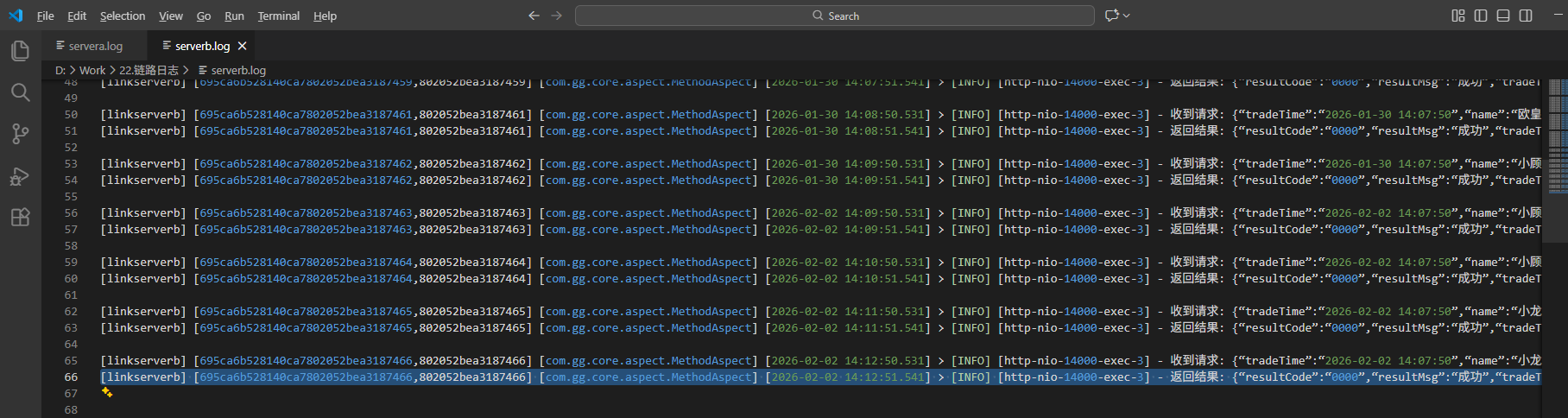
使用命令行传入对应日志文件:
echo '[linkserverb] [695ca6b528140ca7802052bea3187466,802052bea3187466] [com.gg.core.aspect.MethodAspect] [2026-02-02 14:12:51.541] > [INFO] [http-nio-14000-exec-3] - 返回结果: {"resultCode":"0000","resultMsg":"成功","tradeTime":"2026-02-02 14:07:50","name":"小龙","patientId":"123456"}' >> /home/geit/midend-center/service3/linkserverb/logs/serverb.log
4.接口发布
1./api/traces/queryProd
功能描述:查询中台产品与相关的微服务归属关系。为接口2提供可选参数serverList
2./api/traces/search
功能描述:支持多关键字模糊搜索大数据文件信息,让维护人员能方便定位选择具体要查找的具体交易链路,然后显示准确链路
请求报文:
serverList就是/api/traces/queryProd接口返回的,在调用本接口时如果选择产品,就可以送serverList。这样只显示相关服务的大数据查询结果。不送serverList,就不过滤结果。
criteria是查询关键字,尽量准确的信息更容易定位。可以多个条件用|分割查询
{
  "header": {
    "timestamp": 1753955243254,
    "account": "HSDSYY",
    "serialNo": "ff7-e5-454-bc5-dccbe",
    "custId": "manage"
  },
  "body": {
        "startTime": "2026-02-09",
        "endTime": "2026-02-09",
        "serverList": [
            "linkservera",
            "linkserverb"
        ],
        "criteria": "张廷"
  },
  "sign": "3KcDPhzmbiD/34MSCyJHQg=="
}
返回报文:
content就是包含criteria的信息,通过展示,让维护人员选择具体的一条,提取traceId
{
    "header": {
        "returnCode": "0000_000_000",
        "returnMsg": "成功",
        "version": "1.0.0"
    },
    "body": [
        {
            "traceId": "695ca6b528140ca7802052bea3187473",
            "logCount": 8,
            "logs": [
                {
                    "logType": "RECEIVED_REQUEST",
                    "tradeTime": "2026-02-01 14:07:50",
                    "@timestamp": "2026-02-09 14:13:50.491",
                    "serviceName": "linkservera",
                    "content": "{\"tradeTime\":\"2026-02-01 14:07:50\",\"name\":\"张廷\",\"patientId\":\"123456\"}"
                },
                {
                    "logType": "SEND_REQUEST",
                    "tradeTime": "2026-02-01 14:07:50",
                    "@timestamp": "2026-02-09 14:13:50.496",
                    "serviceName": "linkservera",
                    "content": "{\"tradeTime\":\"2026-02-01 14:07:50\",\"name\":\"张廷\",\"patientId\":\"123456\"}"
                },
                {
                    "logType": "RECEIVED_REQUEST",
                    "tradeTime": "2026-02-01 14:07:50",
                    "@timestamp": "2026-02-09 14:13:50.531",
                    "serviceName": "linkserverb",
                    "content": "{\"tradeTime\":\"2026-02-01 14:07:50\",\"name\":\"张廷\",\"patientId\":\"123456\"}"
                },
                {
                    "logType": "SEND_REQUEST",
                    "tradeTime": "2026-02-01 14:07:50",
                    "@timestamp": "2026-02-09 14:13:50.536",
                    "serviceName": "linkserverb",
                    "content": "{\"tradeTime\":\"2026-02-01 14:07:50\",\"name\":\"张廷\",\"patientId\":\"123456\",\"dest\":\"HIS\"}"
                },
                {
                    "logType": "RECEIVED_RESPONSE",
                    "tradeTime": "2026-02-01 14:07:50",
                    "@timestamp": "2026-02-09 14:13:50.539",
                    "serviceName": "linkserverb",
                    "content": "{\"resultCode\":\"0000\",\"resultMsg\":\"成功\",\"tradeTime\":\"2026-02-01 14:07:50\",\"name\":\"张廷\",\"patientId\":\"123456\",\"phone\":\"13616110776\",\"dest\":\"HIS\"}"
                },
                {
                    "logType": "RETURN_RESULT",
                    "tradeTime": "2026-02-01 14:07:50",
                    "@timestamp": "2026-02-09 14:13:51.541",
                    "serviceName": "linkserverb",
                    "content": "{\"resultCode\":\"0000\",\"resultMsg\":\"成功\",\"tradeTime\":\"2026-02-01 14:07:50\",\"name\":\"张廷\",\"patientId\":\"123456\"}"
                },
                {
                    "logType": "RECEIVED_RESPONSE",
                    "tradeTime": "2026-02-01 14:07:50",
                    "@timestamp": "2026-02-09 14:13:51.576",
                    "serviceName": "linkservera",
                    "content": "{\"resultCode\":\"0000\",\"resultMsg\":\"成功\",\"tradeTime\":\"2026-02-01 14:07:50\",\"name\":\"张廷\",\"patientId\":\"123456\",\"phone\":\"13616110776\"}"
                },
                {
                    "logType": "RETURN_RESULT",
                    "tradeTime": "2026-02-01 14:07:50",
                    "@timestamp": "2026-02-09 14:13:51.581",
                    "serviceName": "linkservera",
                    "content": "{\"resultCode\":\"0000\",\"resultMsg\":\"成功\",\"tradeTime\":\"2026-02-01 14:07:50\",\"name\":\"张廷\",\"patientId\":\"123456\"}"
                }
            ]
        },
        {
            "traceId": "695ca6b528140ca7802052bea3187474",
            "logCount": 1,
            "logs": [
                {
                    "logType": "RECEIVED_REQUEST",
                    "tradeTime": "2026-02-09 14:07:50",
                    "@timestamp": "2026-02-09 14:15:50.491",
                    "serviceName": "linkservera",
                    "content": "{\"tradeTime\":\"2026-02-09 14:07:50\",\"name\":\"张廷玉\",\"tradeType\":\"预约挂号\"}"
                }
            ]
        }
    ]
}
3./api/traces/{traceId}
功能描述:通过链路traceId查询所有整个链路所有的相关服务列表和所有关键节点。
请求报文:
Get接口,无请求报文
返回报文:
serverlist是链路涉及的服务列表
datalist是链路涉及的数据列表,通过routor来确认是linkservera和linkserver之间的,还是linkserverb和HIS之间的。
SEND_REQUEST类型返回中合并了URL
RECEIVED_RESPONSE类型返回提取了resultCode,用于判断是否有报错
logTime可用于计算每个步骤之间耗时
对于访问外部服务,如HIS的,只有2个节点返回
{
    "header": {
        "returnCode": "0000_000_000",
        "returnMsg": "成功",
        "version": "1.0.0"
    },
    "body": {
        "serverlist": [
            "linkservera",
            "linkserverb",
            "HIS"
        ],
        "datalist": [
            {
                "logType": "SEND_REQUEST",
                "traceId": "695ca6b528140ca7802052bea3187473",
                "tradeTime": "2026-02-01 14:07:50",
                "@timestamp": "2026-02-09 14:13:50.496",
                "routor": "[linkservera,linkserverb]",
                "serviceName": "linkservera",
                "content": "{\"tradeTime\":\"2026-02-01 14:07:50\",\"name\":\"张廷\",\"patientId\":\"123456\"}",
                "URL": "http://localhost:13000/api/common/used",
                "logTime": "2026-02-09 14:13:50.496"
            },
            {
                "logType": "RECEIVED_REQUEST",
                "traceId": "695ca6b528140ca7802052bea3187473",
                "tradeTime": "2026-02-01 14:07:50",
                "@timestamp": "2026-02-09 14:13:50.531",
                "routor": "[linkservera,linkserverb]",
                "serviceName": "linkserverb",
                "content": "{\"tradeTime\":\"2026-02-01 14:07:50\",\"name\":\"张廷\",\"patientId\":\"123456\"}",
                "logTime": "2026-02-09 14:13:50.531"
            },
            {
                "logType": "SEND_REQUEST",
                "traceId": "695ca6b528140ca7802052bea3187473",
                "tradeTime": "2026-02-01 14:07:50",
                "@timestamp": "2026-02-09 14:13:50.536",
                "routor": "[linkserverb,HIS]",
                "serviceName": "linkserverb",
                "dest": "HIS",
                "content": "{\"tradeTime\":\"2026-02-01 14:07:50\",\"name\":\"张廷\",\"patientId\":\"123456\",\"dest\":\"HIS\"}",
                "URL": "http://localhost:9000/hisapi/testapi",
                "logTime": "2026-02-09 14:13:50.536"
            },
            {
                "logType": "RECEIVED_RESPONSE",
                "traceId": "695ca6b528140ca7802052bea3187473",
                "tradeTime": "2026-02-01 14:07:50",
                "@timestamp": "2026-02-09 14:13:50.539",
                "routor": "[linkserverb,HIS]",
                "resultCode": "0000",
                "serviceName": "linkserverb",
                "dest": "HIS",
                "content": "{\"resultCode\":\"0000\",\"resultMsg\":\"成功\",\"tradeTime\":\"2026-02-01 14:07:50\",\"name\":\"张廷\",\"patientId\":\"123456\",\"phone\":\"13616110776\",\"dest\":\"HIS\"}",
                "logTime": "2026-02-09 14:13:50.539"
            },
            {
                "logType": "RETURN_RESULT",
                "traceId": "695ca6b528140ca7802052bea3187473",
                "tradeTime": "2026-02-01 14:07:50",
                "@timestamp": "2026-02-09 14:13:51.541",
                "routor": "[linkserverb,linkservera]",
                "serviceName": "linkserverb",
                "content": "{\"resultCode\":\"0000\",\"resultMsg\":\"成功\",\"tradeTime\":\"2026-02-01 14:07:50\",\"name\":\"张廷\",\"patientId\":\"123456\"}",
                "logTime": "2026-02-09 14:13:51.541"
            },
            {
                "logType": "RECEIVED_RESPONSE",
                "traceId": "695ca6b528140ca7802052bea3187473",
                "tradeTime": "2026-02-01 14:07:50",
                "@timestamp": "2026-02-09 14:13:51.576",
                "routor": "[linkserverb,linkservera]",
                "resultCode": "0000",
                "serviceName": "linkservera",
                "content": "{\"resultCode\":\"0000\",\"resultMsg\":\"成功\",\"tradeTime\":\"2026-02-01 14:07:50\",\"name\":\"张廷\",\"patientId\":\"123456\",\"phone\":\"13616110776\"}",
                "logTime": "2026-02-09 14:13:51.576"
            }
        ]
    }
}
5.服务器配置给前端发布
访问/usr/local/nginx/conf/conf.d
在midend.conf中添加
    location /linklog/ {
           proxy_pass http://127.0.0.1:15501/;
    }
nginx -s reload
URL地址变成112.124.105.88:8080/linklog/具体接口
更多推荐
 10
10 0
0- 0


 已为社区贡献1条内容

所有评论(0)