
uniapp app端使用苹果登录
·
由于项目有第三方登录所以需要一个苹果账号登录
在manifest中勾选苹果登录
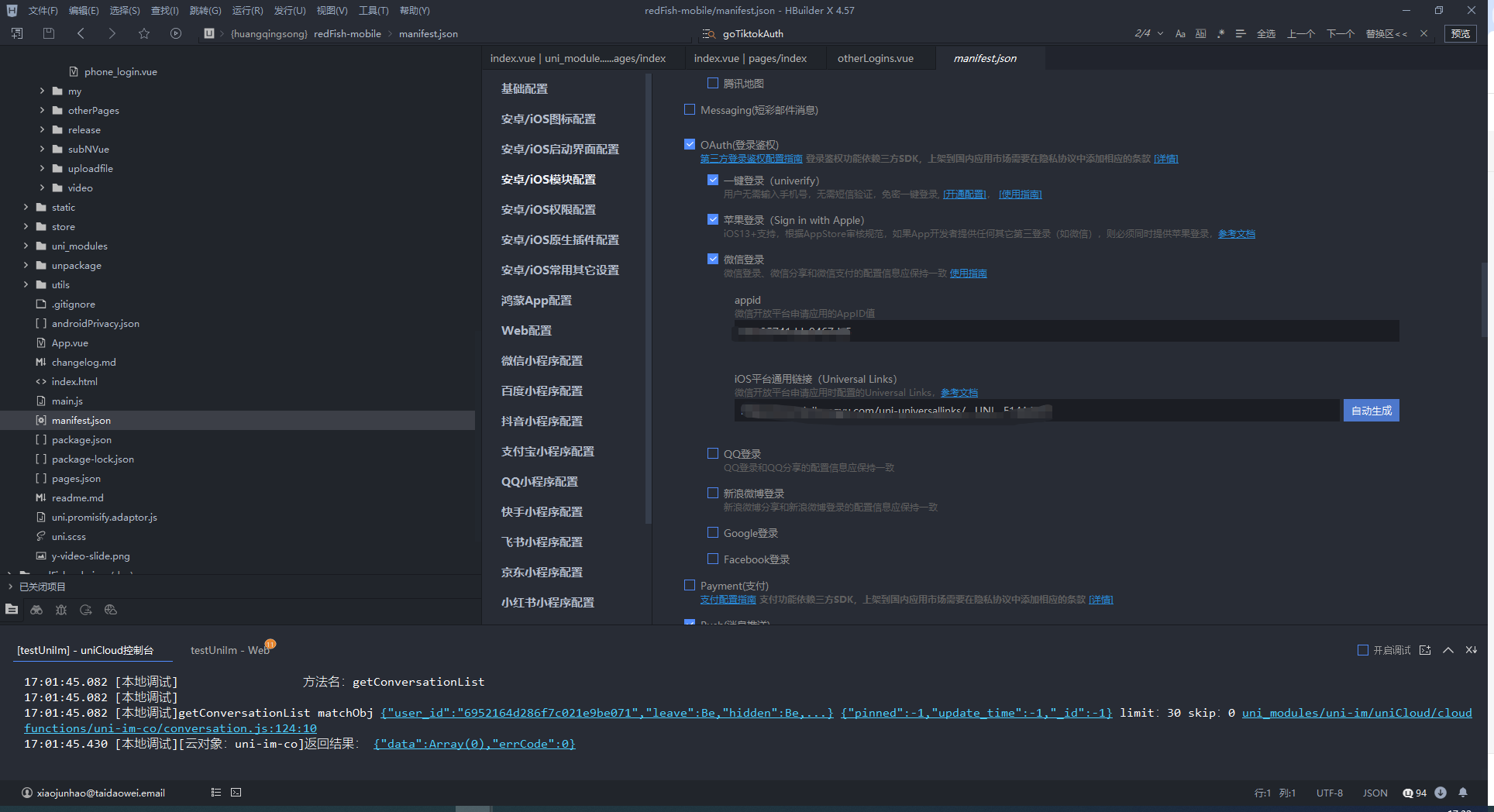
需要用到打包的苹果证书也需要添加苹果登录
代码
// 苹果授权登录
	const goAppleAuth = () => {
		if (!checkSelectAgreement('apple')) return;
		loginType.value = 3;
		uni.getProvider({
			service: 'oauth',
			success: function(res) {
				//支持微信、qq和微博等
				if (~res.provider.indexOf('apple')) {
					uni.login({
						provider: 'apple',
						success: function(loginRes) {
							console.log("苹果授权的apple login", JSON.stringify(loginRes));
							appleAuth.value = loginRes.appleInfo?.user;
							goAppleLoginApi()
						},
						fail: function(err) {
							// 登录授权失败
							// err.code错误码参考`授权失败错误码(code)说明`
							console.log(err, "登录授权失败")
						}
					});
				}
			}
		})
	}
	// 苹果授权 给后端传递获取到的unionid和openId还有手机型号的信息
	const goAppleLoginApi = async () => {
		loginType.value = 3;
		let data = ref({
			iphoneUser: appleAuth.value,
			brand: systemInfo.value.brand,
			invitationCode: uni.getStorageSync('invitationCode') || ''
		})
		//#ifdef APP-PLUS
		data.value.deviceType = isIos.value ? 'IOS' : 'Android';
		// #endif
		//#ifndef APP-PLUS
		data.value.deviceType = 'PC';
		// #endif
		console.log(data.value, "上传");
		uni.showLoading({
			title: "加载中",
			mask: true,
		})
		// return
		try {
			const res = await request({
				url: `/app/logIn/iPhoneLogIn`,
				method: 'POST',
				data: data.value
			})
			uni.hideLoading();
			console.log(res, "当前接口返回回来的参数")
			if (res.code == 200) {
				if (!res.data.status) {
					uni.navigateTo({
						url: `/pages/login/appBindPhone?iphoneUserKey=${res.data.iphoneUserKey}&brand=${data.value.brand}&deviceType=${data.value.deviceType}&loginType=${loginType.value}`,
					})
				} else {
					uni.setStorageSync('userInfo', res.data)
					uni.setStorage({
						key: 'token',
						data: res.data.token,
						success: function() {
							uni.switchTab({
								url: '/pages/index/index'
							});
						}
					});
				}

			} else {
				uni.showToast({
					title: res.data.msg,
					icon: 'none',
					duration: 2000
				});
			}

		} catch (err) {
			console.log(err, "苹果登录失败")
			uni.showToast({
				title: err.data.message,
				icon: 'none',
				duration: 2000
			});
		}
	}
更多推荐


 3
3 0
0- 0


 已为社区贡献4条内容

所有评论(0)