
ap_ctrl_none协议和hls::stream的错误使用-vivado hls设计第九例
一、关于ap_ctrl_none协议
1.将接口上的ap_start和ap_done,ap_idle,ap_ready去掉
二、使用ap_ctrl_none协议协议情况下,将接口信号使用ap_none
1.如果用户设计的顶层使用了ap_ctrl_none协议
2.并且又将接口信号使用ap_none
3.使用了ap_none的变量何时被取值是很重要的
4.顶层接口有ap_none修饰的变量,也有hls::stream变量,容易出问题
5.因为ap_none修饰的变量会造成数据的读写时机不受控制
失败案例:
顶层:
#include "top.h"
#include "hls_opencv.h"
#include "iostream"
using namespace std;
using namespace cv;
int main (int argc, char** argv)
{
IplImage* src = cvLoadImage("D:/vivado_hls/tt.jpg");
int depth = src->depth;
CvSize s;
s.width = 585*2;
s.height = 335*2;
IplImage* dst = cvCreateImage(s, 8, 3);
AXI_STREAM src_axi, dst_axi;
IplImage2AXIvideo(src, src_axi);
hls_video_scaler_top(src_axi, dst_axi, src->height, src->width,s.height,s.width);
//AXIvideo2IplImage(dst_axi, dst);
for(int i=0;i<(585*335*4);i++){
if(!dst_axi.empty()){
AXIvideo2IplImage(dst_axi, dst);
}
}
cvShowImage("src",src);
cvShowImage("dst_hls",dst);
//cv::imwrite("test1.bmp",dst);
cvSaveImage("D:/output_image.jpg", dst);
cvReleaseImage(&dst); // 释放图像内存
//waitKey(0);
return 0;
}
主体设计:
#include "top.h"
void hls_video_scaler_top(AXI_STREAM& input, AXI_STREAM& output,int rows, int cols,int drows, int dcols)
{
#pragma HLS INTERFACE ap_ctrl_none port=return
#pragma HLS INTERFACE axis port=input
#pragma HLS INTERFACE axis port=output
#pragma HLS INTERFACE ap_none port=dcols
#pragma HLS INTERFACE ap_none port=drows
#pragma HLS INTERFACE ap_none port=rows
#pragma HLS INTERFACE ap_none port=cols
RGB_IMAGE img_0(rows, cols);
RGB_IMAGE img_1(drows, dcols);
#pragma HLS dataflow
hls::AXIvideo2Mat(input,img_0);
hls::Resize(img_0,img_1,HLS_INTER_LINEAR);
hls::Mat2AXIvideo(img_1, output);
}
由于上述代码使用了ap_none修饰变量:
#pragma HLS INTERFACE ap_none port=dcols
#pragma HLS INTERFACE ap_none port=drows
#pragma HLS INTERFACE ap_none port=rows
#pragma HLS INTERFACE ap_none port=cols
c/rtl仿真时候,testbench对数据流的读取,必须使用stream.empty()作为判断:
需要使用代码
for(int i=0;i<(s.width*s.high);i++){
if(!dst_axi.empty()){
AXIvideo2IplImage(dst_axi, dst);
}
}
而不能使用
AXIvideo2IplImage(dst_axi, dst);
否则,rtl仿真会挂起
c/rtl仿真,会出现:WARNING: Hls::stream 'hls::stream<ap_axiu<24, 1, 1, 1> >.2' is read while empty, which may result in RTL simulation hanging.
WARNING: Hls::stream 'hls::stream<ap_axiu<24, 1, 1, 1> >.2' is read while empty, which may result in RTL simulation hanging.
WARNING: Hls::stream 'hls::stream<ap_axiu<24, 1, 1, 1> >.2' is read while empty, which may result in RTL simulation hanging.
WARNING: Hls::stream 'hls::stream<ap_axiu<24, 1, 1, 1> >.2' is read while empty, which may result in RTL simulation hanging.
WARNING: Hls::stream 'hls::stream<ap_axiu<24, 1, 1, 1> >.2' is read while empty, which may result in RTL simulation hanging.
WARNING: Hls::stream 'hls::stream<ap_axiu<24, 1, 1, 1> >.2' is read while empty, which may result in RTL simulation hanging.
WARNING: Hls::stream 'hls::stream<ap_axiu<24, 1, 1, 1> >.2' is read while empty, which may result in RTL simulation hanging.
WARNING: Hls::stream 'hls::stream<ap_axiu<24, 1, 1, 1> >.2' is read while empty, which may result in RTL simulation hanging.
WARNING: Hls::stream 'hls::stream<ap_axiu<24, 1, 1, 1> >.2' is read while empty, which may result in RTL simulation hanging
告知用户,仿真会挂起。
总结:
1.ap_none和hls::stream搭配使用的时候问题很多。
2.ap_none和hls::stream搭配使用容易造成c仿真的结果和rtl仿真的结果不一致
3.ap_ctrl_none和hls::stream搭配使用,无问题
4.ap_none信号的取值时机是靠用户和TB找准时机取值,比如ap_none的变量取值一次,hls::stream变量也是取值一次,
但是如果你ap_none取值一次,hls::stream取值row*col次,最后你发现仿真的结果是不对的。
仿真波形:
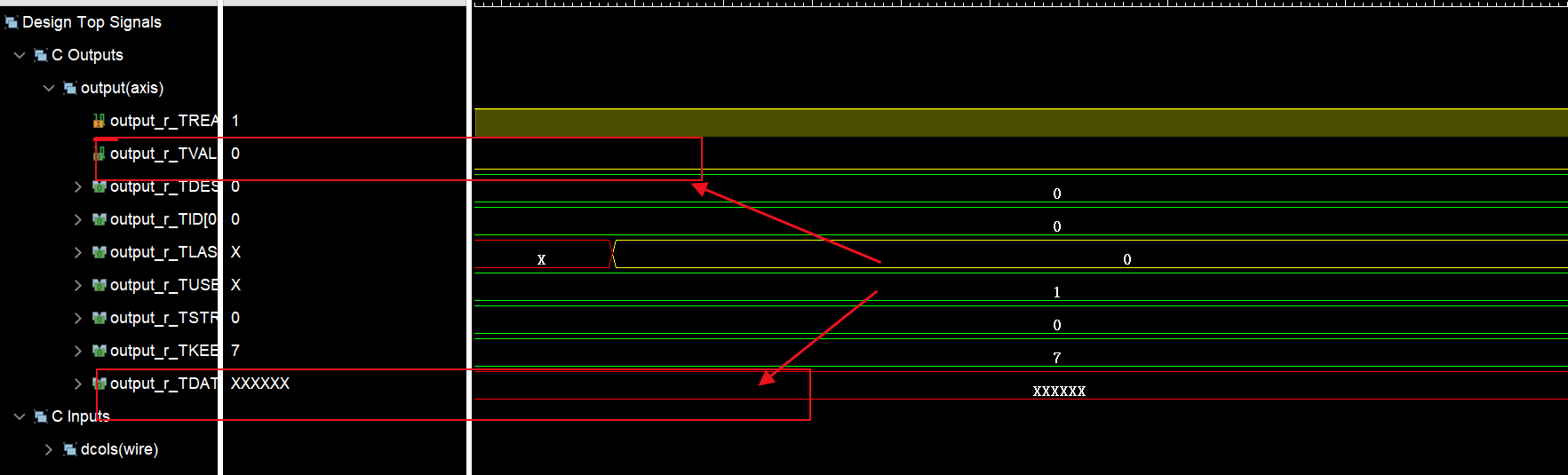
可以看出valid信号为低,data为xxxx,所以最后保存的图像是黑色的,什么内容都没有。
建议:
关于ap_ctrl_none搭配hls::stream使用
1.ap_ctrl_none接口去掉握手信号和hls::stream搭配使用可以
2.不推荐ap_ctrl_none接口和hls::stream搭配的情况下,又使用ap_none,非常不建议,本案例就说明了这个问题。
更多推荐



 31
31 0
0- 0


 已为社区贡献14条内容

所有评论(0)