
在 MacOS 平台上编译doris
一、编译
1. 使用 Homebrew 安装依赖
brew install automake autoconf \
 libtool pkg-config texinfo  \
 coreutils gnu-getopt \
 python@3 cmake ninja ccache \
 bison byacc gettext wget pcre \
 maven llvm@16 openjdk@17 npm
安装 thrift 0.16.0 版本 (注意:Doris 0.15 - 1.2 版本基于 thrift 0.13.0 构建, 最新代码使用 thrift 0.16.0 构建)
brew update
rm -rf /opt/homebrew/Library/Taps/homebrew/homebrew-core
cd ~
brew tap homebrew/core --force
brew tap-new $USER/local-tap
brew extract --version='0.16.0' thrift $USER/local-tap
arch -arm64 brew install thrift@0.16.0
thrift --version
2. 使用预编译三方库提速构建过程
可以在 Apache Doris Third Party Prebuilt 页面直接下载预编译好的第三方库,省去编译第三方库的过程,参考下面的命令。
cd thirdparty
rm -rf installed

#安装(如果未装)
brew install aria2

# Intel 芯片
aria2c -x 16 -s 16 https://github.com/apache/doris-thirdparty/releases/download/automation/doris-thirdparty-prebuilt-darwin-x86_64.tar.xz
tar -Jxf doris-thirdparty-prebuilt-darwin-x86_64.tar.xz

# Apple Silicon 芯片
aria2c -x 16 -s 16  https://github.com/apache/doris-thirdparty/releases/download/automation/doris-thirdparty-prebuilt-darwin-arm64.tar.xz
tar -Jxf doris-thirdparty-prebuilt-darwin-arm64.tar.xz

# 保证 protoc 和 thrift 能够正常运行
cd installed/bin

./protoc --version
./thrift --version
3. 编译源码
配置settings.xml:
<?xml version="1.0" encoding="UTF-8"?>
<settings xmlns="http://maven.apache.org/SETTINGS/1.2.0"
          xmlns:xsi="http://www.w3.org/2001/XMLSchema-instance"
          xsi:schemaLocation="http://maven.apache.org/SETTINGS/1.2.0 http://maven.apache.org/xsd/settings-1.2.0.xsd">

    <!-- 设置本地仓库目录 -->
    <localRepository>~/m2/repo</localRepository>

    <!-- 代理配置(如无代理可删除此块) -->
    <proxies>
        <!-- 可留空 -->
    </proxies>


    <!-- Maven 仓库镜像,优先 Aliyun,其次中央仓库 -->
    <mirrors>
        <mirror>
            <id>aliyunmaven</id>
            <!-- 只代理中央仓库和快照仓库,不代理插件仓库 -->
            <mirrorOf>central,snapshots</mirrorOf>
            <name>Aliyun Maven Central</name>
            <url>https://maven.aliyun.com/repository/public</url>
        </mirror>
        <mirror>
            <id>alimaven</id>
            <mirrorOf>central</mirrorOf>
            <name>Aliyun Central Backup</name>
            <url>http://maven.aliyun.com/nexus/content/repositories/central/</url>
        </mirror>
    </mirrors>

    <!-- 插件仓库专用配置 -->
    <profiles>
        <profile>
            <id>enable-plugin-repos</id>
            <activation>
                <activeByDefault>true</activeByDefault>
            </activation>
            <pluginRepositories>
                <!-- Cloudera 插件源(用于 cup-maven-plugin) -->
                <pluginRepository>
                    <id>cloudera-ext</id>
                    <url>https://repository.cloudera.com/artifactory/ext-release-local</url>
                    <releases>
                        <enabled>true</enabled>
                    </releases>
                    <snapshots>
                        <enabled>false</enabled>
                    </snapshots>
                </pluginRepository>

                <!-- Cloudera 公共源(有些插件也在 public) -->
                <pluginRepository>
                    <id>cloudera-public</id>
                    <url>https://repository.cloudera.com/artifactory/public</url>
                    <releases>
                        <enabled>true</enabled>
                    </releases>
                </pluginRepository>

                <!-- 官方中央仓库作为兜底 -->
                <pluginRepository>
                    <id>central</id>
                    <url>https://repo.maven.apache.org/maven2</url>
                    <releases>
                        <enabled>true</enabled>
                    </releases>
                </pluginRepository>
            </pluginRepositories>
        </profile>
    </profiles>

    <activeProfiles>
        <activeProfile>enable-plugin-repos</activeProfile>
    </activeProfiles>
</settings>
编译doris:
cd ~/zugeworkplace/doris
#编译fe
./build.sh
编译问题相关:
1)配置 环境变量,相应的用户目录改为自己的目录
vim ~/.bash_profile

export DORIS_HOME=~/zugeworkplace/doris
export PATH="~/zugeworkplace/doris/thirdparty/installed/bin:/opt/homebrew/opt/llvm/bin:/opt/homebrew/opt/bison/bin:/opt/homebrew/opt/texinfo/bin:$DORIS_HOME/bin:$PATH"
2)配置忽略警告

be_proc_thread_action.cpp 中定义了一个未使用的常量变量 HEADER_JSON,但由于编译器开启了 -Werror(所有警告视为错误),所以构建失败。
我们手动去掉 be/CMakeLists.txt 或相关 .cmake 文件中添加 -Werror 的地方。
打开 be/CMakeLists.txt,搜索 -Werror,去掉该参数
vim be/CMakeLists.txt
3)增加兼容macos代码
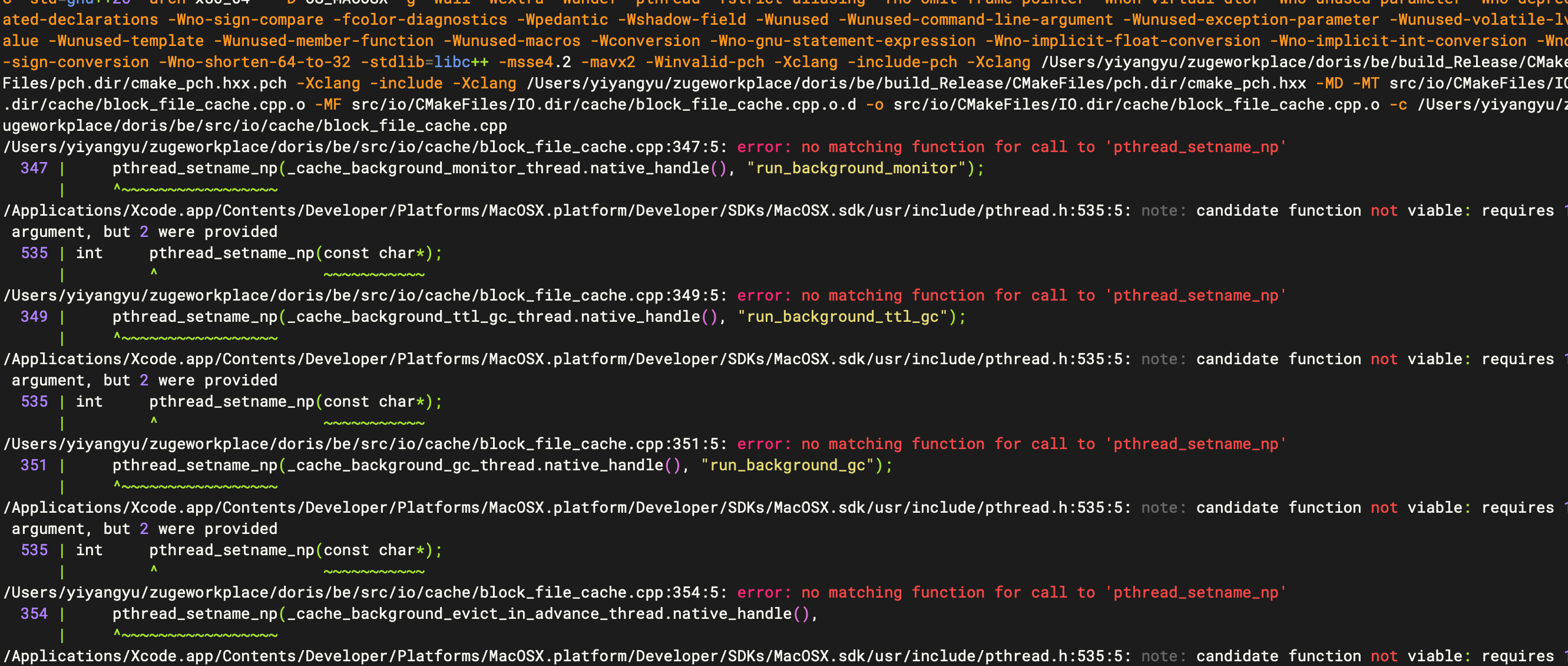
在 macOS 上的 pthread_setname_np 函数只支持一个参数的版本,而 Doris 源码中使用的是 Linux 风格的两个参数的版本。
修改block_file_cache.cpp文件:
增加兼容macos函数,并将pthread_setname_np函数改为兼容macos函数
void set_thread_name(pthread_t thread, const char* name) {
#if defined(__APPLE__)
    pthread_setname_np(name);
#else
    pthread_setname_np(thread, name);
#endif
}

统一调用
set_thread_name(_cache_background_lru_dump_thread.native_handle(), "cache_lru_dump");
4)字节序转换函数兼容macos
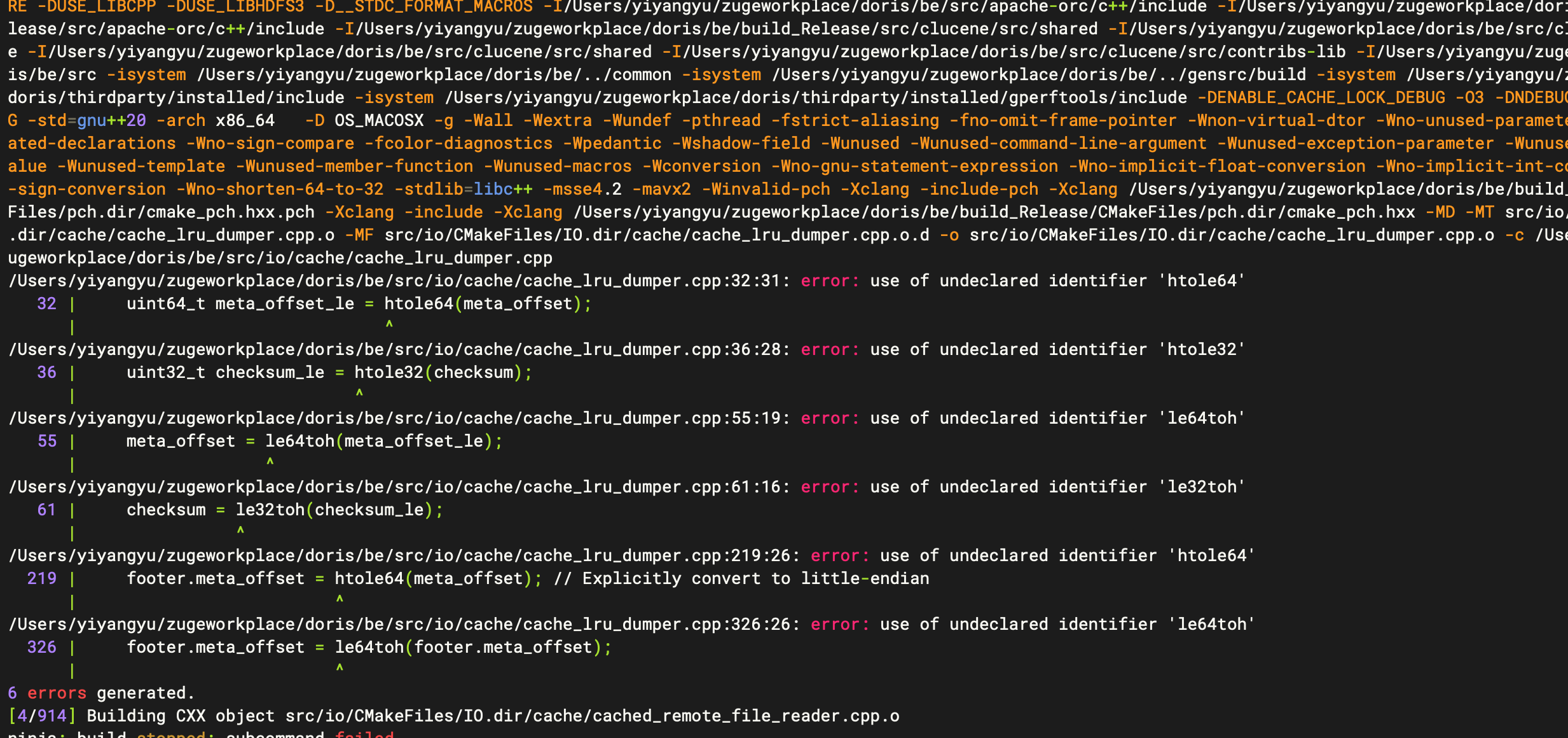
该编译错误是由于 htole64、htole32、le64toh、le32toh 这些字节序转换函数在 macOS 上没有默认定义,而这些是在 Linux 的 <endian.h> 或 glibc 中定义的。
解决方案:引入兼容头文件
可以在 cache_lru_dumper.cpp 顶部添加对 macOS 的兼容实现,放在条件宏里
#if defined(__APPLE__)
    #include <libkern/OSByteOrder.h>
    #define htole64(x) OSSwapHostToLittleInt64(x)
    #define le64toh(x) OSSwapLittleToHostInt64(x)
    #define htole32(x) OSSwapHostToLittleInt32(x)
    #define le32toh(x) OSSwapLittleToHostInt32(x)
#else
    #include <endian.h>
#endif
5)并行构建获取锁失败
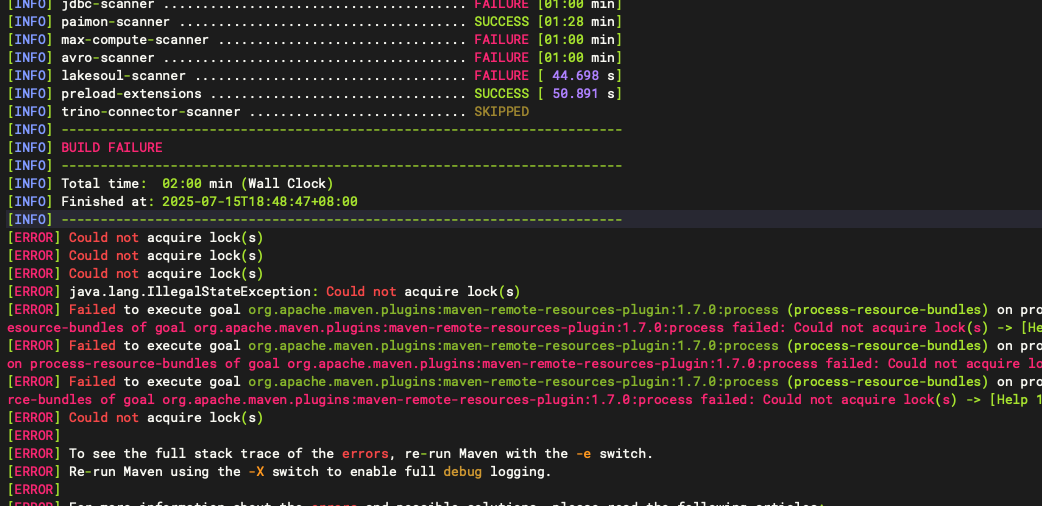
这个错误是由于 Maven 在并行构建时出现了锁冲突。修改构建指令:
# 禁用并行编译(-j 1确保单线程构建)
export MAVEN_OPTS="-Xmx4096m -Xms512m -Dmaven.artifact.threads=1"
./build.sh -j 1
二、启动
1. 调大 file descriptors limit
# 通过 ulimit 命令调大 file descriptors limit 限制大小
ulimit -n 65536
# 查看是否生效
$ ulimit -n

# 将该配置写到到启动脚本中,以便下次打开终端会话时不需要再次设置
# 如果是 bash,执行下面语句
echo 'ulimit -n 65536' >>~/.bashrc
# 如果是 zsh,执行下面语句
echo 'ulimit -n 65536' >>~/.zshrc
2. 启动 BE
cd output/be/bin
./start_be.sh --daemon
3. 启动 FE
cd output/fe/bin
./start_fe.sh --daemon
三、附录
1. 构建脚本用法
用法:build.sh <选项>
可选选项:
    [无选项]                    构建所有组件
    --fe                       构建前端。默认开启。
    --be                       构建后端。默认开启。
    --meta-tool                构建后端元工具。默认关闭。
    --file-cache-microbench    构建后端文件缓存微基准测试工具。默认关闭。
    --cloud                    构建云服务。默认关闭。
    --index-tool               构建后端倒排索引工具。默认关闭。
    --benchmark                构建 Google 基准测试。默认关闭。
    --broker                   构建代理服务。默认开启。
    --hive-udf                 构建用于摄取加载的 Hive UDF 库。默认开启。
    --be-java-extensions       构建后端 Java 扩展。默认开启。
    --be-extension-ignore      构建 be-java-extensions 包时,选择要忽略的模块。多个模块用逗号分隔。
    --clean                    清理并构建目标
    --output                   指定输出目录
    -j                         并行构建后端

环境变量:
   USE_AVX2                    如果 CPU 不支持 AVX2 指令集,请设置 USE_AVX2=0。默认开启。
   ARM_MARCH                   指定 ARM 架构指令集。默认为 armv8-a+crc。
   STRIP_DEBUG_INFO            如果设置 STRIP_DEBUG_INFO=ON,编译的二进制文件中的调试信息将单独存储在 'be/lib/debug_info' 目录中。默认关闭。
   DISABLE_BE_JAVA_EXTENSIONS  如果设置 DISABLE_BE_JAVA_EXTENSIONS=ON,我们将不会构建包含 java-udf、hadoop-hudi-scanner、jdbc-scanner 等的二进制文件。默认关闭。
   DISABLE_JAVA_CHECK_STYLE    如果设置 DISABLE_JAVA_CHECK_STYLE=ON,将跳过前端 Java 代码的样式检查。
   DISABLE_BUILD_AZURE         如果设置 DISABLE_BUILD_AZURE=ON,将不会将 azure 构建到后端中。
   ENABLE_BUILD_FAISS          如果设置 BUILD_FAISS=ON,将链接后端与 faiss。

示例:
   build.sh                                      构建所有组件
   build.sh --be                                 构建后端
   build.sh --meta-tool                          构建后端元工具
   build.sh --file-cache-microbench              构建后端文件缓存微基准测试工具
   build.sh --cloud                              构建云服务
   build.sh --index-tool                         构建后端倒排索引工具
   build.sh --benchmark                          构建后端的 Google 基准测试
   build.sh --fe --clean                         清理并构建前端
   build.sh --fe --be --clean                    清理并构建前端和后端
   build.sh --broker                             构建代理服务
   build.sh --be --fe                            构建后端、前端和 Java UDF 库
   build.sh --be --coverage                      构建启用覆盖率的后端
   build.sh --be --output PATH                   构建后端,结果将输出到 PATH(支持相对路径)
   build.sh --be-extension-ignore avro-scanner   构建 be-java-extensions,选择要忽略的模块。多个模块用逗号分隔,如 --be-extension-ignore avro-scanner,hadoop-hudi-scanner
   USE_AVX2=0 build.sh --be                      构建后端且不使用 AVX2 指令
   USE_AVX2=0 STRIP_DEBUG_INFO=ON build.sh       构建所有组件且不使用 AVX2 指令,并剥离后端的调试信息
ARM_MARCH=armv8-a+crc+simd build.sh --be 使用指定的 ARM 架构指令集构建后端更多推荐


 16
16 0
0- 0


 已为社区贡献1条内容

所有评论(0)