
微信小程序实现优惠券页面布局
·
微信小程序实现优惠券页面布局
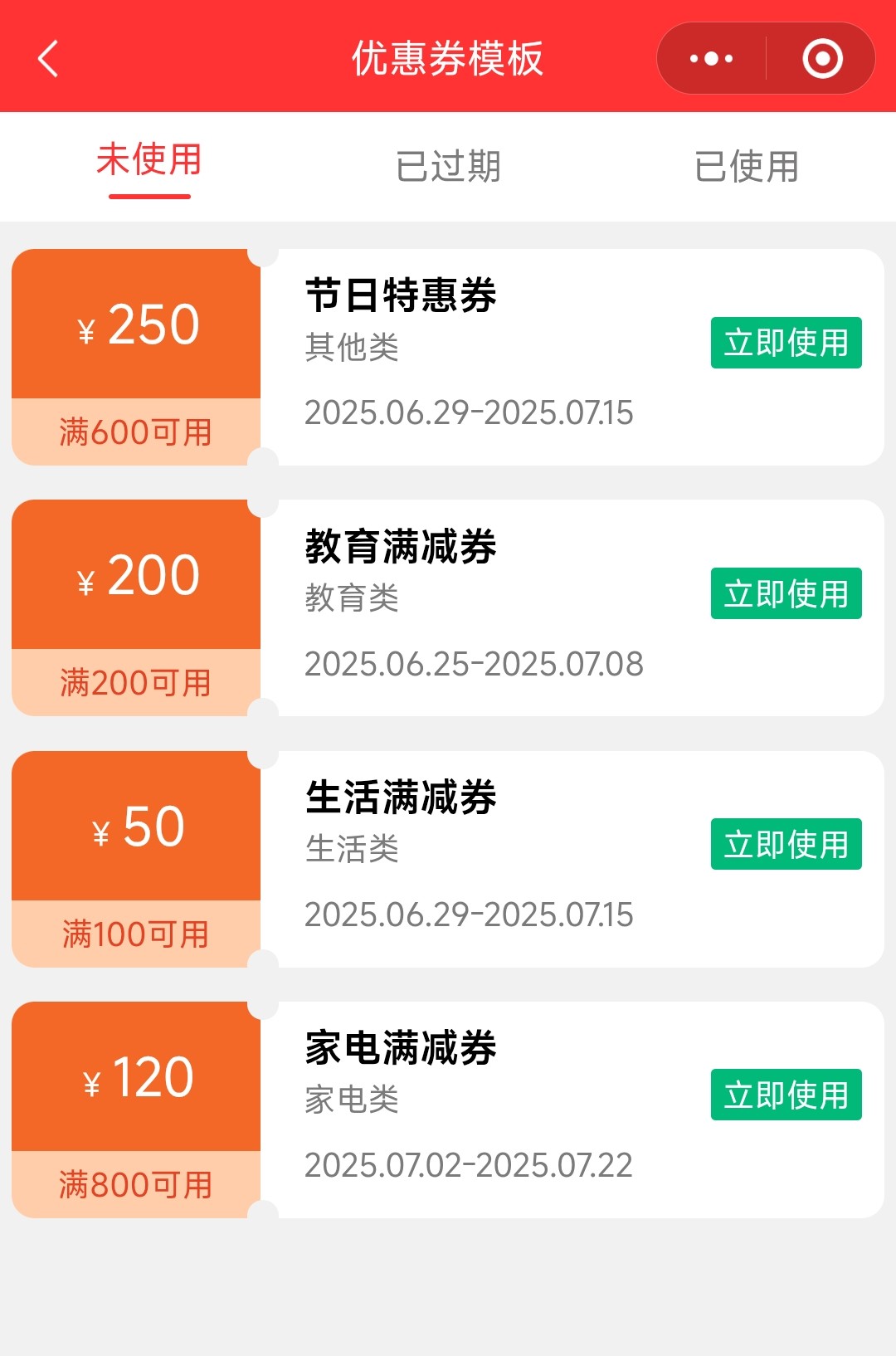
在电商类小程序中,优惠券模块是提升用户复购率和客单价的重要功能。本文将详细介绍一个优惠券列表页面的实现过程,包括数据处理、页面布局、样式设计和交互逻辑,帮助开发者快速掌握类似功能的开发技巧。
功能概述
本次实现的优惠券列表页面具有以下特点:
- 支持按 “未使用”、“已过期”、“已使用” 三种状态筛选优惠券
- 顶部导航栏固定,支持状态切换交互
- 优惠券卡片采用左右分栏设计,直观展示优惠金额和使用条件
- 列表支持纵向滚动,适配不同屏幕尺寸
- 空状态处理,当筛选结果为空时显示提示信息
核心方法实现
1、导航切换事件:处理导航项点击,切换当前选中状态并重新筛选数据
navClick(e) {
  this.setData({
    current: e.currentTarget.dataset.tag
  },()=>{
    this.getDataInfo();  // 数据更新后重新筛选
  })
}
2、数据筛选方法:根据当前选中的状态筛选优惠券
getDataInfo() {
  let t = this.data.current;
  // 筛选出状态匹配的优惠券
  let list = attrList.filter(item => item.current === t);
  this.setData({
    dataList: list
  })
}
具体可根据接口返回数据进行筛选。
3、高度计算方法:动态计算滚动区域高度,适配不同设备
getAreaHeight() {
  let self = this;
  const query = wx.createSelectorQuery();
  query.select('#navArea')
    .boundingClientRect((rect) => {
      // 计算顶部高度和滚动区域高度
      let top = rect.height + 12;
      let range = wx.getWindowInfo().screenHeight;
      self.setData({
        topHeight: top,
        viewHeight: range - top - 76
      });
    }).exec();
}
功能优化与扩展建议
1、性能优化:
-
对于大量优惠券数据,可实现分页加载
-
使用wx:key优化列表渲染性能
-
图片资源使用合适尺寸,避免过大图片影响加载速度
2、功能扩展: -
添加优惠券搜索功能,支持按类型、金额筛选
-
实现优惠券分享功能
-
添加优惠券过期提醒功能
-
支持优惠券使用说明弹窗
3、用户体验优化: -
添加加载状态提示
-
优惠券过期状态使用灰色样式区分
-
实现优惠券滑动删除功能(已过期 / 已使用)
-
添加空状态图片提示,增强视觉效果
以下贴出完整代码,仅供参考:
1、js代码
const attrList = [
  {
    "money": 150,
    "fullMoney": 500,
    "text": "生鲜满减券",
    "kind": "食品类",
    "date": "2025.06.28-2025.07.12",
    "current": 1
  },
  {
    "money": 250,
    "fullMoney": 600,
    "text": "节日特惠券",
    "kind": "其他类",
    "date": "2025.06.29-2025.07.15",
    "current": 0
  },
  {
    "money": 300,
    "fullMoney": 750,
    "text": "教育专区券",
    "kind": "教育类",
    "date": "2025.06.27-2025.07.10",
    "current": 2
  },
  {
    "money": 280,
    "fullMoney": 400,
    "text": "食品折扣券",
    "kind": "食品类",
    "date": "2025.06.30-2025.07.14",
    "current": 1
  },
  {
    "money": 200,
    "fullMoney": 200,
    "text": "教育满减券",
    "kind": "教育类",
    "date": "2025.06.25-2025.07.08",
    "current": 0
  },
  {
    "money": 50,
    "fullMoney": 200,
    "text": "生活优惠券",
    "kind": "生活类",
    "date": "2025.06.28-2025.07.13",
    "current": 2
  },
  {
    "money": 100,
    "fullMoney": 500,
    "text": "食品通用券",
    "kind": "食品类",
    "date": "2025.06.26-2025.07.09",
    "current": 1
  },
  {
    "money": 50,
    "fullMoney": 100,
    "text": "生活满减券",
    "kind": "生活类",
    "date": "2025.06.29-2025.07.15",
    "current": 0
  },
  {
    "money": 75,
    "fullMoney": 300,
    "text": "数码优惠券",
    "kind": "数码类",
    "date": "2025.07.01-2025.07.20",
    "current": 1
  },
  {
    "money": 120,
    "fullMoney": 800,
    "text": "家电满减券",
    "kind": "家电类",
    "date": "2025.07.02-2025.07.22",
    "current": 0
  },
  {
    "money": 35,
    "fullMoney": 150,
    "text": "美妆优惠券",
    "kind": "美妆类",
    "date": "2025.07.03-2025.07.25",
    "current": 2
  }
]

Page({

  /**
   * 页面的初始数据
   */
  data: {
    current: 0,
    topHeight: 44,
    viewHeight: 640,
    navList: [{
        'id': 0,
        'title': '未使用',
        'total': 3
      },
      {
        'id': 1,
        'title': '已过期',
        'total': 3
      },
      {
        'id': 2,
        'title': '已使用',
        'total': 3
      },
    ],
    dataList: []
  },

  navClick(e) {
    this.setData({
      current: e.currentTarget.dataset.tag
    },()=>{
      this.getDataInfo();
    })
  },

  /**
   * 生命周期函数--监听页面初次渲染完成
   */
  onLoad: function () {
    this.getDataInfo();
  },

  getDataInfo() {
    let t = this.data.current;
    let list = attrList.filter(item => item.current === t);
    this.setData({
      dataList: list
    })
  },

  /**
   * 生命周期函数--监听页面初次渲染完成
   */
  onReady: function () {
    this.getAreaHeight();
  },

  getAreaHeight() {
    let self = this;
    const query = wx.createSelectorQuery();
    query.select('#navArea')
      .boundingClientRect((rect) => {
        let top = rect.height + 12;
        let range = wx.getWindowInfo().screenHeight;
        self.setData({
          topHeight: top,
          viewHeight: range - top-76
        });
      }).exec();
  },

  /**
   * 用户点击右上角分享
   */
  onShareAppMessage() {

  }
})
2、wxml代码
<view class="level nav-box" id="navArea">
  <block wx:for="{{navList}}" wx:for-item="item" wx:for-index="index" wx:key="item">
    <view class="nav {{current==index?'active':''}}" bind:tap="navClick" data-tag="{{index}}">
      <view>{{item.title}}</view>
      <view class="line {{current==index?'red':'trans'}}" wx:if="{{current==index}}"></view>
    </view>
  </block>
</view>
<view class="box" style="padding-top: {{topHeight}}px;">
  <scroll-view scroll-y="{{true}}" style="height: {{viewHeight}}px;" wx:if="{{dataList.length>0}}">
    <block wx:for="{{dataList}}" wx:for-index="index" wx:for-item="item" wx:key="item">
      <view class="level row">
        <view class="row-left">
          <view class="middle left-t">
            <text>¥</text>
            <text>{{item.money}}</text>
          </view>
          <view class="middle left-b">满{{item.fullMoney}}可用</view>
        </view>
        <view class="dot top-dot"></view>
        <view class="dot bot-dot"></view>
        <view class="row-right">
          <view class="right-t">
            <text>{{item.text}}</text>
            <text>{{item.kind}}</text>
            <text>立即使用</text>
          </view>
          <view class="right-b">{{item.date}}</view>
        </view>
      </view>
    </block>
  </scroll-view>
  <view class="not-box" wx:else>暂无数据显示!</view>
</view>
3、wxss代码
page {
  font-size: 32rpx;
  background-color: #f1f1f1;
}

.level {
  display: flex;
  flex-direction: row;
  align-items: center;
}

.nav-box {
  position: fixed;
  top: 0;
  left: 0;
  right: 0;
  z-index: 9;
  justify-content: space-around;
  background-color: white;
}

.nav {
  display: flex;
  flex-direction: column;
  align-items: center;
  padding: 20rpx 0;
  color: #7c7a7a;
}

.active {
  color: #FF3333;
}

.line {
  width: 70rpx;
  height: 5rpx;
  margin-top: 10rpx;
  border-radius: 5rpx;
}

.trans {
  background-color: transparent;
}

.red {
  background-color: #FF3333;
}

.box {
  margin-bottom: 10rpx;
  margin-left: 10rpx;
  margin-right: 10rpx;
}

.row {
  background-color: white;
  border-radius: 20rpx;
  position: relative;
  margin-bottom: 30rpx;
}

.row-left {
  width: 30%;
  text-align: center;
}

.middle {
  display: flex;
  align-items: center;
  justify-content: center;
}

.left-t {
  font-size: 44rpx;
  color: white;
  padding: 16% 0;
  background-color: #F36827;
  border-top-left-radius: 20rpx;
}

.left-t text:first-child {
  font-size: 28rpx;
  margin-top: 15rpx;
  padding-right: 5rpx;
}

.left-b {
  background-color: #FFCDAA;
  font-size: 28rpx;
  padding: 5% 0;
  color: #e44222;
  border-bottom-left-radius: 20rpx;
}

.row-right {
  width: 70%;
  padding-left: 5%;
}

.right-t {
  display: flex;
  flex-direction: column;
  position: relative;
}

.right-t text:nth-child(1) {
  font-size: 34rpx;
  font-weight: bold;
}

.right-t text:nth-child(2) {
  font-size: 28rpx;
  color: #7c7a7a;
  padding-top: 5rpx;
}

.right-t text:nth-child(3) {
  position: absolute;
  right: 20rpx;
  font-size: 28rpx;
  bottom: 0;
  background-color: #01BA79;
  color: white;
  border-radius: 5rpx;
  padding: 5rpx 10rpx;
}

.right-b {
  font-size: 28rpx;
  color: #7c7a7a;
  padding-top: 20rpx;
  padding-bottom: 10rpx;
}

.dot {
  width: 28rpx;
  height: 28rpx;
  background-color: #F1F1F1;
  position: absolute;
  border-radius: 28rpx;
  left: 27%;
}

.top-dot {
  top: -12rpx;
}

.bot-dot {
  bottom: -12rpx;
}

.not-box {
  text-align: center;
  padding-top: 45%;
  font-size: 30rpx;
  color: #7c7a7a;
}
4、json代码
{
  "usingComponents": {},
  "navigationBarBackgroundColor": "#FF3333",
  "navigationBarTitleText": "优惠券模板"
}
总结
本文详细介绍了微信小程序优惠券列表页面的实现过程,通过动态计算高度实现了不同设备的适配,使用条件渲染实现了不同状态的展示切换,这些技巧在其他列表类页面开发中也同样适用。
更多示例,请关注 蒜鸟编程(微信小程序 / 抖音 / 小红书/微信公众号/微博****等同名称),在这里,编程与生活的边界从未如此清晰,期待与大家共同成长!后续将围绕编程技术持续更新更多实践示例,如果在实现过程中遇到问题,或者有更好的优化建议,欢迎在评论区交流讨论!
更多推荐



 23
23 0
0- 0


 已为社区贡献5条内容

所有评论(0)