
three.js简单实现小方块堆叠三视图
·
教小学的老姐上课需要一个可以自己堆小方块并能转来转去显示三视图的东西,思考了一下这不是用前端就可以搞定了吗,于是利用three.js实现了效果。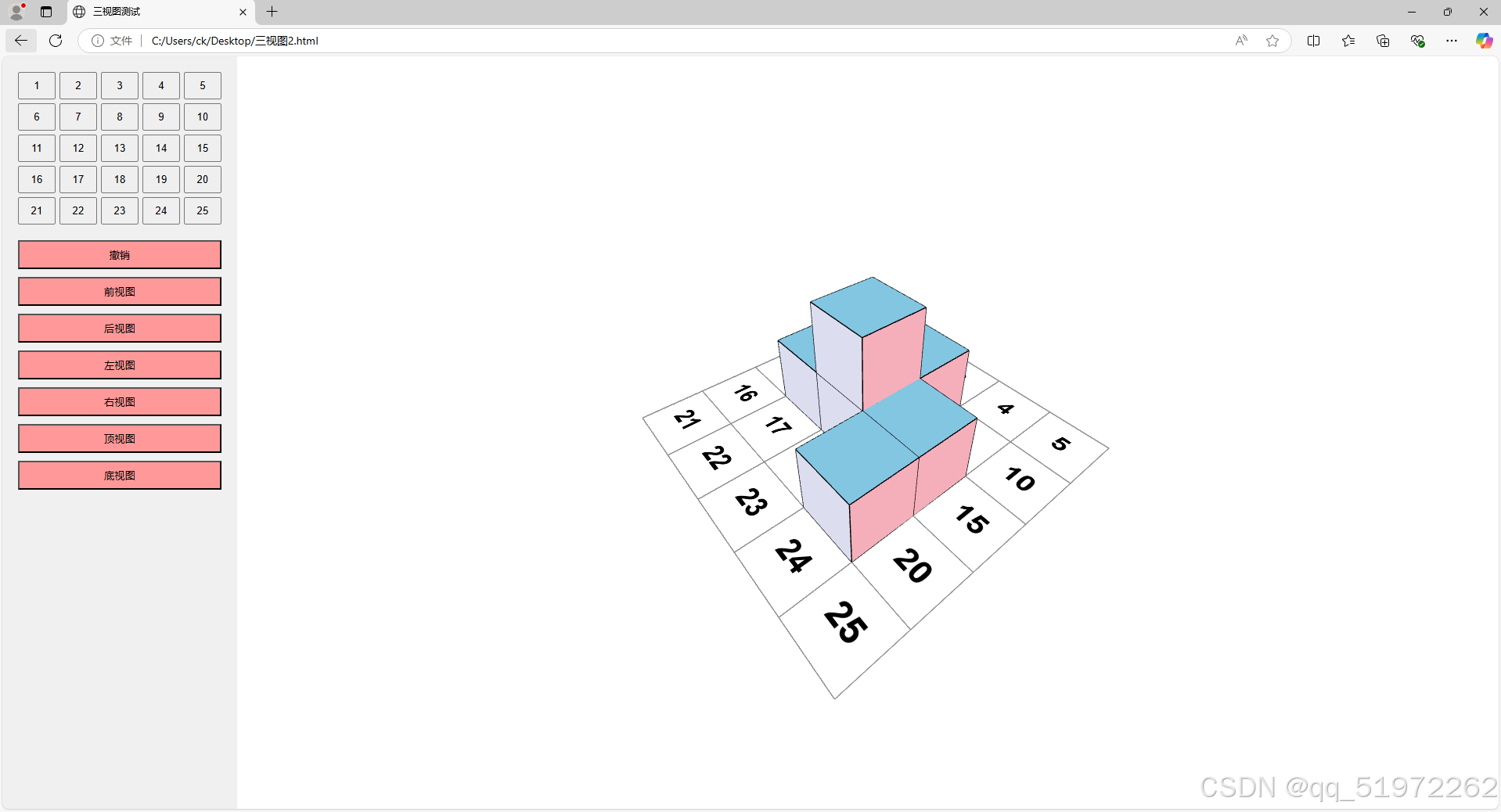
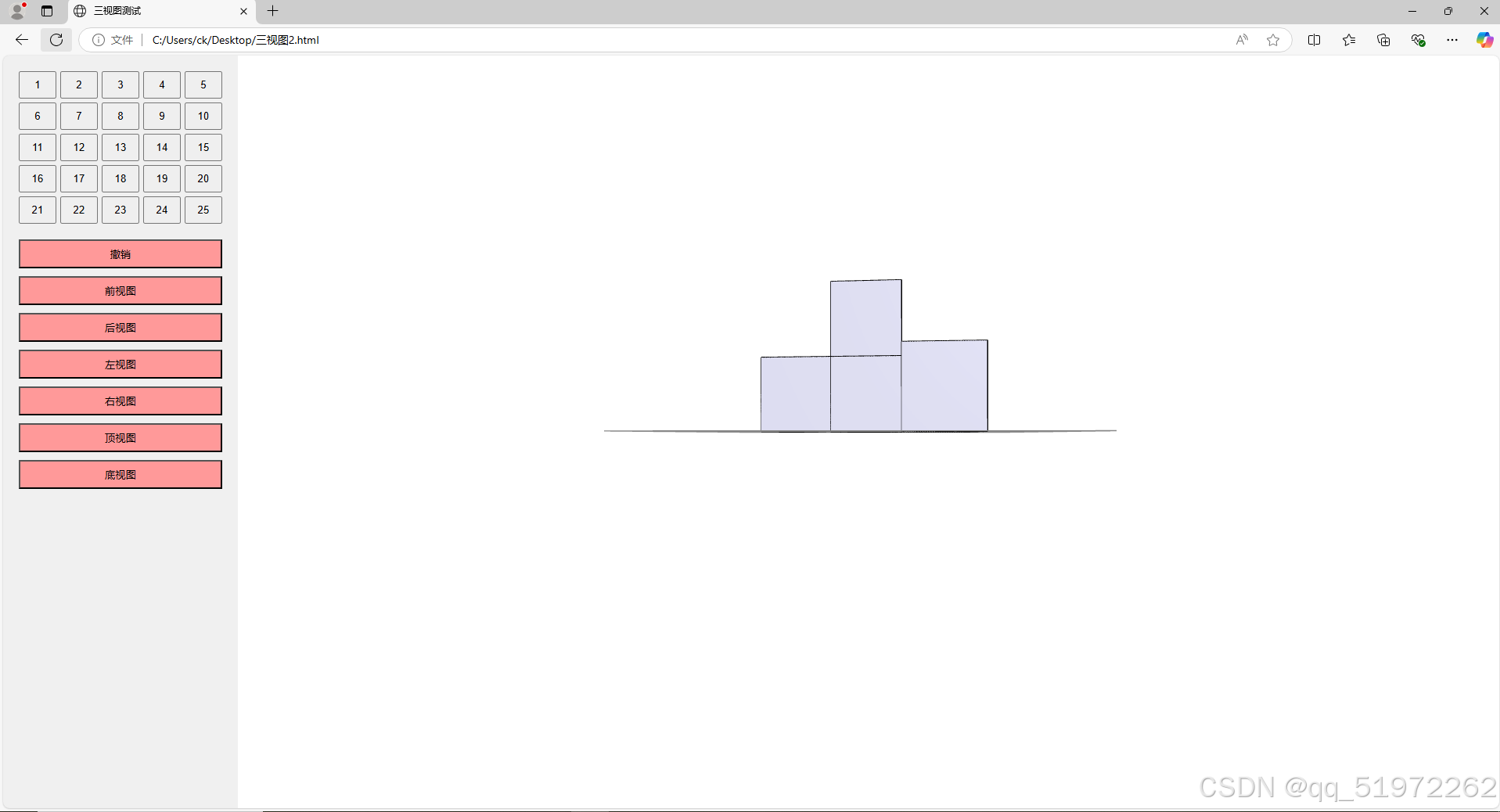
左边25个按钮点击即可在对应位置放置一个小方格,还可以点击切换不同视角,鼠标拖动视角360度旋转。简单好用
<!DOCTYPE html>
<html>
<head>
    <title>三视图测试</title>
    <style>
    body { margin: 0; display: flex; height: 100vh; }
    #controls {
        width: 300px;  /* 增加宽度从 200px 到 300px */
        padding: 20px;
        background: #f0f0f0;
        overflow-y: auto;
    }
    .button-grid {
        display: grid;
        grid-template-columns: repeat(5, 1fr);
        gap: 5px;
        margin-bottom: 20px;
    }
    button {
        padding: 8px;  /* 稍微减小按钮的内边距 */
        cursor: pointer;
        min-width: 40px;  /* 设置最小宽度 */
    }
    #viewport {
        flex: 1;
    }
    #undo {
        width: 100%;
        margin-bottom: 10px;
        background-color: #ff9999;
    }
    #front {
        width: 100%;
        margin-bottom: 10px;
        background-color: #ff9999;
    }
    #back {
        width: 100%;
        margin-bottom: 10px;
        background-color: #ff9999;
    }
    #left {
        width: 100%;
        margin-bottom: 10px;
        background-color: #ff9999;
    }
    #right {
        width: 100%;
        margin-bottom: 10px;
        background-color: #ff9999;
    }
    #top {
        width: 100%;
        margin-bottom: 10px;
        background-color: #ff9999;
    }
    #bottom {
        width: 100%;
        margin-bottom: 10px;
        background-color: #ff9999;
    }

</style>

</head>
<body>
    <div id="controls">
        <div class="button-grid">
            <!-- 1-25的按钮将通过JavaScript生成 -->
        </div>
        <button id="undo">撤销</button>
        <button id="front">前视图</button>
        <button id="back">后视图</button>
        <button id="left">左视图</button>
        <button id="right">右视图</button>
        <button id="top">顶视图</button>
        <button id="bottom">底视图</button>
    </div>
    <div id="viewport"></div>

    <script src="https://unpkg.com/three@0.128.0/build/three.min.js"></script>
    <script src="https://unpkg.com/three@0.128.0/examples/js/controls/OrbitControls.js"></script>

    <script>
        let renderer, camera, scene, controls;
        const cubes = new Map();
        const GRID_SIZE = 5;
        const CUBE_SIZE = 1;
        let history = [];

        // 初始化场景
        function init() {
            // 创建渲染器
            renderer = new THREE.WebGLRenderer({ antialias: true });
            renderer.setSize(window.innerWidth - 300, window.innerHeight);
            document.getElementById('viewport').appendChild(renderer.domElement);

            // 创建场景
            scene = new THREE.Scene();
            scene.background = new THREE.Color(0xffffff);

            // 设置相机
            camera = new THREE.PerspectiveCamera(75, (window.innerWidth - 200) / window.innerHeight, 0.1, 1000);
            camera.position.set(7, 7, 7);
            camera.lookAt(0, 0, 0);

            // 添加灯光
            const ambientLight = new THREE.AmbientLight(0xffffff, 0.5);
            scene.add(ambientLight);
            const directionalLight = new THREE.DirectionalLight(0xffffff, 0.8);
            directionalLight.position.set(5, 5, 5);
            scene.add(directionalLight);

            // 添加网格地面
            const gridHelper = new THREE.GridHelper(GRID_SIZE, GRID_SIZE);
            scene.add(gridHelper);
            addGridNumbers();
            // 初始化轨道控制器
            controls = new THREE.OrbitControls(camera, renderer.domElement);
            controls.enableDamping = true;

            // 生成控制按钮
            createButtons();
            setupViewButtons();

            // 添加撤销按钮事件监听
            document.getElementById('undo').addEventListener('click', undoLastAction);

        }

        function addGridNumbers() {
            // 创建画布来生成数字纹理
            function createTextTexture(text) {
                const canvas = document.createElement('canvas');
                const context = canvas.getContext('2d');
                canvas.width = 128;  // 增加分辨率
                canvas.height = 128;

                // 设置文本样式
                context.fillStyle = 'black';
                context.font = 'bold 64px Arial';  // 增加字体大小以提高清晰度
                context.textAlign = 'center';
                context.textBaseline = 'middle';

                // 在画布中心绘制文本
                context.fillText(text, canvas.width/2, canvas.height/2);

                const texture = new THREE.CanvasTexture(canvas);
                texture.minFilter = THREE.LinearFilter;  // 改善缩小时的质量
                texture.magFilter = THREE.LinearFilter;  // 改善放大时的质量
                return texture;
            }

            // 创建一个平面几何体作为数字的容器
            const planeGeometry = new THREE.PlaneGeometry(0.8, 0.8); // 略小于网格大小

            // 为每个格子添加数字
            for (let i = 1; i <= 25; i++) {
                const position = getGridPosition(i);

                // 创建平面材质
                const planeMaterial = new THREE.MeshBasicMaterial({
                    map: createTextTexture(i.toString()),
                    transparent: true,
                    side: THREE.DoubleSide
                });

                // 创建平面网格
                const numberPlane = new THREE.Mesh(planeGeometry, planeMaterial);

                // 设置位置,将平面旋转为水平放置
                numberPlane.position.set(position.x, 0.01, position.z); // 略高于网格平面
                numberPlane.rotation.x = -Math.PI / 2; // 使平面水平

                scene.add(numberPlane);
            }
        }

        // 创建1-25的按钮
        function createButtons() {
            const container = document.querySelector('.button-grid');
            for (let i = 1; i <= 25; i++) {
                const btn = document.createElement('button');
                btn.textContent = i;
                btn.addEventListener('click', () => addCube(i));
                container.appendChild(btn);
            }
        }

        // 设置视图切换按钮
        function setupViewButtons() {
            // 添加新视图的事件监听器
            document.getElementById('back').addEventListener('click', () => {
                camera.position.set(0, 0, -10);
                camera.lookAt(0, 0, 0);
            });

            document.getElementById('top').addEventListener('click', () => {
                camera.position.set(0, 10, 0);
                camera.up.set(0, 0, -1); // 设置相机向上方向
                camera.lookAt(0, 0, 0);
            });

            document.getElementById('bottom').addEventListener('click', () => {
                camera.position.set(0, -10, 0);
                camera.up.set(0, 0, 1); // 设置相机向上方向
                camera.lookAt(0, 0, 0);
            });

            // 修改现有的视图函数,确保相机up向量的正确设置
            document.getElementById('front').addEventListener('click', () => {
                camera.position.set(0, 0, 10);
                camera.up.set(0, 1, 0); // 重置相机向上方向
                camera.lookAt(0, 0, 0);
            });

            document.getElementById('left').addEventListener('click', () => {
                camera.position.set(-10, 0, 0);
                camera.up.set(0, 1, 0); // 重置相机向上方向
                camera.lookAt(0, 0, 0);
            });

            document.getElementById('right').addEventListener('click', () => {
                camera.position.set(10, 0, 0);
                camera.up.set(0, 1, 0); // 重置相机向上方向
                camera.lookAt(0, 0, 0);
            });
        }

        // 添加立方体
        function addCube(buttonId) {
            const position = getGridPosition(buttonId);
            const key = `${position.x},${position.z}`;
            const count = cubes.get(key)?.count || 0;

            // 创建包含立方体和线框的组
            const cubeGroup = new THREE.Group();

            // 创建彩色立方体
            const cubeGeometry = new THREE.BoxGeometry(CUBE_SIZE, CUBE_SIZE, CUBE_SIZE);

            const materials = [
                    new THREE.MeshPhongMaterial({ color: 0xFFB6C1 }), // 右 - 浅粉红
                    new THREE.MeshPhongMaterial({ color: 0x98FB98 }), // 左 - 浅绿色
                    new THREE.MeshPhongMaterial({ color: 0x87CEEB }), // 上 - 天蓝色
                    new THREE.MeshPhongMaterial({ color: 0xFAFAD2 }), // 下 - 浅黄色
                    new THREE.MeshPhongMaterial({ color: 0xE6E6FA }), // 前 - 淡紫色
                    new THREE.MeshPhongMaterial({ color: 0xF0FFFF })  // 后 - 淡青色
                ];
            const cube = new THREE.Mesh(cubeGeometry, materials);

            // 添加黑色线框
            const edges = new THREE.EdgesGeometry(cubeGeometry);
            const line = new THREE.LineSegments(
                edges,
                new THREE.LineBasicMaterial({ color: 0x000000 })
            );

            // 将立方体和线框添加到组中
            cubeGroup.add(cube);
            cubeGroup.add(line);

            // 设置整个组的位置,包括y轴高度
            cubeGroup.position.set(
                position.x,
                count * CUBE_SIZE + CUBE_SIZE/2,  // 修改这里,将y轴位置设置应用到整个组
                position.z
            );

            scene.add(cubeGroup);

            // 更新存储
            cubes.set(key, {
                count: count + 1,
                group: cubeGroup
            });
            // 记录这个操作到历史
            history.push({
                key: key,
                cubeGroup: cubeGroup
            });
        }

        // 计算网格位置
        function getGridPosition(buttonId) {
            const index = buttonId - 1;
            const row = Math.floor(index / 5);
            const col = index % 5;
            return {
                x: col - 2,
                z: row - 2
            };
        }

        // 设置相机位置
        function setCameraPosition(theta, phi) {
            const radius = 10;
            camera.position.x = radius * Math.sin(theta) * Math.cos(phi);
            camera.position.y = radius * Math.sin(phi);
            camera.position.z = radius * Math.cos(theta) * Math.cos(phi);
            camera.lookAt(0, 0, 0);
        }

        // 动画循环
        function animate() {
            requestAnimationFrame(animate);
            controls.update();
            renderer.render(scene, camera);
        }

        // 初始化并启动
        init();
        animate();

        // 窗口大小调整
        window.addEventListener('resize', () => {
            camera.aspect = (window.innerWidth - 200) / window.innerHeight;
            camera.updateProjectionMatrix();
            renderer.setSize(window.innerWidth - 200, window.innerHeight);
        });
        function undoLastAction() {
    if (history.length === 0) return;

    const lastAction = history.pop();
    const { key, cubeGroup } = lastAction;

    // 从场景中移除最后添加的立方体组
    scene.remove(cubeGroup);

    // 更新该位置的计数
    const currentState = cubes.get(key);
    if (currentState && currentState.count > 1) {
        cubes.set(key, {
            count: currentState.count - 1,
            group: currentState.group
        });
    } else {
        cubes.delete(key);
    }
}
    </script>
</body>
</html>
更多推荐
 4
4 0
0- 0


 已为社区贡献1条内容

所有评论(0)