
uniapp 列表下拉加载,上拉刷新
·
一上拉加载更多
1.1page.json
根目录中的 pages.json 配置文件,页面配置上拉触底的距离:
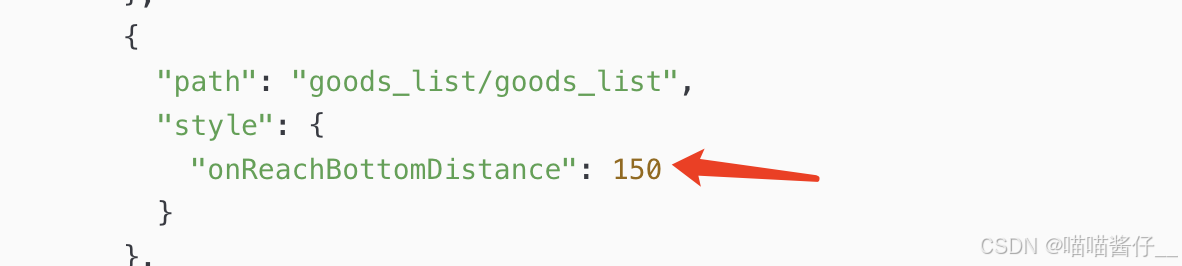
1.2 onReachBottom
声明 onReachBottom 事件处理函数,用来监听页面的上拉触底行为
改造 methods 中的 getGoodsList 函数,当列表数据请求成功之后,进行新旧数据的拼接处理:
// 触底的事件
onReachBottom() {
  // 让页码值自增 +1
  this.queryObj.pagenum += 1
  // 重新获取列表数据
  this.getGoodsList()
}

// 获取商品列表数据的方法
async getGoodsList() {
  // 发起请求
  const { data: res } = await uni.$http.get('/api/public/v1/goods/search', this.queryObj)
  if (res.meta.status !== 200) return uni.$showMsg()

  // 为数据赋值:通过展开运算符的形式,进行新旧数据的拼接
  this.goodsList = [...this.goodsList, ...res.message.goods]
  this.total = res.message.total
}
1.3通过节流阀防止发起额外的请求
来回的拉下拉框,导致一直调用接口, 这种是不合理的, 应该在请求当中不允许再次请求
我们需要一个变量来控制, 在请求之前开启节流阀,请求完毕关闭节流阀。
再onReachBottom 判断节流阀 , false不允许调用接口
// 获取商品列表数据的方法
async getGoodsList() {
  // ** 打开节流阀
  this.isloading = true
  // 发起请求
  const { data: res } = await uni.$http.get('/api/public/v1/goods/search', this.queryObj)
  // ** 关闭节流阀
  this.isloading = false

  // 省略其它代码...
}
在 onReachBottom 触底事件处理函数中,根据节流阀的状态,来决定是否发起请求:
// 触底的事件
onReachBottom() {
  // 判断是否正在请求其它数据,如果是,则不发起额外的请求
  if (this.isloading) return

  this.queryObj.pagenum += 1
  this.getGoodsList()
}
1.4判断数据是否加载完毕
有个total, 如果加载完毕,不应该继续调用下一页的接口了
修改 onReachBottom 事件处理函数如下
当前的页码值 * 每页显示多少条数据 >= 总数条数
pagenum * pagesize >= total
// 触底的事件
onReachBottom() {
  // 判断是否还有下一页数据
  if (this.queryObj.pagenum * this.queryObj.pagesize >= this.total) return uni.$showMsg('数据加载完毕!')

  // 判断是否正在请求其它数据,如果是,则不发起额外的请求
  if (this.isloading) return

  this.queryObj.pagenum += 1
  this.getGoodsList()
}
二下拉刷新
2.1pages.json
为当前的 goods_list 页面单独开启下拉刷新效果
"enablePullDownRefresh": true,
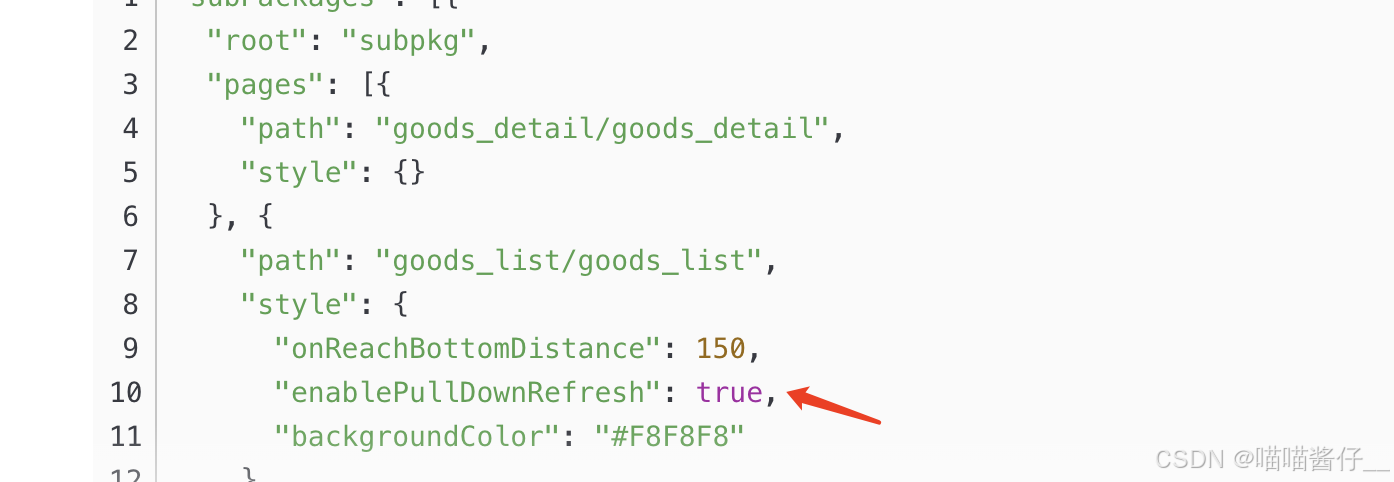
2.2onPullDownRefresh
监听页面的 onPullDownRefresh 事件处理函数: 传递一个回调函数
// 下拉刷新的事件
onPullDownRefresh() {
  // 1. 重置关键数据
  this.queryObj.pagenum = 1
  this.total = 0
  this.isloading = false
  this.goodsList = []

  // 2. 重新发起请求
  this.getGoodsList(() => uni.stopPullDownRefresh())
}
三项目改造使用
加载列表页面
<template>
  <!-- 订单列表 -->
  <custom-navbar title="订单列表" goType="orderList" />
  <view
    class="order-list"
    :style="
      orderList.length == 0 && !isLoading && requestFlag ? 'height:100%' : ''
    "
  >
    <view class="order-list_box" v-if="orderList.length > 0">
      <view
        class="order-list_item"
        v-for="item in orderList"
        :key="item.orderId"
        @click="() => skipDetailPage(item.orderId)"
      >
        <view class="left">
          <image
            :show-loading="true"
            :src="orderIcons[item.viewStatus]?.icon"
            style="width: 60rpx; height: 60rpx"
          ></image>
          <view class="left_text">
            <view class="left_text_top"
              ><text>{{ item.orderNo }}</text></view
            >
            <view class="left_text_bottom"
              ><text :style="`color: ${orderIcons[item.viewStatus]?.color};`">{{
                orderIcons[item.viewStatus]?.label
              }}</text></view
            >
          </view>
        </view>
        <view class="right">
          <text class="right-text">¥{{ item.payableAmount }}</text>
          <up-icon name="arrow-right" color="#D8D8D8" size="14"></up-icon>
        </view>
      </view>
    </view>
    <!-- :style="
        orderList.length == 0 && !isLoading && requestFlag ? 'height:100%' : ''
      " -->
    <!-- :style="finish ? 'margin-top: 20rpx' : 'margin-top: 0rpx'" -->
    <view
      class="order-list_box text_box"
      v-if="orderList.length == 0 && !isLoading && requestFlag"
      :style="
        orderList.length == 0 && !isLoading && requestFlag ? 'height:100%' : ''
      "
    >
      暂无数据
    </view>
    <view class="loading-text">
      {{ finish ? "没有更多数据~" : "" }}
      {{ isLoading ? "正在加载..." : "" }}
    </view>
  </view>
</template>

<script setup>
import { ref } from "vue";
import { onLoad } from "@dcloudio/uni-app";
import { request } from "@/api/request";
import { onReachBottom, onPullDownRefresh } from "@dcloudio/uni-app";
import { orderIcons } from "@/utils/viewStatus.js";
import CustomNavbar from "@/components/CustomNavbar.vue";
import { onShow } from "@dcloudio/uni-app";

function skipDetailPage(id) {
  uni.navigateTo({
    url: "/pages/orderDetail/index?id=" + id,
  });
}

//下拉刷新
onPullDownRefresh(() => {
  console.log("refresh");
  pageIndex.value = 1;
  total.value = 0;
  orderList.value = [];
  finish.value = false;
  getOrderListAPI();
  setTimeout(function () {
    // 操作完成时,必须结束下拉刷新,否则一直会有 loading 标志
    uni.stopPullDownRefresh();
  }, 1000);
});

// 获取列表
let pageIndex = ref(1);
let pageSize = ref(15);
let total = ref(0);
const isLoading = ref(false);
const finish = ref(false);
const orderList = ref([]);

const requestFlag = ref(false);
const viewStatus = ref(null);
onLoad((options) => {
  if (options?.status) {
    viewStatus.value = Number(options?.status);
  }
});

onShow(() => {
  pageIndex.value = 1;
  total.value = 0;
  orderList.value = [];
  isLoading.value = false;
  finish.value = false;
  getOrderListAPI();
  requestFlag.value = true;
});

onReachBottom(() => {
  // 判断是否还有下一页数据
  if (pageIndex.value * pageSize.value >= total.value) {
    finish.value = orderList.value.length != 0;
    return;
  }
  console.log("触底加载", isLoading.value);
  // 判断是否正在请求其它数据,如果是,则不发起额外的请求
  if (isLoading.value) return;
  pageIndex.value += 1;
  getOrderListAPI();
});

const getOrderListAPI = () => {
  // ** 打开节流阀
  isLoading.value = true;
  request({
    url: "/tenant-web/platform/wechat/xcx/order/orderList",
    method: "POST",
    data: {
      pageIndex: pageIndex.value,
      pageSize: pageSize.value,
      viewStatus: viewStatus.value ? viewStatus.value : null,
    },
  })
    .then((res) => {
      if (res?.data?.list && res?.data.list.length != 0) {
        const data = res?.data;
        orderList.value = [...orderList.value, ...res.data.list];
        total.value = Number(data.total);
        console.log("orderList.value", orderList.value);
      } else {
        orderList.value = [];
      }
      // 关闭节流阀
      isLoading.value = false;
    })
    .catch((e) => {
      isLoading.value = false;
      uni.showToast({
        title: e?.msg || "请求失败",
        icon: "none",
      });
    });
};
</script>

<style lang="scss" scoped>
.order-list {
  padding: 20rpx;
  background-color: #eff4f7;
  box-sizing: border-box;
  flex: 1;
  padding-bottom: calc(env(safe-area-inset-bottom));
  // height: 100%;
  .order-list_box {
    background-color: #ffffff;
    border-radius: 20rpx;
    // min-height: calc(100vh - 100rpx);
    // height: 100%;
    padding: 0 10rpx;

    .order-list_item {
      padding: 30rpx 20rpx;
      display: flex;
      justify-content: space-between;
      flex-wrap: wrap;
      border-top: 1rpx solid #f5f5f5;

      .left {
        flex: 2;
        display: flex;
        align-items: center;

        .left_text {
          margin-left: 20rpx;
        }

        .left_text_top {
          font-weight: 400;
          font-size: 26rpx;
          color: #333333;
          margin-bottom: 12rpx;
        }

        .left_text_bottom {
          font-weight: 400;
          font-size: 26rpx;
        }
      }

      .right {
        flex: 1;
        display: flex;
        align-items: center;
        justify-content: flex-end;
        font-weight: 500;
        font-size: 32rpx;
        color: #333333;
        margin-right: -10rpx;

        .right-text {
          margin-right: 20rpx;
        }
      }
    }

    & .order-list_item:first-child {
      border-top: 2rpx solid transparent;
    }
  }
}
.loading-text {
  text-align: center;
  font-family: PingFangSC-Regular;
  font-weight: 400;
  font-size: 28rpx;
  color: #666666;
  margin: 20rpx;
  overflow: hidden;
}
.text_box {
  display: flex;
  align-items: center;
  justify-content: center;
  font-family: PingFangSC-Regular;
  font-weight: 400;
  font-size: 28rpx;
  color: #666666;
}
</style>
<style>
page {
  height: 100%;
  display: flex;
  flex-direction: column;
}
</style>
更多推荐



 4
4 0
0- 0


 已为社区贡献4条内容

所有评论(0)