
uniapp使用vue3+ts环境封装一个瀑布流组件
·
目录结构

说明:
#参数说明
|参数名					|类型	|默认值	|说明				|

|list					|Array	|[]		|数据源				|
|keyName				|String	|'id'	|数据唯一标识字段名	|
|imageKey				|String	|'image'|图片字段名			|
|nameKey				|String	|'name'	|标题字段名			|
|textKey				|String	|'text'	|描述字段名			|
|columnWidth			|Number	|345	|列宽(rpx)			|
|gap					|Number	|30		|列间距(rpx)		|
|itemMarginBottom		|Number	|20		|元素下边距(rpx)	|
|autoHeight				|Boolean|true	|是否自动计算高度	|
|defaultImage			|String	|-		|默认图片地址		|
|defaultContentHeight	|Number	|240	|预估内容高度(rpx)	|


#使用示例
```
<template>
  <zzx-waterfall
    :list="goodsList"
    keyName="goodsId"
    imageKey="cover"
    nameKey="goodsName"
    textKey="description"
    column-width="320"
    gap="20"
    @image-loaded="handleImageLoad"
    @image-error="handleImageError"
  >
    <template #content="{ item }">
      <view class="custom-content">
        <view class="tags">
          <text v-for="tag in item.tags" :key="tag">{{tag}}</text>
        </view>
      </view>
    </template>
  </zzx-waterfall>
</template>
```

#插槽使用示例
##可使用插槽的当时进行自定义样式以及内容,使用方法为template标签内示例
###提供image和content两个插槽,可完全自定义内容展示
```
<zzx-waterfall :list="data">
  <template #image="{ item }">
    <custom-image :src="item.picture" />
  </template>
  <template #content="{ item }">
    <custom-content :data="item" />
  </template>
</zzx-waterfall>
```
子组件代码:
<template>
	<view class="waterfall-container content" :style="{ gap: gap + 'rpx' }">
		<view class="waterfall-column" :style="{ width: columnWidth + 'rpx' }" v-for="(column, index) in columns"
			:key="index">
			<view v-for="item in column" :key="item[keyName]" class="waterfall-item" :id="'item-'+item[keyName]"
				:style="{ marginBottom: itemMarginBottom + 'rpx' }" @click.stop="handleItemClick(item)">
				<!-- 图片插槽 -->
				<slot name="image" :item="item">
					<image :src="parseImageUrl(item[imageKey])" mode="widthFix" :style="{ width: columnWidth + 'rpx' }"
						@load="handleImageLoad(item, index)" @error="handleImageError(item, index)" />
				</slot>

				<!-- 内容插槽 -->
				<slot name="content" :item="item">
					<view class="content-box">
						<text class="title text-ellipsis">{{ item[nameKey] }}</text>
						<text class="desc multi-line-ellipsis">{{ item[textKey] }}</text>
					</view>
				</slot>
			</view>
		</view>
	</view>
</template>

<script lang="ts" setup>
	import { ref, watch, computed } from 'vue'
	import type { PropType } from 'vue'
	const props = defineProps({
		// 数据源
		list: {
			type: Array as PropType<any[]>,
			default: () => []
		},
		// 数据唯一标识字段名
		keyName: {
			type: String,
			default: 'id'
		},
		// 图片字段名
		imageKey: {
			type: String,
			default: ''
		},
		// 标题字段名
		nameKey: {
			type: String,
			default: 'name'
		},
		// 描述字段名
		textKey: {
			type: String,
			default: 'text'
		},
		// 列宽(rpx)
		columnWidth: {
			type: Number,
			default: 345
		},
		// 列间距(rpx)
		gap: {
			type: Number,
			default: 10
		},
		// 元素下边距(rpx)
		itemMarginBottom: {
			type: Number,
			default: 20
		},
		// 是否自动计算高度
		autoHeight: {
			type: Boolean,
			default: true
		},
		// 默认图片地址
		defaultImage: {
			type: String,
			default: '/static/logo.png'
		},
		// 预估内容高度(rpx,autoHeight为false时生效)
		defaultContentHeight: {
			type: Number,
			default: 240
		}
	})

	const emit = defineEmits(['item-click', 'image-loaded', 'image-error'])
	// 列数据
	const columns = ref<any[][]>([[], []])
	// 列高度记录
	const columnHeights = ref<number[]>([0, 0])
	// 图片地址处理逻辑
	const parseImageUrl = (url : string) => {
		if (!url) return props.defaultImage
		// 添加域名处理逻辑(根据实际需求)
		return url.includes('://') ? url : `https://your-imgUrl.com${url}`
	}
	// 优化后的图片加载处理
	const handleImageLoad = (item : any, colIndex : number) => {
		uni.createSelectorQuery()
			.select(`#item-${item[props.keyName]} image`)
			.boundingClientRect(rect => {
				if (!rect) return
				// 添加单位转换(rpx转px)
				const systemInfo = uni.getSystemInfoSync()
				const pxPerRpx = systemInfo.windowWidth / 750
				const contentHeight = props.defaultContentHeight * pxPerRpx
				item._height = rect.height + contentHeight
				reorganizeItems()
			})
			.exec()
	}
	// 处理图片加载失败
	const handleImageError = (item : any, colIndex : number) => {
		const defaultHeight = props.defaultContentHeight / 2 // 转换为px
		columnHeights.value[colIndex] += defaultHeight
		reorganizeItems()
		emit('image-error', item)
	}
	// 点击事件
	const handleItemClick = (item : any) => {
		emit('item-click', item)
	}

	// 重组布局
	const reorganizeItems = () => {
		const newColumns : any[][] = [[], []]
		const heights = [0, 0]
		props.list.forEach(item => {
			// 获取当前项高度
			const itemHeight = props.autoHeight
				? (item._height || props.defaultContentHeight / 2)
				: props.defaultContentHeight / 2
			// 寻找最短列
			const targetCol = heights[0] <= heights[1] ? 0 : 1
			newColumns[targetCol].push(item)
			heights[targetCol] += itemHeight
		})
		columns.value = newColumns
		columnHeights.value = heights
	}

	// 监听数据变化
	watch(() => props.list, (newVal : any[]) => {
		// 初始化高度数据
		newVal.forEach(item => {
			if (!item._height) {
				item._height = props.defaultContentHeight / 2
			}
		})
		reorganizeItems()
	}, { immediate: true, deep: true })
</script>

<style lang="less" scoped>
	.waterfall-container {
		display: flex;
		justify-content: space-between;
		box-sizing: border-box;

		.waterfall-column {
			display: flex;
			flex-direction: column;

			.waterfall-item {
				background: #fff;
				border-radius: 16rpx;
				overflow: hidden;
				box-shadow: 0 4rpx 12rpx rgba(0, 0, 0, 0.06);
				transition: transform 0.1s;

				&:active {
					transform: scale(0.98);
				}

				image {
					background: #f5f5f5;
					display: block;
				}

				.content-box {
					padding: 24rpx;

					.title {
						font-size: 28rpx;
						color: #333;
						line-height: 1.4;
						display: -webkit-box;
						overflow: hidden;
						text-overflow: ellipsis;
						-webkit-line-clamp: 1;
						-webkit-box-orient: vertical;
					}

					.desc {
						margin-top: 16rpx;
						font-size: 24rpx;
						color: #999;
						line-height: 1.5;
						display: -webkit-box;
						overflow: hidden;
						text-overflow: ellipsis;
						-webkit-line-clamp: 2;
						-webkit-box-orient: vertical;
					}
				}
			}
		}
	}
</style>
组件使用:
<template>
	<zzx-waterfall :list="goodsList" nameKey="name" imageKey="picurl" textKey="album" gap="10"
		@item-click="handleItemClick">
	</zzx-waterfall>
</template>

<script lang="ts" setup>
	import zzxWaterfall from '@/components/zzx-waterfall/zzx-waterfall.vue';
	import { ref, onMounted } from 'vue';
	import { http } from '@/utils/http';
	const goodsList = ref([])
	onMounted(() => {
		get_lsit()
	})
	const get_lsit = () => {
		http.get('/api/wangyi/musicChart', { loading: true })
			.then(res => {
				goodsList.value = res.songs
			})
	}

	const handleItemClick = (e : any) => {
		console.log(e);
	}
</script>

<style lang="less" scoped>

</style>
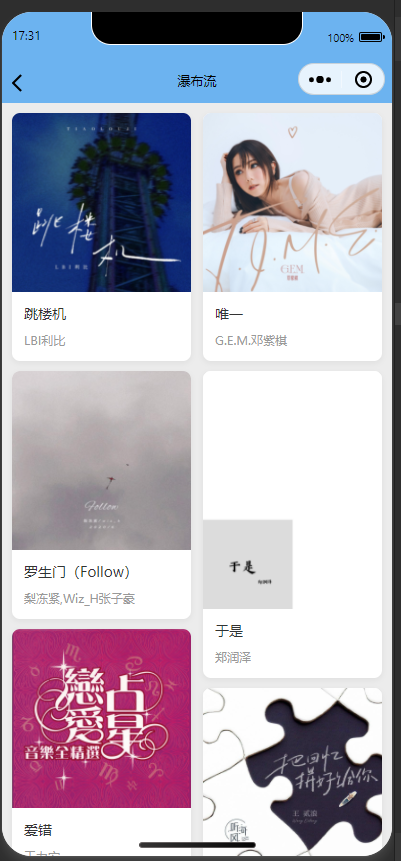
效果图:
更多推荐


 2
2 0
0- 0


 已为社区贡献2条内容

所有评论(0)