
解决 Element-ui中 对话框 (Dialog)中含子组件时,使用 refs 调用该子组件为 undefined 的问题
·
解决 Element-ui中 对话框 (Dialog)中含子组件时,使用 refs 调用该子组件为 undefined 的问题
问题:当对话框 (Dialog)中包含子组件时,我们使用 this.$refs 试图获取该组件的 dom 并操作时,发现获取的 dom 为 undefined 导致后续的方法报错;
<template>
  <div>
    <el-dialog :visible.sync="propertyDialog" width="60%" center>
      <lineChart
        ref="chart"
        :xAxisArr="xAxisArr"
        :yAxisArr="yAxisArr"
      ></lineChart>
    </el-dialog>
  </div>
</template>

<script>
import lineChart from "@/components/lineChart.vue";
export default {
  data() {
    return {
      xAxisArr: [],
      yAxisArr: [],
      propertyDialog: false,
    };
  },
  components: {
    lineChart,
  },
  methods: {
    showCharts() {
      this.propertyDialog = true;
      console.log(this.$refs.chart);
      this.$refs.chart.drawLineChart();
    },
  },
};
</script>
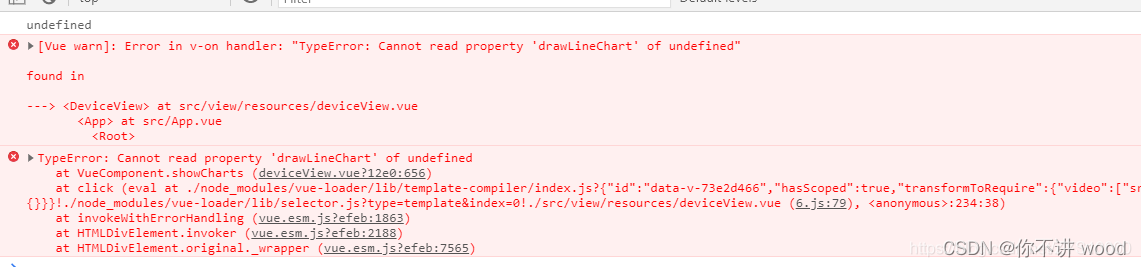
官方的用法说明:将回调延迟到下次 DOM 更新循环之后执行。在修改数据之后立即使用它,然后等待 DOM 更新。
解决方法: 加上一个 this.$nextTick 就可以啦
showCharts(params) {
  this.propertyDialog = true;
  this.$nextTick(()=>{
    console.log(this.$refs.chart);
    this.$refs.chart. ();
  })
},
更多推荐



 9
9 0
0- 0


 已为社区贡献1条内容

所有评论(0)