
virtualBox + vagrant 搭建ansible实验环境
1.下载virtualBox的虚拟机位置
Vagrant 官网下载:vagrantup.com/downloads.html
VirtualBox官网下载:https://www.virtualbox.org/wiki/Downloads
2.修改virtualBox的虚拟机位置
默认是C盘,避免占用大量内存

3.将C盘下的.vagrant.d/boxes目录挪出
- 这个文件夹默认是存放在系统盘上的C:/Users/{用户名}目录下的,如果box文件非常多的话,会造成空间不够。
- 配置环境变量setx VAGRANT_HOME "D:\environment\.vagrant.d"
4.使用中科大镜像指令
中科大镜像USTC Open Source Software Mirror
vagrant init centos7 https://mirrors.ustc.edu.cn/centos-cloud/centos/7/vagrant/x86_64/images/CentOS-7.box
5.启动
vagrant up
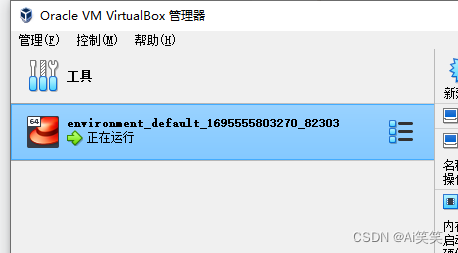
6.搭建ansible实验环境
添加ubuntu box
命令
vagrant box add <box-name> <box-url>
vagrant box add ubuntu/trusty64 https://mirrors.ustc.edu.cn/ubuntu-cloud-images/vagrant/trusty/20191107/trusty-server-cloudimg-amd64-vagrant-disk1.boxVagrantfile
Vagrant.configure(2) do |config|

    #common config
    config.vm.box = "ubuntu/trusty64"
    config.vm.provider "virtualbox" do |vb|
        vb.memory = "256"
    end
    #create some web server
    (1..2).each do |i|
        config.vm.define "web#{i}" do |web_config|
            web_config.vm.hostname ="web#{i}"
            web_config.vm.network "private_network", ip: "192.168.33.2#{i}"
            web_config.vm.network "forwarded_port", guest: 80, host: "808#{i}"
        end
    end
    #create mgmt node
    config.vm.define "mgmt" do |mgmt_config|
        mgmt_config.vm.hostname ="mgmt"
        mgmt_config.vm.network "private_network",ip:"192.168.33.11"
        mgmt_config.vm.provision "shell",path:"bootstrap-mgmt.sh"
    end
end
在Vagrantfile中我们声明了需要创建三台虚拟机,mgmt为管理节点,hostname是mgmt,ip地址为192.168.33.11,同时安装好后会执行一段shell脚本(bootstrap-mgmt.sh)。web1,web2作为被管理节点。
bootstrap-mgmt.sh
#!/usr/bin/env bash
# install ansible (http://docs.ansible.com/ansible/intro_installation.html)
sudo apt-get install software-properties-common
sudo apt-add-repository ppa:ansible/ansible
sudo apt-get update
sudo apt-get install -y ansible
#configure hosts file
cat >>/etc/hosts <<EOL
vagrant env node
192.168.33.11 mgmt
192.168.33.21 web1
192.168.33.22 web2
EOL
在shell脚本中,我们做了两件事
(1)安装ansible,这里因为我们用的是Ubuntu操作系统,所以使用的是apt来进行安装,其他的安装方式可以在http://docs.ansible.com/ansible/intro_installation.html中查看
(2)将每台虚拟机的ip地址和hostname写入到管理节点的hosts文件中,至于为什么要这么做,这个后面再讲
接下来我们只需要在Vagrantfile所在目录的命令行中敲入vagrant up启动虚拟机即可,前提是你已经安装了vagrant了
当虚拟机启动完成后,如果你是Linux或者OS X操作系统,在命令行中执行vagrant ssh mgmt就可以连接到mgmt管理节点了,如果你是windows用户,可以通过Xshell,SecureCRT等SSH客户端连接到mgmt管理节点,账号和密码默认都为vagrant。
更多推荐

 0
0 0
0- 0


 已为社区贡献1条内容

所有评论(0)