
CentOS 配置全局http代理
·
CentOS7或8 配置全局http代理
在安装依赖的时候,经常会因为服务器问题,安装依赖速度很慢甚至无法安装,如下图所示。

可通过配置系统全局代理来提升速度,本文仅做客户端设置教程,具体代理服务器搭建请参考其他文章。
本文所用CentOS为:CentOS Linux release 8.1
进入profile修改配置
su root
vi /etc/profile
在第一行加入以下内容
export proxy="http://IP:PORT"
export http_proxy=$proxy
export https_proxy=$proxy
export no_proxy="localhost, 127.0.0.1, ::1"
其中第一行的ip和端口号根据自己的代理服务器具体配置更改,保存退出后,source一下
source /etc/profile
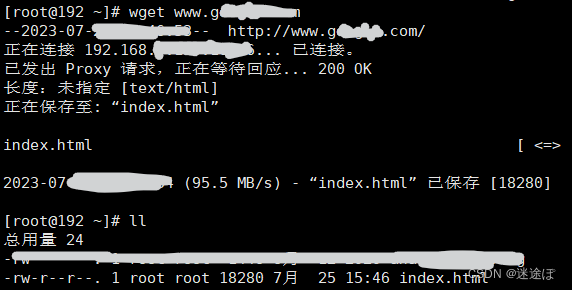
此时已经可以上*网了,可以用wget测试一下
wget www.github.com
如果在当前目录下成功下载了一个index.html文件,则代理成功
如果要关闭代理,仅仅注释掉profile的代理内容是不行的,在文件内加入以下内容
unset http_proxy
unset https_proxy
unset no_proxy
并重新source一下
source /etc/profile
其它:
1、添加 --permanent永久生效,没有此参数重启后失效 这里的6379为redis服务的端口,若为其他服务设置,需要对应端口:
firewall-cmd --zone=public --add-port=6379/tcp --permanent
命令含义:
–zone #作用域
–add-port=80/tcp #添加端口,格式为:端口/通讯协议
–permanent #永久生效,没有此参数重启后失效
2、删除一个要开放的端口号8080/tcp
sudo firewall-cmd --remove-port=8080/tcp --permanent
3、重新载入
firewall-cmd --reload
4、查看所有打开的端口:
firewall-cmd --zone=public --list-ports
5、防火墙的关闭:
systemctl stop firewalld 或 service firewalld stop
6、防火墙的启动:
systemctl start firewalld 或 service firewalld start
7、防火墙的状态查询:
systemctl status firewalld 或 service firewalld status
8、查看当前系统的发行版本
rpm -qi centos-release
更多推荐


 0
0 0
0- 0


 已为社区贡献1条内容

所有评论(0)