
Android kotlin 实现把多个控件整体上下拉回弹功能(添加是否禁用顶部和底部回弹的参数设置,以及回弹效果结束监听)
·
一、实现效果
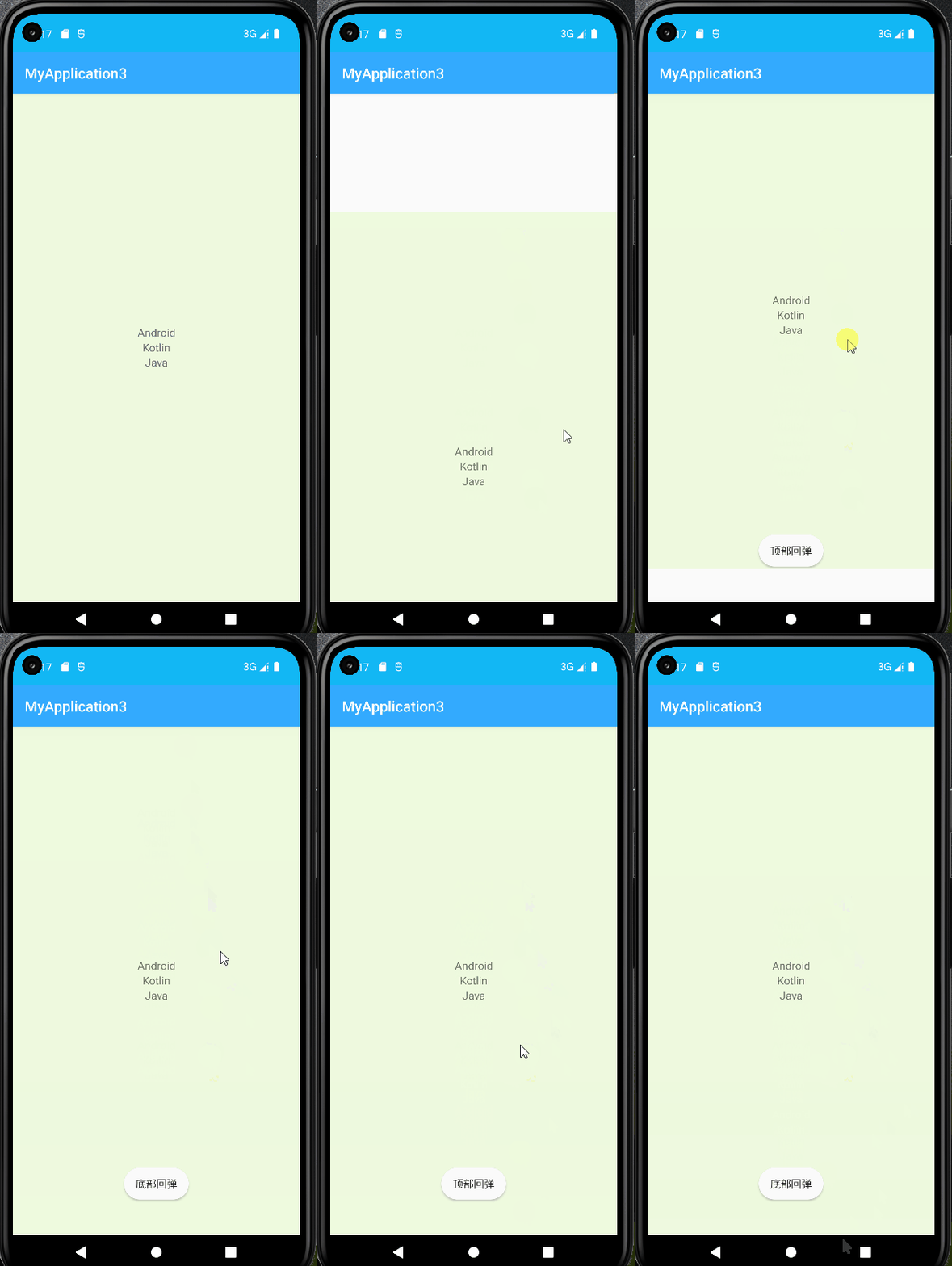
二、源码
1、上下拉回弹,自定义ScrollView
上下拉回弹,自定义ScrollView,ReboundScrollView.kt
package com.example.myapplication3.myview

import android.content.Context
import android.graphics.Rect
import android.util.AttributeSet
import android.view.MotionEvent
import android.view.View
import android.view.animation.Animation
import android.view.animation.TranslateAnimation
import android.widget.ScrollView

class ReboundScrollView : ScrollView {
    private var mEnableTopRebound = true
    private var mEnableBottomRebound = true
    private var mOnReboundEndListener: OnReboundEndListener? = null
    private var mContentView: View? = null
    private val mRect = Rect()

    constructor(context: Context?) : super(context)
    constructor(context: Context?, attrs: AttributeSet?) : super(context, attrs)
    constructor(context: Context?, attrs: AttributeSet?, defStyleAttr: Int) : super(context, attrs, defStyleAttr)

    /** after inflating view, we can get the width and height of view  */
    override fun onFinishInflate() {
        super.onFinishInflate()
        mContentView = getChildAt(0)
    }

    override fun onLayout(changed: Boolean, l: Int, t: Int, r: Int, b: Int) {
        super.onLayout(changed, l, t, r, b)
        if (mContentView == null) return
        // to remember the location of mContentView
        // to remember the location of mContentView
        mRect.set(mContentView!!.left, mContentView!!.top, mContentView!!.right ,mContentView!!.bottom)
    }

    fun setOnReboundEndListener(onReboundEndListener: OnReboundEndListener?): ReboundScrollView {
        mOnReboundEndListener = onReboundEndListener
        return this
    }

    fun setEnableTopRebound(enableTopRebound: Boolean): ReboundScrollView {
        mEnableTopRebound = enableTopRebound
        return this
    }

    fun setEnableBottomRebound(mEnableBottomRebound: Boolean): ReboundScrollView {
        this.mEnableBottomRebound = mEnableBottomRebound
        return this
    }

    private var lastY = 0
    private var rebound = false
    private var reboundDirection = 0 //<0 表示下部回弹 >0 表示上部回弹 0表示不回弹
    override fun dispatchTouchEvent(ev: MotionEvent): Boolean {
        if (mContentView == null) {
            return super.dispatchTouchEvent(ev)
        }
        when (ev.action) {
            MotionEvent.ACTION_DOWN -> lastY = ev.y.toInt()


            MotionEvent.ACTION_MOVE -> {
                if (!isScrollToTop && !isScrollToBottom) {
                    lastY = ev.y.toInt()
//                    break
                } else {
                    //处于顶部或者底部
                    val deltaY = (ev.y - lastY).toInt()
                    //deltaY > 0 下拉 deltaY < 0 上拉
                    //disable top or bottom rebound
                    if ((!mEnableTopRebound && deltaY > 0) || (!mEnableBottomRebound && deltaY < 0)) {
//                        break
                    } else {
                        val offset = (deltaY * 0.48).toInt()
                        mContentView!!.layout(
                            mRect.left,
                            mRect.top + offset,
                            mRect.right,
                            mRect.bottom + offset
                        )
                        rebound = true
                    }
                }
            }


            MotionEvent.ACTION_UP -> {
                if (!rebound) {
//                    break
                } else {
                    reboundDirection = mContentView!!.top - mRect.top
                    val animation =
                        TranslateAnimation(
                            0f,
                            0f,
                            mContentView!!.top.toFloat(),
                            mRect.top.toFloat()
                        )
                    animation.duration = 300
                    animation.setAnimationListener(object : Animation.AnimationListener {
                        override fun onAnimationStart(animation: Animation) {}
                        override fun onAnimationEnd(animation: Animation) {
                            if (mOnReboundEndListener != null) {
                                if (reboundDirection > 0) {
                                    mOnReboundEndListener!!.onReboundTopComplete()
                                }
                                if (reboundDirection < 0) {
                                    mOnReboundEndListener!!.onReboundBottomComplete()
                                }
                                reboundDirection = 0
                            }
                        }

                        override fun onAnimationRepeat(animation: Animation) {}
                    })
                    mContentView!!.startAnimation(animation)
                    mContentView!!.layout(mRect.left, mRect.top, mRect.right, mRect.bottom)
                    rebound = false
                }
            }
        }
        return super.dispatchTouchEvent(ev)
    }

    override fun setFillViewport(fillViewport: Boolean) {
        super.setFillViewport(true) //默认是填充ScrollView 或者再XML布局文件中设置fillViewport属性
    }

    /**
     * 判断当前ScrollView是否处于顶部
     */
    private val isScrollToTop: Boolean
        private get() = scrollY == 0

    /**
     * 判断当前ScrollView是否已滑到底部
     */
    private val isScrollToBottom: Boolean
        private get() = mContentView!!.height <= height + scrollY

    /**
     * listener for top and bottom rebound
     * do your implement in the following methods
     */
    interface OnReboundEndListener {
        fun onReboundTopComplete()
        fun onReboundBottomComplete()
    }
}
2、主activity
MainActivity.kt
package com.example.myapplication3

import android.os.Bundle
import android.widget.Toast
import androidx.appcompat.app.AppCompatActivity
import com.example.myapplication3.myview.ReboundScrollView.OnReboundEndListener
import kotlinx.android.synthetic.main.activity_main.reboundScrollView

class MainActivity : AppCompatActivity() {
    override fun onCreate(savedInstanceState: Bundle?) {
        super.onCreate(savedInstanceState)
        setContentView(R.layout.activity_main)
        reboundScrollView.setEnableTopRebound(true) //设置是否禁用顶部回弹,true是默认的
        reboundScrollView.setEnableBottomRebound(true) //设置是否禁用底部回弹,true是默认的
        reboundScrollView.setOnReboundEndListener(object : OnReboundEndListener {
            override fun onReboundTopComplete() {
                Toast.makeText(this@MainActivity, "顶部回弹", Toast.LENGTH_SHORT).show()
            }

            override fun onReboundBottomComplete() {
                Toast.makeText(this@MainActivity, "底部回弹", Toast.LENGTH_SHORT).show()
            }
        })
    }
}
activity_main.xml
<?xml version="1.0" encoding="utf-8"?>
<LinearLayout xmlns:android="http://schemas.android.com/apk/res/android"
    android:layout_width="match_parent"
    android:layout_height="match_parent">

    <com.example.myapplication3.myview.ReboundScrollView
        android:id="@+id/reboundScrollView"
        android:layout_width="match_parent"
        android:layout_height="match_parent">

        <LinearLayout
            android:layout_width="match_parent"
            android:layout_height="match_parent"
            android:layout_gravity="center"
            android:background="#eefade"
            android:gravity="center"
            android:orientation="vertical">

            <TextView
                android:layout_width="match_parent"
                android:layout_height="wrap_content"
                android:gravity="center"
                android:text="Android"
                android:textSize="15dp" />

            <TextView
                android:layout_width="match_parent"
                android:layout_height="wrap_content"
                android:gravity="center"
                android:text="Kotlin"
                android:textSize="15dp" />

            <TextView
                android:layout_width="match_parent"
                android:layout_height="wrap_content"
                android:gravity="center"
                android:text="Java"
                android:textSize="15dp" />
        </LinearLayout>
    </com.example.myapplication3.myview.ReboundScrollView>
</LinearLayout>
更多推荐



 1
1 0
0- 0


 已为社区贡献11条内容

所有评论(0)