
qt creator : Managing Sessions (****) session sessions
目录
Managing Sessions (官方文档)
--------------------------------------------------
小结:
1. 同一个项目,使用几个不同的 Sessions,这是有必要的。
比如:一个模块使用一个 session。这样方便于个人数据管理:书签管理、断点管理、。。。。
============================
Managing Sessions
When you exit Qt Creator, it stores a snapshot of your current workspace as a session.
To restore the session automatically when you start Qt Creator, select File > Sessions > Manage > Restore last session on startup.
When you open or create any of the following items, they automatically become a part of the session:
- Projects with their dependencies (including SUBDIRS projects when using qmake)
- Editors
- Breakpoints and expressions
- Bookmarks
A session is personal, that is, not meant to be shared. It is not supposed to reflect the project structure. It contains personal data, such as bookmarks and breakpoints that are usually not of interest to other developers working on the same projects.
书签和断点,属于个人数据,只有用户自己才需要。这是 Sessions的用途之一。
For example, if you work on a project and need to switch to another project for a while, you can clone the current session to save it under a name and create a new session for the other project.
Everything that you open after switching to the new session becomes a part of it. When you want to return to working on the first project, switch to the saved session. Qt Creator opens the projects and files that belong to the session.
To manage sessions, select File > Sessions > Manage.
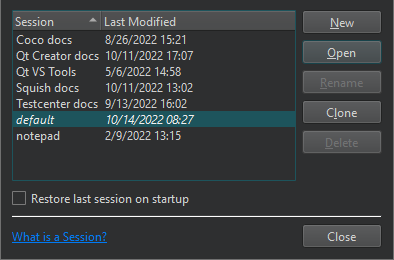
To save a session under a new name, select Clone.
To create a new session:
- Select New.
- In the Enter the name of the session field, enter a name for the session.
- Select Create to create a new empty session or Create and Open to create a session and to switch to it.
To switch between sessions, select Open.
The Projects tab in the Welcome mode lists existing sessions. To open a session, select it or press Ctrl+Alt+<number>, where <number> is the number of the session to open (available for the first nine sessions).
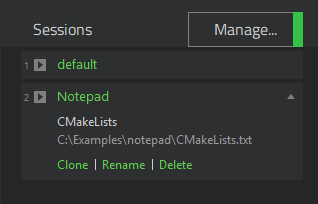
You can also use the t locator filter to open a session. For more information, see Searching with the Locator.
To view more information about a session, select the down arrow icon that appears when you move the mouse cursor over the session name. Select actions to clone, rename, and delete sessions.
When you start Qt Creator from the command line, you can give the name of a session as an argument and Qt Creator will start with this session.
For more information, see Using Command Line Options.
https://doc.qt.io/qtcreator/creator-project-managing-sessions.html
参考:
Qtcreator保存IDE上一次退出前的状态 Sessions (*)
https://blog.csdn.net/ken2232/article/details/130009144
qt creator : Managing Sessions (****) session sessions
https://blog.csdn.net/ken2232/article/details/130019802
kate 跨平台KDE文本编辑器使用方法 汇集: Using Sessions
https://blog.csdn.net/ken2232/article/details/130167973
kate 跨平台KDE文本编辑器使用方法 汇集
https://blog.csdn.net/ken2232/article/details/130167973
Kate 一款功能丰富的文本编辑器(可能是目前最好的开源跨平台轻量编辑器 之一)
https://blog.csdn.net/ken2232/article/details/129605167
更多推荐


 0
0 0
0- 0


 已为社区贡献10条内容

所有评论(0)