
Okhttp源码2:发送请求
Okhttp源码2:发送请求
一、目录
二、目的
分析OkHttp使用时提供的Call,OkHttpClient类,以及OkHttp发送请求时Dispatch调度器调度过程。同时简单分析异步和同步请求的执行流程
下面是一个简单的同步请求的OKHttp的示例
new Thread(new Runable() {
		public void run() {
			try{
					OkHttpClient client = new OkHttpClient();
					Request request = new Request.Builder()
									.url("http://www.baidu.com")
									.build();
						try{
							Response response = client.newCall(request).execute();
							if(response.isSuccessful())
								System.out.println("成功");
								}
							}catch(IOException e){
								e.printStackTrace();
								}
						}catch(Exception e){
						e.printStackTrace();
						}
					}
				}
			}).start();
三、OkHttpClient()类
在使用OkHttp是,会先生成一个OkHttpClient类,OkHttpClient类有两种方法,一种是new(就是上面的示例),另一种是使用建造者()(Builder)模式 – new OkHttpClient.Builder()…Build()。
两种区别在于,第一种会进行默认属性设置,第二种可以对单独的属性进行设置。
下面为第一种的源码
public OkHttpClient() {
    this(new Builder());
  }

  OkHttpClient(Builder builder) {
    this.dispatcher = builder.dispatcher; //调度器详见下文
    this.proxy = builder.proxy;//代理
    this.protocols = builder.protocols; //默认支持的Http协议版本
    this.connectionSpecs = builder.connectionSpecs;//OKHttp连接(Connection)配置
    this.interceptors = Util.immutableList(builder.interceptors);
    this.networkInterceptors = Util.immutableList(builder.networkInterceptors);
    this.eventListenerFactory = builder.eventListenerFactory; //一个Call的状态监听器
    this.proxySelector = builder.proxySelector;//使用默认的代理选择器
    this.cookieJar = builder.cookieJar; //默认是没有Cookie的;
    this.cache = builder.cache;//缓存
    this.internalCache = builder.internalCache;
    this.socketFactory = builder.socketFactory;//使用默认的Socket工厂产生Socket;

    boolean isTLS = false;
    for (ConnectionSpec spec : connectionSpecs) {
      isTLS = isTLS || spec.isTls();
    }

    if (builder.sslSocketFactory != null || !isTLS) {
      this.sslSocketFactory = builder.sslSocketFactory;
      this.certificateChainCleaner = builder.certificateChainCleaner;
    } else {
      X509TrustManager trustManager = systemDefaultTrustManager();
      this.sslSocketFactory = systemDefaultSslSocketFactory(trustManager);
      this.certificateChainCleaner = CertificateChainCleaner.get(trustManager);
    }

    this.hostnameVerifier = builder.hostnameVerifier;//安全相关的设置
    this.certificatePinner = builder.certificatePinner.withCertificateChainCleaner(
        certificateChainCleaner);
    this.proxyAuthenticator = builder.proxyAuthenticator;
    this.authenticator = builder.authenticator;
    this.connectionPool = builder.connectionPool;//连接池
    this.dns = builder.dns;//域名解析系统 domain name -> ip address;
    this.followSslRedirects = builder.followSslRedirects;
    this.followRedirects = builder.followRedirects;
    this.retryOnConnectionFailure = builder.retryOnConnectionFailure;
    this.connectTimeout = builder.connectTimeout;
    this.readTimeout = builder.readTimeout;
    this.writeTimeout = builder.writeTimeout;
    this.pingInterval = builder.pingInterval;// :这个就和WebSocket有关了。为了保持长连接,我们必须间隔一段时间发送一个ping指令进行保活;

    if (interceptors.contains(null)) {
      throw new IllegalStateException("Null interceptor: " + interceptors);
    }
    if (networkInterceptors.contains(null)) {
      throw new IllegalStateException("Null network interceptor: " + networkInterceptors);
    }
  }
可以看到,new 之后,OkHttpClient自动添加了很多的属性.
四、Call类(RealCall)
我们在定义请求对象之后,我们需要生成一个call对象,该对象代表一个准备被执行的请求,Call是可以被取消的,Call对象代表一个request/response对(Stream)还有就是Call只能被执行一次。
从newCall进入源代码
@override public Call newCall(Request request) {
	return RealCall.newRealCall(this,request,false /* for web socket */);
继续进入newRealCall
final class RealCall implements Call{
	final OkHttpClient client;
	final RetryAndFollowUpInterceptor retryAndFollowUpInterceptor;
	private EventListener eventListener;
	final Request originalRequest;
	fianl boolean forWebSocket;
	private boolean executed;
	private RealCall(OkHttpClient client,Request originalRequest,boolean forWebSocket ){
	this.client = client;
    this.originalRequest = originalRequest;
    this.forWebSocket = forWebSocket;
    this.retryAndFollowUpInterceptor = new RetryAndFollowUpInterceptor(client, forWebSocket);
  }
static RealCall newRealCall(OkhttpClient client,Request originalRequest,boolean forWebSocket){
	RealCall call=new RealCall(client,originalRequest,forWebSocket);
	call.eventListener = client.eventListenerFactory().create(call);
	return call;
	}
可以看出在OkHttp中实际生产的是一个Call的实现类RealCall。
五、Dispatcher类
Dispatcher类负责异步任务的请求策略
首先看定义部分
public final class Dispatcher{
	private int maxRequests = 64;
	private int maxRequestsPerHost = 5;
	private Runnable idleCallback;
	private ExecutorService executorService;
	private final Deque<AsyncCall> readyAsyncCalls = new ArrayDeque<>();
	private final Deque<AsyncCall> runningAsyncCalls = new ArrayDeque<>();
	private final Deque<RealCall> runningAsyncCalls = new ArrayDeque<>();
	public Dispatcher(ExecutorService executorService){
		this.executorService = executorService;
		}
	public Dispatcher(){
	}
}
查看下面的executorService()方法
	public synchronized ExecutorService executorService(){
		if(executorService == null){
			executorService = new ThreadPoolExecutor(0,Integer.MAX_VALUE,60,TimeUnit.SECONDS,new SynchronousQueue<Runnable>(),util.threadFactory("OkHttp Dispatcher",false));
			}
			return executorService;
			}
继续查看ThreadPoolExecutor类
public ThreadPoolExecutor(int  corePoolSize,int maximumPoolSize,long keepAliveTime,TimeUnit unit,BlockingQueuq<Runnable> workQueue,ThreadFactory threadFactory){
	this(corePoolSize,maxinumPoolSize,keepAliveTime,unit,workQueue,threadFactory,defaultHandler);
corePoolSize :核心线程数,默认情况下核心线程会一直存活
maximumPoolSize: 线程池所能容纳的最大线程数。超过这个数的线程将被阻塞。
keepAliveTime: 非核心线程的闲置超时时间,超过这个时间就会被回收。
unit: keepAliveTime的单位。
workQueue: 线程池中的任务队列。
threadFactory: 线程工厂,提供创建新线程的功能
corePoolSize设置为0表示一旦有闲置的线程就可以回收。容纳最大线程数设置的非常大,但是由于受到maxRequests的影响,并不会创建特别多的线程。60秒的闲置时间。
六、同步请求的执行流程
1.实例
new Thread(new Runnable){
	public void run(){
			try{
					OkHttpClient client = new OkHttpClient();
					Request request = new Request.Builder()
										.url("http://www.baidu.com")
										.build();
							try{
									Response response = client.newCall(request).execute();
										if(response.isSuccessful()){
											System.out.println("成功“);
											 }
                    } catch (IOException e) {
                        e.printStackTrace();
                    }
                } catch (Exception e) {
                    e.printStackTrace();
                }
            }
        }).start();
2.流程分析
可以看出,在同步请求里,调用了client.newCall(request).execute()的方法,在上文说过newCall返回的是一个RealCall对象,所以execute的实现在RealCall。
//RealCall中
public Response execute() throws IOException{
	synchronized (this) {
      if (executed) throw new IllegalStateException("Already Executed");
      executed = true;
    }
    //重定向拦截器相关
    captureCallStackTrace();
    eventListener.callStart(this);
    try{
    	client.dispatcher().executed(this);
    	Response result=getResponseWithInterceptorChain();
    	if(result == null) throw new IOException("Canceled");
    			return result;
    	}catch(IOException e){
    		evenListener.callFailed(this,e);
    		throw e;
    	}finally{
    		client.dispatcher().finished(this);
    }
  }
进入captureCallStackTrace();
private void captureCallStackTrace(){
	Object callStackTrace = platform.get().getStackTraceForCloseable("response.body().close()");
进入dispatcher的executed方法中
//Dispatcher类中
  /** Used by {@code Call#execute} to signal it is in-flight. */
  synchronized void executed(RealCall call) {
    //将同步请求加入到runningSyncCalls队列中。
    runningSyncCalls.add(call);
  }
继续查看dispatcher的finished方法:
void finished(RealCall call){
	finished(runningSyncCalls,call,false);
	}
private <T> void finished(Deque<T> calls,T call,boolean promoteCalls){
	int runningCallCount;
	Runable idleCallback;
	synchronized(this){
		if(!calls.remove(call)) throw new AssertionError("Call wasn't in-flight!");
		if(promoteCalls) promoteCalls();
		runningCallsCount = runningCallsCount();
		idleCallback = this.idleCallback;
		}
		if(runningCallsCount ==0 && idleCallback !=null) {
			idleCallback.run();
			}
		}
查看runningCallsCount();方法
public synchronized int runningCallCount(){
	return runningAsyncCalls.size()+runningSyncCalls.size();
七、异步请求的执行流程
相对于同步请求的,异步请求较为复杂些
1.示例
private void getDataAsync(){
	OkHttpClient client = new OkHttpClient();
	Request request = new Request.Builder()
					.url("http://www.baidu.com")
					.build();
		client.newCall(request).enqueue(new Callback() {
				public void onFailure(Call call,IOException e){
				}
				public void onResponse(Call call,Response response) throws IOException {
				if(response.isSuccessful()){
						Log.d("OkHttp","获取数据成功”);
						Log.d("OkHttp","response.code()=="+response.code());
		  Log.d("OkHttp","response.body().string()=="+response.body().string());
                }
            }
        });
2.流程分析
和同步请求类似,clientnewCall(request)的方法,所以enqueue的实现在RealCall中,查看具体的源码
public void enqueue(Callback responseCallback){
	synchronized(this){
		 if (executed) throw new IllegalStateException("Already Executed");
      executed = true;
    }

    //同上文
    captureCallStackTrace();
    eventListener.callStart(this);
    调用dispatcher()的enqueuef方法,不过在里面传入一次新的参数,AsyncCall类
    client.dispatcher().enqueue(new AsyncCall(responseCallback));
  }
进入AsyncCall类
  final class AsyncCall extends NamedRunnable {
    private final Callback responseCallback;

    AsyncCall(Callback responseCallback) {
      super("OkHttp %s", redactedUrl());
      this.responseCallback = responseCallback;
    }

    String host() {
      return originalRequest.url().host();
    }

    Request request() {
      return originalRequest;
    }

    RealCall get() {
      return RealCall.this;
    }

    @Override protected void execute() {
      boolean signalledCallback = false;
      try {
	//执行耗时的IO操作
	//获取拦截器链,详见下篇文章
        Response response = getResponseWithInterceptorChain();
        if (retryAndFollowUpInterceptor.isCanceled()) {
          signalledCallback = true;

	  //回调,注意这里回调是在线程池中,而不是向当前的主线程回调
          responseCallback.onFailure(RealCall.this, new IOException("Canceled"));
        } else {
          signalledCallback = true;
          //回调,同上
          responseCallback.onResponse(RealCall.this, response);
        }
      } catch (IOException e) {
        if (signalledCallback) {
          // Do not signal the callback twice!
          Platform.get().log(INFO, "Callback failure for " + toLoggableString(), e);
        } else {
          eventListener.callFailed(RealCall.this, e);
          //回调,同上
          responseCallback.onFailure(RealCall.this, e);
        }
      } finally {

        client.dispatcher().finished(this);
      }
    }
  }
继续查看AsyncCall的父类NamedRunnable
public abstract class NamedRunnable implements Runable{
	protected final String name;

	public NamedRunnable(String formatObject .. args){
			this.name = Util.format(format,args);
			}

	public final void run(){
		String oldName = Thread.currentThread().getName();
		Thread.currentThread().setName(name);
		try{
				execute();
				}finally{
					Thread.currentThread().setName(oldName);
					}
				}
			protected abstract void execute();
	}
重新回到RealCall的enqueue,进入到Dispatche().enqueue中
//Dispatcher()类
  synchronized void enqueue(AsyncCall call) {
   //如果正在运行的异步请求的数量小于maxRequests并且与该请求相同的主机数量小于maxRequestsPerHost
    if (runningAsyncCalls.size() < maxRequests && runningCallsForHost(call) < maxRequestsPerHost) {
    //放入runningAsyncCalls队列中
      runningAsyncCalls.add(call);

     //这里调用了executorService()(源码见第五节中)
      executorService().execute(call);
    } else {
    //否则,放入readyAsyncCalls队列
      readyAsyncCalls.add(call);
    }
  }
当线程池执行AsyncCall任务时,它的execute方法会被调用
继续查看Dispatcher的finished方法,
//Dispatcher
  /** Used by {@code AsyncCall#run} to signal completion. */
  void finished(AsyncCall call) {
    finished(runningAsyncCalls, call, true);
  }
和同步请求类似,不同的是第三个参数为true
//Dispatcher

  private <T> void finished(Deque<T> calls, T call, boolean promoteCalls) {
    int runningCallsCount;
    Runnable idleCallback;
    synchronized (this) {
      //从队列中删除
      if (!calls.remove(call)) throw new AssertionError("Call wasn't in-flight!");

      //异步请求调用 promoteCalls()方法
      if (promoteCalls) promoteCalls();
      runningCallsCount = runningCallsCount();
      idleCallback = this.idleCallback;
    }

    if (runningCallsCount == 0 && idleCallback != null) {
      idleCallback.run();
    }
  }
查看promoteCalls()源码
  private void promoteCalls() {

    //运行中的异步任务队列大于等于最大的请求数
    if (runningAsyncCalls.size() >= maxRequests) return; // Already running max capacity.
    //待执行异步任务队列为空
    if (readyAsyncCalls.isEmpty()) return; // No ready calls to promote.

    //遍历等待队列
    for (Iterator<AsyncCall> i = readyAsyncCalls.iterator(); i.hasNext(); ) {
      AsyncCall call = i.next();

      //将符合条件的事件,从等待队列中移出,放入运行队列中。
      if (runningCallsForHost(call) < maxRequestsPerHost) {
        i.remove();
        runningAsyncCalls.add(call);
        executorService().execute(call);
      }

      if (runningAsyncCalls.size() >= maxRequests) return; // Reached max capacity.
    }
  }
八、总结
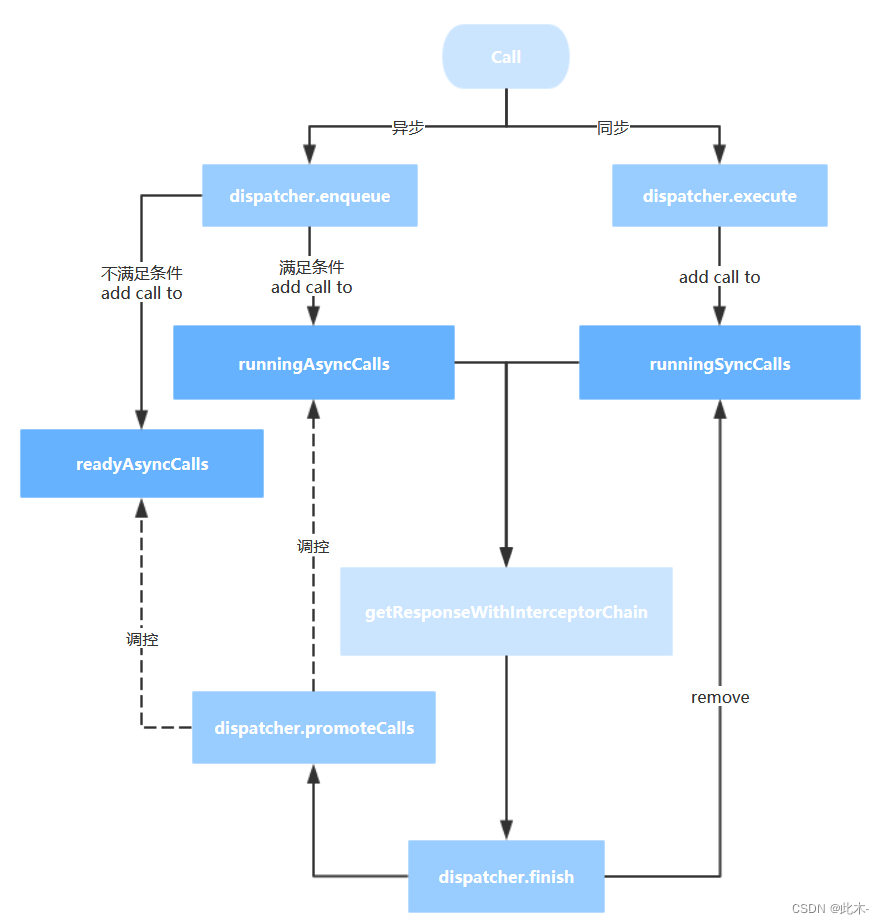
OkHttp采用Dispatcher技术,类似于Nginx,与线程池配合实现了高并发,低阻塞的运行
Okhttp采用Deque作为缓存,按照入队的顺序先进先出
OkHttp最出彩的地方就是在try/finally中调用了finished函数,可以主动控制等待队列的移动,而不是采用锁或者wait/notify,极大减少了编码复杂性
更多推荐



 0
0 0
0- 0


 已为社区贡献1条内容

所有评论(0)