
unity道具tips边缘处靠边脚本
·
应用于游戏tips,当呼出的tips位置在屏幕边缘处,自动校准让整体内容显示完整,对其靠边处理的工具脚本,适用于各种分辨率的情况,挂于作用目标即可。
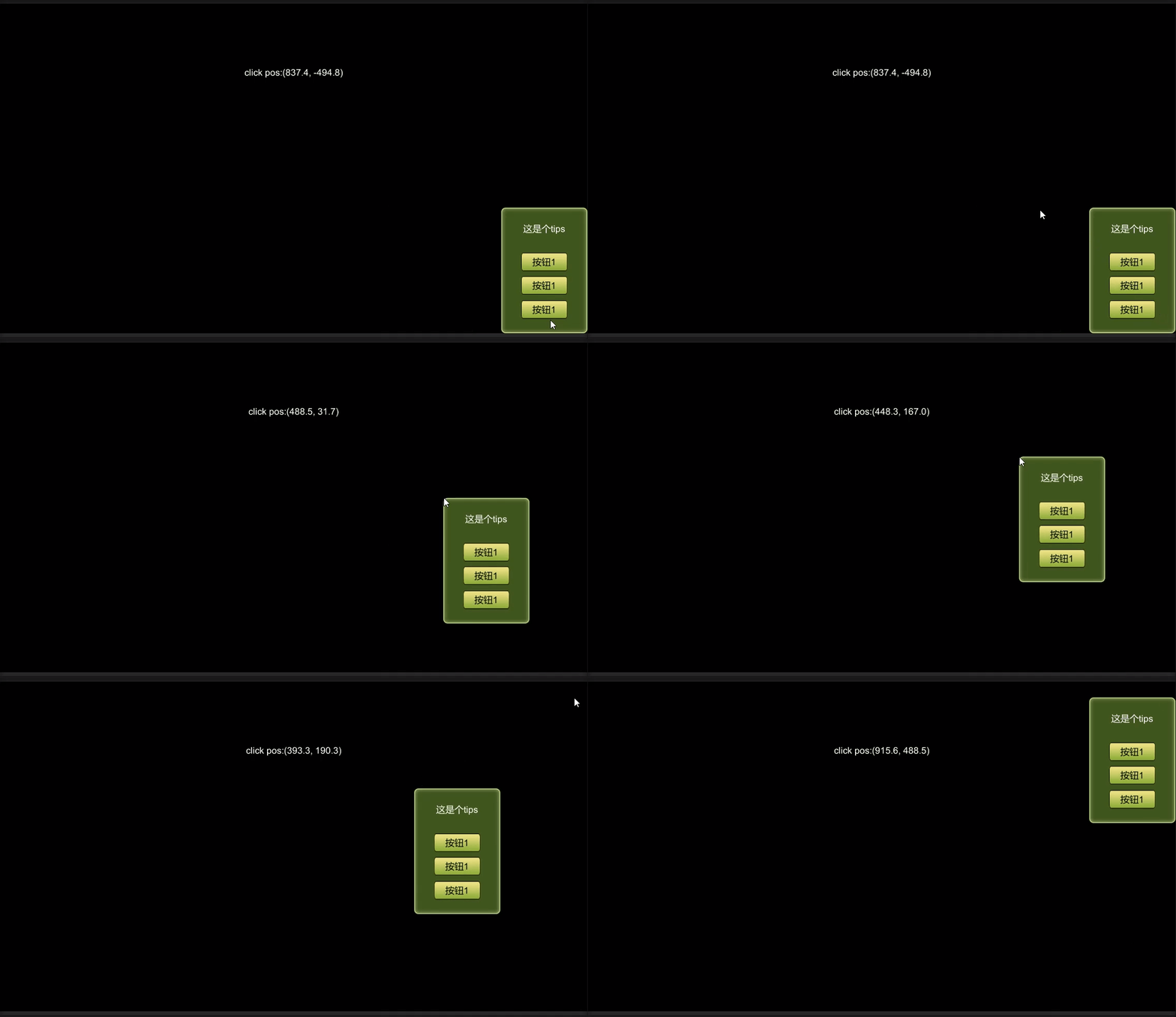
含演示工程
演示工程代码下载见下
主要是通过计算重设锚点和对齐方式
脚本代码摘录:
//  本体是左上锚点
//----------------------------------------------
using UnityEngine;
public class UIEdgeSet : MonoBehaviour
{
    //靠底边
    private const int Bottom = 3;
    //靠右
    private const int Right = 2;
    //靠右下
    private const int BottomRight = 5;
    private Vector2 initPivot;
    private RectTransform target;
    void Awake()
    {
        target = gameObject.GetComponent<RectTransform>();
        initPivot = target.pivot;
    }


    public void ResetInitState()
    {
        target.pivot = initPivot;
        target.anchorMin = new Vector2(0.5f, 0.5f);
        target.anchorMax = new Vector2(0.5f, 0.5f);
    }

    /// <param name="space">距离边缘的值</param>
    public void RefreshEdge(float space)
    {
        int type = -1;
        Vector3 pos = target.anchoredPosition3D;
        if ((pos.y < (-(Screen.height / 2) + target.sizeDelta.y)) && (pos.x > ((Screen.width / 2) - target.sizeDelta.x)))
        {
            type = BottomRight;
        }
        else if (pos.y < (-(Screen.height / 2) + target.sizeDelta.y))
        {
            type = Bottom;
        }
        else if (pos.x > ((Screen.width / 2) - target.sizeDelta.x))
        {
            type = Right;
        }
        if (type > 0)
        {
            SetUIEdge(pos, type, space);
        }
    }

    private void SetUIEdge(Vector3 pos, int type, float num)
    {
        if (type == Right)
        {
            target.pivot = new Vector2(1, initPivot.y);
            target.anchorMin = new Vector2(1, 0.5f);
            target.anchorMax = new Vector2(1, 0.5f);
            target.anchoredPosition3D = new Vector3(num, pos.y, 0);
        }
        else if (type == Bottom)
        {
            target.pivot = new Vector2(initPivot.x, 0);
            target.anchorMin = new Vector2(0.5f, 0);
            target.anchorMax = new Vector2(0.5f, 0);
            target.anchoredPosition3D = new Vector3(pos.x, num, 0);
        }
        else if (type == BottomRight)
        {
            target.anchorMin = new Vector2(1f, 0);
            target.anchorMax = new Vector2(1f, 0);
            target.pivot = new Vector2(1f, 0);
            target.anchoredPosition3D = new Vector3(num, num, 0);
        }
    }
}
演示工程下载见下
调用方式:
using UnityEngine;
using UnityEngine.UI;
public class TestEnter : MonoBehaviour
{
    public GameObject tipView;
    private UIEdgeSet target;
    public Text posTxt;
    void Start()
    {
        target = tipView.GetComponent<UIEdgeSet>();
    }

    // Update is called once per frame
    void Update()
    {
        if (Input.GetMouseButton(0)&& target)
        {
            target.ResetInitState();
            float X = Input.mousePosition.x - Screen.width / 2f;
            float Y = Input.mousePosition.y - Screen.height / 2f;
            Vector2 tranPos = new Vector2(X, Y);
            tipView.transform.localPosition = tranPos;
            posTxt.text = "click pos:"+tranPos.ToString();
            //实际应用中只根据定点坐标,呼出tips, 调用一次此方法RefreshEdge一次即可。
            target.RefreshEdge(0);
        }
    }
}
演示工程下载链接见下
更多推荐


 0
0 0
0- 0


 已为社区贡献1条内容

所有评论(0)