
Spring Cloud Hystrix 熔断参数配置
HystrixCommandProperties命令执行相关配置:
hystrix.command.[commandkey].execution.isolation.strategy 隔离策略THREAD或SEMAPHORE 默认HystrixCommands使用THREAD方式 HystrixObservableCommands使用SEMAPHORE
hystrix.command.[commandkey].execution.timeout.enabled 是否开启超时设置,默认true。
hystrix.command.[commandkey].execution.isolation.thread.timeoutInMilliseconds 默认超时时间 默认1000ms
hystrix.command.[commandkey].execution.isolation.thread.interruptOnTimeout是否打开超时线程中断 默认值true
hystrix.command.[commandkey].execution.isolation.thread.interruptOnFutureCancel 当隔离策略为THREAD时,当执行线程执行超时时,是否进行中断处理,即Future#cancel(true)处理,默认为false。
hystrix.command.[commandkey].execution.isolation.semaphore.maxConcurrentRequests 信号量最大并发度 默认值10该参数当使用ExecutionIsolationStrategy.SEMAPHORE策略时才有效。如果达到最大并发请求数,请求会被拒绝。理论上选择semaphore size的原则和选择thread size一致,但选用semaphore时每次执行的单元要比较小且执行速度快(ms级别),否则的话应该用thread。
hystrix.command.[commandkey].fallback.isolation.semaphore.maxConcurrentRequests fallback方法的信号量配置,配置getFallback方法并发请求的信号量,如果请求超过了并发信号量限制,则不再尝试调用getFallback方法,而是快速失败,默认信号量为10。
hystrix.command.[commandkey].fallback.enabled 是否启用降级处理,如果启用了,则在超时或异常时调用getFallback进行降级处理,默认开启。
hystrix.command.[commandkey].circuitBreaker.enabled 是否开启熔断机制,默认为true。
hystrix.command.[commandkey].circuitBreaker.forceOpen 强制开启熔断,默认为false。
hystrix.command.[commandkey].circuitBreaker.forceClosed 强制关闭熔断,默认为false。
hystrix.command.[commandkey].circuitBreaker.sleepWindowInMilliseconds 熔断窗口时间,默认为5s。
hystrix.command.[commandkey].circuitBreaker.requestVolumeThreshold 当在配置时间窗口内达到此数量后的失败,进行短路。默认20个
hystrix.command.[commandkey].circuitBreaker.errorThresholdPercentage 出错百分比阈值,当达到此阈值后,开始短路。默认50%
hystrix.command.[commandkey].metrics.rollingStats.timeInMilliseconds 设置统计滚动窗口的长度,以毫秒为单位。用于监控和熔断器 默认10s
hystrix.command.[commandkey].metrics.rollingStats.numBuckets 设置统计窗口的桶数量 默认10
hystrix.command.[commandkey].metrics.rollingPercentile.enabled 设置执行时间是否被跟踪,并且计算各个百分比,50%,90%等的时间 默认true
hystrix.command.[commandkey].metrics.rollingPercentile.timeInMilliseconds 设置执行时间在滚动窗口中保留时间,用来计算百分比 默认60000ms
hystrix.command.[commandkey].metrics.rollingPercentile.numBuckets 设置rollingPercentile窗口的桶数量 默认6。
hystrix.command.[commandkey].metrics.rollingPercentile.bucketSize 此属性设置每个桶保存的执行时间的最大值 默认100。如果bucket size=100,window=10s,若这10s里有500次执行,只有最后100次执行会被统计到bucket里去。增加该值会增加内存开销以及排序的开销。
hystrix.command.[commandkey].metrics.healthSnapshot.intervalInMilliseconds 记录health 快照(用来统计成功和错误绿)的间隔,默认500ms
hystrix.command.[commandkey].requestCache.enabled 设置是否缓存请求,request-scope内缓存 默认值true
hystrix.command.[commandkey].requestLog.enabled 设置HystrixCommand执行和事件是否打印到HystrixRequestLog中 默认值true
hystrix.command.[commandkey].threadPoolKeyOverride 命令的线程池key,决定该命令使用哪个线程池。
HystrixThreadPoolProperties线程池相关配置:
hystrix.threadpool.[threadkey].coreSize 线程池核心线程数 默认值10;
hystrix.threadpool.[threadkey].maximumSize 线程池最大线程数 默认值10;
hystrix.threadpool.[threadkey].allowMaximumSizeToDivergeFromCoreSize 当线程数大于核心线程数时,是否需要回收。与keepAliveTimeMinutes配合使用。
hystrix.threadpool.[threadkey].keepAliveTimeMinutes 当实际线程数超过核心线程数时,线程存活时间 默认值1min
hystrix.threadpool.[threadkey].maxQueueSize 最大等待队列数 默认不开启使用SynchronousQueue 不可动态调整
hystrix.threadpool.[threadkey].queueSizeRejectionThreshold 允许在队列中的等待的任务数量 默认值5
hystrix.threadpool.[threadkey].metrics.rollingStats.timeInMilliseconds 设置统计滚动窗口的长度,以毫秒为单位 默认值10000。
hystrix.threadpool.[threadkey].metrics.rollingStats.numBuckets 设置统计窗口的桶数量 默认10
HystrixCollapserProperties批处理相关配置:
hystrix.collapser.[collapserKey].maxRequestsInBatch 单次批处理的最大请求数,达到该数量触发批处理,默认Integer.MAX_VALUE
hystrix.collapser.[collapserKey].timerDelayInMilliseconds 触发批处理的延迟,也可以为创建批处理的时间+该值,默认值10
hystrix.collapser.[collapserKey].requestCache.enabled 默认值true
hystrix.collapser.[collapserKey].metrics.rollingStats.timeInMilliseconds 默认值10000
hystrix.collapser.[collapserKey].metrics.rollingStats.numBuckets 默认值10
hystrix.collapser.[collapserKey].metrics.rollingPercentile.enabled 默认值true
hystrix.collapser.[collapserKey].metrics.rollingPercentile.timeInMilliseconds 默认值60000
hystrix.collapser.[collapserKey].metrics.rollingPercentile.numBuckets 默认值6
hystrix.collapser.[collapserKey].metrics.rollingPercentile.bucketSize 默认值100
Hystrix常用熔断参数
    @HystrixCommand(fallbackMethod = "str_fallbackMethod",
            groupKey = "strGroupCommand",
            commandKey = "strCommard",
            threadPoolKey = "strThreadPool",
            commandProperties = {
                    //设置隔离策略,THREAD表示线程池SEMAPHORE:信号地隔离
                    @HystrixProperty(name = "execution.isolation. strategy", value = "THREAD"),
                    //当隔离策略选择信号地隔离的时候,用来没置信号地的大小(最大并发数)
                    @HystrixProperty(name = "execution.isolation. semaphore.maxConcurrentRequests", value = "10"),
                    //配置命令执行的超时时间
                    @HystrixProperty(name = "execution.isolation.thread.timeoutinMilliseconds", value = "10"),
                    //悬否启用超时时间
                    @HystrixProperty(name = "execution.timeout. enabled", value = "true"),
                    //执行超时的时候是否中断
                    @HystrixProperty(name = "execution.isolation.thread.interruptOnTimeout", value = "true"),
                    //执行被取消的时候是否中断
                    @HystrixProperty(name = "execution.isolation.thread. interruptOnCancel", value = "true"),
                    //允许回调方法执行的最大并发数
                    @HystrixProperty(name = "fallback.isolation.semaphore.maxConcurrentRequests", value = "10"),
                    //服务降级是否启用,是否执行回湖函数
                    @HystrixProperty(name = "fallback.enabled", value = "true"),
                    @HystrixProperty(name = "circuitBreaker.enabled", value = "true"),
                    //该属性用来设置在演动时间窗中,断路器熔断的最小请求数。例如,默认该值为20的时候,
                    //如果滚动时间窗(默认10秒)内仅收到719个请求,即使这19个请求都失败了,断路器也不会打开。
                    @HystrixProperty(name = "circuitBreaker.requestVolumeThreshold", value = "20"),
                    //该属性用来设置在模动时间窗中,表示在滚动时间窗中,在请求数量超过
                    // circuitBreaker. requestVolumeThreshold的情况下,如果错误请求数的百分比超过50,
                    //就把断路器设置为“打开"状态,否则就设置为“关闭"状态。
                    @HystrixProperty(name = "circuitBreaker.errorThresholdPercentage", value = "50"),
                    //该属性用来设置当断路器打开之后的休眠时间窗。休眠时间窗结束之后,
                    //会将断路器置为“半开"状态,尝式熔断的请求命令,如果依然失败就将断路器继续设置为“打开"状态,
                    //如果成功就设置为“关闭"状态。
                    @HystrixProperty(name = "circuitBreaker.sleeplindowinMilliseconds", value = "5000"),
                    //断路器强制打开
                    @HystrixProperty(name = "circuitBreaker.forceOpen", value = "false"),
                    //断路器强制关闭
                    @HystrixProperty(name = "circuitBreaker.forceClosed", value = "false"),
                    //滚动时间窗设置,该时间用于断路器判断健康度时需要收集信息的持续时间
                    @HystrixProperty(name = "metrics.rollingStats.timeinMilliseconds", value = "10000"),
                    //该属性用来设置凝动时间窗统计指标信息时划分"镑"的数量,断路器在收集指标信息的时候会根据//设置的时间窗长度拆分成多个“裙"来翼计各度量值,每个"裙"记录了一段时间内的采集指标。//比如10秒内拆分成10个“裤”收集这样,所以timeinilliseconds 必须能被numBuckets 整除。 否则会抛异常
                    @HystrixProperty(name = "metrics.rollingStats.numBuckets", value = "10"),
                    //动时间窗设置,该时间用于断路器判断健康度时需要收集信息的持续时间
                    @HystrixProperty(name = "metrics.rollingStats.timeinMilliseconds", value = "10000"),
                    //该属性用来设置模动时间窗统计指标信息时划分"榜"的数量,断路器在收集指标信息的时候会根据
                    //设置的时间窗长度拆分成多个“裤"来累计各度量值,每个"榜”记录了一段时间内的采集指标。
                    //比如10秒内拆分成10个"榜"收集这样,所以timeinMilliseconds必须能被numBuckets整除。否则会抛异常
                    @HystrixProperty(name = "metrics.rollingStats. numBuckets", value = "10"),
                    //该属性用来设置对命令执行的延迟是否使用百升位数来跟踪和计算。如果设置为false,那么所有的概要统计都将返回-1.
                    @HystrixProperty(name = "metrics.rollingPercentile. enabled", value = "false"),
                    //该属性用来设置百分位统计的凝动窗口的持续时间,单位为喜秒。
                    @HystrixProperty(name = "metrics.rollingPercentile.timeInMilliseconds", value = "6000e"),
                    //该属性用央设置百分位统计模动窗口中使用“榜”的数量
                    @HystrixProperty(name = "metrics.rollingPercentile. numBuckets", value = "60000"),
                    //该属性用来设置在执行过程中每个“桶”中保留的最大执行次数。如果在模动时间窗内发生超过该设定值的执行况数,
                    //就从最初的位置开始重写。例如,将该值设置为100,滚动窗口为10秒,若在10秒内一个“捅”中发生了500次执行
                    //那么该“桶”中只保留最后的100,次执行的统计。另外,增加该值的大小将会增加内存量的消耗,并增加排序百分位数所需的计算时间。
                    @HystrixProperty(name = "metrics.rollingPercentile. bucketSize", value = "100"),
                    //该属性用来设置采集影响断路器状态的健康快照(请求的成功、错误百分比)的间隔等待时间。
                    @HystrixProperty(name = "metrics. healthSnapshot.intervalinMilliseconds", value = "500"),
                    //悬否开启请求缓存
                    @HystrixProperty(name = "requestCache. enabled", value = "true"),
                    // HystrixCommand的执行和事件悬否打印日志到HystrixRequestLog中
                    @HystrixProperty(name = "requestLog.enabled", value = "true"),
                    @HystrixProperty(name = "metrics.rollingPercentile.bucketSize", value = "100"),
                    //该属性用夹设置采集影响断路器状态的健康快照(请求的成功、错误百分比)的间隔等待时间。
                    @HystrixProperty(name = "metrics. healthSnapshot.intervalinMilliseconds", value = "500"),
                    //是否开启请求缓存
                    @HystrixProperty(name = "requestCache.enabled", value = "true"),
                    // Hystrixcommand的执行和事件是否打印日志到HystrixRequestLog中
                    @HystrixProperty(name = "requestLog. enabled", value = "true"),
            },
            threadPoolProperties = {
                    //该参数用来设置执行命令线程地的核心线程数,该值也就是命令执行的最大并发量
                    @HystrixProperty(name = "coreSize", value = "10"),
                    //该参数用来设置线程池的最大队列大小。当没置为-1时,线程池将使用SynchronousQueue实现的队列
                    //否则将使用LinkedBlockingQueue实现的队列。
                    @HystrixProperty(name = "maxQueuesize", value = "-1"),
                    //该参数用来为队列设置拒绝阈值。通过该参数,即使队列没有达到最大值也能拒绝请求。
                    //该参数主要是对LinkedBlockingQueue队列的补充,因为LinkedBlockingQueue
                    //队列不能动态修改它的对象大小,而通过该属性就可以调整拒绝请求的队列大小了。
                    @HystrixProperty(name = "queueSizeRejectionThreshold", value = "5")
            })
    public String paymentInfo_Timeout(Integer id) {
        try {
            TimeUnit.SECONDS.sleep(1);
        } catch (InterruptedException e) {
            e.printStackTrace();
        }
        return "线程池" + Thread.currentThread().getName() + " id" + id;
    }
hystrix执行请求的代码逻辑如下图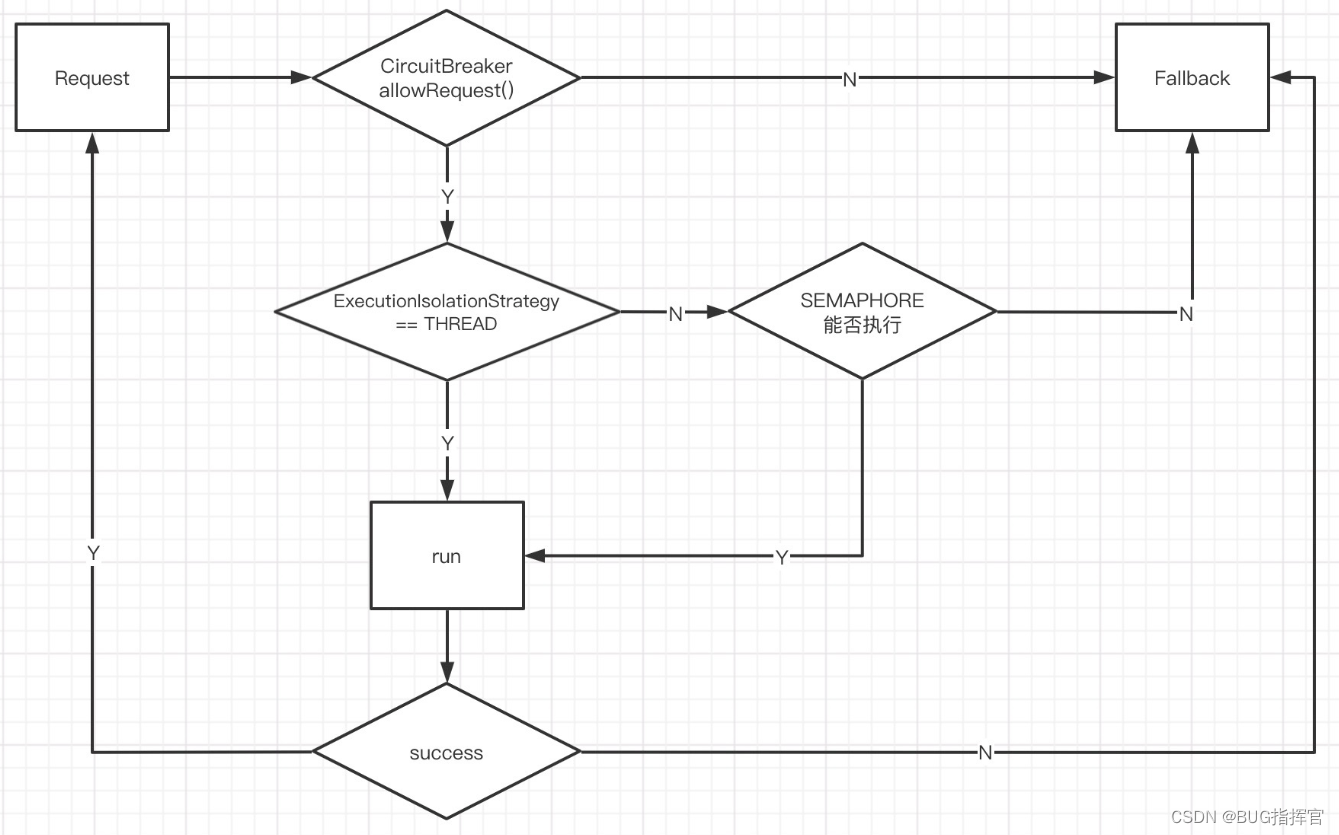
以下为比较重要的hystrix熔断参数。
hystrix:
  command:
    default:
      execution:
        isolation:
          strategy: THREAD
          thread:
            timeoutInMilliseconds: 10000
      circuitBreaker:
        requestVolumeThreshold: 30
        sleepWindowInMilliseconds: 5000
        errorThresholdPercentage: 90
strategy指定策略为thread形式,有2种选择分别是SEMAPHORE, THREAD,后者请求执行逻辑在单独线程内执行,前者在当前请求线程内执行。
timeoutInMilliseconds线程超市时间,我在图里没有画出来。
errorThresholdPercentage 窗口内请求失败数占比。例如超过90%请求触发失败,才允许打开熔断器。
requestVolumeThreshold 如果熔断器要触发熔断,当前时间窗口内必须至少有requestVolumeThreshold配置的请求个数。如果errorThresholdPercentage配置了50%,requestVolumeThreshold为1,如果只有进来一个请求,如果请求失败失败,就会立即触发熔断,不合理。
sleepWindowInMilliseconds熔断触发后,熔断时间。这段时间内都返回fallback结果。
requestVolumeThreshold,sleepWindowInMilliseconds和errorThresholdPercentage在circuitBreaker.allowRequest()里被用到。hystrix根据实际请求的状态决定是否允许执行请求。
public boolean allowRequest() {
    if (properties.circuitBreakerForceOpen().get()) {
        // properties have asked us to force the circuit open so we will allow NO requests
        return false;
    }
    if (properties.circuitBreakerForceClosed().get()) {
        // we still want to allow isOpen() to perform it's calculations so we simulate normal behavior
        isOpen();
        // properties have asked us to ignore errors so we will ignore the results of isOpen and just allow all traffic through
        return true;
    }
    // 熔断器未打开或者熔断时间已经超过熔断时间间隔,则允许请求执行
    return !isOpen() || allowSingleTest();
}


public boolean allowSingleTest() {
    long timeCircuitOpenedOrWasLastTested = circuitOpenedOrLastTestedTime.get();
    // 如果当前熔断器已经打开,并且当前的开启时间已经超过 `sleepWindowInMilliseconds`,则允许请求,并更新`circuitOpenedOrLastTestedTime.compareAndSet`。
    // 1) if the circuit is open
    // 2) and it's been longer than 'sleepWindow' since we opened the circuit
    if (circuitOpen.get() && System.currentTimeMillis() > timeCircuitOpenedOrWasLastTested +
    properties.circuitBreakerSleepWindowInMilliseconds().get()) {
        // We push the 'circuitOpenedTime' ahead by 'sleepWindow' since we have allowed one request to try.
        // If it succeeds the circuit will be closed, otherwise another singleTest will be allowed at the end of the 'sleepWindow'.
        if (circuitOpenedOrLastTestedTime.compareAndSet(timeCircuitOpenedOrWasLastTested, System.currentTimeMillis())) {
            // if this returns true that means we set the time so we'll return true to allow the singleTest
            // if it returned false it means another thread raced us and allowed the singleTest before we did
            return true;
        }
    }
    return false;
}

@Override
public boolean isOpen() {
    if (circuitOpen.get()) {
        // if we're open we immediately return true and don't bother attempting to 'close' ourself as that is left to allowSingleTest and a subsequent successful test to close
        return true;
    }

    // we're closed, so let's see if errors have made us so we should trip the circuit open
    HealthCounts health = metrics.getHealthCounts();

    // check if we are past the statisticalWindowVolumeThreshold
    // 当前窗口请求数未达到 requestVolumeThreshold 数,不打开熔断器
    if (health.getTotalRequests() < properties.circuitBreakerRequestVolumeThreshold().get()) {
        // we are not past the minimum volume threshold for the statisticalWindow so we'll return false immediately and not calculate anything
        return false;
    }

    // 当前窗口请求错误占比未达到 errorThresholdPercentage 值,不打开熔断器
    if (health.getErrorPercentage() < properties.circuitBreakerErrorThresholdPercentage().get()) {
        return false;
    } else {
        // 打开熔断器
        // our failure rate is too high, trip the circuit
        if (circuitOpen.compareAndSet(false, true)) {
            // if the previousValue was false then we want to set the currentTime
            circuitOpenedOrLastTestedTime.set(System.currentTimeMillis());
            return true;
        } else {
            // How could previousValue be true? If another thread was going through this code at the same time a race-condition could have
            // caused another thread to set it to true already even though we were in the process of doing the same
            // In this case, we know the circuit is open, so let the other thread set the currentTime and report back that the circuit is open
            return true;
        }
    }
}
除了以上的几个参数外,还有以下几个比较重要的参数。
hystrix:
  threadpool:
    default:
      metrics:
        rollingStats:
          timeInMilliseconds: 60000
          numBuckets: 1
timeInMilliseconds 表示窗口的时间范围,numBuckets表示桶数量,每个桶的时间为timeInMilliseconds/numBuckets,hystrix统计桶时间内错误数和错误比例来决定是否熔断。
更多推荐


 1
1 0
0- 0


 已为社区贡献5条内容

所有评论(0)