
Java设计模式 - 开闭原则
·
-
开闭原则(Open Closed Principle)是编程中最基础、最重要的设计原则
-
一个软件实体如类,模块和函数应该对扩展开放(对提供方),对修改关闭(对使用 方)。用抽象构建框架,用实现扩展细节。
-
当软件需要变化时,尽量通过扩展软件实体的行为来实现变化,而不是通过修改已有的代码来实现变化。
-
编程中遵循其它原则,以及使用设计模式的目的就是遵循开闭原则。
1. 违反开闭原则
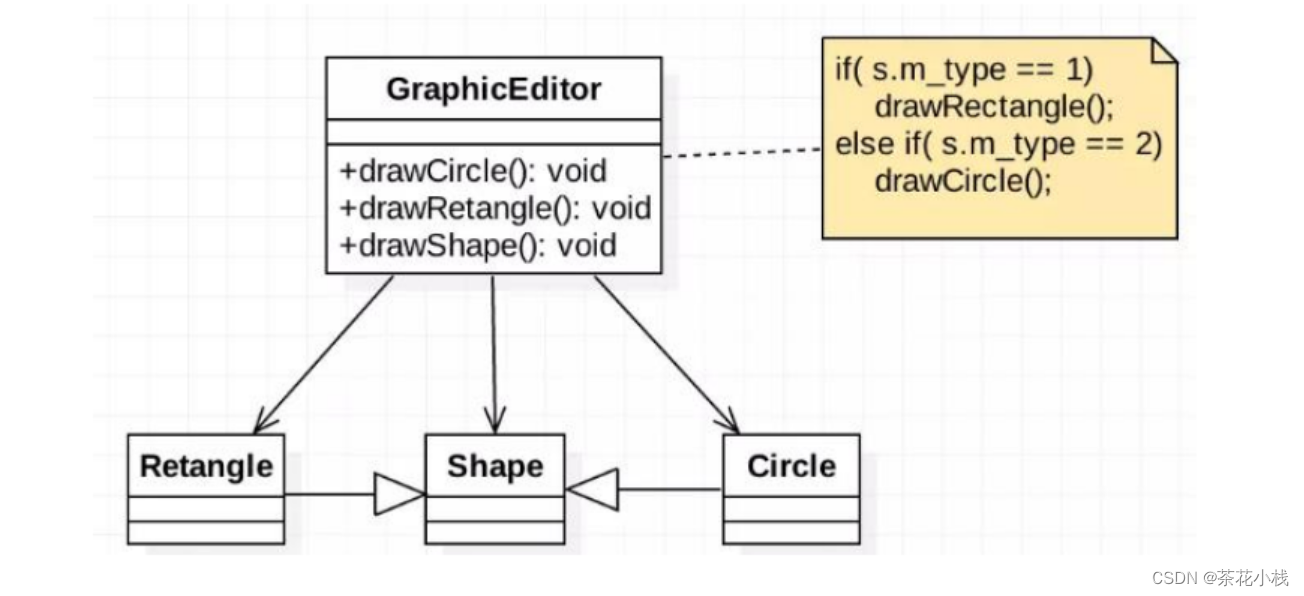
//Shape类,基类
class Shape {
   int m_type;
}

class Rectangle extends Shape {
   Rectangle() {
      super.m_type = 1;
   }
}

class Circle extends Shape {
   Circle() {
      super.m_type = 2;
   }
}

//新增画三角形
class Triangle extends Shape {
   Triangle() {
      super.m_type = 3;
   }
}
如果新增一个画三角形的类,那么使用方代码需要修改:
//这是一个用于绘图的类 [使用方]
class GraphicEditor {
   //接收Shape对象,然后根据type,来绘制不同的图形
   public void drawShape(Shape s) {
      if (s.m_type == 1)
         drawRectangle(s);
      else if (s.m_type == 2)
         drawCircle(s);
      else if (s.m_type == 3)
         drawTriangle(s);
   }

   //绘制矩形
   public void drawRectangle(Shape r) {
      System.out.println(" 绘制矩形 ");
   }

   //绘制圆形
   public void drawCircle(Shape r) {
      System.out.println(" 绘制圆形 ");
   }

   //绘制三角形
   public void drawTriangle(Shape r) {
      System.out.println(" 绘制三角形 ");
   }
}
改进的思路分析:
把创建Shape类做成抽象类,并提供一个抽象的draw方法,让子类去实现即可, 这样我们有新的图形种类时,只需要让新的图形类继承Shape,并实现draw方法即可, 使用方的代码就不需要修 -> 满足了开闭原则
2. 遵守开闭原则
//Shape类,基类
abstract class Shape {
   int m_type;
   public abstract void draw();//抽象方法
}
class Rectangle extends Shape {
   Rectangle() {
      super.m_type = 1;
   }

   @Override
   public void draw() {
      System.out.println(" 绘制矩形 ");
   }
}

class Circle extends Shape {
   Circle() {
      super.m_type = 2;
   }
   @Override
   public void draw() {
      System.out.println(" 绘制圆形 ");
   }
}

class Triangle extends Shape {
   Triangle() {
      super.m_type = 3;
   }
   @Override
   public void draw() {
      System.out.println(" 绘制三角形 ");
   }
}


//新增一个图形
class OtherGraphic extends Shape {
	OtherGraphic() {
		super.m_type = 4;
	}

	@Override
	public void draw() {
		System.out.println(" 绘制其它图形 ");
	}
}
//这是一个用于绘图的类 [使用方]
class GraphicEditor {
	//接收Shape对象,调用draw方法
	public void drawShape(Shape s) {
		s.draw();
	}
}
public class Ocp {
	public static void main(String[] args) {
		GraphicEditor graphicEditor = new GraphicEditor();
		graphicEditor.drawShape(new Rectangle());
		graphicEditor.drawShape(new Circle());
		graphicEditor.drawShape(new Triangle());
		graphicEditor.drawShape(new OtherGraphic());
	}
}
更多推荐



 0
0 0
0- 0


 已为社区贡献6条内容

所有评论(0)