
vue项目打包之后放到服务器nginx上跨域问题
·
最近在写自己网页的练习,前端跨域为proxy代理。请求的接口是网易音乐接口。
vue.config.js
module.exports = {
    publicPath: './',//打包路径
    productionSourceMap: false,//正式优化
    // 跨域
    devServer: {
        open: true, //是否自动弹出浏览器页面
        proxy: {
            '/api': {
                target: 'https://autumnfish.cn/', //API服务器的地址
                ws: true,  //代理websockets
                changeOrigin: true, // 虚拟的站点需要更管origin
                pathRewrite: {   //重写路径 比如'/api/aaa/ccc'重写为'/aaa/ccc'
                    '^/api': ''
                }
            }
        },
    }
}
但是项目打包run build之后,在服务器上需要再次解决跨域问题。
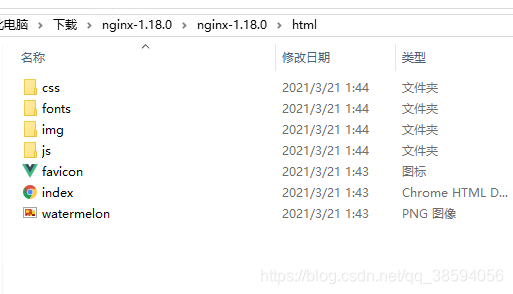
文件夹html放打包好的dist文件夹里面的资源。
conf文件的nginx是配置的
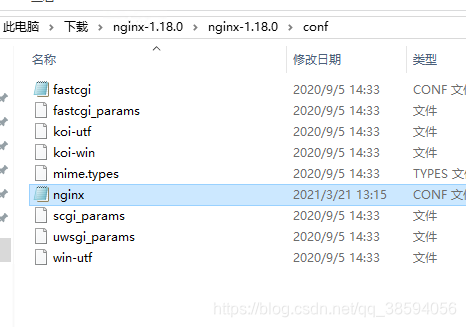
具体配置文件如下:
#user  nobody;
worker_processes  1;

#error_log  logs/error.log;
#error_log  logs/error.log  notice;
#error_log  logs/error.log  info;

#pid        logs/nginx.pid;


events {
    worker_connections  1024;
}


http {
    include       mime.types;
    default_type  application/octet-stream;

    #log_format  main  '$remote_addr - $remote_user [$time_local] "$request" '
    #                  '$status $body_bytes_sent "$http_referer" '
    #                  '"$http_user_agent" "$http_x_forwarded_for"';

    #access_log  logs/access.log  main;

    sendfile        on;
    #tcp_nopush     on;

    #keepalive_timeout  0;
    keepalive_timeout  65;

    #gzip  on;

    server {
        listen       80;//端口号
        server_name  www.numb.run 域名/你自己的服务器地址;

        #charset koi8-r;

        #access_log  logs/host.access.log  main;

        location / {
            root   html;
            index  index.html ;
        }

        #error_page  404              /404.html;

        # redirect server error pages to the static page /50x.html
        #
        error_page   500 502 503 504  /50x.html;
        location = /50x.html {
            root   html;
        }

        # proxy the PHP scripts to Apache listening on 127.0.0.1:80
        #
        #location ~ \.php$ {
        #    proxy_pass   http://127.0.0.1;
        #}

        # pass the PHP scripts to FastCGI server listening on 127.0.0.1:9000
        #
        #location ~ \.php$ {
        #    root           html;
        #    fastcgi_pass   127.0.0.1:9000;
        #    fastcgi_index  index.php;
        #    fastcgi_param  SCRIPT_FILENAME  /scripts$fastcgi_script_name;
        #    include        fastcgi_params;
        #}

        # deny access to .htaccess files, if Apache's document root
        # concurs with nginx's one
        #
        #location ~ /\.ht {
        #    deny  all;
        #}
        !!!!这段是解决跨域的
          ***location /api {
           proxy_pass https://autumnfish.cn/;
              }***
!!!!!这段是解决跨域的
    }


    # another virtual host using mix of IP-, name-, and port-based configuration
    #
    #server {
    #    listen       8000;
    #    listen       somename:8080;
    #    server_name  somename  alias  another.alias;

    #    location / {
    #        root   html;
    #        index  index.html index.htm;
    #    }
    #}


    # HTTPS server
    #
    #server {
    #    listen       443 ssl;
    #    server_name  localhost;

    #    ssl_certificate      cert.pem;
    #    ssl_certificate_key  cert.key;

    #    ssl_session_cache    shared:SSL:1m;
    #    ssl_session_timeout  5m;

    #    ssl_ciphers  HIGH:!aNULL:!MD5;
    #    ssl_prefer_server_ciphers  on;

    #    location / {
    #        root   html;
    #        index  index.html index.htm;
    #    }
    #}

}
配置好之后重启服务器就可以了
更多推荐


 1
1 0
0- 0


 已为社区贡献1条内容

所有评论(0)