
uniapp——操作成功返回首页
·
1、操作成功返回首页
界面如下:
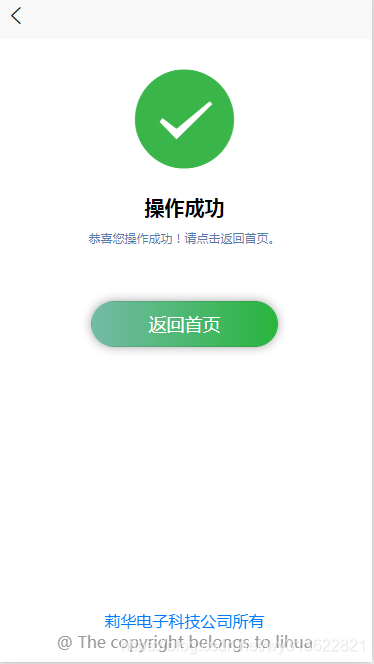
代码:
<template>
	<view class="view_contain">
		<view class="view_iconText">
			<icon type="success" size="100" color="#39b54a" />
			<text class="text_title">操作成功</text>
			<text class="text_content">恭喜您操作成功!请点击返回首页。</text>
		</view>
		<button class="button_gotohome" @tap="goto_Home">返回首页</button>
		<view class="bottom">
			<text style="color: #007AFF;"> 莉华电子科技公司所有</text>
			<text style="color: #999999;">@ The copyright belongs to lihua</text>
			</view>
	</view>
</template>

<script>
	export default {
		data() {
			return {

			}
		},
		methods: {
			goto_Home() {
				uni.switchTab({
					url: '/pages/index/index'
				});
			}
		}
	}
</script>

<style>
	page {
		width: 100%;
		height: 100%;
	}

	.view_contain {
		width: 100%;
		height: 100%;
		margin-top: 50upx;
	}

	.view_iconText {
		display: flex;
		flex-direction: column;
		width: 100%;
		height: 30%;
		align-items: center;
		justify-content: center;
	}
	.text_title{
		margin-top: 50upx;
		font-size: 40upx;
		font-weight: 600;
	}
	.button_gotohome{
		width: 50%;
		background: linear-gradient(to right, #74bba7, #28b53d);
		border-radius: 50upx;
		color: #ffffff;
		box-shadow: 0 0 30rpx rgba(0, 0, 0, 0.35);
		margin-top: 100upx;
	}
	.text_content{
		margin-top: 20upx;
		color: #557ead;
		font-size: 25upx;
	}
	.bottom{
		width: 100%;
		display: flex;
		flex-direction: column;
		position: fixed;
		bottom: 20upx;
		align-items: center;
		justify-content: center;
	}

</style>
更多推荐



 4
4 0
0- 0


 已为社区贡献6条内容

所有评论(0)