
uniapp 仿照小米有品 轮播图组件(堆叠轮播组件)
·
仿小米有品 轮播图组件
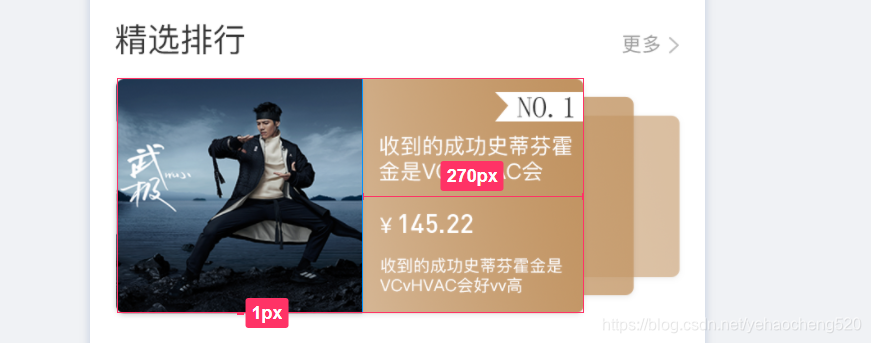
公司UI提供的精钢区的轮播图样式如上图所示:
本着简单高效的编程习惯,我打开了百度……
由于公司现在使用的是 uniapp,所以先从DCLOUD 插件市场查找。
找到一个堆叠轮播组件:

dcloud堆叠轮播组件:https://ext.dcloud.net.cn/plugin?id=1250
最终样式调整之后展示的效果如下图所示:
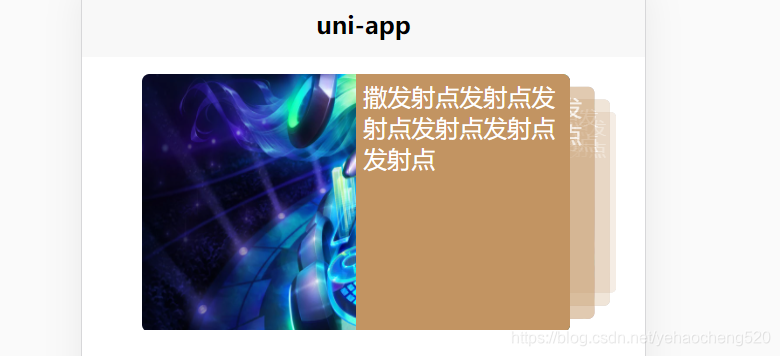
代码如下:
//组件导入:
import blackmonthSwiper from "@/components/blackmonth-swiper/index.vue"
//组件注册:
components:{
	blackmonthSwiper
},
//组件数据处理:
swiperList: [{
	type: 'image',
		url: 'https://ossweb-img.qq.com/images/lol/web201310/skin/big84000.jpg'
	}, {
		type: 'image',
		url: 'https://ossweb-img.qq.com/images/lol/web201310/skin/big37006.jpg',
	}, {
		type: 'image',
		url: 'https://ossweb-img.qq.com/images/lol/web201310/skin/big39000.jpg'
	}, {
		type: 'image',
		url: 'https://ossweb-img.qq.com/images/lol/web201310/skin/big10001.jpg'
	}, {
		type: 'image',
		url: 'https://ossweb-img.qq.com/images/lol/web201310/skin/big25011.jpg'
	}, {
		type: 'image',
		url: 'https://ossweb-img.qq.com/images/lol/web201310/skin/big21016.jpg'
	}, {
		type: 'image',
		url: 'https://ossweb-img.qq.com/images/lol/web201310/skin/big99008.jpg'
	}]
轮播组件包含手动切换与自动轮播两种形式
<template>
	<view>
		<view class="swiperPanel" ref="swiperPanel" @touchstart="startMove" @touchend="endMove">
			<view class="swiperItem" v-for="(item, index) in swiperList" :key="index" :style="{transform: itemStyle[index].transform, zIndex: itemStyle[index].zIndex, opacity: itemStyle[index].opacity}">
				<view class="children">
					<image class="pic" :src="item.url"></image>
					<view class="right">
						撒发射点发射点发射点发射点发射点发射点
					</view>
				</view>
			</view>
		</view>
	</view>
</template>

<script>
	var timer;
	export default {
		props: {
			swiperList: {
				type: Array,
				default: []
			}
		},
		data() {
			return {
				slideNote: {
					x: 0,
					y: 0
				},
				screenWidth: 0,
				itemStyle: []
			};
		},
		created() {
			var macInfo = uni.getSystemInfoSync();
			this.screenWidth = macInfo.screenWidth;
			// 计算swiper样式
			this.swiperList.forEach((item, index) => {
				this.itemStyle.push(this.getStyle(index))
			})
			timer = setInterval(()=>{
				this.rightSlider();
			},3000)
		},
		methods: {
			rightSlider(){
				var newList = JSON.parse(JSON.stringify(this.itemStyle));
				var last = [newList.pop()]
				newList = last.concat(newList)
				this.itemStyle = newList;
			},
			getStyle(e) {
				if (e > this.swiperList.length / 2) {
					var right = this.swiperList.length - e
					return {
						transform: 'scale(' + (1 - right / 10) + ') translate(-' + (right * 9) + '%,0px)',
						zIndex: 9999 - right,
						opacity: 0.5 / right
					}
				} else {
					return {
						transform: 'scale(' + (1 - e / 10) + ') translate(' + (e * 9) + '%,0px)',
						zIndex: 9999 - e,
						opacity: 0.5 / e
					}
				}
			},
			startMove(e) {
				clearInterval(timer);
				this.slideNote.x = e.changedTouches[0] ? e.changedTouches[0].pageX : 0;
				this.slideNote.y = e.changedTouches[0] ? e.changedTouches[0].pageY : 0;
			},
			endMove(e) {
				timer = setInterval(()=>{
					this.rightSlider();
				},3000)
				var newList = JSON.parse(JSON.stringify(this.itemStyle));
				if ((e.changedTouches[0].pageX - this.slideNote.x) < 0) {
					// 向左滑动
					var last = [newList.pop()]
					newList = last.concat(newList)
				} else {
					// 向右滑动
					newList.push(newList[0])
					newList.splice(0, 1)
				}
				this.itemStyle = newList
			}
		}
	}
</script>

<style lang="scss">
	.swiperPanel {
		margin: 20rpx 0;
		height: 344rpx;
		width: 686upx;
		overflow: hidden;
		position: relative;
		margin-left:80upx;

		.swiperItem {
			height: 100%;
			width: 100%;
			position: absolute;
			top: 0;
			left: 0upx;
			transition: all .5s;

			.children {
				height: 100%;
				width: 570upx;
				margin: 2upx 160upx 2upx 0;
				position: relative;

				.right{
					position: absolute;
					right:0;
					top:0;
					width:50%;
					height:100%;
					background:#C29462;
					color:#fff;
					font-size:32upx;
					padding:10upx;
					box-sizing: border-box;
					border-radius: 0 10upx 10upx 0;
				}

				.pic {
					height: 100%;
					width: 100%;
					border-radius: 10upx;
				}
			}
		}
	}
</style>
更多推荐



 2
2 0
0- 0


 已为社区贡献10条内容

所有评论(0)