
elasticsearch语法详细讲解
接下来我们所有对elasticsearch的操作都在kibana中进行
在java中的操作在下一篇文章中讲解
一、elasticsearch基本概念
- Elasticsearch也是基于Lucene的全文检索库,本质也是存储数据,很多概念与MySQL类似的。
说明 cluster 整个elasticsearch 默认就是集群状态,整个集群是一份完整、互备的数据。 node 集群中的一个节点,一般只一个进程就是一个node shard 分片,即使是一个节点中的数据也会通过hash算法,分成多个片存放,默认是5片。 index 索引。相当于rdbms的database, 对于用户来说是一个逻辑数据库,虽然物理上会被分多个shard存放,也可能存放在多个node中。 type 类似于rdbms的table,但是与其说像table,其实更像面向对象中的class , 同一Json的格式的数据集合。 document 文档。类似于rdbms的 row、面向对象里的object field 字段。相当于字段、属性 mappings 映射。字段的数据类型、属性、是否索引、是否存储等特性 - 对比关系:
索引(indices)----------------------Databases 数据库 类型(type)--------------------------Table 数据表 文档(Document)----------------------Row 行 字段(Field)-------------------------Columns 列 - 数据结构对比
public class Movie { String id; String name; Double doubanScore; List<Actor> actorList; } public class Actor{ String id; String name; }- 这两个对象如果放在关系型数据库保存,会被拆成2张表,但是elasticsearch是用一个json来表示一个document
要注意的是: Elasticsearch本身就是分布式的,因此即便你只有一个节点,Elasticsearch默认也会对你的数据进行分片和副本操作,当你向集群添加新数据时,数据也会在新加入的节点中进行平衡。{ “id”:”1”, “name”:”operation red sea”, “doubanScore”:”8.5”, “actorList”:[ {“id”:”1”,”name”:”zhangyi”}, {“id”:”2”,”name”:”haiqing”}, {“id”:”3”,”name”:”zhanghanyu”} ] }
二、索引操作(indeces)
- 1、 查询索引
GET /_cat/indices?v

-
es 中会默认存在一个名为.kibana和.kibana_task_manager的索引
-
表头的含义
字段名 含义说明 health green(集群完整) yellow(单点正常、集群不完整) red(单点不正常) status 是否能使用 index 索引名 uuid 索引统一编号 pri 主节点几个 rep 从节点几个 docs.count 文档数 ocs.deleted 文档被删了多少 store.size 整体占空间大小 i.store.size 主节点占空间大小
-
- 2、 创建索引
- 语法:
PUT /索引名 - 参数可选:指定分片及副本,默认分片为5,副本为1
PUT test
{
  "settings": {
    "number_of_shards": 5
    , "number_of_replicas": 1
  }
}

- 语法:
- 3、查看索引具体信息
- 语法
GET /索引名 - 示例
GET /test - 结果
{
  "test" : {
    "aliases" : { },
    "mappings" : { },
    "settings" : {
      "index" : {
        "creation_date" : "1578479474178",
        "number_of_shards" : "5",
        "number_of_replicas" : "1",
        "uuid" : "yRNcgHe8SWmPO83_AF7k6Q",
        "version" : {
          "created" : "6080199"
        },
        "provided_name" : "test"
      }
    }
  }
}
- 语法
- 4、删除索引
DELETE /索引库名
三、 映射配置
- 1、创建映射字段
- 语法
PUT /索引库名/_mapping/类型名称 { "properties": { "字段名": { "type": "类型", "index": true, "store": true, "analyzer": "分词器" } } }-
类型名称:就是前面将的type的概念,类似于数据库中的不同表
-
字段名:类似于列名,properties下可以指定许多字段。
-
每个字段可以有很多属性。例如:
- type:类型,可以是text、long、short、date、integer、object等
- index:是否索引,默认为true
- store:是否存储,默认为false
- analyzer:分词器,这里使用ik分词器:
ik_max_word或者ik_smart
-
-
- 示例
PUT test/_mapping/goods
{
  "properties": {
    "title": {
      "type": "text",
      "analyzer": "ik_max_word"
    },
    "images": {
      "type": "keyword",
      "index": "false"
    },
    "price": {
      "type": "long"
    }
  }
}
- 语法
- 2、查看映射关系
- 语法:
GET /索引库名/_mapping - 示例:
GET /test/_mapping - 结果
{
  "test" : {
    "mappings" : {
      "goods" : {
        "properties" : {
          "images" : {
            "type" : "keyword",
            "index" : false
          },
          "price" : {
            "type" : "long"
          },
          "title" : {
            "type" : "text",
            "analyzer" : "ik_max_word"
          }
        }
      }
    }
  }
}
- 语法:
- 3、字段属性详解
-
①type
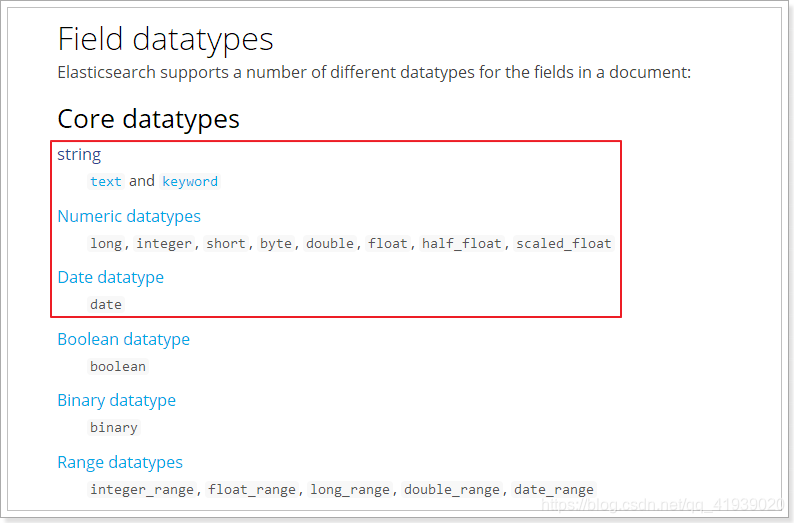
- Elasticsearch中支持的数据类型非常丰富
-
我们说几个关键的:
-
String类型,又分两种:
- text:可分词,不可参与聚合
- keyword:不可分词,数据会作为完整字段进行匹配,可以参与聚合
-
Numerical:数值类型,分两类
- 基本数据类型:long、interger、short、byte、double、float、half_float
- 浮点数的高精度类型:scaled_float
- 需要指定一个精度因子,比如10或100。elasticsearch会把真实值乘以这个因子后存储,取出时再还原。
-
Date:日期类型
- elasticsearch可以对日期格式化为字符串存储,但是建议我们存储为毫秒值,存储为long,节省空间。
-
- Elasticsearch中支持的数据类型非常丰富
-
②index
-
index影响字段的索引情况。
- true:字段会被索引,则可以用来进行搜索。默认值就是true
- false:字段不会被索引,不能用来搜索
index的默认值就是true,也就是说你不进行任何配置,所有字段都会被索引。
但是有些字段是我们不希望被索引的,比如商品的图片信息,就需要手动设置index为false。
-
-
③store
是否将数据进行额外存储。Elasticsearch在创建文档索引时,会将文档中的原始数据备份,保存到一个叫做
_source的属性中。而且我们可以通过过滤_source来选择哪些要显示,哪些不显示。而如果设置store为true,就会在
_source以外额外存储一份数据,多余,因此一般我们都会将store设置为false,事实上,store的默认值就是false。
-
四、新增文档(document)(相当于数据库中的行)
- 1、自动生成id
- 语法:
POST /索引库名/类型名 { "key":"value" } - 示例
POST /test/goods { "title": "华为手机", "images": "http://image.jd.com/12479122.jpg", "price": 4288 } - 结果
- id为BsfnhG8By16f6dCmPuVN
{
  "_index" : "test",
  "_type" : "goods",
  "_id" : "BsfnhG8By16f6dCmPuVN",
  "_version" : 1,
  "result" : "created",
  "_shards" : {
    "total" : 2,
    "successful" : 1,
    "failed" : 0
  },
  "_seq_no" : 0,
  "_primary_term" : 1
}
- 语法:
- 2、自定义id
- 语法
POST /索引库名/类型/id值 { "key":"value" } - 示例
POST /test/goods/1 { "title": "华为手机", "images": "http://image.jd.com/12479122.jpg", "price": 5288 } - 查询一下结果
GET /test/_search - 结果
{
  "took" : 4,
  "timed_out" : false,
  "_shards" : {
    "total" : 5,
    "successful" : 5,
    "skipped" : 0,
    "failed" : 0
  },
  "hits" : {
    "total" : 2,
    "max_score" : 1.0,
    "hits" : [
      {
        "_index" : "test",
        "_type" : "goods",
        "_id" : "BsfnhG8By16f6dCmPuVN",
        "_score" : 1.0,
        "_source" : {
          "title" : "华为手机",
          "images" : "http://image.jd.com/12479122.jpg",
          "price" : 4288
        }
      },
      {
        "_index" : "test",
        "_type" : "goods",
        "_id" : "1",
        "_score" : 1.0,
        "_source" : {
          "title" : "华为手机",
          "images" : "http://image.jd.com/12479122.jpg",
          "price" : 5288
        }
      }
    ]
  }
}
- 语法
- 3、智能判断
事实上Elasticsearch非常智能,你不需要给索引库设置任何mapping映射,它也可以根据你输入的数据来判断类型,动态添加数据映射。- 测试
POST /test/goods/2 { "title":"小米手机", "images":"http://image.jd.com/12479122.jpg", "price":2899, "stock": 200, "saleable":true, "attr": { "category": "手机", "brand": "小米" } } - 查询一下结果
GET /test/goods/2 - 查询结果
{ "_index" : "test", "_type" : "goods", "_id" : "2", "_version" : 1, "_seq_no" : 0, "_primary_term" : 1, "found" : true, "_source" : { "title" : "小米手机", "images" : "http://image.jd.com/12479122.jpg", "price" : 2899, "stock" : 200, "saleable" : true, "attr" : { "category" : "手机", "brand" : "小米" } } } - 再来看一下映射关系
{ "test" : { "mappings" : { "goods" : { "properties" : { "attr" : { "properties" : { "brand" : { "type" : "text", "fields" : { "keyword" : { "type" : "keyword", "ignore_above" : 256 } } }, "category" : { "type" : "text", "fields" : { "keyword" : { "type" : "keyword", "ignore_above" : 256 } } } } }, "images" : { "type" : "keyword", "index" : false }, "price" : { "type" : "long" }, "saleable" : { "type" : "boolean" }, "stock" : { "type" : "long" }, "title" : { "type" : "text", "analyzer" : "ik_max_word" } } } } } }- 自动为新加入的字段设置了映射
- 测试
五、修改数据
- 1、整体覆盖
- 必须指定id
- id对应文档存在,则修改
- id对应文档不存在,则新增
- 可以使用PUT也可以使用POST
PUT /test/goods/2 { "title":"小米手机", "images":"http://image.jd.com/12479122.jpg", "price":2899, "stock": 200, "saleable":true, "attr": { "category": "手机", "brand": "大米" } } - 结果
{
 "_index" : "test",
  "_type" : "goods",
  "_id" : "2",
  "_version" : 6,
  "_seq_no" : 5,
  "_primary_term" : 1,
  "found" : true,
  "_source" : {
    "title" : "小米手机",
    "images" : "http://image.jd.com/12479122.jpg",
    "price" : 2899,
    "stock" : 200,
    "saleable" : true,
    "attr" : {
      "category" : "手机",
      "brand" : "大米"
    }
  }
}
- 必须指定id
- 2、更新字段
- 语法:
POST /{index}/{type}/{id}/_update { "doc": { 字段名: 字段值 } } - 示例
POST /test/goods/2/_update
{
  "doc": {
    "price":1999
  }
}
- 语法:
六、删除数据
- 语法
DELETE /索引库名/类型名/id值 - 示例
DELETE /atguigu/goods/3
七、查询★
-
简单查询
- 查询所有
GET /{index}/_search - 根据id查询
GET /{index}/{type}/{id}
- 查询所有
-
查询结果参数说明
- took:查询花费时间,单位是毫秒
- time_out:是否超时
- _shards:分片信息
- hits:搜索结果总览对象
- total:搜索到的总条数
- max_score:所有结果中文档得分的最高分
- hits:搜索结果的文档对象数组,每个元素是一条搜索到的文档信息
- _index:索引库
- _type:文档类型
- _id:文档id
- _score:文档得分
- _source:文档的源数据
-
数据准备
POST /test/goods/_bulk {"index":{"_id":1}} { "title":"小米手机", "images":"http://image.jd.com/12479122.jpg", "price":1999, "stock": 200, "attr": { "category": "手机", "brand": "小米" } } {"index":{"_id":2}} {"title":"超米手机", "images":"http://image.jd.com/12479122.jpg", "price":2999, "stock": 300, "attr": { "category": "手机", "brand": "小米" } } {"index":{"_id":3}} { "title":"小米电视", "images":"http://image.jd.com/12479122.jpg", "price":3999, "stock": 400, "attr": { "category": "电视", "brand": "小米" } } {"index":{"_id":4}} { "title":"小米笔记本", "images":"http://image.jd.com/12479122.jpg", "price":4999, "stock": 200, "attr": { "category": "笔记本", "brand": "小米" } } {"index":{"_id":5}} { "title":"华为手机", "images":"http://image.jd.com/12479122.jpg", "price":3999, "stock": 400, "attr": { "category": "手机", "brand": "华为" } } {"index":{"_id":6}} { "title":"华为笔记本", "images":"http://image.jd.com/12479122.jpg", "price":5999, "stock": 200, "attr": { "category": "笔记本", "brand": "华为" } } {"index":{"_id":7}} { "title":"荣耀手机", "images":"http://image.jd.com/12479122.jpg", "price":2999, "stock": 300, "attr": { "category": "手机", "brand": "华为" } } {"index":{"_id":8}} { "title":"oppo手机", "images":"http://image.jd.com/12479122.jpg", "price":2799, "stock": 400, "attr": { "category": "手机", "brand": "oppo" } } {"index":{"_id":9}} { "title":"vivo手机", "images":"http://image.jd.com/12479122.jpg", "price":2699, "stock": 300, "attr": { "category": "手机", "brand": "vivo" } } {"index":{"_id":10}} { "title":"华为nova手机", "images":"http://image.jd.com/12479122.jpg", "price":2999, "stock": 300, "attr": { "category": "手机", "brand": "华为" } } -
1、匹配查询(match)
-
匹配所有
GET /test/_search { "query":{ "match_all": {} } } -
条件匹配
GET /test/_search
{
  "query": {
    "match": {
      "title": "华为手机"
    }
  }
}
查询出很多数据,不仅包括
小米手机,而且与小米或者手机相关的都会查询到,说明多个词之间是or的关系。某些情况下,我们需要更精确查找,我们希望这个关系变成
and,可以这样做GET /test/_search { "query": { "match": { "title": { "query": "华为手机", "operator": "and" } } } } -
子属性匹配
GET /test/_search { "query": { "match": { "attr.brand": "小米" } } } -
短句匹配
按短语查询,不再利用分词技术,直接用短语在原始数据中匹配GET /test/_search { "query": { "match_phrase": { "title": "小米手机" } } } -
多字段匹配
match只能根据一个字段匹配查询,如果要根据多个字段匹配查询可以使用multi_matchGET /test/_search { "query": { "multi_match": { "query": "小米", "fields": ["title","attr.brand"] } } }
-
-
2、词条查询(term)
- 单词条查询
term查询被用于精确值 匹配,这些精确值可能是数字、时间、布尔或者那些未分词的字符串GET /test/_search { "query": { "term": { "price": { "value": "2999" } } } } - 多词条查询
terms查询和term查询一样,但它允许你指定多值进行匹配。如果这个字段包含了指定值中的任何一个值,那么这个文档满足条件GET /test/_search { "query": { "terms": { "price": [ "2999", "3999" ] } } }
- 单词条查询
-
3、范围查询(range)
range查询找出那些落在指定区间内的数字或者时间GET /test/_search { "query": { "range": { "price": { "gte": 2000, "lte": 4000 } } } }range查询允许以下字符:操作符 说明 gt 大于 gte 大于等于 lt 小于 lte 小于等于 -
4、模糊查询(fuzzy)
fuzzy允许用户搜索词条与实际词条的拼写出现偏差,但是偏差的编辑距离不得超过2- 编辑距离:从错误的词到正确词条需要修改的次数。例如:oppe—>oppo,需要修改一次,编辑距离就是1。 编辑距离默认是1
GET /test/_search
{
  "query": {
    "fuzzy": {
      "attr.brand": "oppe"
    }
  }
}
我们可以手动将编辑距离改为2
GET /test/_search { "query": { "fuzzy": { "attr.brand": { "value": "eppe", "fuzziness": 2 } } } } -
5、布尔组合(bool)
布尔查询又叫组合查询bool把各种其它查询通过must(与)、must_not(非)、should(或)的方式进行组合GET /test/_search { "query": { "bool": { "must": [ { "range": { "price": { "gte": 2000, "lte": 4000 } } }, { "range": { "price": { "gte": 3000, "lte": 5000 } } } ] } } }注意: 一个组合查询里面只能出现一种组合,不能混用
-
6、过滤(filter)
所有的查询都会影响到文档的评分及排名。如果我们需要在查询结果中进行过滤,并且不希望过滤条件影响评分,那么就不要把过滤条件作为查询条件来用。而是使用filter方式:GET /test/_search { "query": { "bool": { "must": [ { "match": { "title": "小米" } } ], "filter": { "range": { "price": { "gte": 1000, "lte": 3000 } } } } } }注意:
filter中还可以再次进行bool组合条件过滤。 -
7、排序(sort)
sort可以让我们按照不同的字段进行排序,并且通过order指定排序的方式GET /test/_search { "query": { "match": { "title": "小米" } }, "sort": [ { "price": { "order": "desc" }, "stock": { "order": "asc" } } ] } -
8、分页(from/size)
from:从哪一条开始(第一条是0)size:取多少条
GET /test/_search { "query": { "match": { "title": "小米" } }, "from": 1, "size": 2 } -
9、 高亮(highlight)
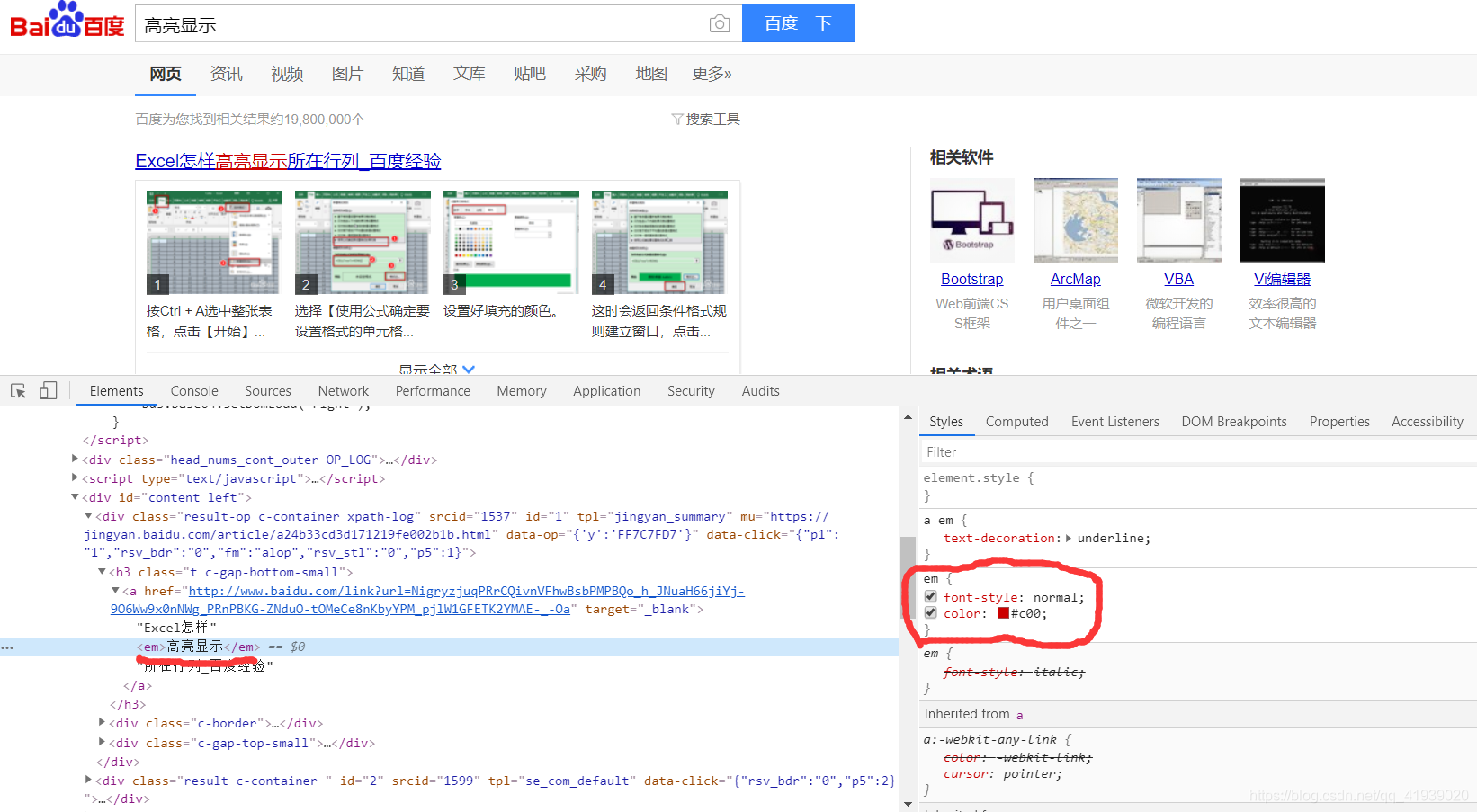
高量显示 的做法是给需要高亮显示的词加上<em>标签,然后在设置<em>的样式,我们需要做的就是为需要高亮显示的词加上<em>标签GET /test/_search { "query": { "match": { "title": "小米" } }, "highlight": { "fields": {"title": {}}, "pre_tags": "<em>", "post_tags": "</em>" } }- 查询结果是这个样子
{
   "_index" : "test",
   "_type" : "goods",
   "_id" : "4",
   "_score" : 0.94566005,
   "_source" : {
     "title" : "小米笔记本",
     "images" : "http://image.jd.com/12479122.jpg",
     "price" : 4999,
     "stock" : 200,
     "attr" : {
       "category" : "笔记本",
       "brand" : "小米"
     }
   },
   "highlight" : {
     "title" : [
       "<em>小米</em>笔记本"
     ]
   }
 }
然后我们可以在做进一步处理
-
10、结果过滤(_source)
默认情况下,elasticsearch在搜索的结果中,会把文档中保存在_source的所有字段都返回。如果我们只想获取其中的部分字段,可以添加
_source的过滤GET /test/_search { "_source": ["title","price"], "query": { "match": { "title": "小米" } } }
八、聚合(aggregations)
聚合可以让我们极其方便的实现对数据的统计、分析。例如:
- 什么品牌的手机最受欢迎?
- 这些手机的平均价格、最高价格、最低价格?
- 这些手机每月的销售情况如何?
实现这些统计功能的比数据库的sql要方便的多,而且查询速度非常快,可以实现实时搜索效果。
-
1、基本概念
- Elasticsearch中的聚合,包含多种类型,最常用的两种,一个叫
桶,一个叫度量: - 桶(bucket)
-
桶的作用,是按照某种方式对数据进行分组,每一组数据在ES中称为一个
桶,例如我们根据国籍对人划分,可以得到中国桶、英国桶,日本桶……或者我们按照年龄段对人进行划分:010,1020,2030,3040等。 -
Elasticsearch中提供的划分桶的方式有很多:
- Date Histogram Aggregation:根据日期阶梯分组,例如给定阶梯为周,会自动每周分为一组
- Histogram Aggregation:根据数值阶梯分组,与日期类似
- Terms Aggregation:根据词条内容分组,词条内容完全匹配的为一组
- Range Aggregation:数值和日期的范围分组,指定开始和结束,然后按段分组
- ……
-
bucket aggregations 只负责对数据进行分组,并不进行计算,因此往往bucket中往往会嵌套另一种聚合:metrics aggregations即度量
-
- 度量(metrics)
-
分组完成以后,我们一般会对组中的数据进行聚合运算,例如求平均值、最大、最小、求和等,这些在ES中称为
度量 -
比较常用的一些度量聚合方式:
- Avg Aggregation:求平均值
- Max Aggregation:求最大值
- Min Aggregation:求最小值
- Percentiles Aggregation:求百分比
- Stats Aggregation:同时返回avg、max、min、sum、count等
- Sum Aggregation:求和
- Top hits Aggregation:求前几
- Value Count Aggregation:求总数
- ……
-
聚合类似于SQL中的分组group by,度量类似于SQL中的函数sum()、avg()…
- Elasticsearch中的聚合,包含多种类型,最常用的两种,一个叫
-
2、聚合为桶
- 按照手机的品牌
attr.brand.keyword来划分桶- 设置size为0,代表只显示聚合结果
GET /test/_search { "size" : 0, "aggs" : { "brands" : { "terms" : { "field" : "attr.brand.keyword" } } } }- 结果
{
  "took" : 8,
  "timed_out" : false,
  "_shards" : {
    "total" : 5,
    "successful" : 5,
    "skipped" : 0,
    "failed" : 0
  },
  "hits" : {
    "total" : 10,
    "max_score" : 0.0,
    "hits" : [ ]
  },
  "aggregations" : {
    "brands" : {
      "doc_count_error_upper_bound" : 0,
      "sum_other_doc_count" : 0,
      "buckets" : [
        {
          "key" : "华为",
          "doc_count" : 4
        },
        {
          "key" : "小米",
          "doc_count" : 4
        },
        {
          "key" : "oppo",
          "doc_count" : 1
        },
        {
          "key" : "vivo",
          "doc_count" : 1
        }
      ]
    }
  }
}
- 按照手机的品牌
-
3、桶内度量
GET /test/_search { "size" : 0, "aggs" : { "brands" : { "terms" : { "field" : "attr.brand.keyword" }, "aggs":{ "avg_price": { "avg": { "field": "price" } } } } } }- aggs:我们在上一个aggs(brands)中添加新的aggs。可见
度量也是一个聚合 - avg_price:聚合的名称
- avg:度量的类型,这里是求平均值
- field:度量运算的字段
- aggs:我们在上一个aggs(brands)中添加新的aggs。可见
-
4、桶内嵌套桶
GET /test/_search
{
    "size" : 0,
    "aggs" : {
        "brands" : {
            "terms" : {
              "field" : "attr.brand.keyword"
            },
            "aggs":{
                "avg_price": {
                   "avg": {
                      "field": "price"
                   }
                },
                "categorys": {
                  "terms": {
                    "field": "attr.category.keyword"
                  }
                }
            }
        }
    }
}
更多推荐


 2
2 0
0- 0


 已为社区贡献1条内容

所有评论(0)