
以太坊DAPP——truffle框架的使用
以太坊DAPP——truffle框架的使用
这篇文章是笔者经历了长时间的实践,整理归纳得出。truffle框架更新很快,可能过一段时间此教程中的部分命令就不再适用
操作系统
Ubuntu 16.04
安装Node.js和npm
安装 Node.js v11.x,可以修改第一个命令中的数值,下载不同的版本,这里笔者在Ubuntu中安装的是Node.js v11.15.0和npm v6.13.4
$ curl -sL https://deb.nodesource.com/setup_11.x | sudo -E bash -
$ sudo apt-get update
$ sudo apt-get install nodejs
下载完成后可以使用nodejs -v命令来查看nodejs下载是否成功,以及下载的nodejs版本,同样npm -v命令来查看npm下载是否成功,以及下载的npm版本
安装Truffle
完成nodejs和npm的安装之后,进行truffle的安装,笔者在Ubuntu中安装的是truffle v5.1.3
$ sudo npm install -g truffle
使用truffle version可以查看到相关软件的版本,如下
Truffle v5.1.3 (core: 5.1.3)
Solidity v0.5.12 (solc-js)
Node v11.15.0
Web3.js v1.2.2
使用truffle -v可以查看到truffle的版本以及部分常用命令,如下
Truffle v5.1.3 - a development framework for Ethereum

Usage: truffle <command> [options]

Commands:
  build     Execute build pipeline (if configuration present)
  compile   Compile contract source files
  config    Set user-level configuration options
  console   Run a console with contract abstractions and commands available
  create    Helper to create new contracts, migrations and tests
  debug     Interactively debug any transaction on the blockchain (experimental)
  deploy    (alias for migrate)
  develop   Open a console with a local development blockchain
  exec      Execute a JS module within this Truffle environment
  help      List all commands or provide information about a specific command
  init      Initialize new and empty Ethereum project
  install   Install a package from the Ethereum Package Registry
  migrate   Run migrations to deploy contracts
  networks  Show addresses for deployed contracts on each network
  obtain    Fetch and cache a specified compiler
  opcode    Print the compiled opcodes for a given contract
  publish   Publish a package to the Ethereum Package Registry
  run       Run a third-party command
  test      Run JavaScript and Solidity tests
  unbox     Download a Truffle Box, a pre-built Truffle project
  version   Show version number and exit
  watch     Watch filesystem for changes and rebuild the project automatically

See more at http://truffleframework.com/docs
可以在truffle学习网站中学习truffle的基础知识
项目初始化
新建一个文件夹,作为开发使用,这里新建了一个名为test的文件夹mkdir test,并进入此文件夹cd test
$ mkdir test
$ cd test
在此文件夹下,安装ganache
安装Ganache
ganache有图形界面版本和命令行版本,这里笔者在Ubuntu中安装的是ganache的命令行版本,Ganache CLI v6.7.0 (ganache-core: 2.8.0)
$ sudo npm install -g ganache-cli
具体的命令行参数配置参见githubhttps://github.com/trufflesuite/ganache-cli
truffle初始化项目
使用truffle命令进行初始化,初始化的方式有很多种
1、truffle init
$ truffle init
成功后会有入下显示
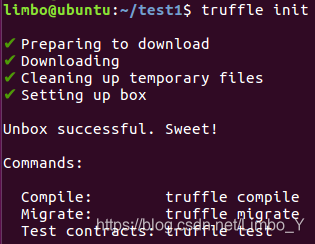
使用这个命令会建立一个空项目,结构如下(可以使用tree命令查看)
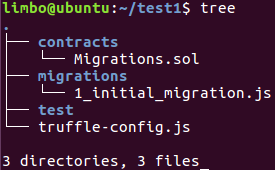
2、truffle unbox metacoin
$ truffle unbox metacoin
使用这个命令会建立一个带有metacoin demo的项目,结构如下(可以使用tree命令查看)
3、truffle unbox react
$ truffle unbox react
使用这个命令会建立一个项目模板,不过笔者没有尝试过这个命令
4、truffle unbox webpack
$ truffle unbox webpack
使用这个命令会建立一个metacoin demo的完整项目,由于需要下载npm依赖,所以需要花费较长时间
本文使用truffle unbox webpack下载好metacoin demo,接下来讲解如何编译合约、迁移合约、测试合约,最后运行metacoin demo
启动Ganache
打开一个新的terminal,进入对应文件夹,执行命令
$ ganache-cli
显示如下,监听本地8545号端口127.0.0.1:8545
Ganache CLI v6.7.0 (ganache-core: 2.8.0)

Available Accounts
==================
(0) 0xaB888536c743E06E96Ec662ff1B2d34a934C19dD (100 ETH)
(1) 0x2D8A8B5d0d399C48e99cb2aA33719382463355e2 (100 ETH)
(2) 0x4f705F9652907296AbFc5BA3b13f6E763Ec089Bb (100 ETH)
(3) 0xF1d547fA66AfbA8122181E9119897706755E04B3 (100 ETH)
(4) 0xa6023091fFD1c250013A00421942FC5A740a2f0e (100 ETH)
(5) 0xef32fA3415832D01e18EB0402dd82C7bdb71397b (100 ETH)
(6) 0x0a61409c859E1e9Ad7f54eaC92b5C94fBB87EAfc (100 ETH)
(7) 0x9338e4Eff385eF9Cb96f3bf93aec8258356d7CeC (100 ETH)
(8) 0xf8A7A036eB33134De5e8ff99b53DA2C93F91D595 (100 ETH)
(9) 0x17500487D20941a09E3350c67B0A32b2357627ea (100 ETH)

Private Keys
==================
(0) 0x86a144e742890aca833f6dd54150417f1aba0807784b9c3ae381c4f31348e533
(1) 0x68f7d8ed82963c43e4e1ab503d37407845a1243022b84c08dc3a421490a90cab
(2) 0x194a8ac556db374e822a20f0bbb072028bf2b6f4674cdb6454a0df25498ae4f2
(3) 0x8b4c63fdd9cd7fe5f6104f172a4185ce83dd64fc49a1f0fdaedee77ed151d3cd
(4) 0x5d021367572220b22d33dfa63568eaf7548fcb12e782198e1bc423f2b9ba1c47
(5) 0x42374980d7924708cde29ee49452b98dcef61fb611146a57e64b8c108855a9d8
(6) 0x892edb202a13064976a3d5b8f42cde6e983bb9c72a0dc3419dd7c0f836a25671
(7) 0x0c94115a1b4afd9a681201169472ce99da7efadb3763edee8717ffe50f9046e4
(8) 0xfee536dee12ce82a1fb063e2e3c7b01caa4fb4491d806f7220b2453a82e50ee1
(9) 0xb204ccdcd77a8f4e11accd1dc10b9f59a567a66071dd57af551f267a0daccd69

HD Wallet
==================
Mnemonic:      tail wheel tunnel powder horn genre morning poet outdoor predict wing report
Base HD Path:  m/44'/60'/0'/0/{account_index}

Gas Price
==================
20000000000

Gas Limit
==================
6721975

Listening on 127.0.0.1:8545
编译合约
在项目文件夹下,执行命令进行合约编译,编译完成后会多出一些json文件
$ truffle compile
部署合约
编译完成后,打开truffle-config.js文件,修改文件,将这一部分的注释去除即可
  networks: {
    development: {
      host: "localhost",
      port: 8545,
      network_id: "*"
    }
  }
执行命令进行合约部署,在部署过程中可以在ganache-cli窗口看到变化
$ truffle migrant
测试合约
执行命令进行合约测试
$ truffle test
运行DAPP
由于package.json文件在文件夹app下,所以进入文件夹app中执行npm run dev命令,否者会报找不到package.json的错误
$ cd app
$ npm run dev
有如下显示,表示运行成功,项目部署在http://localhost:8080/
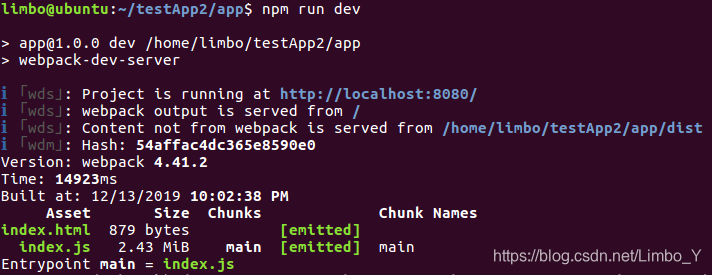
打开浏览器输入此地址,可以看到项目界面如下
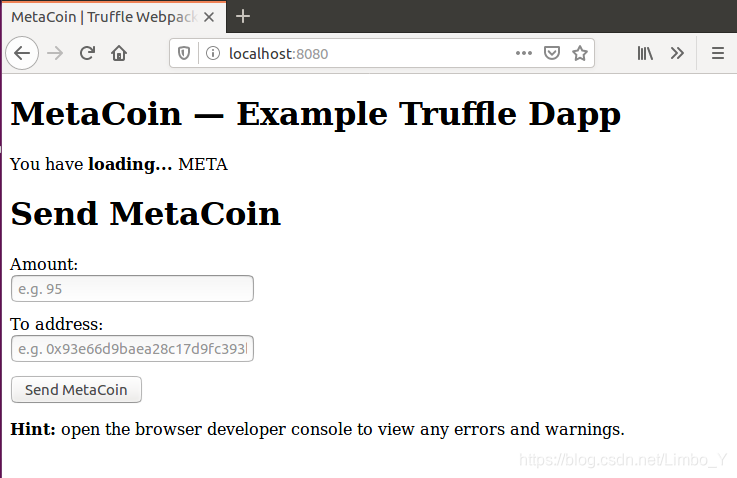
到此为止,可以根据ganache-cli提供的十个测试账户进行转账metacoin的操作
更多推荐
 1
1 0
0- 0


 已为社区贡献1条内容

所有评论(0)