
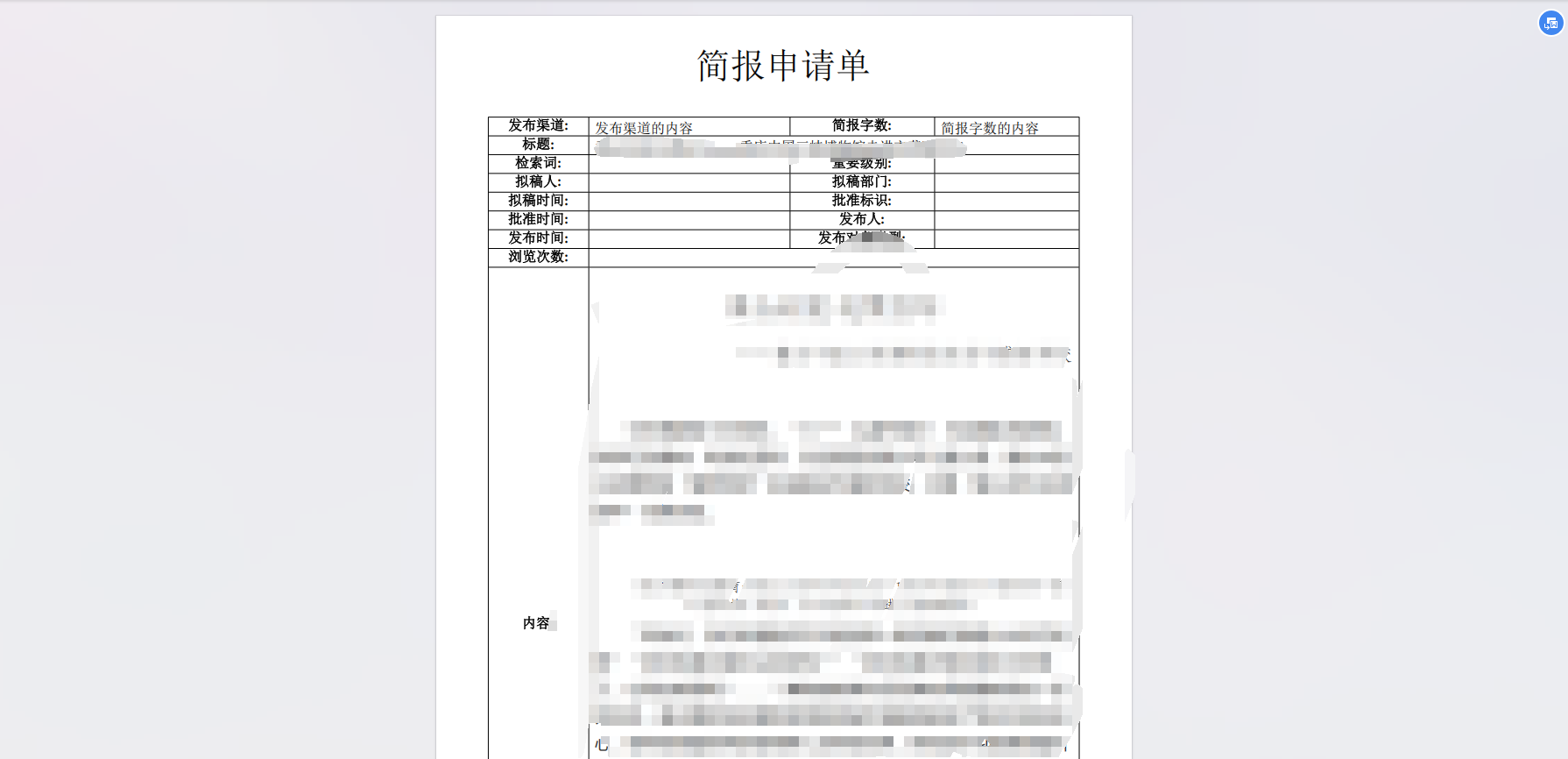
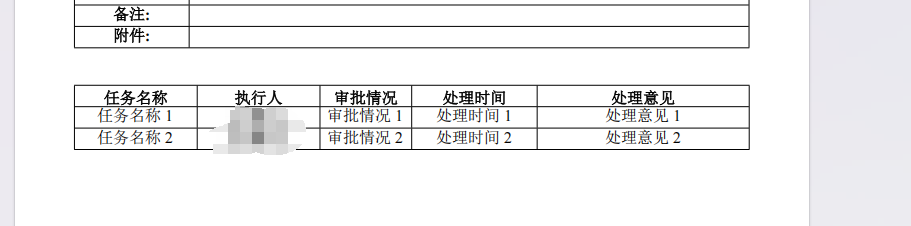
使用spire.doc.free-5.2.0.jar生成word,并且转pdf,带富文本内容,带数字签名
·
package com.demo.demo2;

import com.spire.doc.*;
import com.spire.doc.documents.HorizontalAlignment;
import com.spire.doc.documents.Paragraph;
import com.spire.doc.documents.VerticalAlignment;
import com.spire.doc.fields.DocPicture;
import com.spire.doc.fields.TextRange;
import com.spire.doc.formatting.CellFormat;
import com.spire.doc.formatting.ParagraphFormat;

import java.io.*;

/**
 * @author fg
 * @date 2025/4/15 15:05
 **/
public class Spire {
    public static void main(String[] args) {
        setData(2,"E:\\Desktop\\rz\\a.docx","E:\\Desktop\\rz\\a.pdf");
    }

    /**
     * 生成公共方法
     *
     * @param auditSize 审核的数据条数,用于循环生成数字签名
     * @param wordPath  生成的word地址
     * @param pdfPath 生成的pdf地址
     * @return void
     * @author fg
     * @date 2025/4/16 9:20
     */
    public static void setData(int auditSize, String wordPath, String pdfPath) {
        // 创建文档对象
        Document document = new Document();
        // 添加 Section
        Section sec = document.addSection();
        Paragraph titleParagraph = sec.addParagraph();
        ParagraphFormat format = titleParagraph.getFormat();
        format.setHorizontalAlignment(HorizontalAlignment.Center);
        TextRange textRange = titleParagraph.appendText("简报申请单");
        textRange.getCharacterFormat().setFontSize(30);
        Paragraph other = sec.addParagraph();//凑行数
        Paragraph other1 = sec.addParagraph();//凑行数
        // 创建表格(1行2列)
        Table table = sec.addTable(true);
        table.resetCells(11, 4); // 11行4列
        TableRow tableRow = table.getRows().get(0);
        tableRow.getCells().get(0).setCellWidth(16.6f, CellWidthType.Percentage);
        tableRow.getCells().get(1).setCellWidth(32, CellWidthType.Percentage);
        tableRow.getCells().get(1).setCellWidth(16.6f, CellWidthType.Percentage);
        tableRow.getCells().get(1).setCellWidth(34.8f, CellWidthType.Percentage);
        TableRow row1 = table.getRows().get(0);
        setTitle(row1, 0, "发布渠道:");
        setContent(row1, 1, "发布渠道的内容");
        setTitle(row1, 2, "简报字数:");
        setContent(row1, 3, "简报字数的内容");


        TableRow row2 = table.getRows().get(1);
        setTitle(row2, 0, "标题:");
        setContent(row2, 1, "标题");
//        //调用方法纵向合并第1列中的第2、3个单元格
//        tb.applyVerticalMerge(0,1,2);
        //调用方法横向合并第1行中的第2、3,4个单元格
        table.applyHorizontalMerge(1, 1, 3);

        TableRow row3 = table.getRows().get(2);
        setTitle(row3, 0, "检索词:");
        setContent(row3, 1, "");
        setTitle(row3, 2, "重要级别:");
        setContent(row3, 3, "");

        TableRow row4 = table.getRows().get(3);
        setTitle(row4, 0, "拟稿人:");
        setContent(row4, 1, "");
        setTitle(row4, 2, "拟稿部门:");
        setContent(row4, 3, "");

        TableRow row5 = table.getRows().get(4);
        setTitle(row5, 0, "拟稿时间:");
        setContent(row5, 1, "");
        setTitle(row5, 2, "批准标识:");
        setContent(row5, 3, "");

        TableRow row6 = table.getRows().get(5);
        setTitle(row6, 0, "批准时间:");
        setContent(row6, 1, "");
        setTitle(row6, 2, "发布人:");
        setContent(row6, 3, "");

        TableRow row7 = table.getRows().get(6);
        setTitle(row7, 0, "发布时间:");
        setContent(row7, 1, "");
        setTitle(row7, 2, "发布对象类型:");
        setContent(row7, 3, "");


        TableRow row8 = table.getRows().get(7);
        setTitle(row8, 0, "浏览次数:");
        setContent(row8, 1, "");
        //调用方法横向合并第8行中的第2、3,4个单元格
        table.applyHorizontalMerge(7, 1, 3);
        String htmlContent ="";//带富文本的内容
        TableRow row9 = table.getRows().get(8);
        setTitle(row9, 0, "内容:");
        TableCell htmlCell = row9.getCells().get(1);
        htmlCell.addParagraph().appendHTML(htmlContent);
        //调用方法横向合并第9行中的第2、3,4个单元格
        table.applyHorizontalMerge(8, 1, 3);


        TableRow row10 = table.getRows().get(9);
        setTitle(row10, 0, "备注:");
        setContent(row10, 1, "");
        //调用方法横向合并第10行中的第2、3,4个单元格
        table.applyHorizontalMerge(9, 1, 3);


        TableRow row11 = table.getRows().get(10);
        setTitle(row11, 0, "附件:");
        setContent(row11, 1, "");
        //调用方法横向合并第11行中的第2、3,4个单元格
        table.applyHorizontalMerge(10, 1, 3);

        // **保存文档**
        ByteArrayOutputStream os = new ByteArrayOutputStream();
        //列宽自动适应内容
        table.autoFit(AutoFitBehaviorType.Auto_Fit_To_Window);

        Paragraph other3 = sec.addParagraph();//拿来凑行数的
        Paragraph other4 = sec.addParagraph();//拿来凑行数的


        // 创建表格(1行2列)
        Table bottomTable = sec.addTable(true);
        bottomTable.resetCells(1 + auditSize, 5); // 11行4列
        TableRow bottomTableRow = bottomTable.getRows().get(0);
        setTitle(bottomTableRow, 0, "任务名称");
        setTitle(bottomTableRow, 1, "执行人");
        setTitle(bottomTableRow, 2, "审批情况");
        setTitle(bottomTableRow, 3, "处理时间");
        setTitle(bottomTableRow, 4, "处理意见");
        bottomTableRow.getCells().get(0).setCellWidth(16.6f, CellWidthType.Percentage);
        bottomTableRow.getCells().get(1).setCellWidth(13, CellWidthType.Percentage);
        bottomTableRow.getCells().get(2).setCellWidth(16.6f, CellWidthType.Percentage);
        bottomTableRow.getCells().get(3).setCellWidth(20f, CellWidthType.Percentage);
        bottomTableRow.getCells().get(4).setCellWidth(33.8f, CellWidthType.Percentage);


        for (int i = 1; i <= auditSize; i++) {
            TableRow contentRow = bottomTable.getRows().get(i);
            setContentAtTableTwo(contentRow, 0, "任务名称" + i);
            //创建 DocPicture 类的对象
            DocPicture picture = new DocPicture(document);
            //从磁盘加载图片
            picture.loadImage("E:\\Desktop\\1.png");
            //设置图片大小
            // 方案1:按单元格百分比缩放(推荐)
            picture.setWidth(50);  // 宽度
            picture.setHeight(15);  // 高度
            //将图片文本环绕方式设置为四周环绕
            //picture.setTextWrappingStyle( TextWrappingStyle.Square);
            //将图片插入
            TableCell tableCell = contentRow.getCells().get(1);
            Paragraph paragraph = tableCell.addParagraph();
            paragraph.getFormat().setHorizontalAlignment(HorizontalAlignment.Center);//左右居中
            CellFormat cellFormat = tableCell.getCellFormat();
            cellFormat.setVerticalAlignment(VerticalAlignment.Middle);//上下居中
            paragraph.getChildObjects().insert(0, picture);
            setContentAtTableTwo(contentRow, 2, "审批情况" + i);
            setContentAtTableTwo(contentRow, 3, "处理时间" + i);
            setContentAtTableTwo(contentRow, 4, "处理意见" + i);
        }

        // **写入文件**
        document.saveToStream(os, FileFormat.Docx);
        File file = new File(wordPath);
        try (FileOutputStream out = new FileOutputStream(file)) {
            out.write(os.toByteArray());
        } catch (FileNotFoundException e) {
            e.printStackTrace();
        } catch (IOException e) {
            e.printStackTrace();
        }
        //加载Word
        document.loadFromFile(wordPath);
        //保存为PDF格式
        document.saveToFile(pdfPath, FileFormat.PDF);
    }

    /**
     * 设置标题
     *
     * @param row       第几行
     * @param column    第几列
     * @param titieName 标题名字
     * @return void
     * @author fg
     * @date 2025/4/15 14:56
     */
    public static void setTitle(TableRow row, int column, String titieName) {
        TableCell cell = row.getCells().get(column);
        TextRange textRange = cell.addParagraph().appendText(titieName);
        textRange.getOwnerParagraph().getFormat().setHorizontalAlignment(HorizontalAlignment.Center);//左右居中
        CellFormat cellFormat = cell.getCellFormat();
        cellFormat.setVerticalAlignment(VerticalAlignment.Middle);//上下居中
        cellFormat.setTextWrap(true);//自动换行
        textRange.getCharacterFormat().setBold(true);//字体加粗
    }

    /**
     * 设置普通内容
     *
     * @param row     当前行数
     * @param column  列
     * @param content 内容
     * @return void
     * @author fg
     * @date 2025/4/15 14:52
     */
    public static void setContent(TableRow row, int column, String content) {
        TableCell cell = row.getCells().get(column);
        cell.addParagraph().appendText(content);
    }

    public static void setContentAtTableTwo(TableRow row, int column, String content) {
        TableCell cell = row.getCells().get(column);
        TextRange textRange = cell.addParagraph().appendText(content);
        textRange.getOwnerParagraph().getFormat().setHorizontalAlignment(HorizontalAlignment.Center);//左右居中
        CellFormat cellFormat = cell.getCellFormat();
        cellFormat.setVerticalAlignment(VerticalAlignment.Middle);//上下居中
    }

}
效果
更多推荐



 1
1 0
0- 0


 已为社区贡献1条内容

所有评论(0)