
Vue读取word文本并生成试题导入题库
目录
背景介绍
公司业务主要是做安全风险智能化管控的HSE平台,其中一个重要模块就是安全教育培训,不可避免会涉及在线考试、题库、试题等内容,其中试题作为基础数据,支持客户自己新增和excel批量导入。客户在使用过程中,提出需支持word格式的试题导入,产品经理分析一波觉得合理,需求就甩给我们了,行,那就做吧。
需求分析
没有规矩,不成方圆,同理,如果没有具体的规则做支撑,随便一种格式都能导入的话岂不乱了套了,结合代码实现难易程度和产品经理讨论后,最终制定了如下规则:
1、试题序号不会计入试题题干信息,仅用于列表展示。
2、题型标注:支持使用【单选题】、【多选题】、【判断题】、【填空题】、【简答题】来标注不同的题型。
3、试题题干根据题干段尾的提醒标注【】识别为题干。
4、单选题试题在()内填写正确答案,且只能选择一个答案。
5、多选题试题在()内填写正确答案,可选择多个答案。
6、判断题试题在题型标注前()内填写正确答案,(正确/错误)。
7、填空题和简答题两类试题需填写参考答案,以便阅卷讲师进行人工阅卷评分。
8、试题各项之间识别通过换行(Enter)区分,如:选项与答案详解,答案详解与试题难度等。
9、答案详解在换行(Enter)之后通过(答案详解:)进行识别为试题解析行。
10、试题难度在换行(Enter)之后通过(试题难度:)进行识别为试题难度行。
11、答案解析为非必填项。
12、试题难度也为非必填项,且如果未设置值,则默认难度为【低】。
13、各类试题录入格式如下:
1、我国的火警报警电话是(C)?【单选题】
A、110
B、120
C、119
D、911
试题难度:低
答案详解:我国的火警报警电话是119。
2、防火的基本原理有(ABCD)?【多选题】
A、控制可燃物
B、隔绝空气
C、消除引火源
D、阻止火势蔓延
答案详解:四者皆为防火的原理。
3、身上着火后,迎风奔跑是错误的。(正确)【判断题】
试题难度:低
答案详解:正确的
4、火警电话是___?【填空题】
试题难度:低
参考答案:119
答案详解:我国的火警报警电话是119。
5、请简述发生火灾时的操作规范。【简答题】
试题难度:低
参考答案:立即报警,大声提醒其他人,迅速离开现场,使用楼梯,不要使用电梯,到达安全地点,遵守消防员指示。
答案详解:立即报警,大声提醒其他人,迅速离开现场,使用楼梯,不要使用电梯,到达安全地点,遵守消防员指示。
实现思路
1、导入word文件并读取文本内容
这里我使用mammoth插件来实现word文字的读取,在终端安装该插件。
npm i mammoth文件中导入该组件并编写读取文本逻辑存入inputText变量中(说明:FlexExportButton、flex-button是我们内部自己封装的按钮,改成el-button再结合实际使用即可)
<template>
  <div>
    <div ref="actionsBox" class="flex-btn-pageTop">
      <FlexExportButton :title="'下载模板'" :fileName="'导入试题模板'" :url="downWord_url" :downLoadFn="downLoadFile" />
      <flex-button @click.native="importTemplate">模板导入</flex-button>
      <flex-button @click.native="exampleVisible = true" type="plain">格式示例</flex-button>
      <flex-button @click.native="clearText" type="plain">清空文本</flex-button>
    </div>
    <input style="display: none" ref="file" type="file" @change="handleFileChange" accept=".docx" />
    <div class="quiz-generator">
      <el-input type="textarea" class="pub-area custom-textarea" v-model="inputText" placeholder="在这里输入试题"></el-input>
      <div class="pub-area" style="height: 470px">
        <div class="right-area">
          <div class="topic-item content" v-for="(item, index) in dtoList.dtoList" :key="index">
            <!-- 单选 -->
            <div v-if="item.questionType === 1">
              <div>
                <p>{
  { index + 1 }}、{
  { item.questionStem }}</p>
                <el-radio-group v-model="quesAnswerList[index].answer" disabled>
                  <div v-for="(it, idx) in item.questionOptionList" :key="idx">
                    <el-radio class="padding-style" :label="it.questionOption">
                      {
  { it.questionOption }}、{
  { it.optionContent }}
                    </el-radio>
                  </div>
                </el-radio-group>
              </div>
            </div>
            <!-- 多选 -->
            <div v-if="item.questionType === 2">
              <div>
                <p>{
  { index + 1 }}、{
  { item.questionStem }}</p>
                <el-checkbox-group v-model="quesAnswerList[index].answer" disabled>
                  <div v-for="(it, idx) in item.questionOptionList" :key="idx">
                    <el-checkbox class="padding-style" :label="it.questionOption">
                      {
  { it.questionOption }}、{
  { it.optionContent }}</el-checkbox>
                  </div>
                </el-checkbox-group>
              </div>
            </div>
            <!-- 填空 -->
            <div v-if="item.questionType === 3">
              <div>
                <p>{
  { index + 1 }}、{
  { item.questionStem }}</p>
                <div class="aq-search-common">
                  <el-input style="width: 40vw" placeholder="" readonly />
                </div>
              </div>
            </div>
            <!-- 判断 -->
            <div v-if="item.questionType === 4">
              <div>
                <p>{
  { index + 1 }}、{
  { item.questionStem }}</p>
                <div>
                  <el-radio-group v-model="quesAnswerList[index].answer" disabled>
                    <div><el-radio class="padding-style" label="正确" value="1">正确</el-radio></div>
                    <div><el-radio class="padding-style" label="错误" value="2">错误</el-radio></div>
                  </el-radio-group>
                </div>
              </div>
            </div>
            <!-- 简答 -->
            <div v-if="item.questionType === 5">
              <div>
                <p>{
  { index + 1 }}、{
  { item.questionStem }}</p>
                <div class="aq-search-common">
                  <el-input style="width: 40vw" placeholder="" type="textarea" rows="2" readonly />
                </div>
              </div>
            </div>
            <div style="padding-top: 5px;" v-show="item.questionType === 3 || item.questionType === 5">参考答案:{
  {
              item.answerList.length ?
                item.answerList[0].answer : "" }}</div>
            <div style="padding: 5px 0;">试题难度:{
  { getTagValue(dict["NETS_ITEM_DIFFICULTY"], item.difficultyLevel) }}
            </div>
            <div>答案详解:{
  { item.answerDetails }}</div>
          </div>
        </div>
        <div style="text-align: center; margin-top: 2px;"><flex-button style="width: 200px" :loading="btnLoading"
            @click.native="importHandle">导入</flex-button></div>
      </div>
    </div>
  </div>
</template>

<script>
import mammoth from 'mammoth';
export default {
  data() {
    return {
      inputText: '',
      dtoList: {
        dtoList: [], // 生成的试题数组
      },
      quesAnswerList: [],
      dict: {},
      answerListId: [{
        id: 1,
        answer: 'A'
      }, {
        id: 2,
        answer: 'B'
      }, {
        id: 3,
        answer: 'C'
      }, {
        id: 4,
        answer: 'D'
      }, {
        id: 5,
        answer: 'E'
      }],
      btnLoading: false
    }
  },
  methods: {
    handleFileChange(event) {
      const file = event.target.files[0];
      if (file) {
        // 创建FileReader来读取文件
        const reader = new FileReader();

        // 文件读取完成后触发的事件
        reader.onload = (event) => {
          // event.target.result 包含了文件的内容
          const arrayBuffer = event.target.result;

          // Mammoth.js 用于转换arrayBuffer到文本
          mammoth.extractRawText({ arrayBuffer: arrayBuffer }).then(result => {
            this.inputText = result.value.replace(/^\s*[\r\n]/gm, ''); // 赋值操作,将文本内容保存在data属性中
          }).catch(error => {
            console.error('File reading error: ', error);
          });
        };

        // 读取文件为ArrayBuffer
        reader.readAsArrayBuffer(file);
      }
    },
    importTemplate() {
      this.$refs.file.value = ''
      this.$refs.file.click();
    },
  }
}
</script>

<style lang='scss' scoped>
.quiz-generator {
  display: flex;
  justify-content: space-between;

  .pub-area {
    width: 49.5%;
    height: 500px;
  }

  .custom-textarea {
    ::v-deep .el-textarea__inner {
      height: 500px !important;
      border: 1px solid #747474 !important;
      border-radius: none;
      /* 或者您想要的任何高度 */
      /* 若想限制最小或最大高度,可以用min-height或max-height */
    }
  }

  .left-area,
  .right-area {
    width: 100%;
    height: 100%;
    border: 1px solid #747474;
    overflow-y: auto;

    .topic-item {
      border-bottom: 1px dashed #bdbdbd;
      padding: 10px;

      &>p {
        padding: 4px;

        &>span {
          color: rgb(203, 94, 94);
        }
      }
    }
  }
}
</style>
2、监听文本内容,根据上方规则生成试题(核心代码)
<script>
export default {
  watch: {
    // 监听 inputText 的变化并生成试题
    inputText: {
      handler(newText) {
        this.generateQuestions(newText);
      },
      immediate: true
    }
  },
  methods: {
    generateQuestions() {
      // 分析输入文本并确定题目类型和内容,这里有一套复杂的逻辑来区分不同的题型
      let parsedText = this.parseInput(this.inputText);

      // parseInput函数返回一个题目对象数组
      this.quesAnswerList.length = 0
      this.dtoList.dtoList = parsedText.map((item, ind) => {
        const regex1 = /(【单选题】|【多选题】)\s*$/
        const regex3 = /(【判断题】)\s*$/
        const regex4 = /(【填空题】|【简答题】)\s*$/
        let question = {
          managementId: this.$route.query.id ? this.$route.query.id : "",
          questionStem: "", // 题干
          questionType: "", // 试题类型
          answerList: [], // 答案列表
          answerDetails: "", // 答案解析
          difficultyLevel: 1, // 试题难度
          questionOptionList: [] // 试题选项
        }
        item.forEach((it, idx) => {
          if (idx == 0) {
            // 先判断题型,生成题干、题目类型、答案
            if (regex1.test(it)) { // 单选题|多选题
              // 去掉末尾多余的空格和【单选题】|【多选题】字样
              const title = it.replace(/(【单选题】|【多选题】)$/, '').replace(/\s*$/, '')
              let matches = title.match(/[\((][A-Z]+[\))]/g);
              if (matches && matches.length > 0) {
                // 取最后一个匹配结果
                let lastMatch = matches[matches.length - 1];
                question.questionStem = title.replace(lastMatch, '( )').replace(/^([0-9]+、|[0-9]+\.)/, '').replace(/^\s*/, '')
                const resLen = lastMatch.match(/[A-Z]/g)
                if (resLen.length === 1) {
                  question.questionType = 1
                  let ansIndex = this.answerListId.filter(it => it.answer == resLen[0])
                  question.answerList.push({ answer: resLen[0], index: ansIndex.length > 0 ? ansIndex[0].id : "" })
                  this.quesAnswerList.push({ answer: resLen[0] })
                } else if (resLen.length > 1) {
                  question.questionType = 2
                  resLen.forEach((itx, index) => {
                    let ansIndex = this.answerListId.filter(it => it.answer == itx)
                    question.answerList.push({ answer: itx, index: ansIndex.length > 0 ? ansIndex[0].id : "" })
                  })
                  this.quesAnswerList.push({ answer: question.answerList.map(i => i.answer) })
                }
              } else {
                const oneRegex = /【单选题】\s*$/
                if (oneRegex.test(it)) {
                  question.questionType = 1
                  question.answerList.push({ answer: "" })
                  this.quesAnswerList.push({ answer: "" })
                } else {
                  question.questionType = 2
                  question.answerList.push({ answer: [] })
                  this.quesAnswerList.push({ answer: [] })
                }
                question.questionStem = title.replace(/^([0-9]+、|[0-9]+\.)/, '').replace(/^\s*/, '')
              }
            } else if (regex3.test(it)) { // 判断题
              // 去掉末尾多余的空格和【判断题】字样
              const title = it.replace(/(【判断题】)$/, '').replace(/\s*$/, '')
              let matches = title.match(/[\((](正确|错误)[\))]/g);
              if (matches && matches.length > 0) {
                // 取最后一个匹配结果
                let lastMatch = matches[matches.length - 1];
                question.questionStem = title.replace(lastMatch, "").replace(/^([0-9]+、|[0-9]+\.)/, '').replace(/^\s*/, '')
                const resLen = lastMatch.match(/正确|错误/g)
                if (resLen.length) {
                  question.questionType = 4
                  question.answerList.push({ answer: resLen[0] })
                  this.quesAnswerList.push({ answer: resLen[0] })
                }
              } else {
                question.questionType = 4
                question.answerList.push({ answer: "" })
                this.quesAnswerList.push({ answer: "" })
                question.questionStem = title.replace(/^([0-9]+、|[0-9]+\.)/, '').replace(/^\s*/, '')
              }
            } else if (regex4.test(it)) { // 填空题|简答题
              // 去掉末尾多余的空格和【填空题】|【简答题】字样
              const title = it.replace(/(【填空题】|【简答题】)$/, '').replace(/\s*$/, '')
              question.questionStem = title.replace(/^([0-9]+、|[0-9]+\.)/, '').replace(/^\s*/, '')
              const regex = /(【填空题】)\s*$/
              if (regex.test(it)) {
                question.questionType = 3
              } else {
                question.questionType = 5
              }
              this.quesAnswerList.push({ answer: "" })
            }
          } else {
            if (question.questionType === 1 || question.questionType === 2) {
              // 过滤掉开头空格,以大写字母开头后面跟“、”或者“.”代表是选项
              const regExp = /^\s*[A-Z][、|\.]/
              const capital = /[A-Z]/
              if (regExp.test(it)) {
                question.questionOptionList.push({ questionOption: it.match(capital) ? it.match(capital)[0] : "", optionContent: it.replace(regExp, '') })
              }
            }
            const diffRegExp = /^\s*试题难度[::]/
            if (diffRegExp.test(it)) {
              let diffName = it.replace(diffRegExp, '').replace(/^\s+|\s+$/g, '')
              diffName == "中" ? question.difficultyLevel = 2 : diffName == "高" ? question.difficultyLevel = 3 : ''
            }
            const answerRegExp = /^\s*参考答案[::]/
            if (answerRegExp.test(it) && (question.questionType === 3 || question.questionType === 5)) {
              let detailName = it.replace(answerRegExp, '').replace(/^\s+|\s+$/g, '')
              question.answerList.push({ answer: detailName })
              this.quesAnswerList[ind].answer = detailName
            }
            const detailRegExp = /^\s*答案详解[::]/
            if (detailRegExp.test(it)) {
              let detailName = it.replace(detailRegExp, '').replace(/^\s+|\s+$/g, '')
              question.answerDetails = detailName
            }
          }
        })
        if (question.questionType) {
          return question
        } else {
          return null
        }
      }).filter(it => it !== null && it !== undefined && it);
    },
    parseInput(input) {
      // 将输入分割成每一行,然后进一步解析每一行以建立一个题目对象
      let lines = input.split('\n');
      // 匹配以“(【单选题】|【多选题】|【判断题】|【填空题】|【简答题】)”结尾并忽略结尾空格的正则
      const regex = /(【单选题】|【多选题】|【判断题】|【填空题】|【简答题】)\s*$/
      let topicList = []
      let temp = []
      lines.forEach(item => {
        const isOneOrMore = regex.test(item)
        if (isOneOrMore) {
          temp.length > 0 && topicList.push(temp)
          temp = []
          temp.push(item.replace(/^\s+|\s+$/g, ''))
        } else if (item.replace(/^\s+|\s+$/g, '').length > 0) {
          temp.push(item.replace(/^\s+|\s+$/g, ''))
        }
      })
      temp.length > 0 && topicList.push(temp)
      //...解析文本的具体逻辑
      return topicList;
    },
  }
}
</script>
3、点击导入按钮进行试题规范校验
<script>
export default {
  methods: {
    importHandle() {
      if (this.dtoList.dtoList.length === 0) return this.$message.warning("请先在左边输入试题")
      let isOk = true
      // 答案必填校验
      for (let i = 0; i < this.dtoList.dtoList.length; i++) {
        if (this.dtoList.dtoList[i].questionType === 1 && this.quesAnswerList[i].answer === "") {
          isOk = false
          return this.$message.error(`请填写第${i + 1}题选择题的答案`)
        } else if (this.dtoList.dtoList[i].questionType === 2 && this.quesAnswerList[i].answer.length === 0) {
          isOk = false
          return this.$message.error(`请填写第${i + 1}题选择题的答案`)
        } else if (this.dtoList.dtoList[i].questionType === 4 && this.quesAnswerList[i].answer === "") {
          isOk = false
          return this.$message.error(`请填写第${i + 1}题判断题的答案`)
        } else if (this.dtoList.dtoList[i].questionType === 3 && this.quesAnswerList[i].answer === "") {
          isOk = false
          return this.$message.error(`请填写第${i + 1}题填空题的答案`)
        } else if (this.dtoList.dtoList[i].questionType === 5 && this.quesAnswerList[i].answer === "") {
          isOk = false
          return this.$message.error(`请填写第${i + 1}题简答题的答案`)
        }
      }

      for (let i = 0; i < this.dtoList.dtoList.length; i++) {
        if (this.dtoList.dtoList[i].questionType === 1 || this.dtoList.dtoList[i].questionType === 2) {
          // 选择题判断答案是否有重复的,如有两个选项C
          const answerHasDuplicates = this.hasDuplicateProperty(this.dtoList.dtoList[i].answerList, "answer")
          if (answerHasDuplicates) {
            isOk = false
            return this.$message.warning(`第${i + 1}题选择题有重复的答案,请检查`)
          }
          // 选择题判断选项是否有重复的,如有两个选项B
          const hasDuplicates = this.hasDuplicateProperty(this.dtoList.dtoList[i].questionOptionList, "questionOption")
          if (hasDuplicates) {
            isOk = false
            return this.$message.warning(`第${i + 1}题选择题选项中有重复的选项,请检查`)
          }

          const tempOptionList = this.dtoList.dtoList[i].questionOptionList.map(it => it.questionOption)
          // 选择题判断选项是否按照顺序排列并且以A开始,如选项ABCDE 但是填写了EDCBA、CD、ACD等
          if (!this.isValidSequence(tempOptionList)) {
            isOk = false
            return this.$message.warning(`第${i + 1}题选择题选项没按照字母顺序排列,请检查`)
          }

          for (let j = 0; j < this.dtoList.dtoList[i].answerList.length; j++) {
            // 选择题判断答案是否不在选项范围,如选项只有ABCD 但是填写了F为正确答案
            const hasValue = this.hasSpecificValue(this.dtoList.dtoList[i].questionOptionList, "questionOption", this.dtoList.dtoList[i].answerList[j].answer);
            if (!hasValue) {
              isOk = false
              return this.$message.warning(`第${i + 1}题选择题答案有不在选项范围的,请检查`)
            }
          }
          if (!isOk) return
        }
      }
      if (!isOk) return
      this.btnLoading = true
      // 以下是接口示例,请自行实现 batchAdd 方法

      // batchAdd(this.dtoList).then(res => {
      //   if (res.code === 1) {
      //     this.$message.success("试题导入成功");
      //   } else {
      //     this.$message.error(res.msg);
      //   }
      //   this.btnLoading = false
      // })
    },

    // 判断答案选项是否按照顺序排列
    isValidSequence(arr) {
      const validSequence = ['A', 'B', 'C', 'D', 'E'];

      // 检查数组是否为空或第一个元素不是'A'
      if (arr.length === 0 || arr[0] !== 'A') {
          return false;
      }

      // 遍历数组并检查每个元素是否在有效序列中
      for (let i = 0; i < arr.length; i++) {
          if (arr[i] !== validSequence[i]) {
              return false; // 如果不匹配,则返回false
          }
      }

      return true; // 如果所有条件都满足,返回true
    },

    // 检查数组中对象某个属性的值是否有重复的
    hasDuplicateProperty(arr, propertyName) {
      let seenValues = new Set();
      for (let i = 0; i < arr.length; i++) {
        if (seenValues.has(arr[i][propertyName])) {
          return true; // 发现重复
        }
        seenValues.add(arr[i][propertyName]);
      }
      return false; // 未发现重复
    },

    // 检查数组中对象的某个属性的值是否存在某个值
    hasSpecificValue(arr, propertyName, valueToFind) {
      return arr.some(obj => obj[propertyName] === valueToFind);
    },
  }
}
</script>
效果展示
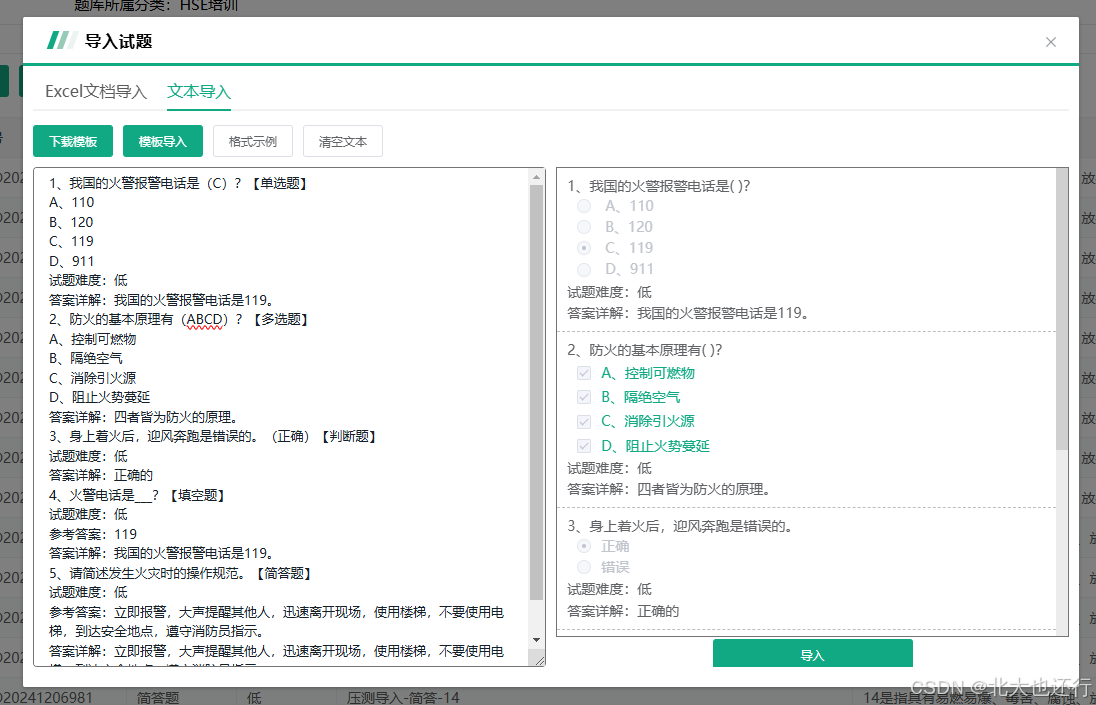
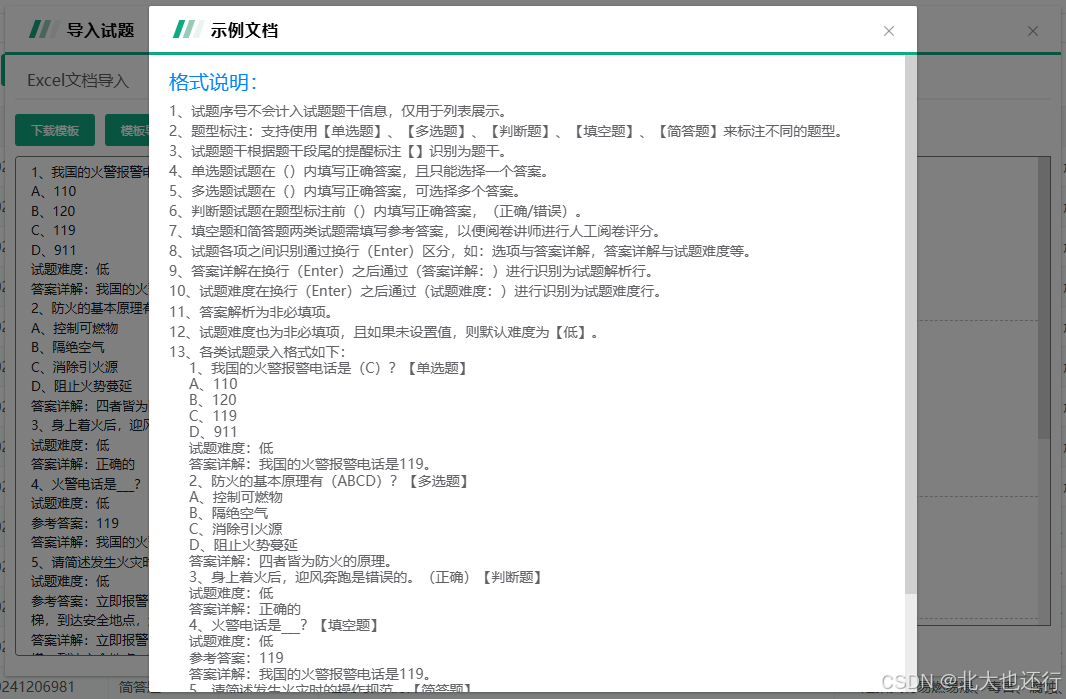
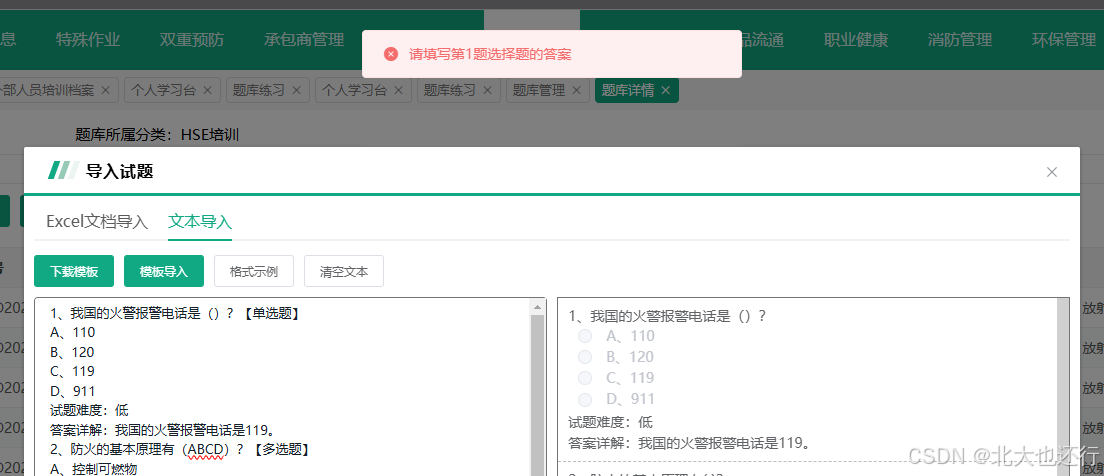
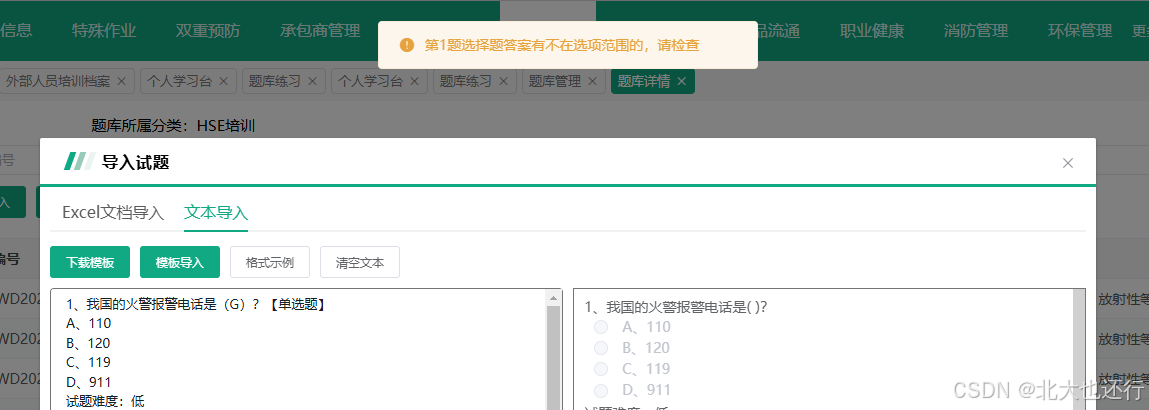
总结
本需求的核心是根据制定的规则,充分利用正则表达式生成固定格式的试题后,在调用后端接口导入试题时再校验不合理的情况,以提高代码健壮性,难点在于规则、校验复杂,需要对正则表达式有一个较为清晰的理解。
更多推荐



 30
30 0
0- 0


 已为社区贡献1条内容

所有评论(0)