
Springboot集成x-file-storage(宝藏上传插件)
·
X-file-storage
发现了一个Springboot宝藏上传插件
一 介绍
官方地址:https://x-file-storage.xuyanwu.cn/#/
一行代码将文件存储到本地、FTP、SFTP、WebDAV、阿里云 OSS、华为云 OBS、七牛云 Kodo、腾讯云 COS、百度云 BOS、又拍云 USS、MinIO、 Amazon S3、GoogleCloud Storage、FastDFS、 Azure Blob Storage、Cloudflare R2、金山云 KS3、美团云 MSS、京东云 OSS、天翼云 OOS、移动 云EOS、沃云 OSS、 网易数帆 NOS、Ucloud US3、青云 QingStor、平安云 OBS、首云 OSS、IBM COS、其它兼容 S3 协议的存储平台。
二 集成
我这个只是简单的实例,更多方法建议去看官方帮助文档:快速入门
1 pom.xml中引入依赖
<!-- 文件上传-->
<dependency>
    <groupId>org.dromara.x-file-storage</groupId>
    <artifactId>x-file-storage-spring</artifactId>
    <version>2.1.0</version>
</dependency>
还需要配置你上传的存储平台的依赖
例如阿里云:
<dependency>
    <groupId>com.aliyun.oss</groupId>
    <artifactId>aliyun-sdk-oss</artifactId>
    <version>3.16.1</version>
</dependency>
腾讯云
<dependency>
    <groupId>com.qcloud</groupId>
    <artifactId>cos_api</artifactId>
    <version>5.6.137</version>
</dependency>
2 配置文件
在项目的application.yml 配置文件中先添加以下基础配置,再添加对应平台的配置
这个是阿里云的,其他存储平台请看 官方帮助文档:快速入门
# 文件上传
dromara:
  x-file-storage: #文件存储配置
    default-platform: aliyun-oss-1 #默认使用的存储平台
    thumbnail-suffix: ".min.jpg" #缩略图后缀,例如【.min.jpg】【.png】
    #对应平台的配置写在这里,注意缩进要对齐,
    aliyun-oss:
      - platform: aliyun-oss-1 # 存储平台标识
        enable-storage: true  # 启用存储
        # 下面的根据自己的填
        access-key: LTAI5tAiBDoLJRvT......
        secret-key: 3ZsC3OBA2hSFbVU......
        end-point: oss-cn-beijing.aliyuncs.com
        bucket-name: text-oss-liao
        # 'https://'+'bucket-name'+'.''+'end-point'+'/'
        domain:  https://text-oss-liao.oss-cn-beijing.aliyuncs.com/ # 访问域名,注意“/”结尾,例如:https://abc.oss-cn-shanghai.aliyuncs.com/
        base-path: text-oss-liao/ # 基础路径,自己命名,我直接bucketName了,记得最后加‘/’
3 在项目的启动类上加上@EnableFileStorage注解
import org.dromara.x.file.storage.spring.EnableFileStorage;
import org.springframework.boot.SpringApplication;
import org.springframework.boot.autoconfigure.SpringBootApplication;
@EnableFileStorage
@SpringBootApplication
public class DemoApplication {
    public static void main(String[] args) {
        SpringApplication.run(DemoApplication.class, args);
    }

}
4 编写业务
因为这只是简单上传实例测试所以我就直接写在Controller了
import org.dromara.x.file.storage.core.FileInfo;
import org.dromara.x.file.storage.core.FileStorageService;
import org.springframework.beans.factory.annotation.Autowired;
import org.springframework.web.bind.annotation.PostMapping;
import org.springframework.web.bind.annotation.RequestMapping;
import org.springframework.web.bind.annotation.RestController;
import org.springframework.web.multipart.MultipartFile;

import java.time.LocalDate;
import java.time.LocalDateTime;
import java.time.format.DateTimeFormatter;
import java.util.UUID;

@RestController
@RequestMapping("xfilestroage")
public class XFileStorageController {
    @Autowired
    private FileStorageService fileStorageService;
    /**
     * 通用上传请求(单个)
     */
    @PostMapping("/upload")
    public String uploadFile(MultipartFile file) {
        FileInfo upload = fileStorageService.of(file).upload();
        return upload.getUrl();
    }
}
5 测试
用apifox测试
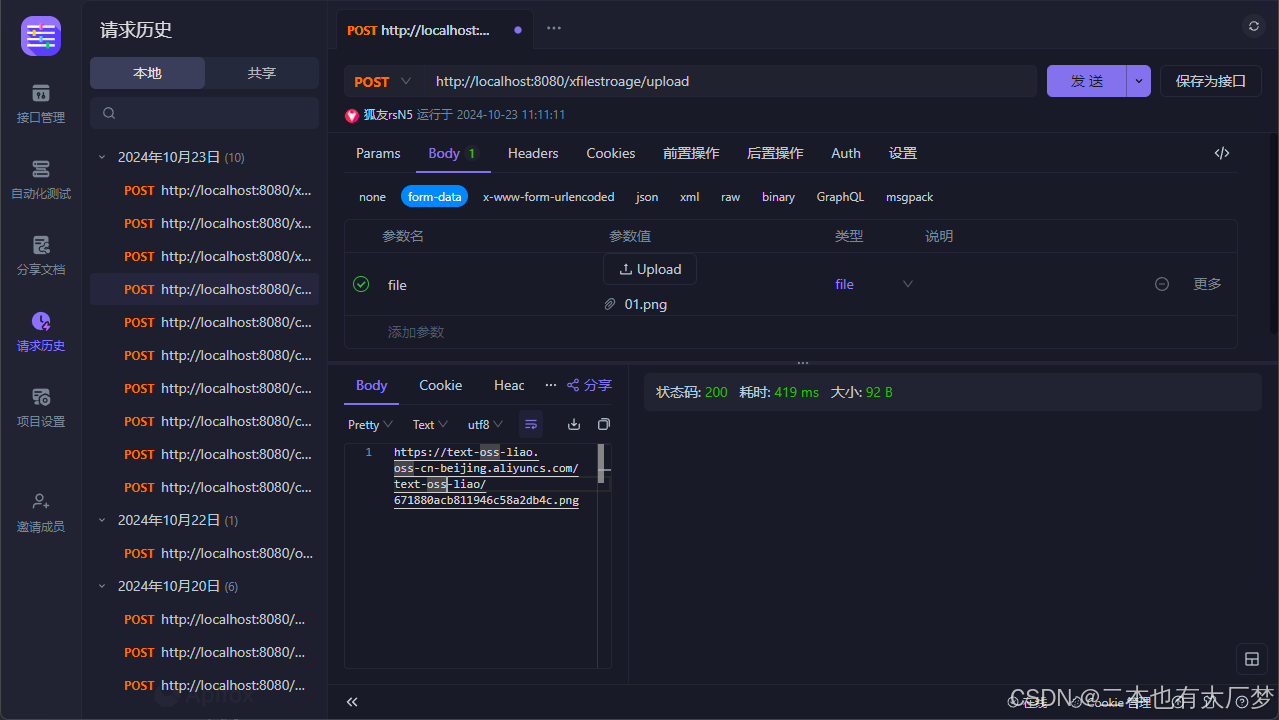
上传成功!
X-file-storage还有很多很多关于上传和下载的方法,建议去官网看看。
更多推荐



 8
8 0
0- 0


 已为社区贡献2条内容

所有评论(0)