

需求说明
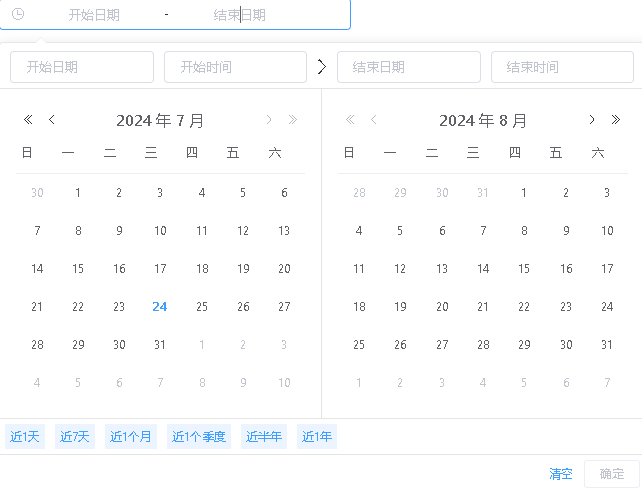
想要在 el-date-picker 的搜索日期范围的框上,加上快捷键,需求如图所示:
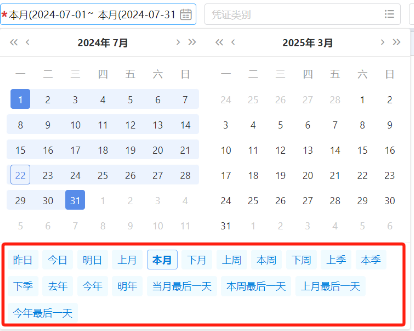
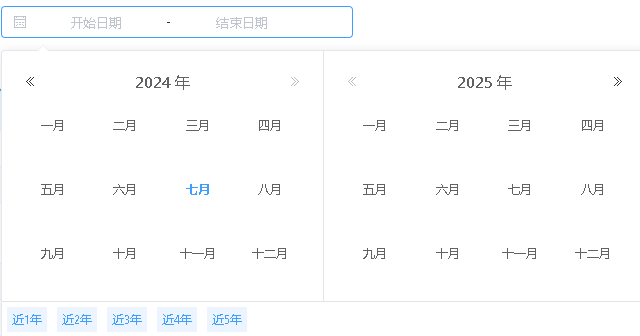
考虑到快捷键的慢慢增多的问题,实力建议快捷键做成上面的样式,放到下面去,能够正常排列。(初步分析排列应该是flex排列的)
需求分析
[ el-date-picker 说明书](https://element.eleme.cn/#/zh-CN/component/date-picker)
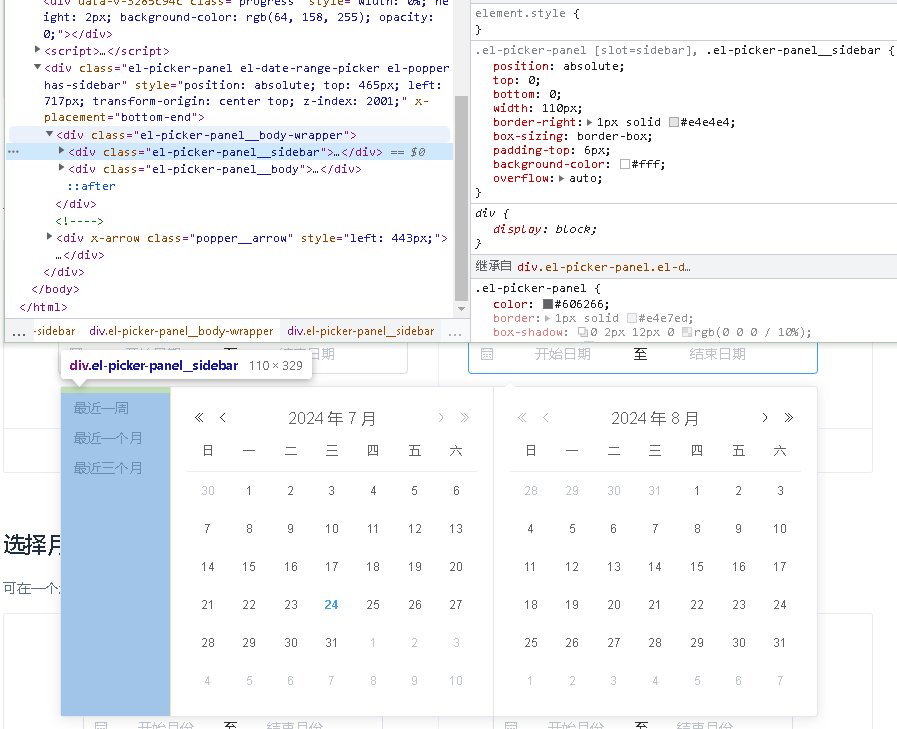
如上图,可以看到日期范围的快捷键是通过绝对定位放在左边的,并且外框设置了宽度,只要把宽度变回原来的,把快捷键定位到下面就可以实现我们想要的效果,所以得出结论,做成上面的效果图中的样式,完全可以实现。
代码实现
注意点:
- 不同类型的日期范围高度和下边沿的样式不同,有的带有确定按钮,到HH的日期范围,上排有一个时间选择器
- 这里场景是将得到的范围进行搜索查询数据,计算时,需要注意范围的精确程度,精确的程度会[左, 右]包含,而不是[左, 右) 右边不包含。例如:精确到年,计算最近1年时,结果应为['2024','2024'], 即年数差就 为 period / 365 - 1 ,需要将年数差减1,才是区间值,才能正确得到计算结果。
代码如下:
// 查询-日期-侧边栏样式优化【css】
.el-picker-panel.el-date-range-picker.has-sidebar {
  width: 646px;
  .el-picker-panel__sidebar {
    top: calc(100% - 36px);
    left: 0;
    width: 644px;
    border-right: 0;
    border-top: 1px solid #e4e4e4;
    padding-top: 0;
    display: flex;
    height: 36px;
    line-height: 36px;
    .el-picker-panel__shortcut {
      display: inline-flex;
      width: auto;
      color: #409eff;
      background: #ecf5ff;
      margin: 5px;
      padding: 0 5px;
      line-height: 26px;
      text-align: center;
      font-size: 12px;
      &:hover {
        background-color: #409eff;
        color: #fff;
      }
    }
  }
  // 日期下面空出距离(固定)
  .el-picker-panel__sidebar + .el-picker-panel__body {
    margin-bottom: 36px;
    margin-left: unset;
  }
  // @注意点1:带时间的高度不同
  &.has-time .el-picker-panel__sidebar {
    top: calc(100% - 75px);
  }
}- 1.
- 2.
- 3.
- 4.
- 5.
- 6.
- 7.
- 8.
- 9.
- 10.
- 11.
- 12.
- 13.
- 14.
- 15.
- 16.
- 17.
- 18.
- 19.
- 20.
- 21.
- 22.
- 23.
- 24.
- 25.
- 26.
- 27.
- 28.
- 29.
- 30.
- 31.
- 32.
- 33.
- 34.
- 35.
- 36.
- 37.
- 38.
- 39.
// 配置快捷键【js】
pickerOptions({type, format }) {
  if (type === 'daterange') {
    const len = format.length
    const getTime = period => {
      const end = new Date()
      let start = new Date()
      let month = start.getMonth() + 1
      let year = start.getFullYear()
      const time = 3600 * 1000 * 24
      // 1, 7, | 30, 90, 180, 365,| 365*2, 365*3
      if (period % 30 == 0) { // 对月数进行处理
        period = period / 30 - (len == 7 ? 1 : 0) // @注意点2:'yyyy-MM' 的需要-1, 以便范围正确
        month = month - period
        if (month < 0) {
          start.setFullYear(year - 1)
          month = month + 12
        }
        start.setMonth(month - 1)
      } else if (period % 365 == 0) { // 对年数进行处理
        period = period / 365 - (len == 4 ? 1 : 0) // 'yyyy' 的需要-1
        start.setFullYear(year - period)
        if (len == 7) {
          start.setMonth(month)
        }
      } else {
        period += len == 10 ? -1 : 0
        start.setTime(start.getTime() - time * period)
      }
      return [start, end]
    }
    const option = {
      shortcuts: [
        {
          text: '近1年',
          onClick(picker) {
            picker.$emit('pick', getTime(365))
          },
        },
      ],
    }
    if (len == 4) {
      option.shortcuts.push(
        {
          text: '近2年',
          onClick(picker) {
            picker.$emit('pick', getTime(365 * 2))
          },
        },
        {
          text: '近3年',
          onClick(picker) {
            picker.$emit('pick', getTime(365 * 3))
          },
        },
        {
          text: '近4年',
          onClick(picker) {
            picker.$emit('pick', getTime(365 * 5))
          },
        },
        {
          text: '近5年',
          onClick(picker) {
            picker.$emit('pick', getTime(365 * 10))
          },
        }
      )
    } else if (len > 4) {
      option.shortcuts.unshift(
        {
          text: '近1个月',
          onClick(picker) {
            picker.$emit('pick', getTime(30))
          },
        },
        {
          text: '近1个季度',
          onClick(picker) {
            picker.$emit('pick', getTime(90))
          },
        },
        {
          text: '近半年',
          onClick(picker) {
            picker.$emit('pick', getTime(180))
          },
        }
      )
    }
    if (len > 7) {
      option.shortcuts.unshift(
        {
          text: '近1天',
          onClick(picker) {
            picker.$emit('pick', getTime(1))
          },
        },
        {
          text: '近7天',
          onClick(picker) {
            picker.$emit('pick', getTime(7))
          },
        }
      )
    } else if (len == 7) {
      option.shortcuts.splice(1, 0, {
        text: '近2个月',
        onClick(picker) {
          picker.$emit('pick', getTime(60))
        },
      })
    }
    return option
  }
  return {}
},- 1.
- 2.
- 3.
- 4.
- 5.
- 6.
- 7.
- 8.
- 9.
- 10.
- 11.
- 12.
- 13.
- 14.
- 15.
- 16.
- 17.
- 18.
- 19.
- 20.
- 21.
- 22.
- 23.
- 24.
- 25.
- 26.
- 27.
- 28.
- 29.
- 30.
- 31.
- 32.
- 33.
- 34.
- 35.
- 36.
- 37.
- 38.
- 39.
- 40.
- 41.
- 42.
- 43.
- 44.
- 45.
- 46.
- 47.
- 48.
- 49.
- 50.
- 51.
- 52.
- 53.
- 54.
- 55.
- 56.
- 57.
- 58.
- 59.
- 60.
- 61.
- 62.
- 63.
- 64.
- 65.
- 66.
- 67.
- 68.
- 69.
- 70.
- 71.
- 72.
- 73.
- 74.
- 75.
- 76.
- 77.
- 78.
- 79.
- 80.
- 81.
- 82.
- 83.
- 84.
- 85.
- 86.
- 87.
- 88.
- 89.
- 90.
- 91.
- 92.
- 93.
- 94.
- 95.
- 96.
- 97.
- 98.
- 99.
- 100.
- 101.
- 102.
- 103.
- 104.
- 105.
- 106.
- 107.
- 108.
- 109.
- 110.
- 111.
- 112.
- 113.
- 114.
- 115.
- 116.
- 117.
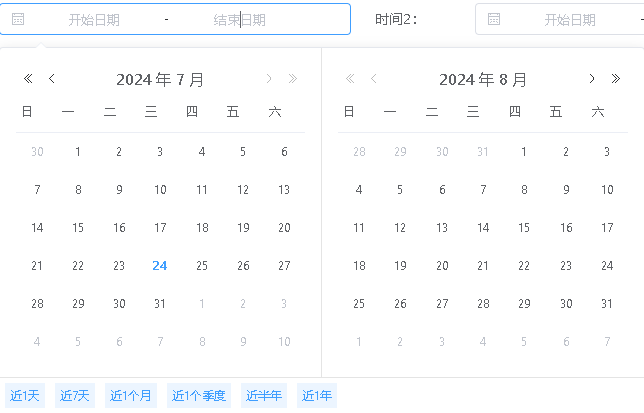
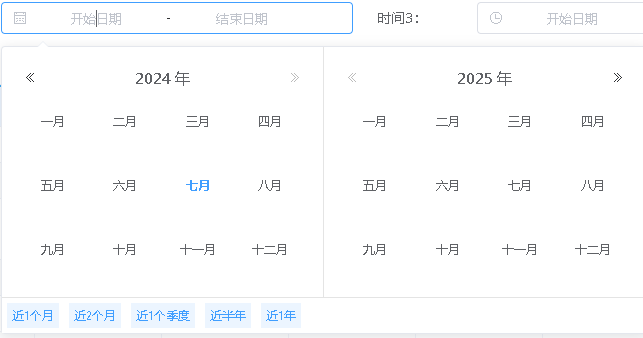
实现效果
如下图所示:




 已为社区贡献2条内容

所有评论(0)