
IDEA设置成MyEclipse方式快捷键
·
Java开发工具快捷键的使用,能够给我们日常开发提升效率。但是对于一些习惯性使用MyEclipse的开发人员,切换到IEDA之后,默认快捷键和Myclipse存在很大差异,使用起来很不顺手。这里将MyEclipse快捷键打包成jar文件,开发人员可以将jar导入到IDEA中,这样在IDEA中可以使用和MyEclipse同样的快捷键。
链接:https://pan.baidu.com/s/1VPjaTiyWLL1mBnEGmwtDXw
提取码:stf1
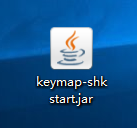
-
根据上述网盘地址下载jar包
-
IDEA中点击File-Import Settings
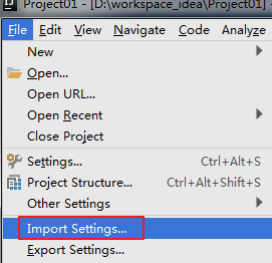
-
导入keymap-shkstart.jar
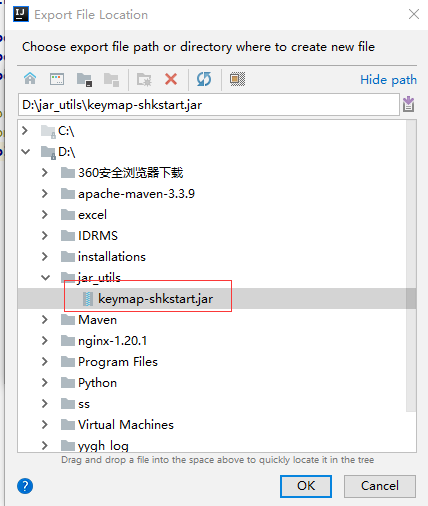
- 导入之后需要重启IDEA,快捷键生效(赶紧去试一下吧)
附:常用快捷键
| 序号 | 功能 | 快捷键 |
|---|---|---|
| 1 | 执行(run) | alt+r |
| 2 | 提示补全 (Class Name Completion) | alt+/ |
| 3 | 单行注释 | ctrl + / |
| 4 | 多行注释 | ctrl + shift + / |
| 5 | 向下复制一行 (Duplicate Lines) | ctrl+alt+down |
| 6 | 删除一行或选中行 (delete line) | ctrl+d |
| 7 | 向下移动行(move statement down) | alt+down |
| 8 | 向上移动行(move statement up) | alt+up |
| 9 | 向下开始新的一行(start new line) | shift+enter |
| 10 | 向上开始新的一行 (Start New Line before current) | ctrl+shift+enter |
| 11 | 如何查看源码 (class) | ctrl + 选中指定的结构 或 ctrl + shift + t |
| 12 | 万能解错/生成返回值变量 | alt + enter |
| 13 | 退回到前一个编辑的页面 (back) | alt + left |
| 14 | 进入到下一个编辑的页面(针对于上条) (forward) | alt + right |
| 15 | 查看继承关系(type hierarchy) | F4 |
| 16 | 格式化代码(reformat code) | ctrl+shift+F |
| 17 | 提示方法参数类型(Parameter Info) | ctrl+alt+/ |
| 18 | 复制代码 | ctrl + c |
| 19 | 撤销 | ctrl + z |
| 20 | 反撤销 | ctrl + y |
| 21 | 剪切 | ctrl + x |
| 22 | 粘贴 | ctrl + v |
| 23 | 保存 | ctrl + s |
| 24 | 全选 | ctrl + a |
| 25 | 选中数行,整体往后移动 | tab |
| 26 | 选中数行,整体往前移动 | shift + tab |
| 27 | 查看类的结构:类似于 eclipse 的 outline | ctrl+o |
| 28 | 重构: 修改变量名与方法名(rename) | alt+shift+r |
| 29 | 大写转小写/小写转大写(toggle case) | ctrl+shift+y |
| 30 | 生成构造器/get/set/toString | alt +shift + s |
| 31 | 查看文档说明(quick documentation) | F2 |
| 32 | 收起所有的方法(collapse all) | alt + shift + c |
| 33 | 打开所有方法(expand all) | alt+shift+x |
| 34 | 打开代码所在硬盘文件夹(show in explorer) | ctrl+shift+x |
| 35 | 生成 try-catch 等(surround with) | alt+shift+z |
| 36 | 局部变量抽取为成员变量(introduce field) | alt+shift+f |
| 37 | 查找/替换(当前) | ctrl+f |
| 38 | 查找(全局) | ctrl+h |
| 39 | 查找文件 | double Shift |
| 40 | 查看类的继承结构图(Show UML Diagram) | ctrl + shift + u |
| 41 | 查看方法的多层重写结构(method hierarchy) | ctrl+alt+h |
| 42 | 添加到收藏(add to favorites) | ctrl+alt+f |
| 43 | 抽取方法(Extract Method) | alt+shift+m |
| 44 | 打开最近修改的文件(Recently Files) | ctrl+E |
| 45 | 关闭当前打开的代码栏(close) | ctrl + w |
| 46 | 关闭打开的所有代码栏(close all) | ctrl + shift + w |
| 47 | 快速搜索类中的错误(next highlighted error) | ctrl + shift + q |
| 48 | 选择要粘贴的内容(Show in Explorer) | ctrl+shift+v |
| 49 | 查找方法在哪里被调用(Call Hierarchy) | ctrl+shift+h |
更多推荐



 1
1 0
0- 0


 已为社区贡献1条内容

所有评论(0)