
LayUi集成下载Excel、word、PDF、CSV扩展
·
根据项目需求,主要用的layui这个前段框架,现在需要支持将页面下载为四种格式的文件。
Excel、CSV
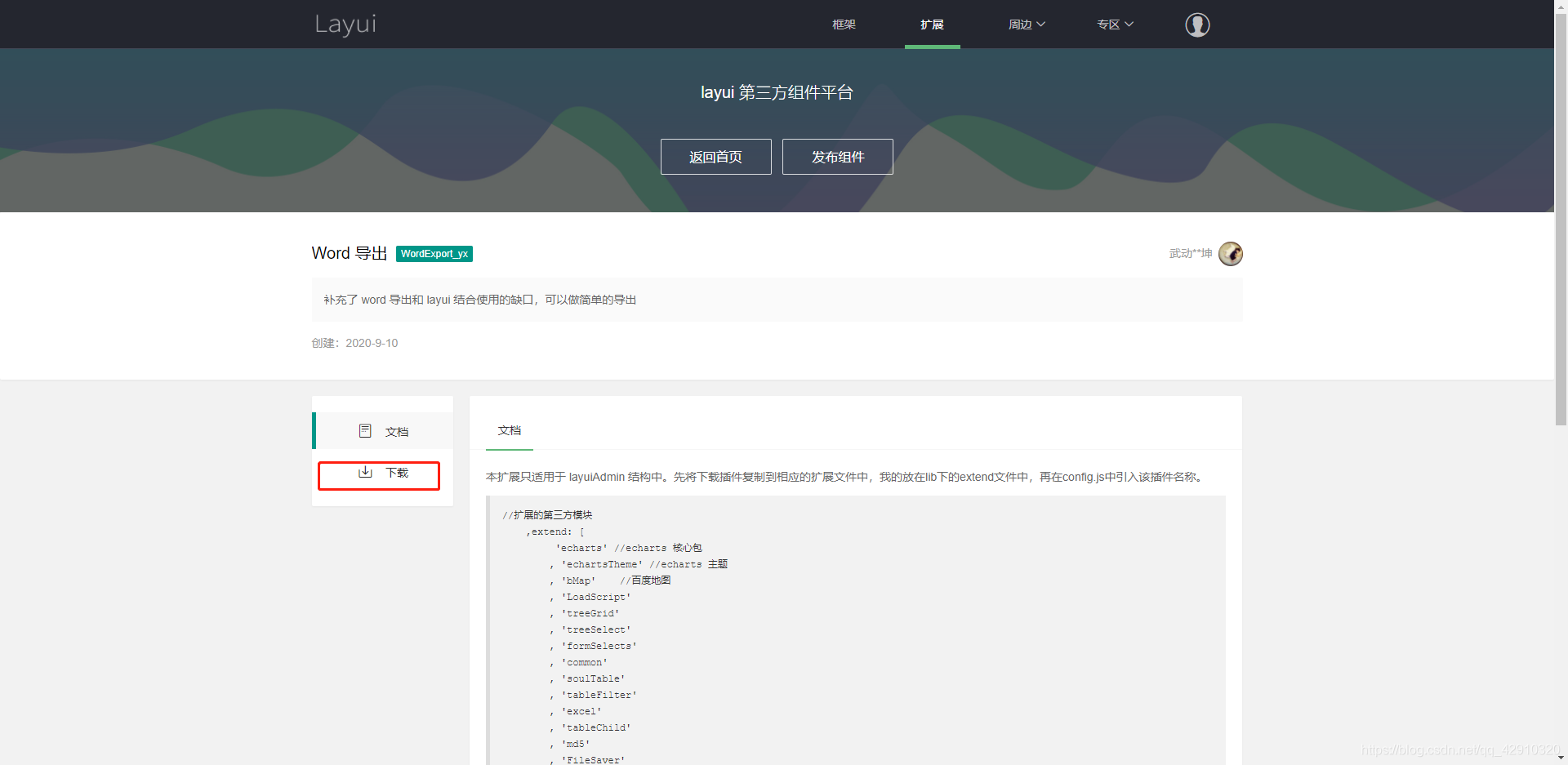
第一步:去layUi官网中找到对应的扩展文档;
下载对应的扩展文件,导入项目中。
根据文档的写法。初始化Excel控件
layui.config({
    base: 'layui_exts/', // 配置一个可访问地址
}).extend({
    excel: 'excel',
});
layui.use(['excel'], function (){
    //导出格式在这里改变类型就行了
    //layui.excel.exportExcel([[1, 2, 3]], '表格导出.xlsx', 'xlsx')
    layui.excel.exportExcel([[1, 2, 3]], '表格导出.csv', 'csv')
})
文档官方地址:
http://excel.wj2015.com/_book/
页面:

下载的Excel效果:

下载的CSV效果:

Word
第一步:导入js文件
    <script type="text/javascript" src="../layui/layui.js"></script>
    <script type="text/javascript" src="../extend/FileSaver.js"></script>
    <script type="text/javascript" src="../extend/wordexport.js"></script>
FileSaver.js代码:
/*
* FileSaver.js
* A saveAs() FileSaver implementation.
*
* By Eli Grey, http://eligrey.com
*
* License : https://github.com/eligrey/FileSaver.js/blob/master/LICENSE.md (MIT)
* source  : http://purl.eligrey.com/github/FileSaver.js
*/

// The one and only way of getting global scope in all environments
// https://stackoverflow.com/q/3277182/1008999
layui.define(["jquery"], function (exports) {
var jQuery = layui.jquery;

 var obj = (function($) {

		var _global = typeof window === 'object' && window.window === window
		  ? window : typeof self === 'object' && self.self === self
		  ? self : typeof global === 'object' && global.global === global
		  ? global
		  : this

		function bom (blob, opts) {
		  if (typeof opts === 'undefined') opts = { autoBom: false }
		  else if (typeof opts !== 'object') {
			console.warn('Deprecated: Expected third argument to be a object')
			opts = { autoBom: !opts }
		  }

		  // prepend BOM for UTF-8 XML and text/* types (including HTML)
		  // note: your browser will automatically convert UTF-16 U+FEFF to EF BB BF
		  if (opts.autoBom && /^\s*(?:text\/\S*|application\/xml|\S*\/\S*\+xml)\s*;.*charset\s*=\s*utf-8/i.test(blob.type)) {
			return new Blob([String.fromCharCode(0xFEFF), blob], { type: blob.type })
		  }
		  return blob
		}

		function download (url, name, opts) {
		  var xhr = new XMLHttpRequest()
		  xhr.open('GET', url)
		  xhr.responseType = 'blob'
		  xhr.onload = function () {
			saveAs(xhr.response, name, opts)
		  }
		  xhr.onerror = function () {
			console.error('could not download file')
		  }
		  xhr.send()
		}

		function corsEnabled (url) {
		  var xhr = new XMLHttpRequest()
		  // use sync to avoid popup blocker
		  xhr.open('HEAD', url, false)
		  try {
			xhr.send()
		  } catch (e) {}
		  return xhr.status >= 200 && xhr.status <= 299
		}

		// `a.click()` doesn't work for all browsers (#465)
		function click (node) {
		  try {
			node.dispatchEvent(new MouseEvent('click'))
		  } catch (e) {
			var evt = document.createEvent('MouseEvents')
			evt.initMouseEvent('click', true, true, window, 0, 0, 0, 80,
								  20, false, false, false, false, 0, null)
			node.dispatchEvent(evt)
		  }
		}

		// Detect WebView inside a native macOS app by ruling out all browsers
		// We just need to check for 'Safari' because all other browsers (besides Firefox) include that too
		// https://www.whatismybrowser.com/guides/the-latest-user-agent/macos
		var isMacOSWebView = /Macintosh/.test(navigator.userAgent) && /AppleWebKit/.test(navigator.userAgent) && !/Safari/.test(navigator.userAgent)

		var saveAs = _global.saveAs || (
		  // probably in some web worker
		  (typeof window !== 'object' || window !== _global)
			? function saveAs () { /* noop */ }

		  // Use download attribute first if possible (#193 Lumia mobile) unless this is a macOS WebView
		  : ('download' in HTMLAnchorElement.prototype && !isMacOSWebView)
		  ? function saveAs (blob, name, opts) {
			var URL = _global.URL || _global.webkitURL
			var a = document.createElement('a')
			name = name || blob.name || 'download'

			a.download = name
			a.rel = 'noopener' // tabnabbing

			// TODO: detect chrome extensions & packaged apps
			// a.target = '_blank'

			if (typeof blob === 'string') {
			  // Support regular links
			  a.href = blob
			  if (a.origin !== location.origin) {
				corsEnabled(a.href)
				  ? download(blob, name, opts)
				  : click(a, a.target = '_blank')
			  } else {
				click(a)
			  }
			} else {
			  // Support blobs
			  a.href = URL.createObjectURL(blob)
			  setTimeout(function () { URL.revokeObjectURL(a.href) }, 4E4) // 40s
			  setTimeout(function () { click(a) }, 0)
			}
		  }

		  // Use msSaveOrOpenBlob as a second approach
		  : 'msSaveOrOpenBlob' in navigator
		  ? function saveAs (blob, name, opts) {
			name = name || blob.name || 'download'

			if (typeof blob === 'string') {
			  if (corsEnabled(blob)) {
				download(blob, name, opts)
			  } else {
				var a = document.createElement('a')
				a.href = blob
				a.target = '_blank'
				setTimeout(function () { click(a) })
			  }
			} else {
			  navigator.msSaveOrOpenBlob(bom(blob, opts), name)
			}
		  }

		  // Fallback to using FileReader and a popup
		  : function saveAs (blob, name, opts, popup) {
			// Open a popup immediately do go around popup blocker
			// Mostly only available on user interaction and the fileReader is async so...
			popup = popup || open('', '_blank')
			if (popup) {
			  popup.document.title =
			  popup.document.body.innerText = 'downloading...'
			}

			if (typeof blob === 'string') return download(blob, name, opts)

			var force = blob.type === 'application/octet-stream'
			var isSafari = /constructor/i.test(_global.HTMLElement) || _global.safari
			var isChromeIOS = /CriOS\/[\d]+/.test(navigator.userAgent)

			if ((isChromeIOS || (force && isSafari) || isMacOSWebView) && typeof FileReader !== 'undefined') {
			  // Safari doesn't allow downloading of blob URLs
			  var reader = new FileReader()
			  reader.onloadend = function () {
				var url = reader.result
				url = isChromeIOS ? url : url.replace(/^data:[^;]*;/, 'data:attachment/file;')
				if (popup) popup.location.href = url
				else location = url
				popup = null // reverse-tabnabbing #460
			  }
			  reader.readAsDataURL(blob)
			} else {
			  var URL = _global.URL || _global.webkitURL
			  var url = URL.createObjectURL(blob)
			  if (popup) popup.location = url
			  else location.href = url
			  popup = null // reverse-tabnabbing #460
			  setTimeout(function () { URL.revokeObjectURL(url) }, 4E4) // 40s
			}
		  }
		)

		_global.saveAs = saveAs.saveAs = saveAs

		if (typeof module !== 'undefined') {
		  module.exports = saveAs;
		}
})(jQuery);

  exports("FileSaver", obj);
});
wordexport.js代码:
layui.define(["jquery"], function (exports) {
var jQuery = layui.jquery;


if (typeof jQuery !== "undefined" && typeof saveAs !== "undefined") {
   var obj = (function($) {
        $.fn.wordExport = function(fileName,style) {
            fileName = typeof fileName !== 'undefined' ? fileName : "jQuery-Word-Export";
            var static = {
                mhtml: {
                    top: "Mime-Version: 1.0\nContent-Base: " + location.href + "\nContent-Type: Multipart/related; boundary=\"NEXT.ITEM-BOUNDARY\";type=\"text/html\"\n\n--NEXT.ITEM-BOUNDARY\nContent-Type: text/html; charset=\"utf-8\"\nContent-Location: " + location.href + "\n\n<!DOCTYPE html>\n<html>\n_html_</html>",
                    head: "<head>\n<meta http-equiv=\"Content-Type\" content=\"text/html; charset=utf-8\">\n<style>\n_styles_\n</style>\n</head>\n",
                    body: "<body>_body_</body>"
                }
            };
            var options = {
                maxWidth: 624
            };
            // Clone selected element before manipulating it
            //clone(),复制
            var markup = $(this).clone();

            // Remove hidden elements from the output
            markup.each(function() {
                var self = $(this);
                //我这里是将HTML中的冻结窗口元素排除掉
                self.find("div.layui-table-fixed").remove();
                self.find("div.layui-table-body table div").remove();
                //设置内联样式
                self.find("th").css("width",'140px');
                self.find("td").css("width",'140px');
                if (self.is(':hidden'))
                    self.remove();
            });

            // Embed all images using Data URLs
            var images = Array();
            var img = markup.find('img');
            for (var i = 0; i < img.length; i++) {
                // Calculate dimensions of output image
                var w = Math.min(img[i].width, options.maxWidth);
                var h = img[i].height * (w / img[i].width);
                // Create canvas for converting image to data URL
                var canvas = document.createElement("CANVAS");
                canvas.width = w;
                canvas.height = h;
                // Draw image to canvas
                var context = canvas.getContext('2d');
                context.drawImage(img[i], 0, 0, w, h);
                // Get data URL encoding of image
                var uri = canvas.toDataURL("image/png");
                $(img[i]).attr("src", img[i].src);
                img[i].width = w;
                img[i].height = h;
                // Save encoded image to array
                images[i] = {
                    type: uri.substring(uri.indexOf(":") + 1, uri.indexOf(";")),
                    encoding: uri.substring(uri.indexOf(";") + 1, uri.indexOf(",")),
                    location: $(img[i]).attr("src"),
                    data: uri.substring(uri.indexOf(",") + 1)
                };
            }

            // Prepare bottom of mhtml file with image data
            var mhtmlBottom = "\n";
            for (var i = 0; i < images.length; i++) {
                mhtmlBottom += "--NEXT.ITEM-BOUNDARY\n";
                mhtmlBottom += "Content-Location: " + images[i].location + "\n";
                mhtmlBottom += "Content-Type: " + images[i].type + "\n";
                mhtmlBottom += "Content-Transfer-Encoding: " + images[i].encoding + "\n\n";
                mhtmlBottom += images[i].data + "\n\n";
            }
            mhtmlBottom += "--NEXT.ITEM-BOUNDARY--";

            //TODO: load css from included stylesheet
            // var styles = style;
            // var styles = '';
            var styles = style;

            // Aggregate parts of the file together
            var fileContent = static.mhtml.top.replace("_html_", static.mhtml.head.replace("_styles_", styles) + static.mhtml.body.replace("_body_", markup.html())) + mhtmlBottom;
            console.info("fileContent",fileContent);
            // Create a Blob with the file contents
            var blob = new Blob([fileContent], {
                type: "application/msword;charset=utf-8"
            });
            saveAs(blob, fileName + ".doc");
        };
    })(jQuery);
} else {
    if (typeof jQuery === "undefined") {
        console.error("jQuery Word Export: missing dependency (jQuery)");
    }
    if (typeof saveAs === "undefined") {
        console.error("jQuery Word Export: missing dependency (FileSaver.js)");
    }
}
	  exports("wordexport", obj);
});
其中的FileSaver.js和wordexport.js是在layui官网的扩展中找到对应的扩展文档,下载的。

当js文件引入后,自选集需要写的代码就是下面这几句了,很简单:
let style = "";
//这里的style是自定义导出的Word文档里面的样式,我这里导出的是表格,所以在修改表格单元格宽度
style+=".layui-table-body table tr td{width:140px;}";
$("div[lay-id='myTable']").wordExport(“导出Word文档名称”,style);
这里我发现,导出的文档存在问题:
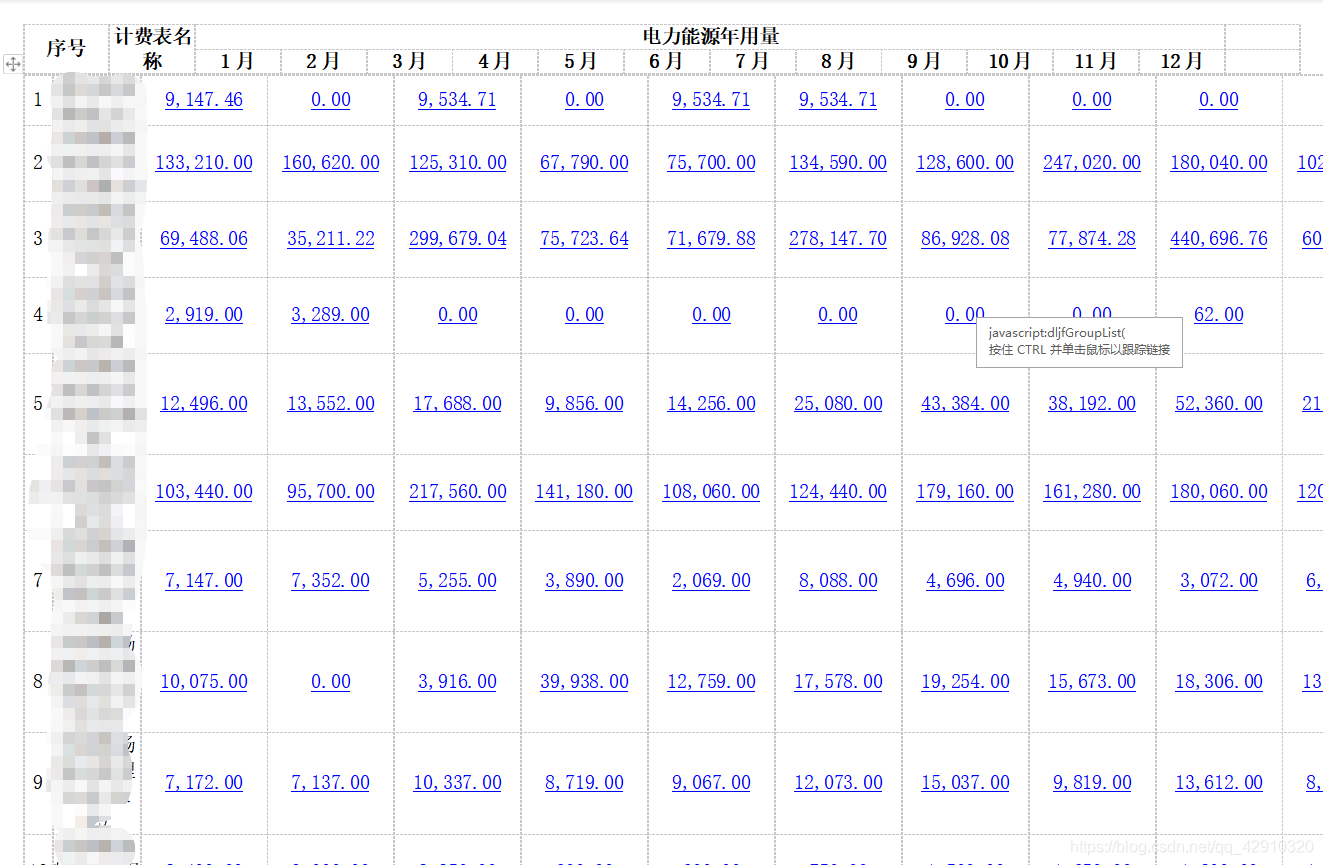
表头和数据部分单元格对不齐,这个问题正在想办法解决,后期解决了再更新吧。
经过我两天的碰壁,换了种方法解决了这个问题:
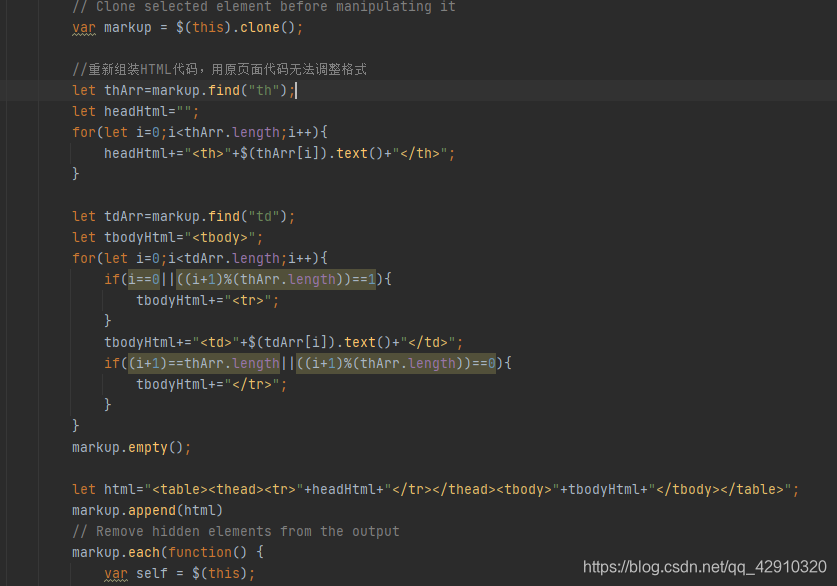
在wordexport.js文件中的下图位置,只获取页面的数据,自己重新生成一个table的html代码,情况复制的对象,重新填充HTML代码,在导出,就解决了格式对不齐的问题。这里应为无论怎么尝试调整样式都无法解决,所以退而求其次了。

重新组装个table对象:
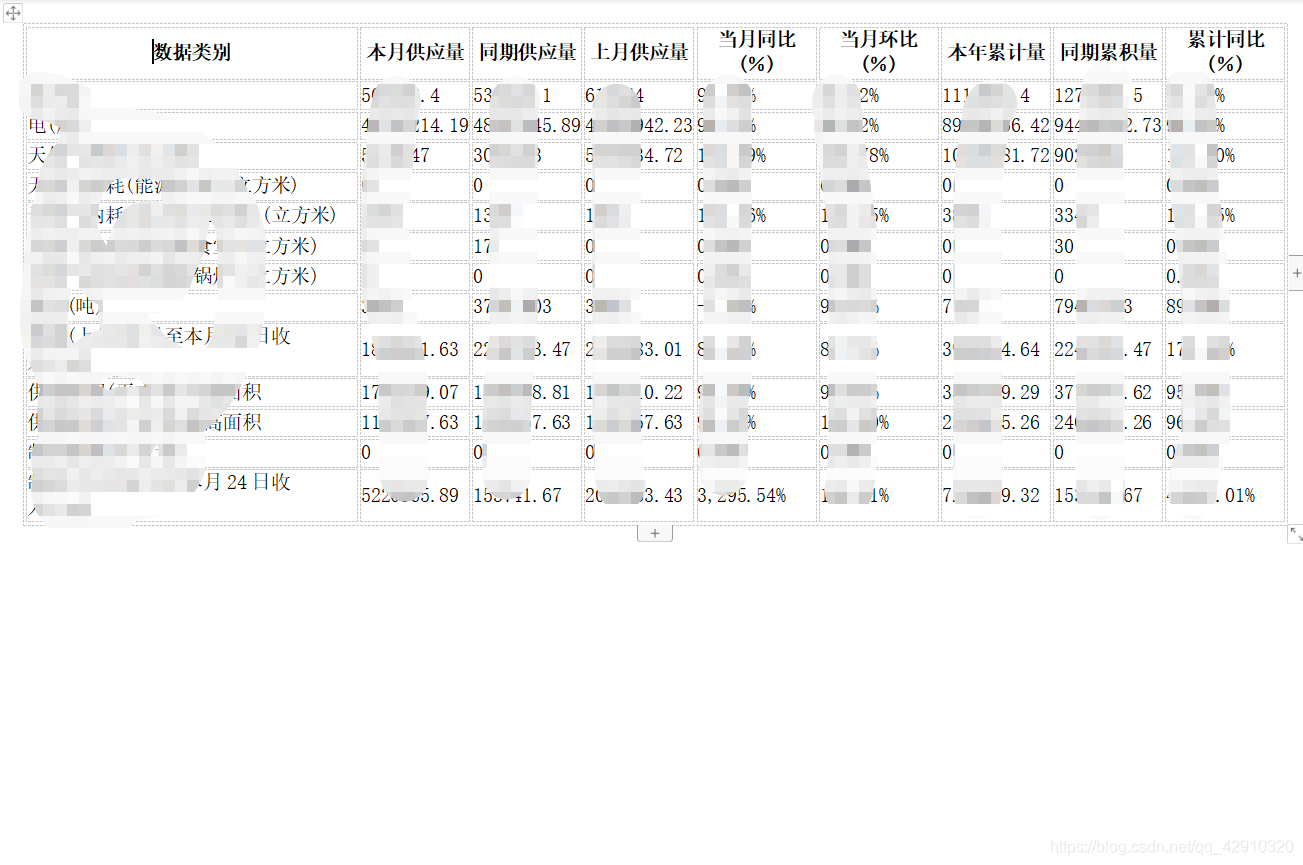
最后效果:
需要引入的js文件:
    <script type="text/javascript" src="../html2canvas.js"></script>
    <script type="text/javascript" src="../jspdf.debug.js"></script>
这两个文件在网上找找都能找到,下载就可以了。
引入js文件以后,当然就是自己写的js代码块了:
function exportPdf() {
        //获取需要转换的部分的对象
        //也可以直接在对象上添加id属性,$(“#id”)直接获取对象
        var target = $("div .layui-table-box");
        //注意:这两句代码是给对象添加内联样式的宽度和高度
        //如果存在滚动条的情况,这两句就非常关键了,添加内联样式以后,下载的PDF是全部,包括滚动条隐藏的部分,如果不添加,只能下载当前可视部门
        target.css('width',($("div .layui-table-body table").width()) + "px");
        target.css('height',($("div .layui-table-body table").height()+$("div .layui-table-header table").height()) + "px");

        html2canvas(target, {
            onrendered:function(canvas) {
                let contentWidth = canvas.width;
                let contentHeight = canvas.height;

                //一页pdf显示html页面生成的canvas高度;
                let pageHeight = contentWidth / 592.28 * 841.89;
                //未生成pdf的html页面高度
                let leftHeight = contentHeight;
                //页面偏移
                let position = 0;
                //a4纸的尺寸[595.28,841.89],html页面生成的canvas在pdf中图片的宽高
                let imgWidth = 595.28;
                let imgHeight = 592.28/contentWidth * contentHeight;

                let pageData = canvas.toDataURL('image/jpeg', 1.0);

                let pdf = new jsPDF('', 'pt', 'a4');

                //有两个高度需要区分,一个是html页面的实际高度,和生成pdf的页面高度(841.89)
                //当内容未超过pdf一页显示的范围,无需分页
                if (leftHeight < pageHeight) {
                    pdf.addImage(pageData, 'JPEG', 0, 0, imgWidth, imgHeight );
                } else {
                    while(leftHeight > 0) {
                        pdf.addImage(pageData, 'JPEG', 0, position, imgWidth, imgHeight)
                        leftHeight -= pageHeight;
                        position -= 841.89;
                        //避免添加空白页
                        if(leftHeight > 0) {
                            pdf.addPage();
                        }
                    }
                }

                pdf.save("下载的PDF的名称.pdf");
                //在下载完场后,得去掉内联样式,这样才不影响页面的滚动条效果
                target.removeAttr("style");
            }
        })
    }
之前我在解决滚动条影响的问题的时候,看见网上说的复制一个对象,添加到body中的做法,这种会影响页面布局、显示等,体验很差,可能是我未处理好的问题吧,我这种处理方法感觉也还行,就站不考虑那么多了。
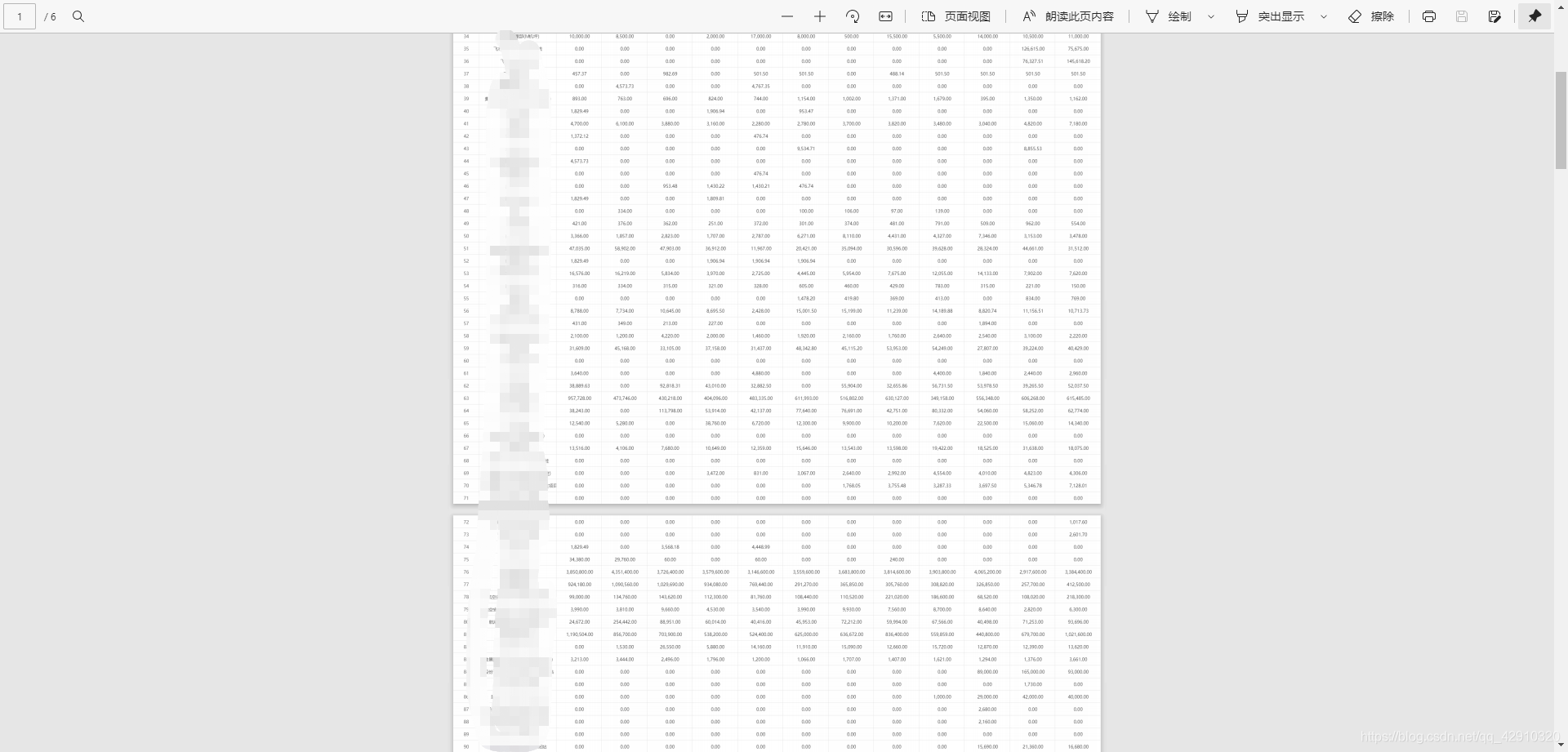
下载的PDF文件,是有自动翻页功能的,当高度超过A4纸高度,会自动添加一页。
下载的效果:
更多推荐


 2
2 0
0- 0


 已为社区贡献1条内容

所有评论(0)