
使用MapReduce框架编写wordcount程序,统计某文本中每个单词出现的次数
文章目录
前言
输入的内容如下文件,要求计算出文件中单词的出现次数,并按照单词的字母顺序进行排序,每个单词和其出现次数占一行,单词与出现次数之间有间隔 :
text.txt文件内容如下:
hello word
hello hadoop
bye hadoop
要求输出结果:
bye 1
hadoop 2
hello 2
world 1
一、设计思路
先在map()中将文件内容切成分片单词,然后在reduce()中统计各个单词出现的次数,最后计算结果排序输出。由于MapReduce是以键值对<key,value>形式传递的,且shuffle的排序、聚集、分发也是按着<key,value>来处理,因此把map的输出结果设置为以单词作为key,出现次数作为value。reduce方法的格式则为<key,value-list>(<word,{1,1,1,…}>)。
wordcount程序执行流程如下图:

二、程序源码
1.自定义Mapper内部类
public class WordCountMapper extends Mapper<LongWritable,Text,Text,IntWritable>{
	private static final IntWritable one=new IntWritable(1);
	private static final Text word=new Text();

	public void map(LongWritable key,Text value,
			Mapper<LongWritable,Text,Text,IntWritable>.Context context) throws IOException, InterruptedException
	{

		String lineString=value.toString();
		String[] words=lineString.split(" ");//将每个单词以空格为界分开
		for(String w:words)
		{
			word.set(w);
			context.write(word,one);
		}
	}
2.自定义Reducer内部类
public class WordCountReducer extends Reducer<Text,IntWritable,Text,IntWritable>{
	public void reduce(Text key,Iterable<IntWritable> values,
			Reducer<Text,IntWritable,Text,IntWritable>.Context context) throws IOException, InterruptedException
	{
		int sum=0;
		for(IntWritable v:values)
		{
			sum+=v.get();//统计出现次数
		}
		context.write(key,new IntWritable(sum));
	}
}
3.自定义WordCount主类
package hadoop.WordCount;

import java.io.*;

import org.apache.hadoop.conf.Configuration;
import org.apache.hadoop.fs.*;
import org.apache.hadoop.io.*;
import org.apache.hadoop.mapreduce.*;
import org.apache.hadoop.mapreduce.lib.input.*;
import org.apache.hadoop.mapreduce.lib.output.*;

public class WordCount {
	public static void main(String[] args) throws IOException, ClassNotFoundException, InterruptedException {
		Configuration conf = new Configuration();

		Job job = Job.getInstance(conf,WordCount.class.getName());
		job.setJarByClass(WordCount.class);
		//设置mapper、reducer类
		job.setMapperClass(WordCountMapper.class);
		job.setReducerClass(WordCountReducer.class);

		//设置Map任务输出类型
		job.setMapOutputKeyClass(Text.class);
		job.setMapOutputValueClass(IntWritable.class);

		//设置reduce任务输出类型
		job.setOutputKeyClass(Text.class);
		job.setOutputValueClass(IntWritable.class);

		//设置输入输出文件格式
		job.setInputFormatClass(TextInputFormat.class);
		job.setOutputFormatClass(TextOutputFormat.class);

		//设置HDFS输入输出路径,切记输出路径如果存在会报错
		FileInputFormat.addInputPath(job, new Path("/input/words.txt"));
		FileOutputFormat.setOutputPath(job, new Path("/output"));

		job.waitForCompletion(true);

	}
}
三、程序运行
这里要特别注意,运行前要start-all.sh启动hadoop,并且不能存在output文件,不然会报错!!
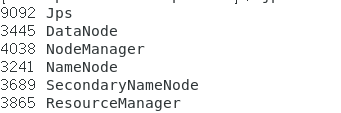
如果jps后输出如下图,则表示成功开启。
运行有两种方法:直接在eclipse中运行或者导出jar包。
1.导出jar包并运行
1.以jar包格式导出工程文件,并把jar包放到hadoop的mapreduce路径下。以我的为例,路径是/opt/modules/hadoop2.10.0/share/hadoop/mapreduce/。
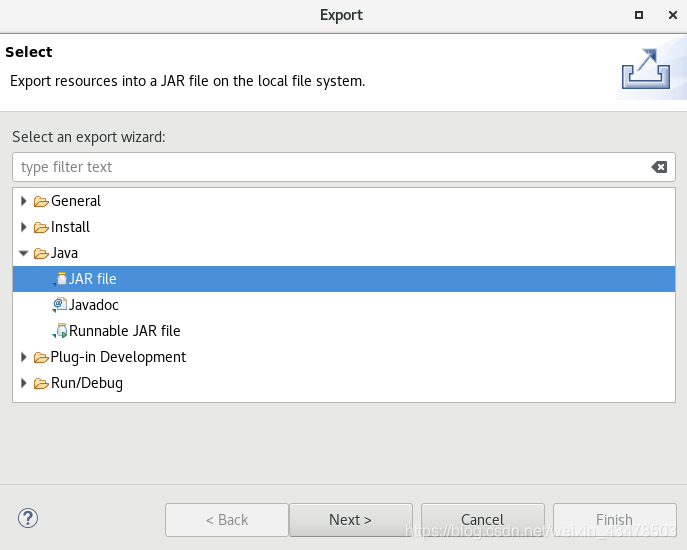
a.选择jar file->next:
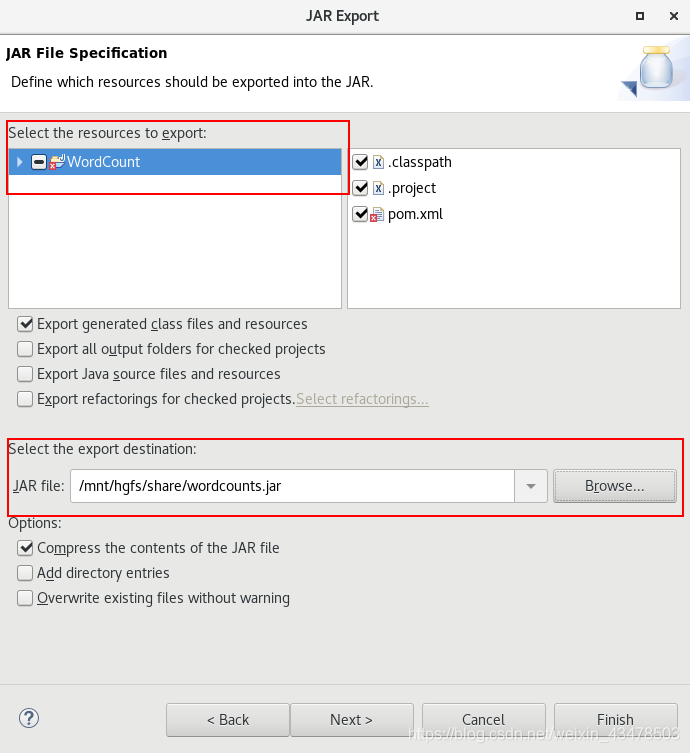
b.勾上文件,并选择输出路径->next。
c.在Main class选上主类->Finish
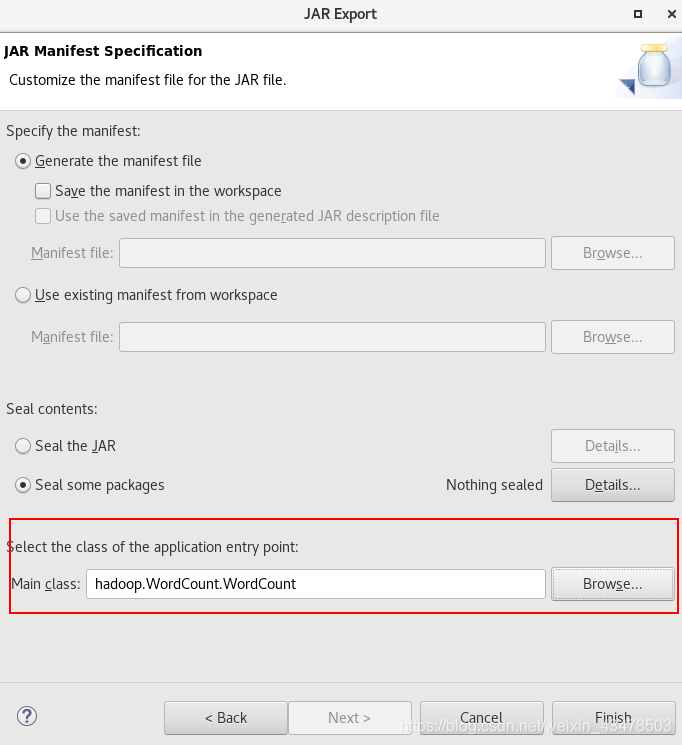
这样就成功导出jar包。
2.在mapreduce路径下输入 hadoop jar xxx.jar wordcount(input文件要输出的位置)运行jar包,如果输出以下信息表示程序运行正常。
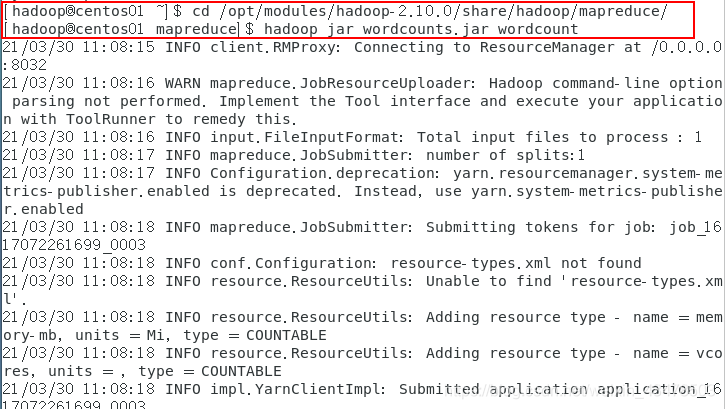
3.接着输入 hadoop fs -cat /wordcount/output/ 查看结果*

2.直接在eclipse中运行
直接run运行即可。
如果运行后报错Input path does not exist://file:/…,那则是没有添加hdfs路径的原因。

解决方法:
在主类的main()中添加hdfs路径 conf.set(“fs.defaultFS”,“hdfs://ip地址:9000”);

如果报错output already exists 那就是你的输出路径已经存在,需要先删除再运行。

解决方法:
hadoop fs -rm -r 输出路径
四、运行jar包时可能出现的问题
1.运行jar包后报错:Exception in thread “main” org.apache.hadoop.hdfs.server.namenode.SafeModeException: Cannot delete /tmp/hadoop-yarn/staging/hadoop/.staging/job_1617072261699_0001. Name node is in safe mode.
The reported blocks 14 needs additional 1 blocks to reach the threshold 0.9990 of total blocks 16.
(如图)

解决方法:
这里说的是namenode在安全模式,因此我们需要解除该模式。
输入命令:hadoop dfsadmin -safemode leave

start-all.sh重启hdfs
2.运行jar包后报错:Error: org.apache.hadoop.hdfs.BlockMissingException: Could not obtain block: BP-728561137–1614217124875:blk_1073741869_1045 file=/wordcount/input/text.txt

解决方法:
这里说的是数据块被破坏,可能是在复制文档的时候出了问题。所以删除原来存放内容的文档,重新写一个即可。
更多推荐



 4
4 0
0- 0


 已为社区贡献1条内容

所有评论(0)