
windows api 截屏和应用窗口截屏
·
原理
创建hdc和bitmap后,使用bitblt将桌面hdc的像素拷贝到创建后的hdc中,然后使用GetDIBits将像素的值拷贝出来。
注意事项:
- 显示器dc名称“display",大小写无区别。
- CreateDC和GetDC是一样的。
- CreateCompatibleBitmap中的HDC参数,要使用使用“display”创建的DC,而不能使用CreateCompatibleDC创建的dc,microsoft给出的解释如下:
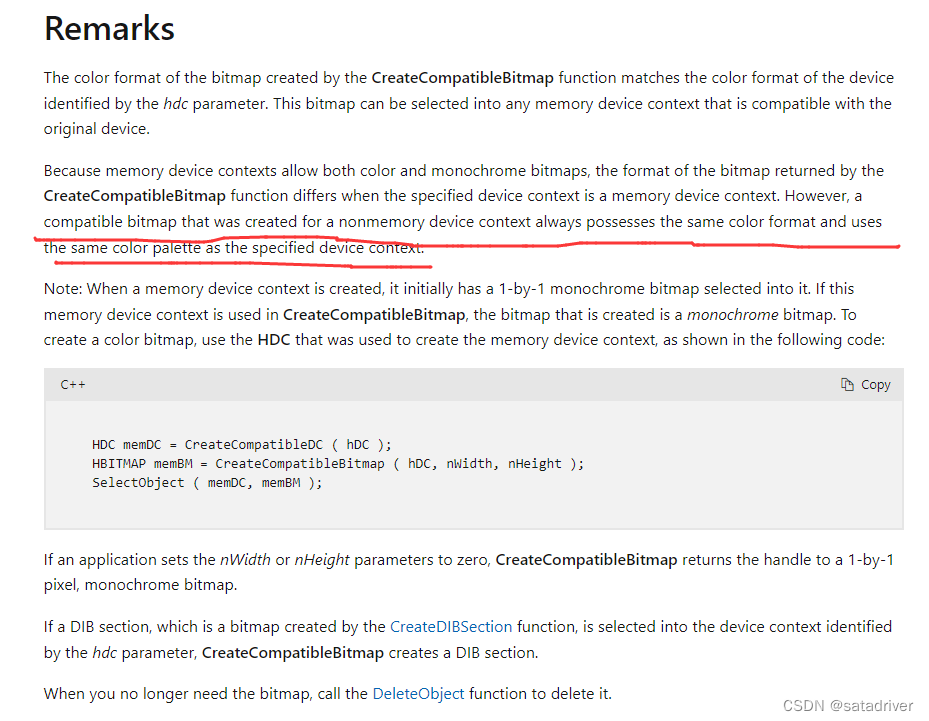
- lpGetDIBits中既可以使用hdc也可以使用hdcmem,这点的原因暂时不明白。
废话不多说,上代码:
注意:本程序中所有的API函数前面有个lp前缀,这是因为特殊的开发环境所致,编译时去掉lp前缀即可。
#include "../api.h"
#include "../public.h"
#include <windows.h>
#include "GetScreenFrame.h"
#include "../log.h"


int GetScreenFrame(int ibits, char* szScreenDCName, int left, int top, int ScrnResolutionX, int ScrnResolutionY, char* lpBuf, char** lppixel, int* pixelsize) {

	int iRes = 0;

	//HDC hdc = lpCreateDCA(szScreenDCName, 0, 0, 0);
	HDC hdc = lpGetDC(0);
	if (hdc == 0)
	{
		writeLog("GetScreenFrame lpCreateDCA error:%d\r\n", GetLastError());
		return FALSE;
	}

	HDC hdcmem = lpCreateCompatibleDC(hdc);

	HBITMAP hbitmap = lpCreateCompatibleBitmap(hdc, ScrnResolutionX, ScrnResolutionY);

	lpSelectObject(hdcmem, hbitmap);

	iRes = lpBitBlt(hdcmem, 0, 0, ScrnResolutionX, ScrnResolutionY, hdc, 0, 0, SRCCOPY);

	if (hbitmap == 0)
	{
		lpReleaseDC(0, hdc);
		lpDeleteDC(hdcmem);
		lpDeleteObject(hbitmap);

		writeLog("GetScreenFrame lpCreateCompatibleBitmap error:%d\r\n", GetLastError());
		return FALSE;
	}

	int wbitcount = 0;
	if (ibits <= 1) {
		wbitcount = 1;
	}
	else if (ibits <= 4) {
		wbitcount = 4;
	}
	else if (ibits <= 8) {
		wbitcount = 8;
	}
	else if (ibits <= 16) {
		wbitcount = 16;
	}
	else if (ibits <= 24) {
		wbitcount = 24;
	}
	else {
		wbitcount = 32;
	}

	DWORD dwpalettesize = 0;
	if (wbitcount <= 8)
	{
		dwpalettesize = (1 << wbitcount) * sizeof(RGBQUAD);
	}

	DWORD dwbmbitssize = ((ScrnResolutionX * wbitcount + 31) / 32) * 4 * ScrnResolutionY;

	DWORD dwBufSize = dwbmbitssize + dwpalettesize + sizeof(BITMAPINFOHEADER) + sizeof(BITMAPFILEHEADER);

	LPBITMAPFILEHEADER bmfhdr = (LPBITMAPFILEHEADER)lpBuf;
	bmfhdr->bfType = 0x4d42;
	bmfhdr->bfSize = dwBufSize;
	bmfhdr->bfReserved1 = 0;
	bmfhdr->bfReserved2 = 0;
	bmfhdr->bfOffBits = (DWORD)sizeof(BITMAPFILEHEADER) + (DWORD)sizeof(BITMAPINFOHEADER) + dwpalettesize;

	LPBITMAPINFOHEADER lpbi = (LPBITMAPINFOHEADER)(lpBuf + sizeof(BITMAPFILEHEADER));
	lpbi->biSize = sizeof(BITMAPINFOHEADER);
	lpbi->biWidth = ScrnResolutionX;
	lpbi->biHeight = ScrnResolutionY;
	lpbi->biPlanes = 1;
	lpbi->biBitCount = wbitcount;
	lpbi->biCompression = BI_RGB;
	lpbi->biSizeImage = 0;
	lpbi->biXPelsPerMeter = 0;
	lpbi->biYPelsPerMeter = 0;
	lpbi->biClrUsed = 0;
	lpbi->biClrImportant = 0;

	char* lpData = lpBuf + sizeof(BITMAPINFOHEADER) + sizeof(BITMAPFILEHEADER) + dwpalettesize;

	iRes = lpGetDIBits(hdc, hbitmap, 0, ScrnResolutionY, lpData, (BITMAPINFO*)lpbi, DIB_RGB_COLORS);

	lpDeleteDC(hdc);
	lpDeleteObject(hbitmap);
	lpReleaseDC(0, hdc);

	if (iRes == 0)
	{
		writeLog("lpGetDIBits error:%d\r\n", GetLastError());
		return FALSE;
	}

	*lppixel = lpData;
	*pixelsize = dwbmbitssize;
	return dwBufSize;
}
至于应用程序窗口截屏,原理大同小异,需要增加窗口和进程判断的逻辑,原理很简单,不再赘述,自己琢磨吧。
更多推荐



 0
0 0
0- 0


 已为社区贡献3条内容

所有评论(0)