
PySide2安装教程
·
1、安装PySide2
pip install PySide2
如果嫌慢,可以直接用国内镜像安装(此处用豆瓣安装):
pip install pyside2 -i https://pypi.douban.com/simple/
2、配置环境变量
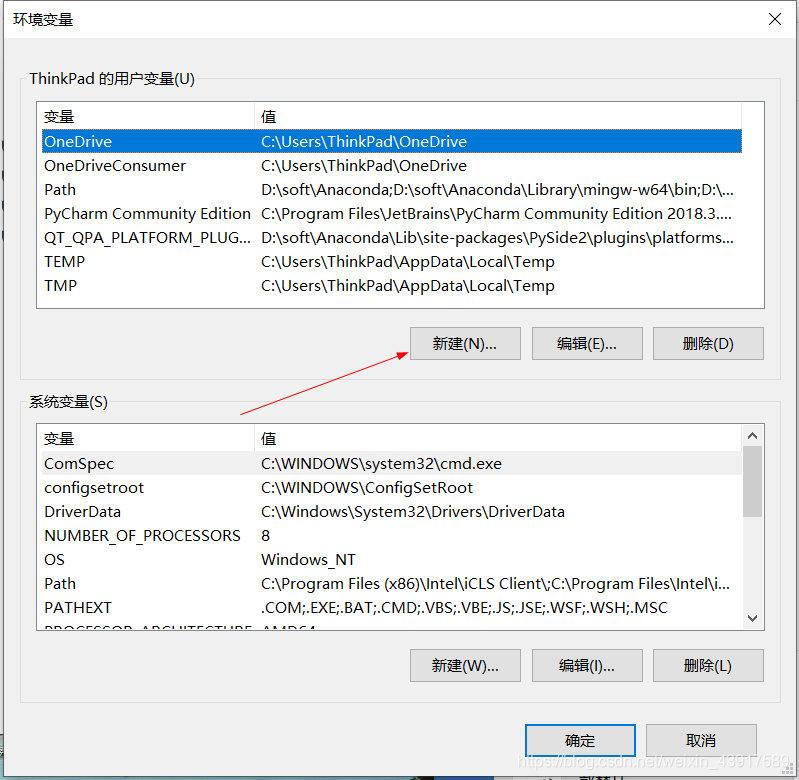
找到PySide2路径中的\plugins\platforms添加到环境变量中的用户变量里。
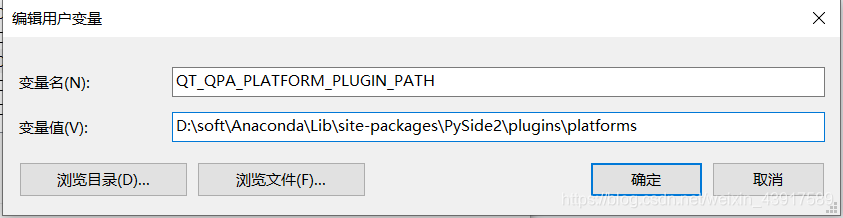
变量名为:QT_QPA_PLATFORM_PLUGIN_PATH
变量值为:PySide2\plugins\platforms的绝对地址
路径例子:D:\soft\Anaconda\Lib\site-packages\PySide2\plugins\platforms
3、重启电脑,让新添加的用户变量生效!
更多推荐

 5
 0
- 0


 已为社区贡献4条内容

所有评论(0)