
【黑马健康APP--饮食记录界面实现】
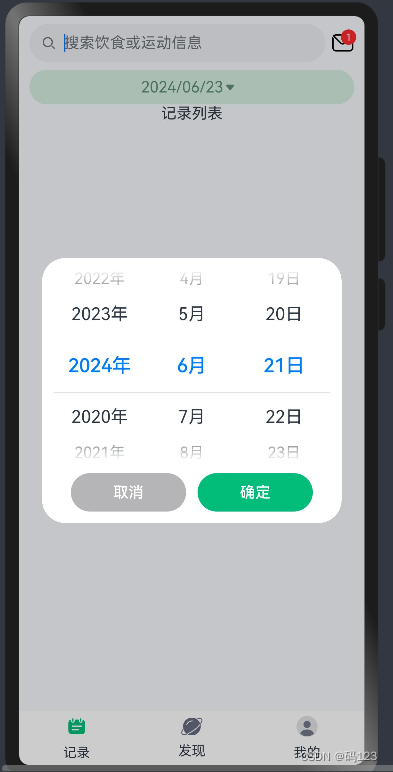
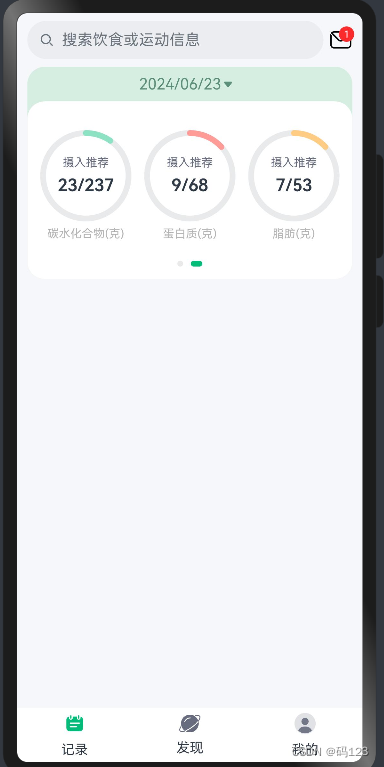
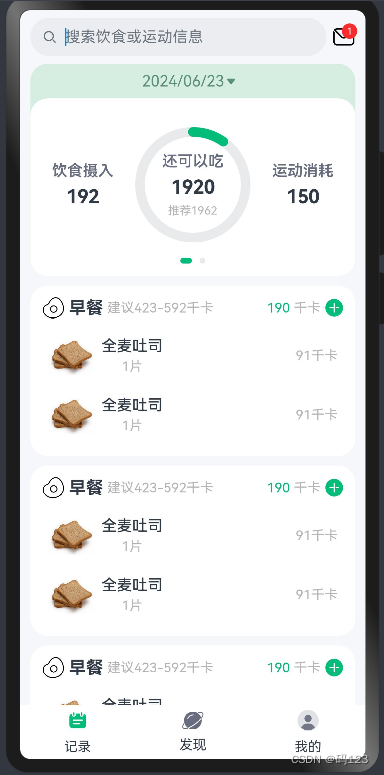
本章实现项目《黑马健康APP》的首页中部分记录界面的实现,我把它分为三部分实现。首页UI设计包括顶部搜索栏,中部是饮食记录统计区域,下面是记录列表区域。卡片点击弹窗显示日期,展示对应的饮食记录;统计区域卡片左右轮换,第一部分展示总的热量统计,滑动则展示营养素的统计;再往下记录列表区域为List列表,列表中逐一的渲染文本和图片的内容。
一.运行效果
二.知识储备
(一)Search组件
目标:Search文本输入框是搜索框组件,适用于浏览器的搜索内容输入框等应用场景。利用placeholder设置无输入时的提示文本。实现界面布局要求。
(二)DatePicker组件
目标:日期选择器组件,用于根据指定日期范围创建日期滑动选择器。start指定选择器的起始日期,end指定选择器的结束日期。onChange(callback: (value: DatePickerResult) => void)选择日期时触发该事件。本日期选择器存毫秒值不存日期,日期date对象将来做状态变量用prop或者link监控有问题有错误。AppStorage.SetOrCreate保存日期到全局变量存储。
(三)Swiper组件
目标:滑块视图容器,提供子组件滑动轮播显示的能力,熟练应用SwiperController,Swiper容器组件的控制器,可以将此对象绑定至Swiper组件,然后通过它控制翻页。
(四)List列表
目标:使用ListItem定义列表项的布局和样式,包括如何使用模板来显示列表项的数据,
学会如何在运行时添加、删除或更新列表项。
三.实现步骤
(一)饮食记录页的结构解构:
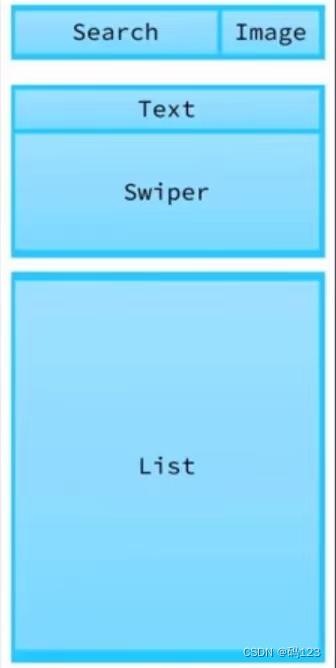
(二)实现饮食记录页界面布局:新建view目录下record文件下新建饮食记录页RecordIndex,其内部完成整个饮食记录的开发 :头部搜索栏、统计卡片,记录列表三部分都用定义单独的组件去写。
(三)编写顶部搜索栏SearchHeader内容:
- SearchHeader中Badge显示信封e-mail的数字,个点击点亮类似也可以定义状态变量控制。
import { CommonConstants } from '../../common/constants/CommonConstants'
@Component
export default struct  SearchHeader{
  build() {
    Row({space:CommonConstants.SPACE_6}) {
      Search({ placeholder: '搜索饮食或运动信息' })
        .textFont({size:18})
        .layoutWeight(1)
      Badge({ count: 1, position: BadgePosition.RightTop,style: {fontSize: 10}}){
        Image($r('app.media.ic_public_email'))
          .width(24)
      }
    }
    .width(CommonConstants.THOUSANDTH_940)
  }
}
(四)编写卡片区域StatsCard内容:1.新建DatePickDialog组件实现日期弹窗器,在 StatsCard中实时监控;2.使用 Swiper组件完成显示热量的统计信息块和营养素的信息块,新建热量统计块CalorieStats;新建营养素块NutrientStats。
- 卡片区域一部分为Text文本,又可以弹窗显示选择日期;区域二统计的部分一个是显示热量的统计信息,另一个还会出现弹窗营养素的信息。
- 日期选择窗DatePicker组件实现,穿梭切换的两个卡片实现借助Swiper组件实现。
记录界面RecordIndex代码:
import RecordList from './RecordList'
import SearchHeader from './SearchHeader'
import StatsCard from './StatsCard'
@Component
export default struct RecordIndex {
  build() {
    Column(){
      //1.头部搜索栏
      SearchHeader()
      //2.统计卡片
      StatsCard()
      //3.记录列表
      RecordList()
    }
    .width('100%')
    .height('100%')
    .backgroundColor($r('app.color.index_page_background'))

  }
}
卡片区域它包括滑动轮播的两个切换面,StatsCard代码:
import { CommonConstants } from '../../common/constants/CommonConstants'
import DateUtil from '../../common/utils/DateUtil'
import CalorieStats from './CalorieStats'
import DatePickDialog from './DatePickDialog'
import NutrientStats from './NutrientStats'
@Component
export default struct  StatsCard{

  @StorageProp('selectedDate') selectedDate:number= DateUtil.beginTimeOfDay(new Date())

  controller:CustomDialogController=new CustomDialogController({
    builder:DatePickDialog({selectedDate:new Date(this.selectedDate)})
  })
  build() {
   Column(){
      //1.日期信息
     Row(){
       Text(DateUtil.formatDate(this.selectedDate))
         .fontColor($r('app.color.secondary_color'))
       Image($r('app.media.ic_public_spinner'))
         .width(20)
         .fillColor($r('app.color.secondary_color'))
     }
     .padding(CommonConstants.SPACE_8)
     .onClick(()=> this.controller.open())
      //2.统计信息
     Swiper(){
       //2.1热量统计
       CalorieStats()
       //2.2营养素统计
       NutrientStats()
     }
     .width('100%')
     .backgroundColor(Color.White)
     .borderRadius(CommonConstants.DEFAULT_18)
     .indicatorStyle({selectedColor:$r('app.color.primary_color')})
   }
    .width(CommonConstants.THOUSANDTH_940)
    .backgroundColor($r('app.color.stats_title_bgc'))
    .borderRadius(CommonConstants.DEFAULT_18)
  }
}
StatsCard中热量统计块CalorieStats代码:
import { CommonConstants } from '../../common/constants/CommonConstants'
@Component
export default struct CalorieStats {
  intake:number=192
  expend:number=150
  recommend:number=CommonConstants.RECOMMEND_CALORIE
  build() {
    Row({space:CommonConstants.SPACE_6}){
      //1.饮食摄入
      this.StatsBuilder('饮食摄入',this.intake)

      //2.还可以吃
      Stack(){
        //2.1进度条
        Progress({
          value:this.intake,
          total:this.recommend,
          type:ProgressType.Ring
        })
          .width(120)
          .style({strokeWidth:CommonConstants.DEFAULT_10})
          .color($r('app.color.primary_color'))
        //2.2统计数据
        this.StatsBuilder('还可以吃',(this.recommend-this.intake+this.expend),`推荐${this.recommend}`)
      }

      //3.运动消耗
      this.StatsBuilder('运动消耗',this.expend)

    }
    .width('100%')
    .justifyContent(FlexAlign.SpaceEvenly)
    .padding({top:30,bottom:35})
  }
  @Builder StatsBuilder(label:string,value:number,tips?:string){
    Column({space:CommonConstants.SPACE_6}){
      Text(label)
        .fontColor($r('app.color.gray'))
        .fontWeight(CommonConstants.FONT_WEIGHT_600)
      Text(value.toFixed(0))
        .fontSize(20)
        .fontWeight(CommonConstants.FONT_WEIGHT_700)
     if(tips){
       Text(tips)
         .fontSize(12)
         .fontColor($r('app.color.light_gray'))
     }
    }
  }
}
StatsCard中营养素块NutrientStats代码:
import { CommonConstants } from '../../common/constants/CommonConstants'
@Component
export default struct NutrientStats {
  carbon:number=23
  protein:number=9
  fat:number=7

  recommendCarbon:number=CommonConstants.RECOMMEND_CARBON
  recommendProtein:number=CommonConstants.RECOMMEND_PROTEIN
  recommendFat:number=CommonConstants.RECOMMEND_FAT


  build() {
    Row({space:CommonConstants.SPACE_6}){
      //1.碳水化合物
      this.StatsBuilder(
        '碳水化合物',
        this.carbon,
        this. recommendCarbon,$r('app.color.carbon_color')
      )

      //2.蛋白质
      this.StatsBuilder(
        '蛋白质',
        this.protein,
        this. recommendProtein,$r('app.color.protein_color')
      )

      //3.脂肪
      this.StatsBuilder(
        '脂肪',
        this.fat,
        this. recommendFat,$r('app.color.fat_color')
      )

    }
    .width('100%')
    .justifyContent(FlexAlign.SpaceEvenly)
    .padding({top:30,bottom:35})
  }
  @Builder StatsBuilder(label:string,value:number,recommend:number,color:ResourceStr){
    Column({space:CommonConstants.SPACE_6}){
      Stack() {
        Progress({
          value: value,
          total: recommend,
          type: ProgressType.Ring
        })
          .width(95)
          .style({ strokeWidth: CommonConstants.DEFAULT_6 })
          .color(color)
        Column({space:CommonConstants.SPACE_6}) {
          Text('摄入推荐')
            .fontSize(12)
            .fontColor($r('app.color.gray'))
          Text(`${value.toFixed(0)}/${recommend.toFixed(0)}`)
            .fontSize(18)
            .fontWeight(CommonConstants.FONT_WEIGHT_600)
        }
      }
      Text(`${label}(克)`)
        .fontSize(12)
        .fontColor($r('app.color.light_gray'))
    }
  }
}
(四)编写列表区域RecordList内容:展示列表信息,并实现List区域增删改信息功能。
记录界面RecordList代码:
import router from '@ohos.router'
import { CommonConstants } from '../../common/constants/CommonConstants'
@Extend(Text)  function grayText(){
  .fontSize(14)
  .fontColor($r('app.color.light_gray'))
}
@Component
export default struct RecordList {
  build() {
    List({space:CommonConstants.SPACE_10}){
      ForEach([1,2,3,4,5],(item)=>{
        ListItem(){
          Column({space:CommonConstants.SPACE_8}){
            //1.分组的标题
            Row({space:CommonConstants.SPACE_4}){
              Image($r('app.media.ic_breakfast')).width(24)
              Text('早餐').fontSize(18).fontWeight(CommonConstants.FONT_WEIGHT_700)
              Text('建议423-592千卡').grayText()
              Blank()
              Text('190').fontSize(14).fontColor($r('app.color.primary_color'))
              Text('千卡').grayText()
              Image($r('app.media.ic_public_add_norm_filled'))
                .width(20)
                .fillColor($r('app.color.primary_color'))
                .onClick(()=>{
                  router.pushUrl({
                    url:'pages/ItemIndex'
                  })
                })
            }
            .width('100%')

            //2.组内记录列表
            List(){
              ForEach([1,2],(item)=>{
                ListItem(){
                  Row({space:CommonConstants.SPACE_6}){
                    Image($r('app.media.toast')).width(50)
                    Column({space:CommonConstants.SPACE_4}){
                      Text('全麦吐司').fontWeight(CommonConstants.FONT_WEIGHT_500)
                      Text('1片').grayText()
                    }
                    Blank()
                    Text('91千卡').grayText()
                  }
                  .width('100%')
                  .padding(CommonConstants.SPACE_6)
                }.swipeAction({end:this.deleteButton.bind(this)})
              })
            }
            .width('100%')

          }
          .width('100%')
          .backgroundColor(Color.White)
          .borderRadius(CommonConstants.DEFAULT_18)
          .padding(CommonConstants.SPACE_12) }
      })
    }
    .width(CommonConstants.THOUSANDTH_940)
    .height('100%')
    .margin({top:10})

  }
  @Builder deleteButton(){
    Image($r('app.media.ic_public_delete_filled'))
      .width(20)
      .fillColor(Color.Red)
      .margin(5)

  }
}
四.总结
本次开发学习了日期选择器AppStorage保存日期到全局变量存储这一重要的知识点对我开发过程有重要作用;另外子组件Swipe滑动轮播显示的能力,Swipe的其他自动播放的功能有着广泛和实用性的作用,学习掌握提高了我的开发能力。
更多推荐
 28
28 0
0- 0


 已为社区贡献1条内容

所有评论(0)