
Go语言学习笔记【19】 gin框架
【声明】
非完全原创,部分内容来自于学习其他人的理论和B站视频。如果有侵权,请联系我,可以立即删除掉。
参考文章:
(1)Gin框架(一):基础概览
(2)gin框架剖析(一)
一、简介、安装及快速入手
1、gin简介
Gin 是 Go语言写的一个 web 框架,它具有运行速度快,分组的路由器,良好的崩溃捕获和错误处理,非常好的支持中间件和 json
它是一个类似于martini但拥有更好性能的API框架, 由于使用了httprouter,速度提高了近40倍。中文文档较为齐全
2、下载安装
要求golang的版本在1.15及以上,下载:
go get -u github.com/gin-gonic/gin
问题
(1)连接超时:开启gomodule,设置代理
go env -w GO111MODULE="on"
go env -w GOPROXY="https://goproxy.cn","https://goproxy.io"
(2)go mod的错误:解决方案
vscode的gopath和go mod无法共存
- 原因:go mod会将依赖包下载在
pkg/mod下面,vscode默认导包路径是GOROOT/src和GOPATH/src,因此在导包时,vscode自动检查机制会显示找不到包 - 解决方法:
(1)vscode设置中搜索go.useLanguageServer并关闭,该方法虽然不报告警但没有代码提示了
(2)将整个项目移到GOPATH路径外面,然后项目下面敲go mod init xxx和go install github.com/gin-gonic/gin@lastest,即可完成导包

3、快速使用
3.1、官方快速入手的demo
import (
	"net/http"
	"github.com/gin-gonic/gin"
)

func main() {
	r := gin.Default()
	r.GET("/ping", func(c *gin.Context) {
		c.JSON(http.StatusOK, gin.H{
			"message": "pong",
		})
	})
	r.Run() // listen and serve on 0.0.0.0:8080 (for windows "localhost:8080")
}
3.2、运行结果
[GIN-debug] [WARNING] Creating an Engine instance with the Logger and Recovery middleware already attached.

[GIN-debug] [WARNING] Running in "debug" mode. Switch to "release" mode in production.
 - using env:	export GIN_MODE=release
 - using code:	gin.SetMode(gin.ReleaseMode)

[GIN-debug] GET    /ping                     --> main.main.func1 (3 handlers)
[GIN-debug] [WARNING] You trusted all proxies, this is NOT safe. We recommend you to set a value.
Please check https://pkg.go.dev/github.com/gin-gonic/gin#readme-don-t-trust-all-proxies for details.
[GIN-debug] Environment variable PORT is undefined. Using port :8080 by default
[GIN-debug] Listening and serving HTTP on :8080

4、REST
4.1、概念
REST,即Representational State Transfer的缩写,它是一种架构风格,跟编程语言无关,跟平台无关,采用HTTP做传输协议。“表现层状态转化”。如果一个架构符合REST原则,就称它为RESTful架构。
REST强调用URL定位资源、用HTTP动词(GET,POST,PUT,DELETE)描述操作
设计风格:
- 资源:是网络上的一个实体,如图片,数据,歌曲等。资源可以通过载体表示,如图片可以用JPG格式,文本可以用TXT格式,目前最流行的表示载体是JSON
- 统一接口:数据操作
CRUD(create, read, update, delete),对应到HTTP方法:GET获取资源,POST新建资源(或更新资源),PUT更新资源,DELETE删除资源。通过上述HTTP方法便统一了对数据的操作 - URI:
Uniform Resourse identifier,统一资源位置。一个URI是某一个资源的地址或识别符,一个资源可以有多个URL - 无状态:所有的资源都可以通过URL直接定位,不依赖于其他资源或状态。例如,想要接收微信好友的消息,就必须先登录上微信,此时就构成了依赖关系,因此是有状态的
- 过滤信息:为了限定信息的多少或者获取特定的信息,可以通过前端参数过滤返回结果。
4.2、示例代码
4.2.1、代码
func main() {
	r := gin.Default()
	r.GET("/ping", func(c *gin.Context) {
		c.JSON(http.StatusOK, gin.H{
			"message": "get",
		})
	})
	r.POST("/ping", func(c *gin.Context) {
		c.JSON(http.StatusOK, gin.H{
			"message": "post",
		})
	})
	r.PUT("/ping", func(c *gin.Context) {
		c.JSON(http.StatusOK, gin.H{
			"message": "put",
		})
	})
	r.DELETE("/ping", func(c *gin.Context) {
		c.JSON(http.StatusOK, gin.H{
			"message": "delete",
		})
	})
	r.Run() // listen and serve on 0.0.0.0:8080 (for windows "localhost:8080")
}
4.2.2、postman测试

二、gin渲染
1、html文件渲染
1.1、定义两个html文件
(1)html_file/index.tmpl
<!DOCTYPE html>
<html lang="zh-CN">
<body>
    this is {{.name}} page
</body>
(2)html_file/home.html
{{define "gets/home.html"}}
<!DOCTYPE html>
<html lang="en">
<body>
    this is {{.title}} page
</body>
</html>
{{end}}
(3)html_file/demo.tmpl
<!DOCTYPE html>
<html lang="en">
<body>
    <div>
        {{/* 将'.text'对应的value作为参数传给htmlparse函数 */}}
        {{ .text | htmlparse }}
    </div>
</body>
</html>
1.2、gin服务端的代码
func main() {
	//1. 设置默认的路由引擎
	r := gin.Default()
	//自定义函数"htmlparse", 将传入的字符串解析为网页要显示的内容
	r.SetFuncMap(template.FuncMap{
		"htmlparse": func(str string) template.HTML {
			return template.HTML(str)
		},
	})

	//2. 加载html文件
	//r.LoadHTMLFiles("html_file/index.tmpl", "html_file/home.html")
	r.LoadHTMLGlob("html_file/*")

	//3. 接收客户端的GET请求并处理
	r.GET("/index", func(c *gin.Context) {
		//方法1:通过文件名来查找html文件
		c.HTML(http.StatusOK, "index.tmpl", gin.H{
			"name": "index",
		})
	})

	r.GET("/home", func(c *gin.Context) {
		//方法2:通过文件中define的名字来查找html文件
		c.HTML(http.StatusOK, "gets/home.html", gin.H{
			"title": "home",
		})
	})

	m := map[string]string{"text": "<h1><a href='www.baidu.com'>百度一下</a></h1>"}
	r.GET("/demo", func(c *gin.Context) {
		c.HTML(http.StatusOK, "demo.tmpl", m)
	})

	//4. 设置端口及监听服务端的连接
	r.Run(":8088")
}
1.3、浏览器客户端测试


2、静态文件渲染
静态资源一般包括:css、js、image等文件
2.1、创建文件夹放置静态文件

(1)staic/css/style.css
*{
    color:coral;
    background-color: darkturquoise;
}
(2)staic/js/demo.js
alert("demo test")
(3)staic/img/swim.jpeg
2.2、index.html文件
<!DOCTYPE html>
<head>
    <link rel="stylesheet" href="demo/css/style.css">
    <title>index</title>
</head>
<body>
    <div><h1>Hello, this is a {{.}} page</h1></div>
    <img src="https://gimg2.baidu.com/image_search/src=http%3A%2F%2Fzhongces3.sina.com.cn%2Fproduct%2F20210316%2F6637448af6e94692a1b7c95cd40e70f3.jpeg&refer=http%3A%2F%2Fzhongces3.sina.com.cn&app=2002&size=f9999,10000&q=a80&n=0&g=0n&fmt=auto?sec=1663868287&t=f770b159851a8d2dcf538cdc58d58329">
    <img src="demo/img/swim.jpeg"/>
    <script src="demo/js/demo.js">
    </script>
</body>
2.3、gin服务端代码
func main() {
	r := gin.Default()
	//将html文件中的'demo'指向到'./static'目录
	r.Static("/demo", "./static")
	r.LoadHTMLFiles("index.html")
	r.GET("/demo", func(c *gin.Context) {
		c.HTML(http.StatusOK, "index.html", "demo_index")
	})
	r.Run(":9000")
}
2.4、浏览器的展示效果

2.5、下载网站上的前端模板文件进行渲染
(1)下载前端模板
下载的路径:https://sc.chinaz.com/moban/190107489630.htm
(2)文件结构
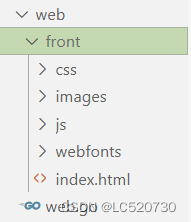
将下载下来的文件放置在web/front目录下,并且将目录下的index.html中css/images/js文件的引用加上前缀demo/。文件的目录结构如下:
(3)服务端代码
func main() {
	r := gin.Default()
	//将html文件中的'demo'指向到'./static'目录
	r.Static("/demo", "./front")
	r.LoadHTMLFiles("front/index.html")
	r.GET("/demo", func(c *gin.Context) {
		c.HTML(http.StatusOK, "index.html", nil)
	})
	r.Run(":9000")
}
(4)效果

3、其他类型数据的渲染
3.1、json、xml、yaml
func main() {
	r := gin.Default()

	//1. json渲染
	r.GET("/json", func(c *gin.Context) {
		//gin.H是map[string]interface{}类型,也可以自定义map进行传参
		c.JSON(http.StatusOK, gin.H{"Name": "Hello, golang"})
	})
	r.GET("/json_struct", func(c *gin.Context) {
		type MSG struct {
			Name string `json:usr`
			Age  int
		}
		msg := MSG{"go", 20}
		c.JSON(http.StatusOK, msg)
	})

	//2. xml渲染
	r.GET("/xml", func(c *gin.Context) {
		//gin.H是map[string]interface{}类型,也可以自定义map进行传参
		c.XML(http.StatusOK, gin.H{"Name": "Hello, golang"})
	})
	r.GET("/xml_struct", func(c *gin.Context) {
		type MSG struct {
			Name string `json:usr`
			Age  int
		}
		msg := MSG{"go", 20}
		c.XML(http.StatusOK, msg)
	})

	//3. yaml渲染
	r.GET("/yaml", func(c *gin.Context) {
		c.YAML(http.StatusOK, gin.H{"message": "ok", "status": http.StatusOK})
	})

	r.Run(":8088")
}
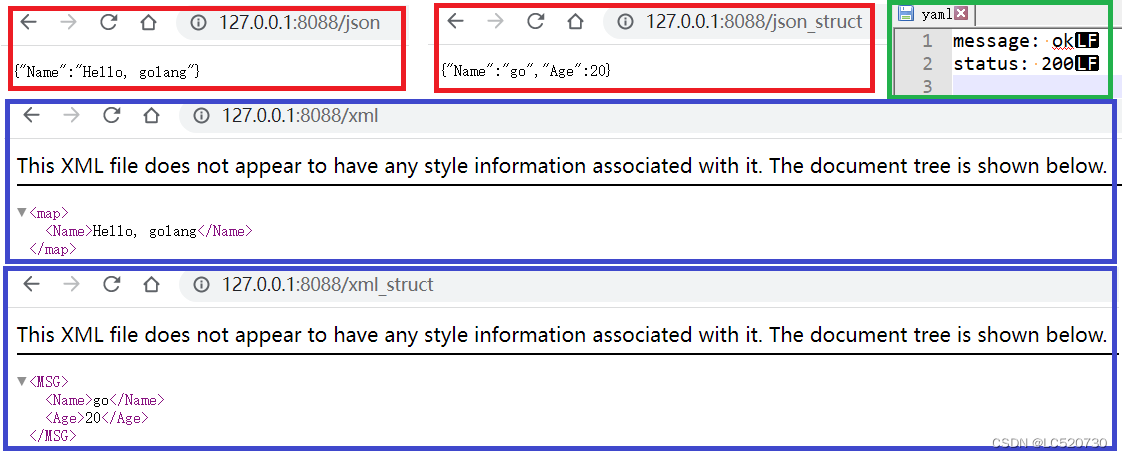
三、gin获取参数
1、url和表单参数
1.1、GET url参数获取的相关方法
Query方法适用于/path?id=1234&name=Manu&value=的URL参数解析
Param方法适用于/user/id/name/addr格式的URL参数解析,并且解析的参数个数需要全部匹配上,否则返回404
1.1.1、Query方法
// Query returns the keyed url query value if it exists,
// otherwise it returns an empty string `("")`.
// It is shortcut for `c.Request.URL.Query().Get(key)`
//     GET /path?id=1234&name=Manu&value=
// 	   c.Query("id") == "1234"
// 	   c.Query("name") == "Manu"
// 	   c.Query("value") == ""
// 	   c.Query("wtf") == ""
func (c *Context) Query(key string) (value string)

// DefaultQuery returns the keyed url query value if it exists,
// otherwise it returns the specified defaultValue string.
// See: Query() and GetQuery() for further information.
//     GET /?name=Manu&lastname=
//     c.DefaultQuery("name", "unknown") == "Manu"
//     c.DefaultQuery("id", "none") == "none"
//     c.DefaultQuery("lastname", "none") == ""
func (c *Context) DefaultQuery(key, defaultValue string) string

// GetQuery is like Query(), it returns the keyed url query value
// if it exists `(value, true)` (even when the value is an empty string),
// otherwise it returns `("", false)`.
// It is shortcut for `c.Request.URL.Query().Get(key)`
//     GET /?name=Manu&lastname=
//     ("Manu", true) == c.GetQuery("name")
//     ("", false) == c.GetQuery("id")
//     ("", true) == c.GetQuery("lastname")
func (c *Context) GetQuery(key string) (string, bool)
1.1.2、Param方法
// Param returns the value of the URL param.
// It is a shortcut for c.Params.ByName(key)
//     router.GET("/user/:id", func(c *gin.Context) {
//         // a GET request to /user/john
//         id := c.Param("id") // id == "john"
//     })
func (c *Context) Param(key string) string
1.2、POST提交的参数数据获取的相关方法
1.2.1、PostForm方法
// PostForm returns the specified key from a POST urlencoded form or multipart form
// when it exists, otherwise it returns an empty string `("")`.
func (c *Context) PostForm(key string) (value string)

// DefaultPostForm returns the specified key from a POST urlencoded form or multipart form
// when it exists, otherwise it returns the specified defaultValue string.
// See: PostForm() and GetPostForm() for further information.
func (c *Context) DefaultPostForm(key, defaultValue string) string

// GetPostForm is like PostForm(key). It returns the specified key from a POST urlencoded
// form or multipart form when it exists `(value, true)` (even when the value is an empty string), otherwise it returns ("", false).
// For example, during a PATCH request to update the user's email:
//     email=mail@example.com  -->  ("mail@example.com", true) := GetPostForm("email") // set email to "mail@example.com"
// 	   email=     -->  ("", true) := GetPostForm("email") // set email to ""
//                -->  ("", false) := GetPostForm("email") // do nothing with email
func (c *Context) GetPostForm(key string) (string, bool)

// GetPostFormMap returns a map for a given form key, plus a boolean value
// whether at least one value exists for the given key.
func (c *Context) GetPostFormMap(key string) (map[string]string, bool)

// GetPostFormArray returns a slice of strings for a given form key, plus
// a boolean value whether at least one value exists for the given key.
func (c *Context) GetPostFormArray(key string) (values []string, ok bool)
1.2.2、GetRawData方法
一般先获取数据流,然后反序列为json格式的map或者struct
// GetRawData returns stream data.
func (c *Context) GetRawData() ([]byte, error)
1.3、url和表单参数示例
1.3.1、gin代码
func main() {
	r := gin.Default()
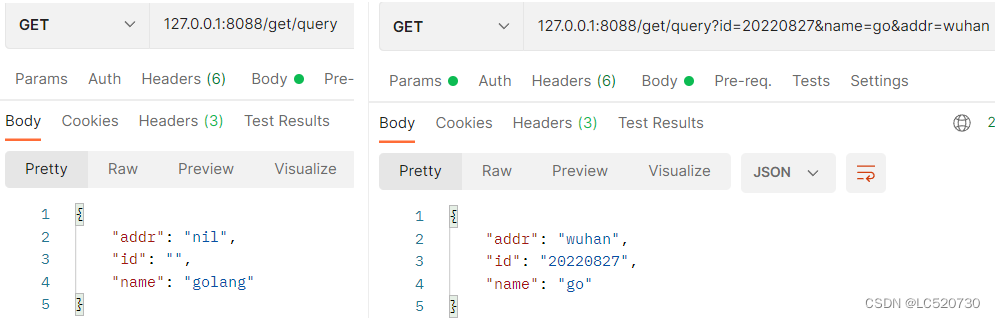
	r.GET("/get/query", func(c *gin.Context) {
		//获取query参数:URL中?后面携带的参数
		id := c.Query("id")                      //未获取到返回""
		name := c.DefaultQuery("name", "golang") //未获取到返回"golang"
		addr, ok := c.GetQuery("addr")           //ok表示是否获取到,未获取到返回""
		if !ok {
			addr = "nil"
		}
		c.JSON(http.StatusOK, gin.H{
			"id":   id,
			"name": name,
			"addr": addr,
		})
	})

	r.GET("path/:name/:age", func(ctx *gin.Context) {
		//客户侧请求的参数通过URL路径自动匹配,若匹配失败返回""
		name, str_age := ctx.Param("name"), ctx.Param("age")
		age, _ := strconv.Atoi(str_age)
		m := map[string]interface{}{"name": name, "age": age}
		ctx.JSON(http.StatusOK, m)
	})

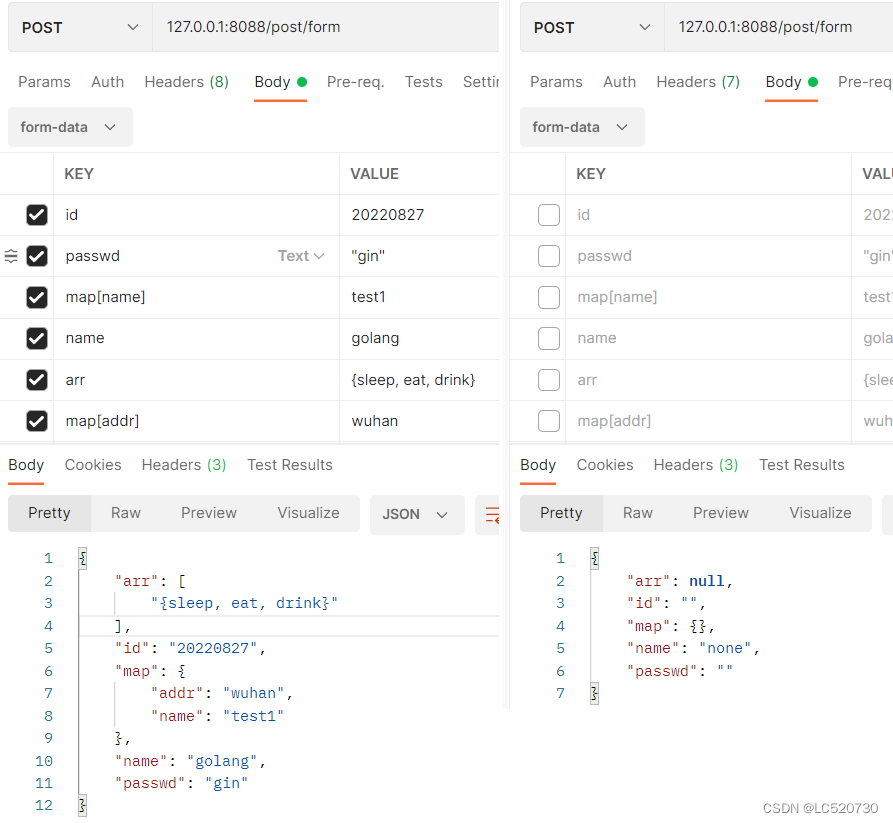
	r.POST("/post/form", func(c *gin.Context) {
		//获取客户端POST提交的表单数据
		id := c.PostForm("id")
		name := c.DefaultPostForm("name", "none")
		passwd, _ := c.GetPostForm("passwd")
		m, _ := c.GetPostFormMap("map")
		arr, _ := c.GetPostFormArray("arr")
		//获取post表单中的所有数据
		for k, v := range c.Request.PostForm {
			fmt.Printf("key: %v\tvalue: %v\n", k, v)
		}
		c.JSON(http.StatusOK, gin.H{
			"id":     id,
			"name":   name,
			"passwd": passwd,
			"map":    m,
			"arr":    arr,
		})
	})

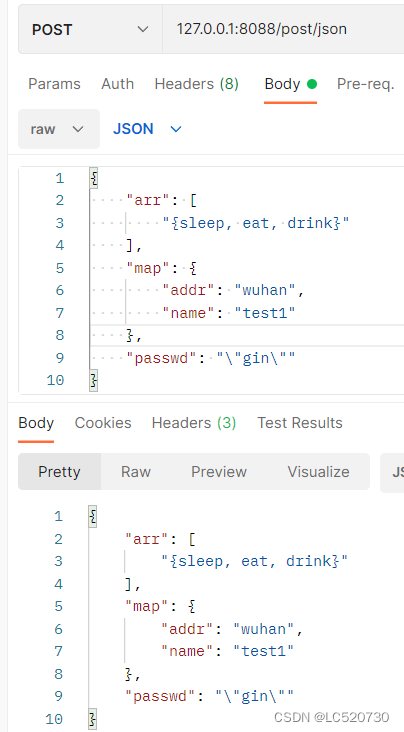
	r.POST("post/json", func(c *gin.Context) {
		//获取客户端POST提交的json数据
		data, err := c.GetRawData()
		if err != nil {
			c.JSON(http.StatusBadRequest, "Get Data failed")
		} else {
			m := make(map[string]interface{})
			err = json.Unmarshal(data, &m)
			if err != nil {
				c.JSON(http.StatusBadRequest, "Data Unmarshal failed")
			} else {
				c.JSON(http.StatusOK, m)
			}
		}
	})

	r.Run(":8088")
}
1.3.2、运行结果
(1)Query方法
(2)Param方法
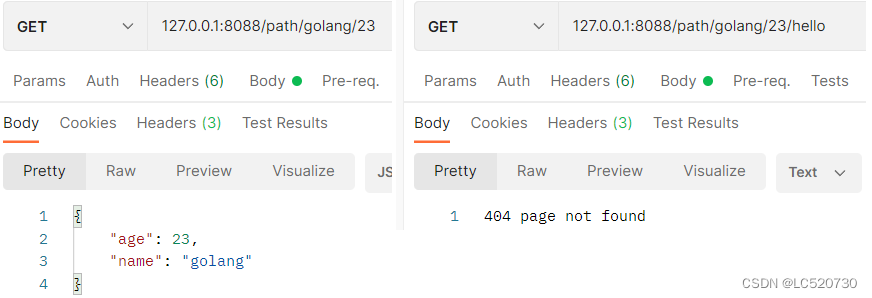
(3)PostForm方法
(4)GetRawData方法
2、参数绑定
2.1、相关方法
// ShouldBind checks the Method and Content-Type to select a binding engine automatically,
// Depending on the "Content-Type" header different bindings are used, for example:
//     "application/json" --> JSON binding
//     "application/xml"  --> XML binding
// It parses the request's body as JSON if Content-Type == "application/json" using JSON or XML as a JSON input.
// It decodes the json payload into the struct specified as a pointer.
// Like c.Bind() but this method does not set the response status code to 400 or abort if input is not valid.
func (c *Context) ShouldBind(obj any) error
为了能够更方便的获取请求相关参数,可以基于请求的Content-Type识别请求数据类型并利用反射机制自动提取请求中Query、form表单、JSON、XML等参数到结构体中
ShouldBind 会按照下面的顺序解析请求中的数据完成绑定:
- 如果是 GET 请求,只使用 Form 绑定引擎(query)。
- 如果是 POST 请求,首先检查 content-type 是否为 JSON 或 XML,然后再使用 Form(form-data)
2.2、测试
2.2.1、gin代码
// Binding from JSON、form
type User struct {
	User     string `form:"user" json:"user" binding:"required"`
	Password string `form:"password" json:"password" binding:"required"`
}

func main() {
	rout := gin.Default()
	var usr User
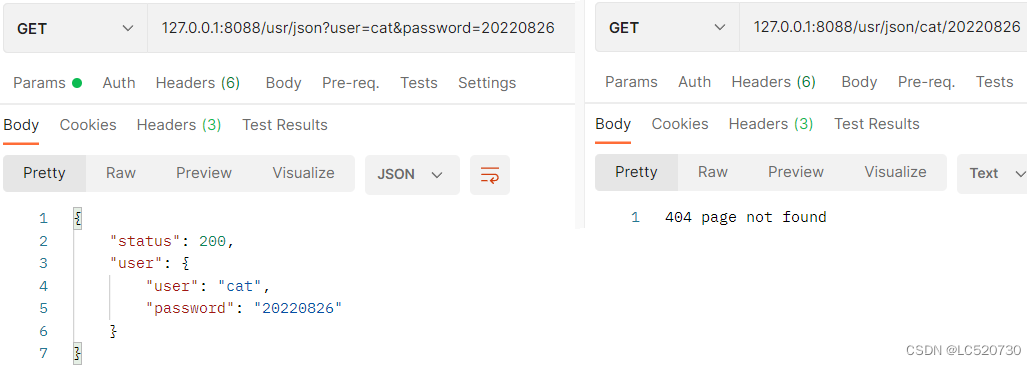
	//可以是: json?user=cat&password=20220826
	//但不能是:  json/cat/20220826
	rout.GET("/usr/json", func(ctx *gin.Context) {
		usr = User{}
		if err := ctx.ShouldBind(&usr); err == nil {
			ctx.JSON(http.StatusOK, gin.H{
				"status": http.StatusOK,
				"user":   usr,
			})
		} else {
			ctx.JSON(http.StatusBadRequest, gin.H{"error": err.Error()})
		}
	})

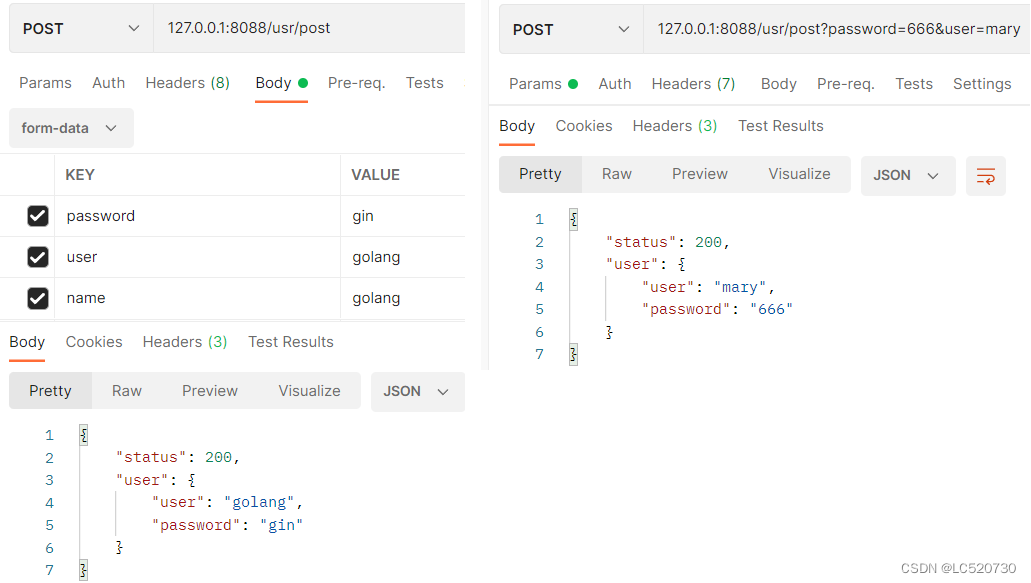
	rout.POST("/usr/post", func(ctx *gin.Context) {
		usr = User{}
		if err := ctx.ShouldBind(&usr); err == nil {
			ctx.JSON(http.StatusOK, gin.H{
				"status": http.StatusOK,
				"user":   usr,
			})
		} else {
			ctx.JSON(http.StatusBadRequest, gin.H{"error": err.Error()})
		}
	})

	rout.Run(":8088")
}
2.2.2、运行结果
(1)GET请求
(2)POST请求
四、gin文件上传
1、相关方法
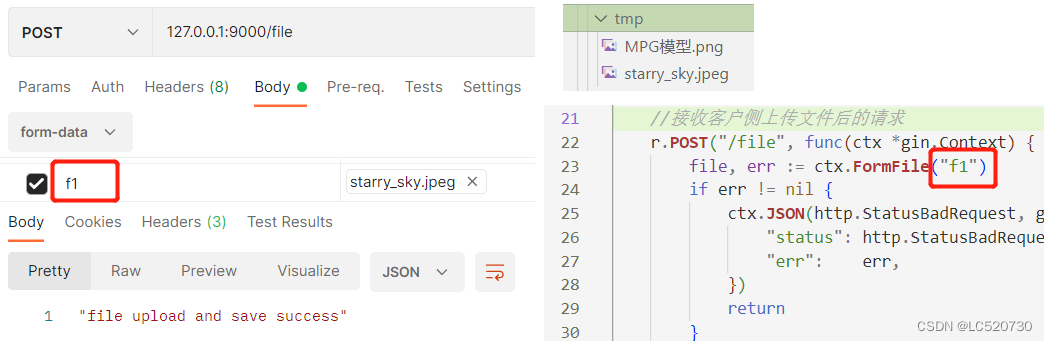
特别注意:保存文件到服务端本地时,要求目录已存在,否则会报错
// FormFile returns the first file for the provided form key.
func (c *Context) FormFile(name string) (*multipart.FileHeader, error)

// MultipartForm is the parsed multipart form, including file uploads.
func (c *Context) MultipartForm() (*multipart.Form, error)

// SaveUploadedFile uploads the form file to specific dst.
func (c *Context) SaveUploadedFile(file *multipart.FileHeader, dst string) error
2、gin代码(包括单文件和多文件上传)
func main() {
	r := gin.Default()

	//加载html文件并接收GET请求
	r.LoadHTMLFiles("./index.html")
	r.GET("/up_page", func(c *gin.Context) {
		c.HTML(http.StatusOK, "index.html", nil)
	})

	//接收客户侧上传文件后的请求
	r.POST("/file", func(ctx *gin.Context) {
		file, err := ctx.FormFile("f1")
		if err != nil {
			ctx.JSON(http.StatusBadRequest, gin.H{
				"status": http.StatusBadRequest,
				"err":    err,
			})
			return
		}
		dst := fmt.Sprintf("./tmp/%s", file.Filename)
		if err = ctx.SaveUploadedFile(file, dst); err != nil {
			ctx.JSON(http.StatusInternalServerError, fmt.Sprintf("file save err[%s]", err))
		} else {
			ctx.JSON(http.StatusOK, "file upload and save success")
		}
	})

	r.POST("/mltifile", func(ctx *gin.Context) {
		form, err := ctx.MultipartForm()
		if err != nil {
			ctx.JSON(http.StatusBadRequest, gin.H{
				"status": http.StatusBadRequest,
				"err":    err,
			})
			return
		}
		files := form.File["f1"]
		for index, file := range files {
			dst := path.Join("./multi", strconv.Itoa(index)+"_"+file.Filename)
			if err = ctx.SaveUploadedFile(file, dst); err != nil {
				ctx.JSON(http.StatusInternalServerError, fmt.Sprintf("file save err[%s]", err))
				return
			}
		}
		ctx.JSON(http.StatusOK, "all file upload and save success")
	})
	r.Run(":9000")
}
3、文件上传结果
3.1、单文件上传
(1)使用html上传文件
<!DOCTYPE html>
<html lang="zh-CN">
    <body>
        <!-- 一定要指定action(待跳转的POST网页路径)、enctype(传输数据为二进制类型) -->
        <form action="/file", method="post" enctype="multipart/form-data">
            <input type="file" name="f1">
            <input type="submit" value="upload">
        </form>
    </body>
</html>

(2)postman直接上传
3.2、多文件上传
<!DOCTYPE html>
<html lang="zh-CN">
    <body>
        <!-- 一定要指定action(待跳转的POST网页路径)、enctype(传输数据为二进制类型)、multiple(多文件选择) -->
        <form action="/mltifile", method="post" enctype="multipart/form-data">
            <input type="file" name="f1" multiple>
            <input type="submit" value="upload">
        </form>
    </body>
</html>

五、gin路由和重定向
1、路由(组)
路由的基本原理就是构造一个路由地址的前缀树。Gin框架中的路由使用的是httprouter库
1.1、普通路由
1.1.1、相关方法
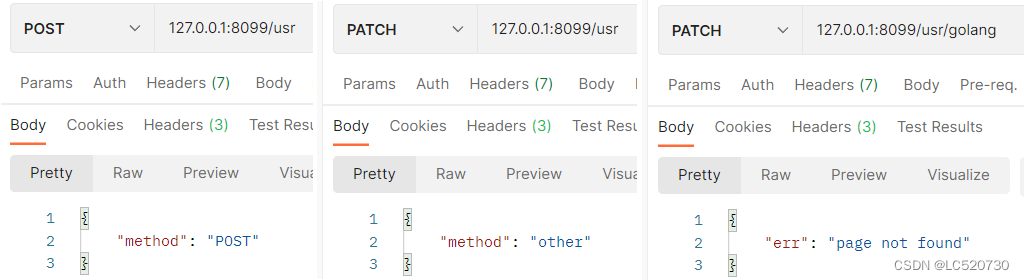
除了指定的GET/POST/PUT等方法之外,还有一个匹配所有请求集合的万能处理函数Any,一个为没有配置处理函数的路由添加自定义处理的函数NoRoute,其默认返回404
// Any registers a route that matches all the HTTP methods.
// GET, POST, PUT, PATCH, HEAD, OPTIONS, DELETE, CONNECT, TRACE.
func (group *RouterGroup) Any(relativePath string, handlers ...HandlerFunc) IRoutes {
	for _, method := range anyMethods {
		group.handle(method, relativePath, handlers)
	}
	return group.returnObj()
}

// NoRoute adds handlers for NoRoute. It returns a 404 code by default.
func (engine *Engine) NoRoute(handlers ...HandlerFunc)

// anyMethods for RouterGroup Any method
anyMethods = []string{
	http.MethodGet, http.MethodPost, http.MethodPut, http.MethodPatch,
	http.MethodHead, http.MethodOptions, http.MethodDelete, http.MethodConnect,
	http.MethodTrace,
}
1.1.2、测试
func main() {
	r := gin.Default()
	r.Any("/usr", func(ctx *gin.Context) {
		switch ctx.Request.Method {
		case http.MethodGet:
			ctx.JSON(http.StatusOK, gin.H{"method": "GET"})
		case http.MethodPost:
			ctx.JSON(http.StatusOK, gin.H{"method": "POST"})
		case "TRACE":
			ctx.JSON(200, gin.H{"method": "TRACE"})
		default:
			ctx.JSON(http.StatusOK, gin.H{"method": "other"})
		}
	})
	r.NoRoute(func(ctx *gin.Context) {
		ctx.JSON(http.StatusOK, gin.H{"err": "page not found"})
		//ctx.HTML(http.StatusNotFound, "demo_404.html", nil)
	})
	r.Run(":8099")
}
1.2、路由组
将拥有共同URL前缀的路由划分为一个路由组,代码看起来更直观
1.2.1、相关方法
// Group creates a new router group. You should add all the routes that have common middlewares or the same path prefix.
// For example, all the routes that use a common middleware for authorization could be grouped.
func (group *RouterGroup) Group(relativePath string, handlers ...HandlerFunc) *RouterGroup
1.2.2、示例代码
func main() {
	r := gin.Default()
	g := r.Group("/usr") //将拥有共同URL前缀的路由划分为一个路由组
	{
		g.GET("/index", func(ctx *gin.Context) {
			ctx.JSON(http.StatusOK, gin.H{"url": ctx.Request.URL.Path})
		})
		g.GET("/login", func(ctx *gin.Context) {
			ctx.JSON(http.StatusOK, gin.H{"url": ctx.Request.URL.Path})
		})
		g.POST("/login", func(ctx *gin.Context) {
			ctx.JSON(http.StatusOK, gin.H{"mthod": ctx.Request.Method})
		})

		//路由组支持嵌套, 此处可以是`shop`, 也可以是`/shop`
		s := g.Group("/shop")
		{
			s.GET("/index", func(ctx *gin.Context) {
				ctx.JSON(http.StatusOK, gin.H{"mthod": ctx.Request.Method, "url": ctx.Request.URL.Path})
			})
			s.POST("/index", func(ctx *gin.Context) {
				ctx.JSON(http.StatusOK, gin.H{"mthod": ctx.Request.Method, "url": ctx.Request.URL.Path})
			})
		}
	}
	r.Run(":9099")
}
1.2.3、运行结果

2、重定向
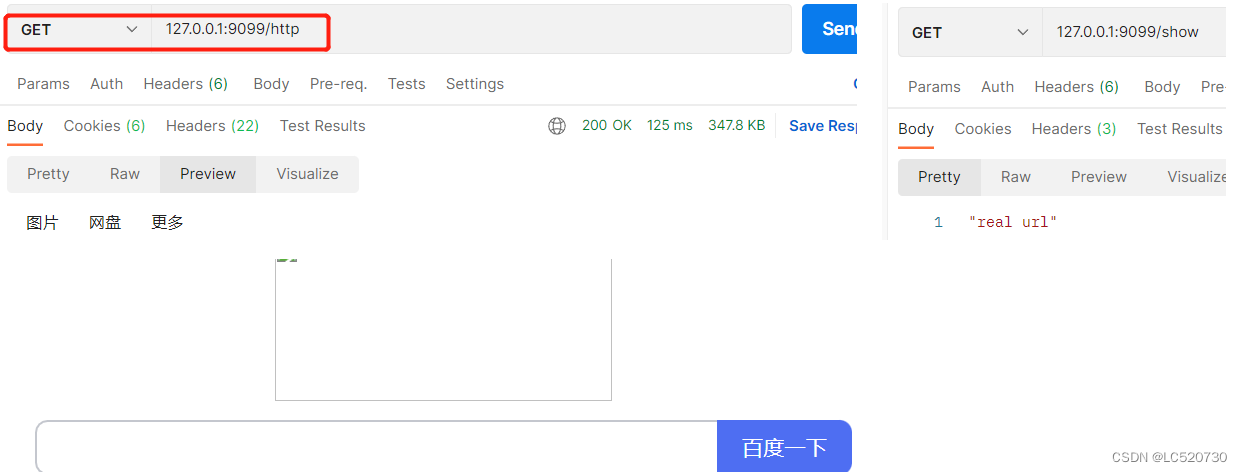
2.1、HTTP重定向
// Redirect returns an HTTP redirect to the specific location.
func (c *Context) Redirect(code int, location string)
2.2、路由重定向
// HandleContext re-enters a context that has been rewritten.
// This can be done by setting c.Request.URL.Path to your new target.
// Disclaimer: You can loop yourself to deal with this, use wisely.
func (engine *Engine) HandleContext(c *Context)
2.3、测试
func main() {
	r := gin.Default()

	r.GET("/http", func(c *gin.Context) {
		c.Redirect(http.StatusMovedPermanently, "http://www.baidu.com/") // 重定向到http的网址
	})

	r.GET("/real", func(c *gin.Context) {
		c.JSON(http.StatusOK, "real url")
	})
	r.GET("/show", func(c *gin.Context) {
		c.Request.URL.Path = "/real" //指定重定向的URL
		r.HandleContext(c)
	})
	r.Run(":9099")
}
六、gin中间件
开发者在处理请求的过程中,有时候需要加入自己的钩子(Hook)函数。这个钩子函数就叫中间件,中间件适合处理一些公共的业务逻辑,比如登录认证、权限校验、数据分页、记录日志、耗时统计等。
1、gin.Default默认的中间件
gin.Default默认注册了中间件Logger和Recovery,其中Logger默认将log写入到控制台;Recovery捕获panic并返回500
// Default returns an Engine instance with the Logger and Recovery middleware already attached.
func Default() *Engine {
	debugPrintWARNINGDefault()
	engine := New()
	engine.Use(Logger(), Recovery())
	return engine
}

// Logger instances a Logger middleware that will write the logs to gin.DefaultWriter.
// By default, gin.DefaultWriter = os.Stdout.
func Logger() HandlerFunc

// Recovery returns a middleware that recovers from any panics and writes a 500 if there was one.
func Recovery() HandlerFunc
2、中间件注册
2.1、相关函数
(1)Next和Abort函数
Next函数将 执行[下一个]处理函数,剩余的处理函数按照顺序入栈,剩余处理函数依次出栈后继续执行Next所在处理函数剩余的代码Abort函数将 不执行剩余的处理函数,直接跳过剩余的处理函数,继续执行Next所在处理函数剩余的代码- 根据该特性,可以将登录的处理函数注册到全局路由中,登录成功后调用
Next,登录失败则调用Abort
(2)Set和Get函数
- 在处理函数的上下文中设置值,在后面的处理函数中可取值,以达到数据共享的目的
// Next should be used only inside middleware.
// It executes the pending handlers in the chain inside the calling handler.
// See example in GitHub.
func (c *Context) Next()

// Abort prevents pending handlers from being called. Note that this will not stop the current handler.
// Let's say you have an authorization middleware that validates that the current request is authorized.
// If the authorization fails (ex: the password does not match), call Abort to ensure the remaining handlers
// for this request are not called.
func (c *Context) Abort()

// Set is used to store a new key/value pair exclusively for this context.
// It also lazy initializes  c.Keys if it was not used previously.
func (c *Context) Set(key string, value any)

// Get returns the value for the given key, ie: (value, true).
// If the value does not exist it returns (nil, false)
func (c *Context) Get(key string) (value any, exists bool)

// MustGet returns the value for the given key if it exists, otherwise it panics.
func (c *Context) MustGet(key string) any
2.2、中间件注册
2.2.1、gin代码
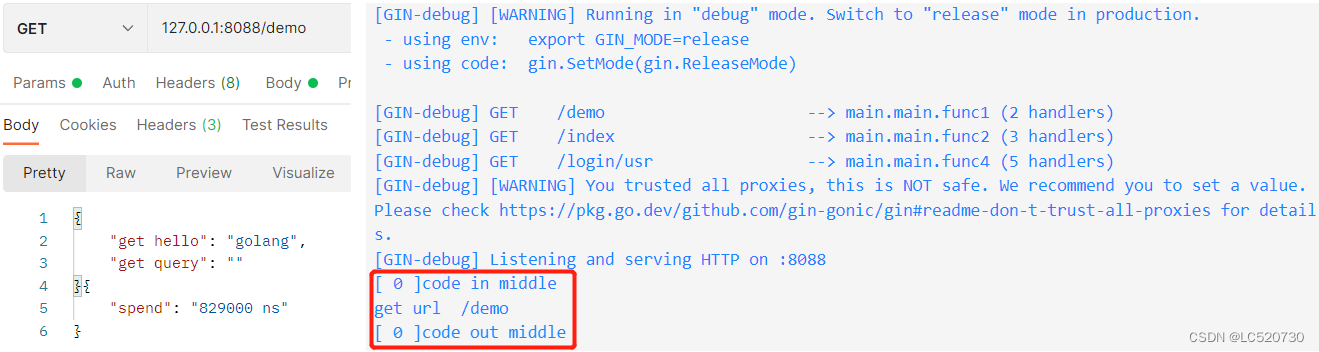
var cnt = 0

func middle() func(c *gin.Context) {
	return func(c *gin.Context) {
		cur := cnt
		cnt++
		fmt.Println("[", cur, "]code in middle")
		start := time.Now()
		//上下文中设置值, 后续可取值
		c.Set("hello", "golang")
		c.Next() //执行[下一个]处理函数,处理函数按照顺序入栈
		c.JSON(http.StatusOK, gin.H{"spend": strconv.FormatInt(int64(time.Since(start)), 10) + " ns"})
		fmt.Println("[", cur, "]code out middle")
	}
}

func abort() gin.HandlerFunc {
	return func(c *gin.Context) {
		fmt.Println("code in abort")
		start := time.Now()
		c.Abort() //不执行剩余的处理函数
		c.JSON(http.StatusOK, gin.H{"spend": time.Since(start)})
		fmt.Println("code out abort")
	}
}

func main() {
	r := gin.New()
	r.Use(middle()) //注册全局中间件

	r.GET("/demo", func(ctx *gin.Context) {
		val, _ := ctx.Get("hello") //获取上下文的值
		para, _ := ctx.GetQuery("name")
		fmt.Println("get url ", ctx.Request.URL.Path)
		ctx.JSON(http.StatusOK, gin.H{"get hello": val, "get query": para})
	})

	//给"/index"路由单独添加1个中间件
	r.GET("/index", middle(), func(ctx *gin.Context) {
		val := ctx.MustGet("hello").(string) //获取上下文的值
		fmt.Println("get url ", ctx.Request.URL.Path)
		ctx.JSON(http.StatusOK, gin.H{"url": ctx.Request.URL.Path, "get hello": val})
	})

	g := r.Group("/login", middle()) //给路由组添加中间件
	{
		g.GET("/usr", func(ctx *gin.Context) {
			fmt.Println("get url ", ctx.Request.URL.Path)
			ctx.JSON(http.StatusOK, gin.H{"url": ctx.Request.URL.Path})
		}, abort(), func(ctx *gin.Context) {
			fmt.Println("get method ", ctx.Request.Method)
			ctx.JSON(http.StatusOK, gin.H{"method": ctx.Request.Method})
		})
	}
	r.Run(":8088")
}
2.2.2、测试/demo
执行顺序:全局路由注册的middle中间件 ==> 自定义的demo处理函数
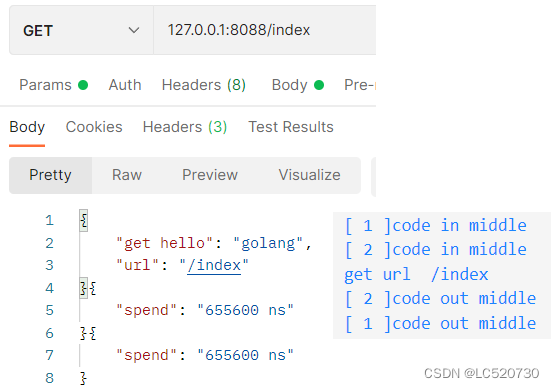
2.2.3、测试/index
执行顺序:全局路由注册的middle中间件 ==> index路由注册的middle中间件 ==> 自定义的index处理函数
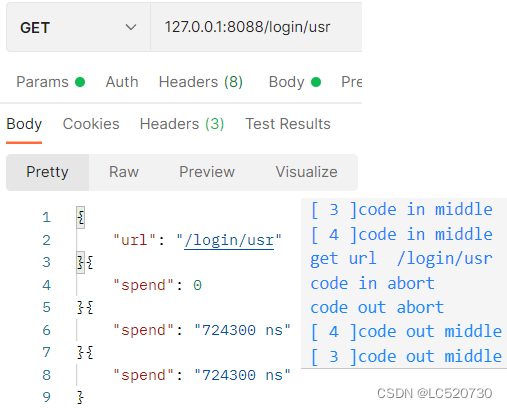
2.2.4、测试/login/usr
执行顺序:全局路由注册的middle中间件 ==> login路由组注册的middle中间件 ==> 自定义的url处理函数 ==> login/usr路由注册的abort中间件(调用Abort函数,因此自定义的method处理函数不执行)
更多推荐

 0
0 0
0- 0


 已为社区贡献4条内容

所有评论(0)