
微信开放平台_第三方平台授权流程_引入用户进入授权页
·
四、生成授权页
4.1 官方说明
- 方式一:授权管理方输入授权页,扫描二维码。授权页网址为:https://mp.weixin.qq.com/cgi-bin/componentloginpage?component_appid=xxxx&pre_auth_code=xxxxx&redirect_uri=xxxx&auth_type=xxx
| 参数 | 必填 | 参数说明 |
| component_appid | 是 | 第三方平台方 appid |
| pre_auth_code | 是 | 预授权码 |
| redirect_uri | 是 | 回调 URI |
| auth_type | 否 | 要授权的帐号类型, 1 则商户扫码后,手机端仅展示公众号、2 表示仅展示小程序,3 表示公众号和小程序都展示。如果为未制定,则默认小程序和公众号都展示。第三方平台开发者可以使用本字段来控制授权的帐号类型。 |
| biz_appid | 否 | 指定授权唯一的小程序或公众号 |
- 方式二:第三方平台生成授权链接,授权管理方点击链接,进行授权
注:auth_type、biz_appid 两个字段互斥。
4.2 代码流程说明:
下面采用方式一,即生成授权二维码,二维码是由地址自动生成的。
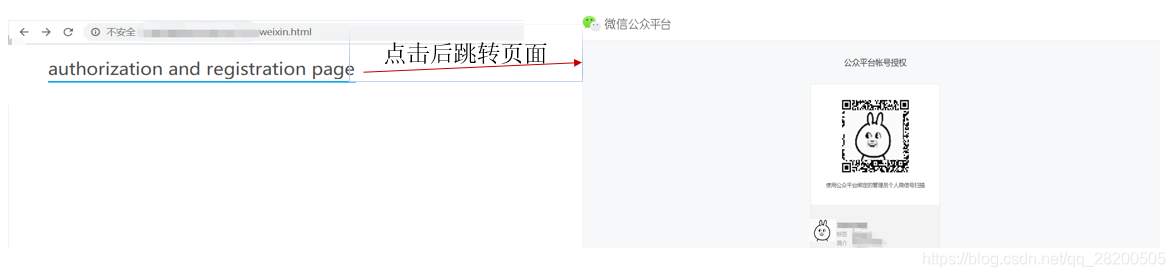
授权码分为两个后端和前端两个方面,此处前端页面配合使用,使用SpringMVC的ModelAndView直接跳转会找不到域名而报错,因此要将页面链接设置到<a></a>标签中,点击后跳转到授权页面。
- 后端Controller层代码:
SpringMVC中的Controller层。
    /**
     * 获取授权二维码页面的地址,并将其返回到前端页面。
     */
    @GetMapping("/getAuthPage")
    public Result getAuthPage(HttpServletResponse response){
        Result rs = this.getFailResult();
        log.info("第三方平台生成授权页");
        String authPageURL = "";
        try {
            String preAuthCode = OpAuthCodeUtil.getPreAuthCode();
            log.info("小程序或者公众号授权给第三方平台【预授权码】:" + preAuthCode);

            String componentAppid = ComponentConfig.APPID;  //第三方平台应用ID
            String redirectUri = "http://wx.intelvox.com.cn/olcs/api/wx/open/platform/authcode";   //回调URI
            String authType = "1";       //要授权的帐号类型, 1 则商户扫码后,手机端仅展示公众号、2 表示仅展示小程序,3 表示公众号和小程序都展示。
            StringBuilder data = new StringBuilder();
            data.append("?component_appid="+componentAppid);
            data.append("&pre_auth_code="+preAuthCode);
            data.append("&redirect_uri="+redirectUri);
            data.append("&auth_type="+authType);
            authPageURL = WeixinImSetting.OPEN_URL_AUTHPAGE + data;//生成授权页网址
            log.info("第三方平台生成授权页,操作成功");
            rs = this.getSuccessResult();
            rs.setResult(authPageURL);
        } catch (Exception e) {
            log.error("第三方平台生成授权页,操作异常", e.getMessage(), e);
        }
        return rs;
    }
2. 前端接收页面
<!DOCTYPE html>
<html lang="en">
<head>
    <meta charset="UTF-8">
    <title>1</title>
    <script type="text/javascript" src="js/jquery-3.4.1.min.js"></script>
    <script>
        $(function(){
            $.ajax({
                type : "GET",
                contentType: "application/json;charset=UTF-8",
                url : "api/wx/open/getAuthPage",
                success : function(result) {
                    console.log(result.result);
                    $("#code").attr("href",result.result) //设置跳转页面地址
                },
                error : function(e){
                    console.log(e.status);
                    console.log(e.responseText);
                }
            });
        });
    </script>
</head>
<body>
    <div style="margin:0 auto;">
    <h2><a id="code" href="">authorization and registration page</a>
    </h2>
</div>
</body>
</html>
结果示意图:
更多推荐

 0
0 0
0- 0


 已为社区贡献2条内容

所有评论(0)