
【微信开放平台】微信第三方扫码登录(亲测可用)
·
创建Spring项目,引入httpclient-4.5.jar
1.需要一个微信开放平台账号,并创建一个网站应用,将appid appSecret获取下来
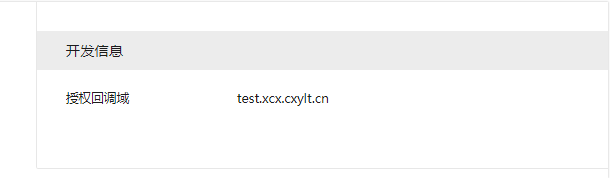
2.将本地内网穿透的地址配置进网站应用里面的开发信息-授权回调域
第一个二维码页面
后端代码,生成授权地址,让用户点击扫码登录
@RequestMapping(value = "login.do", method = RequestMethod.GET)
    public String userLogin(Model model) throws UnsupportedEncodingException{
		String oauthUrl = "https://open.weixin.qq.com/connect/qrconnect?appid=APPID&redirect_uri=REDIRECT_URI&response_type=code&scope=SCOPE&state=STATE#wechat_redirect";
		String redirect_uri = URLEncoder.encode("http://192.168.123.29:8080/login/callBack", "utf-8"); ;
		oauthUrl =  oauthUrl.replace("APPID","wxbf5e4cbd80f6c6f7").replace("REDIRECT_URI",redirect_uri).replace("SCOPE","snsapi_login");
		model.addAttribute("oauthUrl",oauthUrl);
        return "systemManage/user/login";
    }
前端代码
<a onclick="weixinLogin()"></a>
function weixinLogin(){
            window.location.href='${oauthUrl}';
		}
编写授权后回调方法
@RequestMapping(value="callBack",method = RequestMethod.GET)
	public String callBack(String code,String state,Model model,HttpServletRequest request) throws Exception{
		String returns="";
		HttpSession session = request.getSession();
		logger.info("进入授权回调,code:{"+code+"},state:{"+state+"}");

		//1.通过code获取access_token
		String url = "https://api.weixin.qq.com/sns/oauth2/access_token?appid=APPID&secret=SECRET&code=CODE&grant_type=authorization_code";
		url = url.replace("APPID","wxbf5e4cbd80f6c6f7").replace("SECRET","7835d9ad2989573cfb3742edb5fed035").replace("CODE",code);
		String tokenInfoStr =  sendGet(url);

		JSONObject tokenInfoObject = new JSONObject(tokenInfoStr);
		logger.info("tokenInfoObject:{"+tokenInfoObject+"}");

		//2.通过access_token和openid获取用户信息
		String userInfoUrl = "https://api.weixin.qq.com/sns/userinfo?access_token=ACCESS_TOKEN&openid=OPENID";
		userInfoUrl = userInfoUrl.replace("ACCESS_TOKEN",tokenInfoObject.getString("access_token")).replace("OPENID",tokenInfoObject.getString("openid"));
		String userInfoStr =  sendGet(userInfoUrl);
		logger.info("userInfoObject:{"+userInfoStr+"}");
		String openid = tokenInfoObject.getString("openid");
		if(openid!=null && openid!=""){
			User us=new User();
			us.setuWechatOpenId(openid);
			User user=userService.queryByQQorWechat(us);
			if(user!=null){
				// 登录后存放进shiro token
				UsernamePasswordToken token = new UsernamePasswordToken(user.getuName(), user.getuPassword());
				Subject subject = SecurityUtils.getSubject();
				subject.login(token);
				subject.getSession().setAttribute(Const.SESSION_USER, user);
				User ul = (User) subject.getSession().getAttribute(Const.SESSION_USER);
				session.setAttribute(Const.USER_SESSION, ul);
				returns = "redirect:/sij.do";
			}else{
				model.addAttribute("tokenInfoObject",tokenInfoObject);
				model.addAttribute("userInfoObject",userInfoStr);
				returns= "/binding";
			}
		}else{
			returns= "/login";
		}
		return returns;
	}
	/**
	 *
	 * 功能描述: 获取access_token
	 *
	 */
	public static String sendGet(String url) {
		String result = "";
		StringBuilder jsonStr = new StringBuilder();
		BufferedReader in = null;
		try {
			String urlNameString = url;
			URL realUrl = new URL(urlNameString);
			// 打开和URL之间的连接
			URLConnection connection = realUrl.openConnection();
			// 设置通用的请求属性
			connection.setRequestProperty("accept", "*/*");
			connection.setRequestProperty("connection", "Keep-Alive");
			connection.setRequestProperty("user-agent",
					"Mozilla/4.0 (compatible; MSIE 6.0; Windows NT 5.1;SV1)");
			// 建立实际的连接
			connection.connect();
			// 获取所有响应头字段
			Map<String, List<String>> map = connection.getHeaderFields();
			// 遍历所有的响应头字段
			for (String key : map.keySet()) {
				System.out.println(key + "--->" + map.get(key));
			}

			//ConstantUtil.UTF_CODE 编码格式
			InputStreamReader reader = new InputStreamReader(connection.getInputStream(), "utf-8");
			char[] buff = new char[1024];
			int length = 0;
			while ((length = reader.read(buff)) != -1) {
				result = new String(buff, 0, length);
				jsonStr.append(result);
			}


			Gson gson = new Gson();
			Map temp  = gson.fromJson("", Map.class);

		} catch (Exception e) {
			System.out.println("发送GET请求出现异常!" + e);
			e.printStackTrace();
		}
		// 使用finally块来关闭输入流
		finally {
			try {
				if (in != null) {
					in.close();
				}
			} catch (Exception e2) {
				e2.printStackTrace();
			}
		}
		return jsonStr.toString();
	}
回调后跳转页面,这个页面记录授权获取的信息
<html>
<head>
    <title>Title</title>
    <script src="http://res.wx.qq.com/connect/zh_CN/htmledition/js/wxLogin.js"></script>

</head>
<body>
<h2>你好,授权成功!</h2><br>
<h3>通过code换取access_token 结果:</h3>
<p >${tokenInfoObject}</p>
<h3>通过access_token获取用户信息 结果:</h3>
<p >${userInfoObject}</p>
<script type="text/javascript" src="/js/jquery-1.8.3.js"></script>
<script type="text/javascript">
    var oprnId=${tokenInfoObject};
    console.log(oprnId['openid']);
</script>
</body>
</html>
到此微信扫码登录已完成。
更多推荐



 3
3 0
0- 0


 已为社区贡献1条内容

所有评论(0)